This is the multi-page printable view of this section.
Click here to print .
Return to the regular view of this page .
Operator Tasks Operational guides for deploying, configuring, and maintaining an etcd cluster.
1 - How to Set Up a Demo etcd Cluster Guide to setting up a cluster in etcd
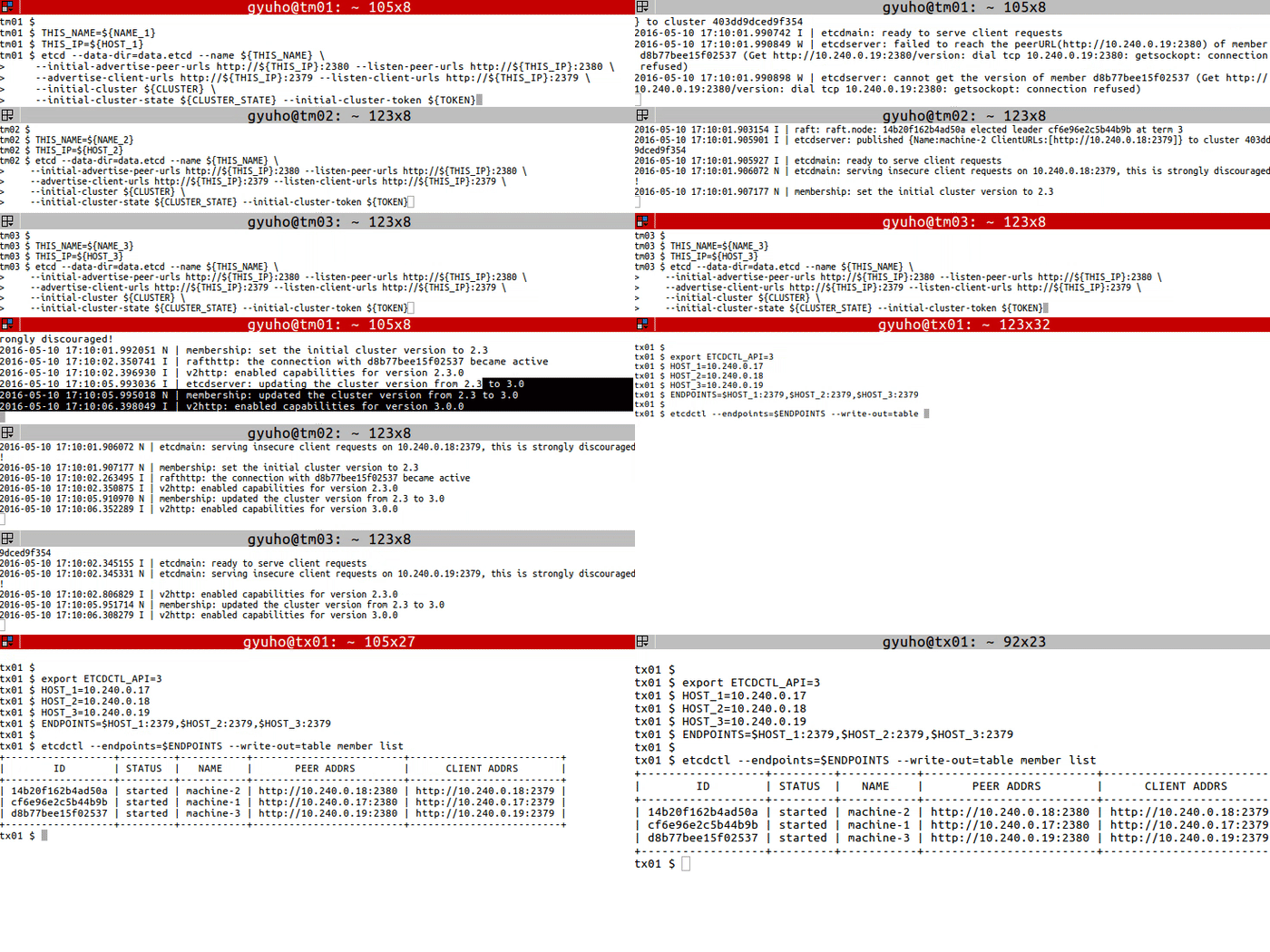
On each etcd node, specify the cluster members:
TOKEN = token-01
CLUSTER_STATE = new
NAME_1 = machine-1
NAME_2 = machine-2
NAME_3 = machine-3
HOST_1 = 10.240.0.17
HOST_2 = 10.240.0.18
HOST_3 = 10.240.0.19
CLUSTER = ${ NAME_1 } = http://${ HOST_1 } :2380,${ NAME_2 } = http://${ HOST_2 } :2380,${ NAME_3 } = http://${ HOST_3 } :2380Run this on each machine:
# For machine 1
THIS_NAME = ${ NAME_1 }
THIS_IP = ${ HOST_1 }
etcd --data-dir= data.etcd --name ${ THIS_NAME } \
--initial-advertise-peer-urls http://${ THIS_IP } :2380 --listen-peer-urls http://${ THIS_IP } :2380 \
--advertise-client-urls http://${ THIS_IP } :2379 --listen-client-urls http://${ THIS_IP } :2379 \
--initial-cluster ${ CLUSTER } \
--initial-cluster-state ${ CLUSTER_STATE } --initial-cluster-token ${ TOKEN }
# For machine 2
THIS_NAME = ${ NAME_2 }
THIS_IP = ${ HOST_2 }
etcd --data-dir= data.etcd --name ${ THIS_NAME } \
--initial-advertise-peer-urls http://${ THIS_IP } :2380 --listen-peer-urls http://${ THIS_IP } :2380 \
--advertise-client-urls http://${ THIS_IP } :2379 --listen-client-urls http://${ THIS_IP } :2379 \
--initial-cluster ${ CLUSTER } \
--initial-cluster-state ${ CLUSTER_STATE } --initial-cluster-token ${ TOKEN }
# For machine 3
THIS_NAME = ${ NAME_3 }
THIS_IP = ${ HOST_3 }
etcd --data-dir= data.etcd --name ${ THIS_NAME } \
--initial-advertise-peer-urls http://${ THIS_IP } :2380 --listen-peer-urls http://${ THIS_IP } :2380 \
--advertise-client-urls http://${ THIS_IP } :2379 --listen-client-urls http://${ THIS_IP } :2379 \
--initial-cluster ${ CLUSTER } \
--initial-cluster-state ${ CLUSTER_STATE } --initial-cluster-token ${ TOKEN } Or use our public discovery service:
curl https://discovery.etcd.io/new?size= 3
https://discovery.etcd.io/a81b5818e67a6ea83e9d4daea5ecbc92
# grab this token
TOKEN = token-01
CLUSTER_STATE = new
NAME_1 = machine-1
NAME_2 = machine-2
NAME_3 = machine-3
HOST_1 = 10.240.0.17
HOST_2 = 10.240.0.18
HOST_3 = 10.240.0.19
DISCOVERY = https://discovery.etcd.io/a81b5818e67a6ea83e9d4daea5ecbc92
THIS_NAME = ${ NAME_1 }
THIS_IP = ${ HOST_1 }
etcd --data-dir= data.etcd --name ${ THIS_NAME } \
--initial-advertise-peer-urls http://${ THIS_IP } :2380 --listen-peer-urls http://${ THIS_IP } :2380 \
--advertise-client-urls http://${ THIS_IP } :2379 --listen-client-urls http://${ THIS_IP } :2379 \
--discovery ${ DISCOVERY } \
--initial-cluster-state ${ CLUSTER_STATE } --initial-cluster-token ${ TOKEN }
THIS_NAME = ${ NAME_2 }
THIS_IP = ${ HOST_2 }
etcd --data-dir= data.etcd --name ${ THIS_NAME } \
--initial-advertise-peer-urls http://${ THIS_IP } :2380 --listen-peer-urls http://${ THIS_IP } :2380 \
--advertise-client-urls http://${ THIS_IP } :2379 --listen-client-urls http://${ THIS_IP } :2379 \
--discovery ${ DISCOVERY } \
--initial-cluster-state ${ CLUSTER_STATE } --initial-cluster-token ${ TOKEN }
THIS_NAME = ${ NAME_3 }
THIS_IP = ${ HOST_3 }
etcd --data-dir= data.etcd --name ${ THIS_NAME } \
--initial-advertise-peer-urls http://${ THIS_IP } :2380 --listen-peer-urls http://${ THIS_IP } :2380 \
--advertise-client-urls http://${ THIS_IP } :2379 --listen-client-urls http://${ THIS_IP } :2379 \
--discovery ${ DISCOVERY } \
--initial-cluster-state ${ CLUSTER_STATE } --initial-cluster-token ${ TOKEN } Now etcd is ready! To connect to etcd with etcdctl:
export ETCDCTL_API = 3
HOST_1 = 10.240.0.17
HOST_2 = 10.240.0.18
HOST_3 = 10.240.0.19
ENDPOINTS = $HOST_1 :2379,$HOST_2 :2379,$HOST_3 :2379
etcdctl --endpoints= $ENDPOINTS member list 2 - How to conduct leader election in etcd cluster Steps for conducting a leader election through the etcdctl client
Prerequisites Ensure etcdetcdctl Check for active etcd cluster. Conduct Leader election The etcdctl command is used to conduct leader elections in an etcd cluster. It makes sure that only one client can become leader at a time.
etcdctl --endpoints=$ENDPOINTS elect <election-name> [proposal]
etcdctl --endpoints= $ENDPOINTS elect election-name p1 Options Address of each etcd cluster members.
A string identifier for the election. All participants competing for leadership must use the same election name.
Proposal value of the new leader.
Example ./etcdctl elect my-election proposal1
my-election/694d99fafea88404
proposal1
another election:
./etcdctl elect new-election proposal1
new-election/694d99fafea8840f
proposal1 3 - How to check Cluster status Guide to checking etcd cluster status
Prerequisites Check Overall Status endpoint status to check the overall status of each endpoint specified in --endpoints flag:
etcdctl endpoint status ( --endpoints= $ENDPOINTS | --cluster) Options --cluster[= false] : use all endpoints from the cluster member list Check Health endpoint health to check the healthiness of each endpoint specified in --endpoints flag:
etcdctl endpoint health ( --endpoints= $ENDPOINTS | --cluster) Options --cluster[= false] : use all endpoints from the cluster member list Check KV Hash endpoint hashkv to check the KV history hash of each endpoint specified in --endpoints flag:
etcdctl endpoint hashkv ( --endpoints= $ENDPOINTS | --cluster) [ rev = $REV ] Options --cluster[= false] : use all endpoints from the cluster member list
--rev= 0: maximum revision to hash ( default: latest revision) Options inherited from parent commands --endpoints= "127.0.0.1:2379" : gRPC endpoints
-w, --write-out= "simple" : set the output format ( fields, json, protobuf, simple, table) Examples etcdctl --write-out= table --endpoints= $ENDPOINTS endpoint status
+------------------+------------------+---------+---------+-----------+------------+-----------+------------+--------------------+--------+
| ENDPOINT | ID | VERSION | DB SIZE | IS LEADER | IS LEARNER | RAFT TERM | RAFT INDEX | RAFT APPLIED INDEX | ERRORS |
+------------------+------------------+---------+---------+-----------+------------+-----------+------------+--------------------+--------+
| 10.240.0.17:2379 | 4917a7ab173fabe7 | 3.5.0 | 45 kB | true | false | 4 | 16726 | 16726 | |
| 10.240.0.18:2379 | 59796ba9cd1bcd72 | 3.5.0 | 45 kB | false | false | 4 | 16726 | 16726 | |
| 10.240.0.19:2379 | 94df724b66343e6c | 3.5.0 | 45 kB | false | false | 4 | 16726 | 16726 | |
+------------------+------------------+---------+---------+-----------+------------+-----------+------------+--------------------+--------| etcdctl --endpoints= $ENDPOINTS endpoint health
10.240.0.17:2379 is healthy: successfully committed proposal: took = 3.345431ms
10.240.0.19:2379 is healthy: successfully committed proposal: took = 3.767967ms
10.240.0.18:2379 is healthy: successfully committed proposal: took = 4.025451ms etcdctl --cluster endpoint hashkv --write-out= table
+------------------+------------+---------------+
| ENDPOINT | HASH | HASH REVISION |
+------------------+------------+---------------+
| 10.240.0.17:2379 | 3892279174 | 3 |
| 10.240.0.18:2379 | 3892279174 | 3 |
| 10.240.0.19:2379 | 3892279174 | 3 |
+------------------+------------+---------------+ 4 - How to save the database Guide to taking a snapshot of the etcd database
Pre-requisites Snapshot a database snapshot to save point-in-time snapshot of etcd database:
etcdctl --endpoints= $ENDPOINT snapshot save DB_NAME Global Options etcdctl --endpoints=[ 127.0.0.1:2379] , gRPC endpoints Snapshot can only be requested from one etcd node, so --endpoints flag should contain only one endpoint.
etcdutl -w, --write-out string set the output format ( fields, json, protobuf, simple, table) ( default "simple" ) Example ENDPOINTS = $HOST_1 :2379
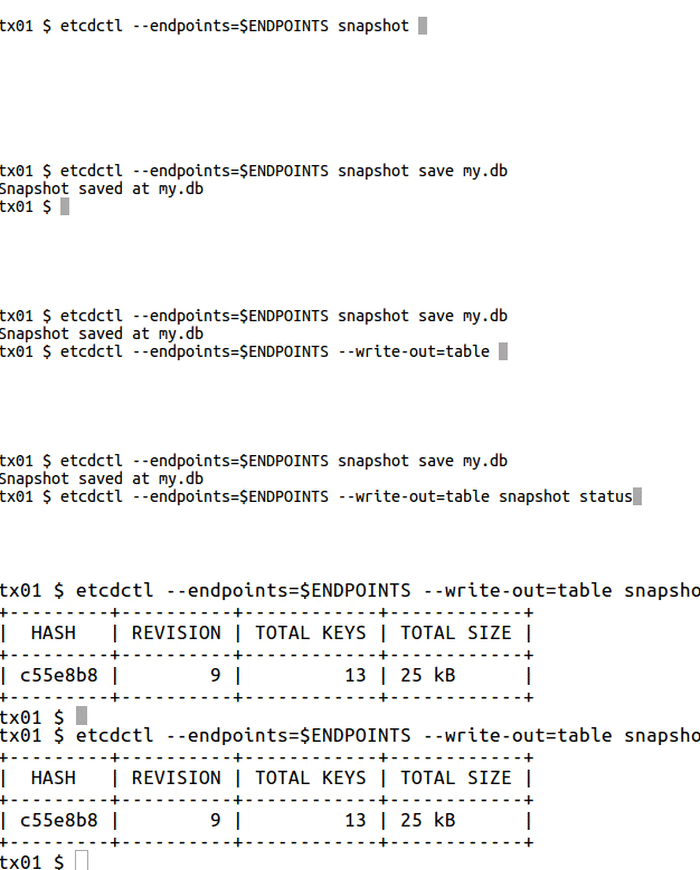
etcdctl --endpoints= $ENDPOINTS snapshot save my.db
Snapshot saved at my.db etcdutl --write-out= table snapshot status my.db
+---------+----------+------------+------------+
| HASH | REVISION | TOTAL KEYS | TOTAL SIZE |
+---------+----------+------------+------------+
| c55e8b8 | 9 | 13 | 25 kB |
+---------+----------+------------+------------+ 5 - How to Add and Remove Members Guide to dealing with membership in etcd cluster
member to add,remove,update membership:
# For each machine
TOKEN = my-etcd-token-1
CLUSTER_STATE = new
NAME_1 = etcd-node-1
NAME_2 = etcd-node-2
NAME_3 = etcd-node-3
HOST_1 = 10.240.0.13
HOST_2 = 10.240.0.14
HOST_3 = 10.240.0.15
CLUSTER = ${ NAME_1 } = http://${ HOST_1 } :2380,${ NAME_2 } = http://${ HOST_2 } :2380,${ NAME_3 } = http://${ HOST_3 } :2380
# For node 1
THIS_NAME = ${ NAME_1 }
THIS_IP = ${ HOST_1 }
etcd --data-dir= data.etcd --name ${ THIS_NAME } \
--initial-advertise-peer-urls http://${ THIS_IP } :2380 \
--listen-peer-urls http://${ THIS_IP } :2380 \
--advertise-client-urls http://${ THIS_IP } :2379 \
--listen-client-urls http://${ THIS_IP } :2379 \
--initial-cluster ${ CLUSTER } \
--initial-cluster-state ${ CLUSTER_STATE } \
--initial-cluster-token ${ TOKEN }
# For node 2
THIS_NAME = ${ NAME_2 }
THIS_IP = ${ HOST_2 }
etcd --data-dir= data.etcd --name ${ THIS_NAME } \
--initial-advertise-peer-urls http://${ THIS_IP } :2380 \
--listen-peer-urls http://${ THIS_IP } :2380 \
--advertise-client-urls http://${ THIS_IP } :2379 \
--listen-client-urls http://${ THIS_IP } :2379 \
--initial-cluster ${ CLUSTER } \
--initial-cluster-state ${ CLUSTER_STATE } \
--initial-cluster-token ${ TOKEN }
# For node 3
THIS_NAME = ${ NAME_3 }
THIS_IP = ${ HOST_3 }
etcd --data-dir= data.etcd --name ${ THIS_NAME } \
--initial-advertise-peer-urls http://${ THIS_IP } :2380 \
--listen-peer-urls http://${ THIS_IP } :2380 \
--advertise-client-urls http://${ THIS_IP } :2379 \
--listen-client-urls http://${ THIS_IP } :2379 \
--initial-cluster ${ CLUSTER } \
--initial-cluster-state ${ CLUSTER_STATE } \
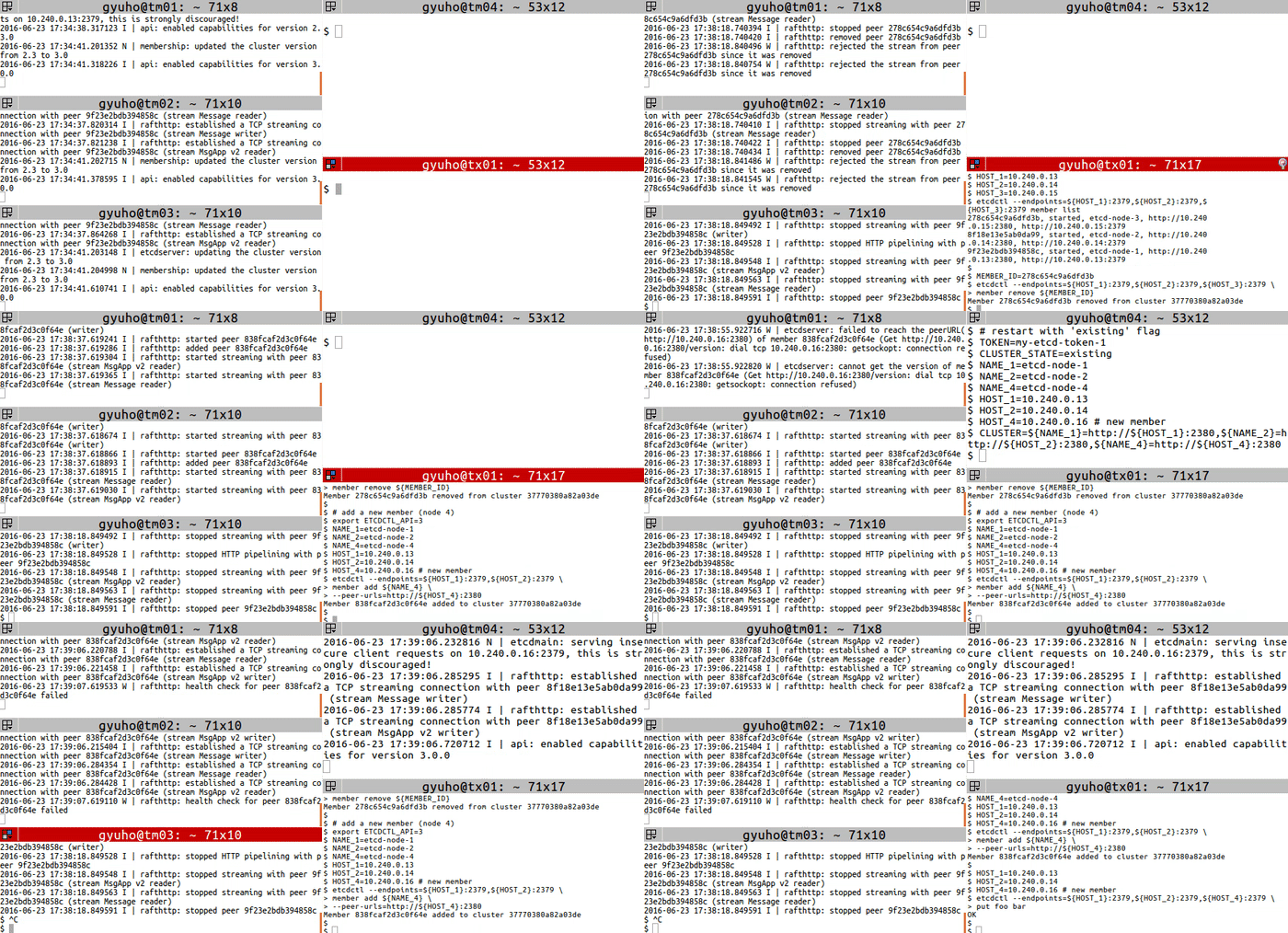
--initial-cluster-token ${ TOKEN } Then replace a member with member remove and member add commands:
# get member ID
export ETCDCTL_API = 3
HOST_1 = 10.240.0.13
HOST_2 = 10.240.0.14
HOST_3 = 10.240.0.15
etcdctl --endpoints= ${ HOST_1 } :2379,${ HOST_2 } :2379,${ HOST_3 } :2379 member list
# remove the member
MEMBER_ID = 278c654c9a6dfd3b
etcdctl --endpoints= ${ HOST_1 } :2379,${ HOST_2 } :2379,${ HOST_3 } :2379 \
member remove ${ MEMBER_ID }
# add a new member (node 4)
export ETCDCTL_API = 3
NAME_1 = etcd-node-1
NAME_2 = etcd-node-2
NAME_4 = etcd-node-4
HOST_1 = 10.240.0.13
HOST_2 = 10.240.0.14
HOST_4 = 10.240.0.16 # new member
etcdctl --endpoints= ${ HOST_1 } :2379,${ HOST_2 } :2379 \
member add ${ NAME_4 } \
--peer-urls= http://${ HOST_4 } :2380 Next, start the new member with --initial-cluster-state existing flag:
# [WARNING] If the new member starts from the same disk space,
# make sure to remove the data directory of the old member
#
# restart with 'existing' flag
TOKEN = my-etcd-token-1
CLUSTER_STATE = existing
NAME_1 = etcd-node-1
NAME_2 = etcd-node-2
NAME_4 = etcd-node-4
HOST_1 = 10.240.0.13
HOST_2 = 10.240.0.14
HOST_4 = 10.240.0.16 # new member
CLUSTER = ${ NAME_1 } = http://${ HOST_1 } :2380,${ NAME_2 } = http://${ HOST_2 } :2380,${ NAME_4 } = http://${ HOST_4 } :2380
THIS_NAME = ${ NAME_4 }
THIS_IP = ${ HOST_4 }
etcd --data-dir= data.etcd --name ${ THIS_NAME } \
--initial-advertise-peer-urls http://${ THIS_IP } :2380 \
--listen-peer-urls http://${ THIS_IP } :2380 \
--advertise-client-urls http://${ THIS_IP } :2379 \
--listen-client-urls http://${ THIS_IP } :2379 \
--initial-cluster ${ CLUSTER } \
--initial-cluster-state ${ CLUSTER_STATE } \
--initial-cluster-token ${ TOKEN }