This is the multi-page printable view of this section. .
etcd 3.7 Documentation
- 1: Tasks
- 1.1: Operator Tasks
- 1.2: Developer Tasks
- 1.2.1: Reading from etcd
- 1.2.2: Writing to etcd
- 1.2.3: How to get keys by prefix
- 1.2.4: How to delete keys
- 1.2.5: How to make multiple writes in a transaction
- 1.2.6: How to watch keys
- 1.2.7: How to create lease
- 1.2.8: How to create locks
- 2: Quickstart
- 3: Demo
- 4: Install
- 5: Feature Gates
- 6: FAQ
- 7: Libraries and tools
- 8: Metrics
- 9: Reporting bugs
- 10: Tuning
- 11: Internals
- 11.1: Discovery service protocol
- 11.2: Logging conventions
- 11.3: Golang modules
- 12: Learning
- 12.1: Data model
- 12.2: etcd client design
- 12.3: etcd learner design
- 12.4: etcd v3 authentication design
- 12.5: etcd API
- 12.6: etcd persistent storage files
- 12.7: etcd API guarantees
- 12.8: etcd versus other key-value stores
- 12.9: Glossary
- 13: Developer guide
- 13.1: Discovery service protocol
- 13.2: Set up a local cluster
- 13.3: Interacting with etcd
- 13.4: Why gRPC gateway
- 13.5: gRPC naming and discovery
- 13.6: Embedding etcd in a Go Application
- 13.7: System limits
- 13.8: etcd features
- 13.9: API reference
- 13.10: API reference: concurrency
- 14: Operations guide
- 14.1: Authentication Guides
- 14.1.1: Authentication
- 14.1.2: Role-based access control
- 14.2: Configuration options
- 14.3: Transport security model
- 14.4: Clustering Guide
- 14.5: Run etcd clusters as a Kubernetes StatefulSet
- 14.6: Run etcd clusters inside containers
- 14.7: Failure modes
- 14.8: Disaster recovery
- 14.9: etcd gateway
- 14.10: gRPC proxy
- 14.11: Hardware recommendations
- 14.12: Maintenance
- 14.13: Monitoring etcd
- 14.14: Performance
- 14.15: Design of runtime reconfiguration
- 14.16: Runtime reconfiguration
- 14.17: Supported platforms
- 14.18: Versioning
- 14.19: Data Corruption
- 14.1: Authentication Guides
- 15: Benchmarks
- 16: Downgrading
- 17: Upgrading
- 17.1: Upgrading etcd clusters and applications
- 17.2: Upgrade etcd from v3.5 to v3.6
- 17.3: Upgrade etcd from 3.4 to 3.5
- 17.4: Upgrade etcd from 3.3 to 3.4
- 17.5: Upgrade etcd from v3.6 to v3.7
- 17.6: Upgrade etcd from 3.2 to 3.3
- 17.7: Upgrade etcd from 3.1 to 3.2
- 17.8: Upgrade etcd from 3.0 to 3.1
- 17.9: Upgrade etcd from 2.3 to 3.0
- 18: Triage
- 18.1: Issue triage guidelines
- 18.2: PR management
etcd is a strongly consistent, distributed key-value store. These guides cover installing and operating etcd, building applications against its APIs, understanding its design, measuring performance, and upgrading or downgrading clusters in the 3.7 release line.
Start with Quickstart for a local single-member cluster, Install for supported installation paths, or Operations guide for production deployments.
1 - Tasks
1.1 - Operator Tasks
1.1.1 - How to Set Up a Demo etcd Cluster
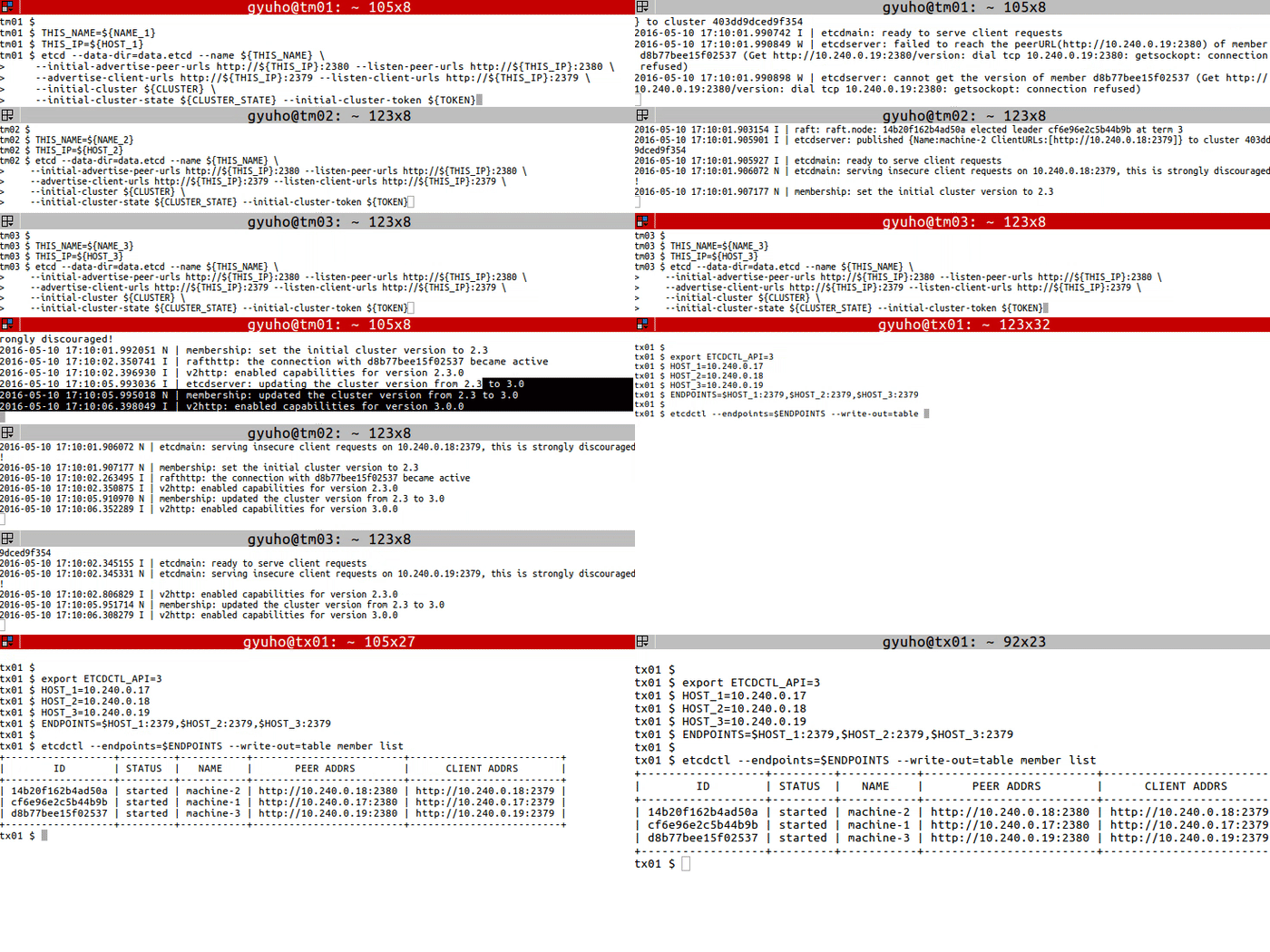
On each etcd node, specify the cluster members:
Run this on each machine:
Or use our public discovery service:
Now etcd is ready! To connect to etcd with etcdctl:
1.1.2 - How to conduct leader election in etcd cluster
Prerequisites
Conduct Leader election
The etcdctl command is used to conduct leader elections in an etcd cluster. It makes sure that only one client can become leader at a time.
etcdctl --endpoints=$ENDPOINTS elect <election-name> [proposal]
Options
--endpoints : $ENDPOINTS
Address of each etcd cluster members.
election-namestring
A string identifier for the election. All participants competing for leadership must use the same election name.
leader-namestring
Proposal value of the new leader.
Example
1.1.3 - How to check Cluster status
Prerequisites
- Install
etcdandetcdctl
Check Overall Status
endpoint status to check the overall status of each endpoint specified in --endpoints flag:
Options
Check Health
endpoint health to check the healthiness of each endpoint specified in --endpoints flag:
Options
Check KV Hash
endpoint hashkv to check the KV history hash of each endpoint specified in --endpoints flag:
Options
Options inherited from parent commands
Examples
1.1.4 - How to save the database
Pre-requisites
Snapshot a database
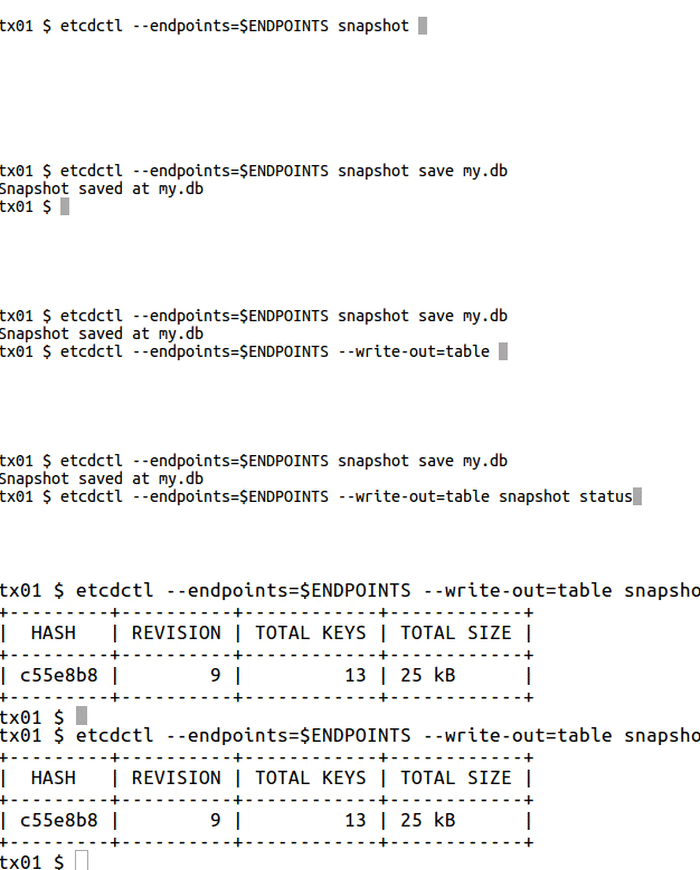
snapshot to save point-in-time snapshot of etcd database:
Global Options
etcdctl
Snapshot can only be requested from one etcd node, so --endpoints flag should contain only one endpoint.
etcdutl
Example
1.1.5 - How to Add and Remove Members
member to add,remove,update membership:
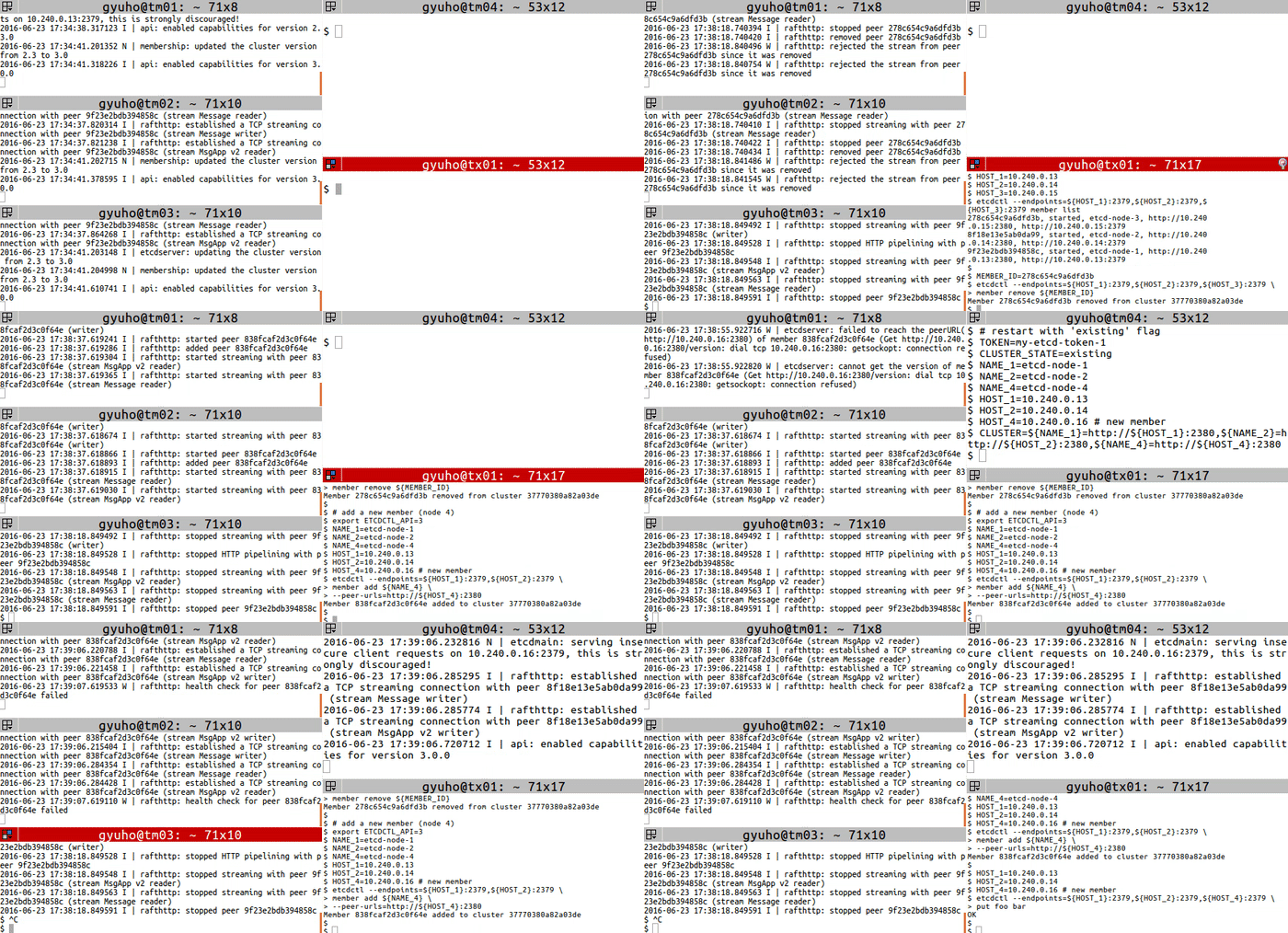
Then replace a member with member remove and member add commands:
Next, start the new member with --initial-cluster-state existing flag:
1.2 - Developer Tasks
1.2.1 - Reading from etcd
Prerequisites
- Install
etcdctl
Procedure
Use the get subcommand to read from etcd:
where:
foois the requested keyHello World!is the retrieved value
Or, for formatted output:
where write-out="json" causes the value to be output in JSON format (note that the key is not returned).
1.2.2 - Writing to etcd
Prerequisites
- Install
etcdctl
Procedure
Use the put subcommand to write a key-value pair:
where:
foois the key name"Hello World!"is the quote-delimited value
1.2.3 - How to get keys by prefix
Pre-requisites
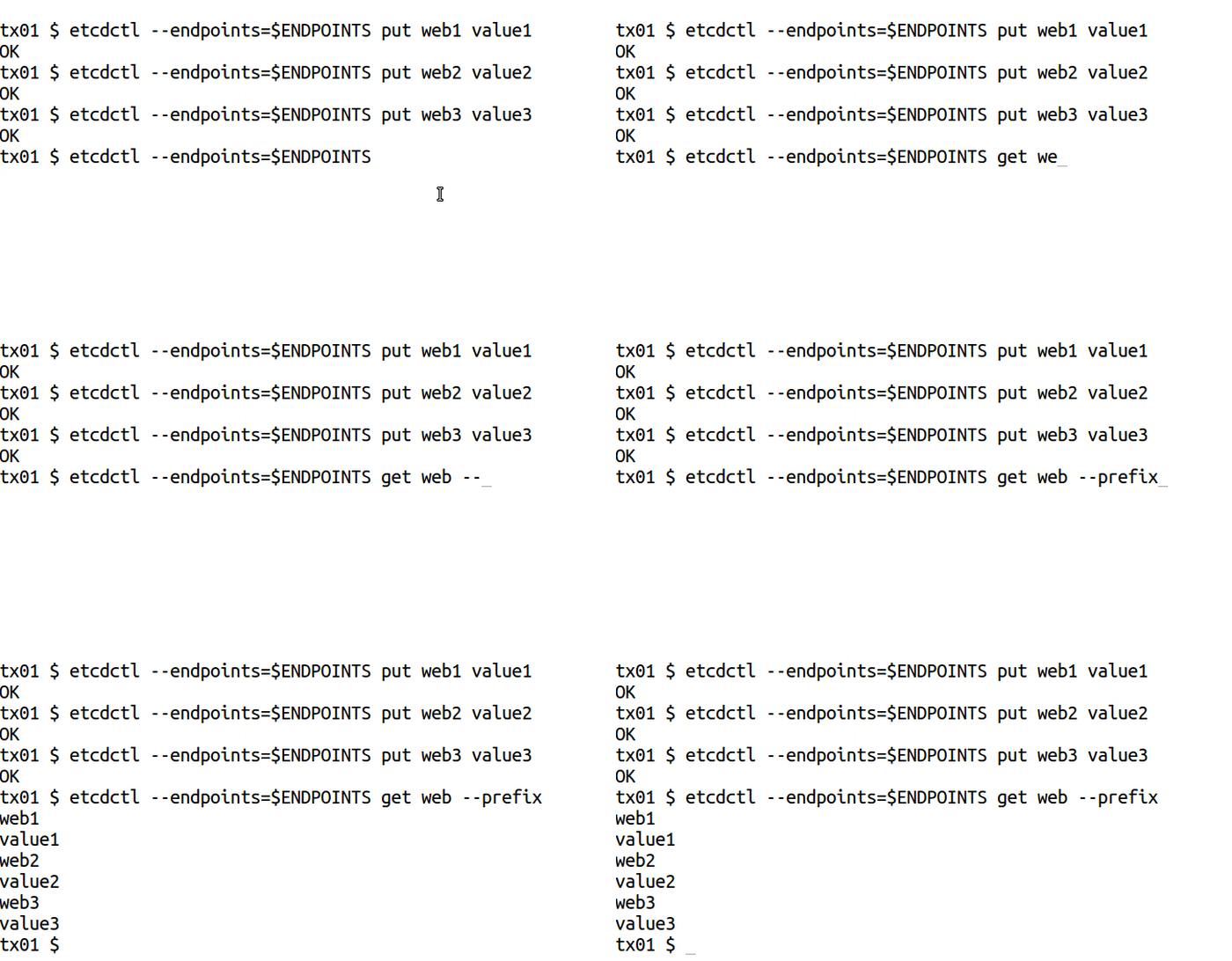
Get keys by prefix
Global Options
Options
Example
1.2.4 - How to delete keys
Prerequisites
- Install
etcdandetcdctl
Add or delete keys
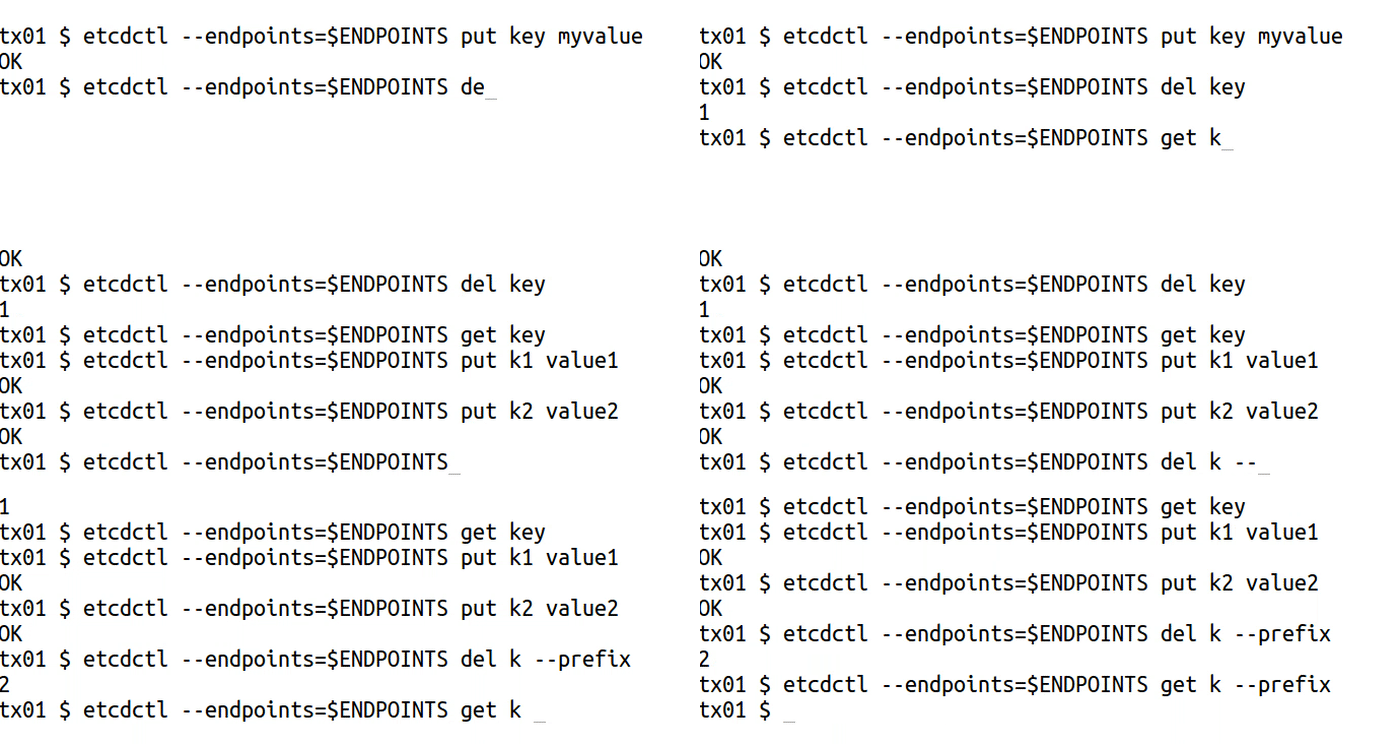
del to remove the specified key or range of keys:
Options
Options inherited from parent commands
Examples
1.2.5 - How to make multiple writes in a transaction
Prerequisites
- Install
etcdandetcdctl. - A running
etcdcluster.
Terminology
Here are definitions of some key terms used in the Example below.
| Terms | Definition |
|---|---|
| etcdctl | The command line tool for interacting with the etcd server. |
txn
command | txn command is an abbreviation for “transaction”. It reads multiple etcd requests from standard input and applies them as a single atomic transaction. A transaction consists of list of conditions, a list of requests to apply if all the conditions are true, and a list of requests to apply if any condition is false. View etcdctl key-value commands
for more information. |
compare | The compare clause within a transaction (txn) serves as a conditional check that determines whether the transaction’s operations should proceed. It ensures changes are only applied if the current state of the key-value store matches expected conditions, thereby maintaining data consistency and preventing conflicts in concurrent environments. To see how the command is structured, view Perform a transaction
section below. |
Transactions
txn to process all the requests in one transaction:
Transactions in etcd allow you to execute multiple operations atomically, ensuring that either all operations are applied or none are. This is crucial for maintaining data consistency when performing related updates. Learn more about transactions in the API documentation .
Example
Let’s consider a scenario where you want to update a user’s email and phone number in a single transaction. This ensures that both updates are applied together.

0. Variables and Flags used
| Variables |
|---|
/users/{<user_id>/email : etcd key representing a user’s email address. |
/users/<user_id>/phone : etcd key representing a user’s phone number. |
| Flags |
--interactive
: A flag to allow inputting transaction data manually |
1. Set up initial data
First, create a user with some initial data.
2. Perform a transaction
Update the user’s email and phone number in a single transaction.
- Compare: Check if the current email is “old.address@johndoe.com ”. This ensures the transaction only proceeds if the data is as expected.
- Success: If the comparison is true, update both the email and phone number.
- Failure: If the comparison fails, retrieve the current email to understand why the transaction didn’t proceed.
Important considerations
- Atomicity: The transaction ensures that both the email and phone number are updated together. If the initial condition (comparison) is not met, neither update is applied.
- Consistency: Using transactions maintains data consistency, especially when dealing with multiple related updates.
- Avoid multiple puts on the same key: Do not put multiple values for the same key within a single transaction, as this can lead to unexpected results. Each key should be updated only once per transaction.
1.2.6 - How to watch keys
Prerequisites
- Install
etcdandetcdctl
Watching keys
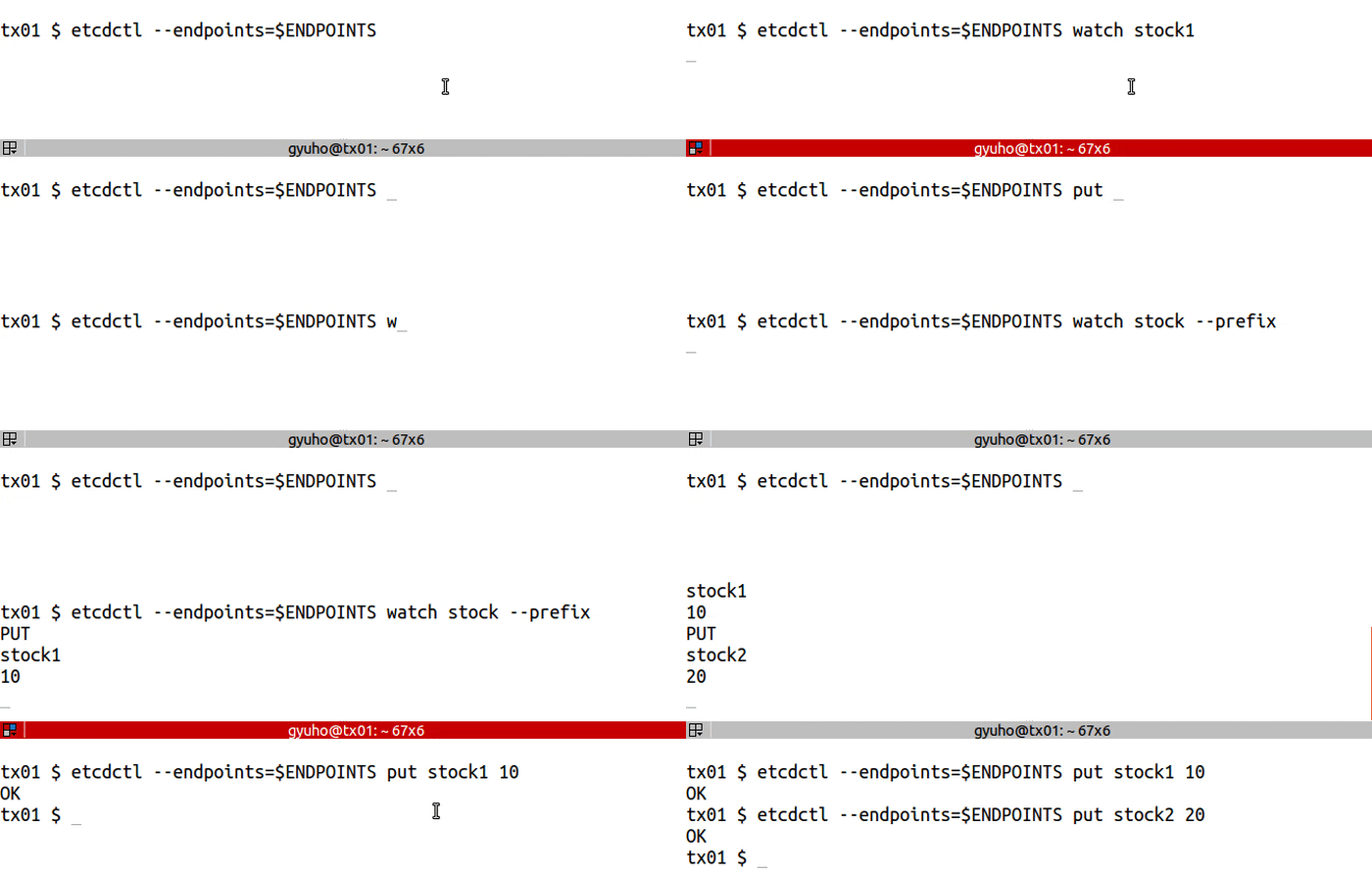
watch to get notified of future changes:
Options
Options inherited from parent commands
Examples
1.2.7 - How to create lease
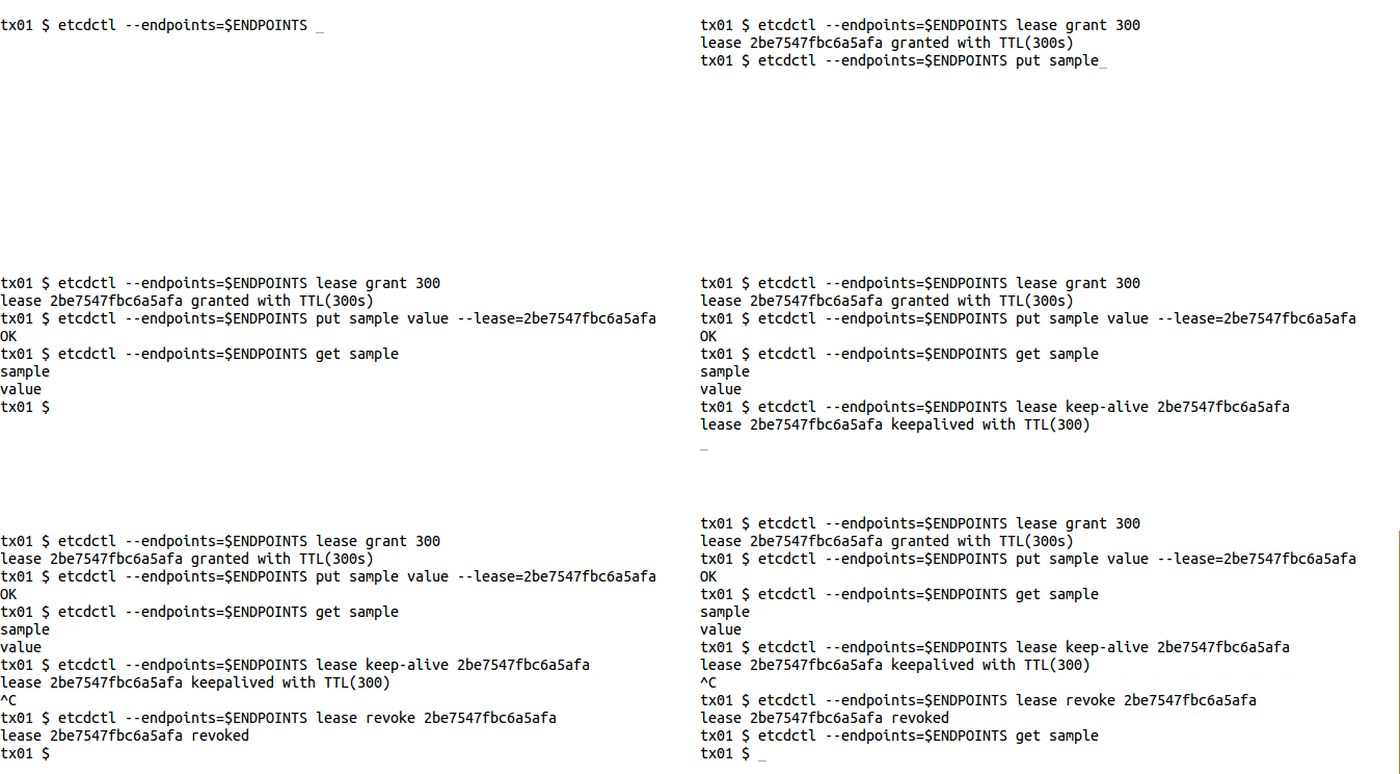
lease to write with TTL:
1.2.8 - How to create locks
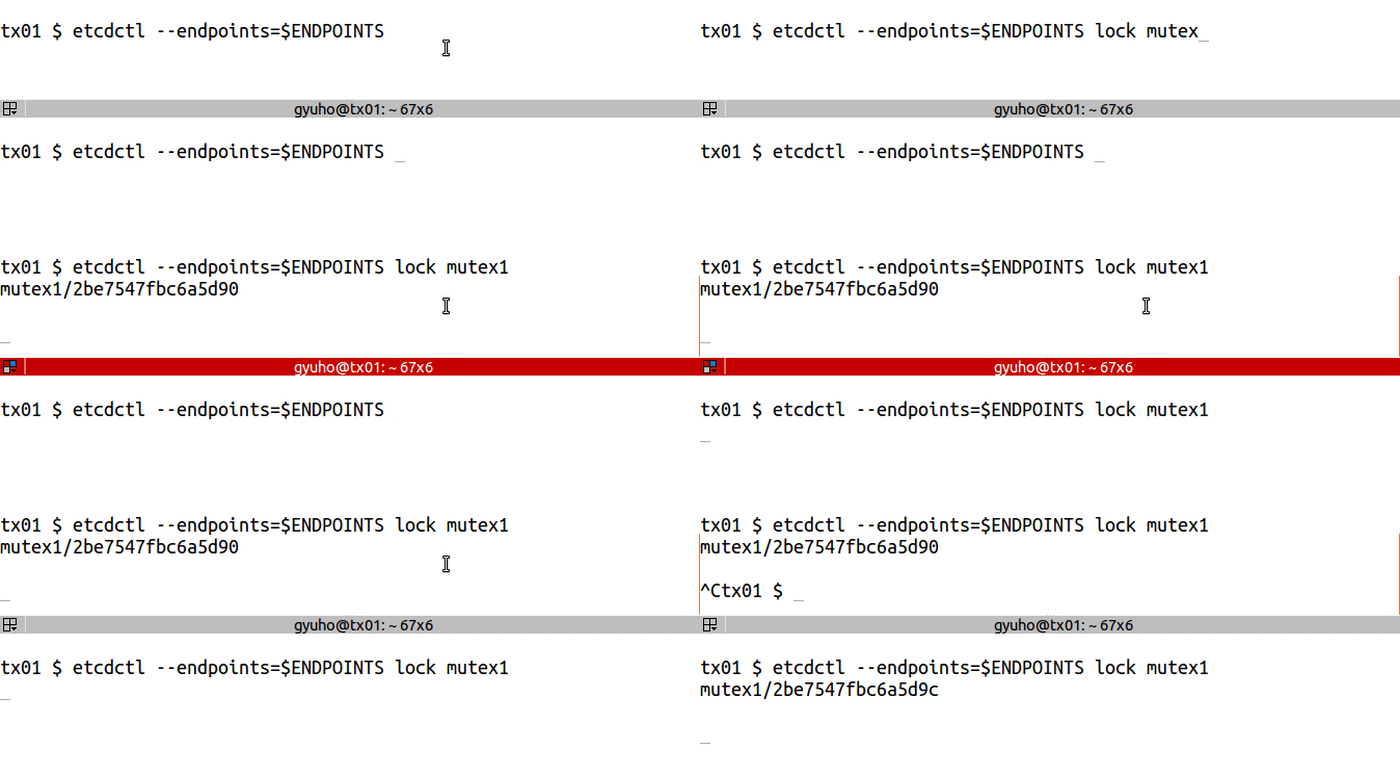
LOCK acquires a distributed mutex with a given name. Once the lock is acquired, it will be held until etcdctl is terminated.
Prerequisites
- Install
etcdandetcdctl
Creating a lock
lock for distributed lock:
Options
- endpoints - defines a comma-delimited list of machine addresses in the cluster.
- ttl - time out in seconds of lock session.
2 - Quickstart
Follow these instructions to locally install, run, and test a single-member cluster of etcd:
Install etcd from pre-built binaries or from source. For details, see Install .
WarningImportant: Ensure that you perform the last step of the installation instructions to verify that
etcdis in your path.Launch
etcd:NoteNote: The output produced by
etcdare logs — info-level logs can be ignored.From another terminal, use
etcdctlto set a key:From the same terminal, retrieve the key:
What’s next?
Learn about more ways to configure and use etcd from the following pages:
If you are a developer:
- Explore the gRPC API .
- Find language bindings and tools .
If you are an operator or admin:
- Set up a multi-machine cluster .
- Learn how to configure etcd.
- Use TLS to secure an etcd cluster .
- Tune etcd .
3 - Demo
This series of examples shows the basic procedures for working with an etcd cluster.
Auth
auth,user,role for authentication:
4 - Install
Requirements
Before installing etcd, see the following pages:
Install pre-built binaries
The easiest way to install etcd is from pre-built binaries:
Download the compressed archive file for your platform from Releases , choosing release v3.7.0 or later.
Unpack the archive file. This results in a directory containing the binaries.
Add the executable binaries to your path. For example, rename and/or move the binaries to a directory in your path (like
/usr/local/bin), or add the directory created by the previous step to your path.From a shell, test that
etcdis in your path:
Build from source
If you have Go version 1.21+ , you can build etcd from source by following these steps:
Download the etcd repo as a zip file and unzip it, or clone the repo using the following command.
To build from
main@HEAD, omit the-b v3.7.0flag.Change directory:
Run the build script:
The binaries are under the
bindirectory.Add the full path to the
bindirectory to your path, for example:Test that
etcdis in your path:
Installation via OS packages
Disclaimer: etcd installations through OS package managers can deliver outdated versions since they are not being automatically maintained nor officially supported by etcd project. Therefore use OS packages with caution.
There are various ways of installing etcd on different operating systems and these are just some examples how it can be done.
MacOS (Homebrew)
- Update homebrew:
- Install etcd:
- Verify install
Linux
Although installing etcd through many major Linux distributions’ official repositories and package managers is possible, the published versions can be significantly outdated. So, installing this way is strongly discouraged.
The recommended way to install etcd on Linux is either through pre-built binaries or by using Homebrew.
Homebrew on Linux
Homebrew can run on Linux , and can provide recent software versions.
Prerequisites
Update Homebrew:
Procedure
Install using
brew:
Result
Verify installation by getting the version:
Docker
etcd uses gcr.io/etcd-development/etcd
as a
primary container registry, and quay.io/coreos/etcd
as
secondary.
To run etcd using Docker:
Installation as part of Kubernetes installation
Installation check
For a slightly more involved sanity check of your installation, see Quickstart .
5 - Feature Gates
This page contains an overview of the various feature gates an administrator can specify on etcd.
See feature stages for an explanation of the stages for a feature.
Overview
Feature gates are a set of key=value pairs that describe etcd features.
You can turn these features on or off using the --feature-gates command line flag
on etcd.
etcd lets you enable or disable a set of feature gates.
Use -h flag to see a full set of feature gates.
To set feature gates, use the --feature-gates flag assigned to a list of feature pairs in commandline:
Or specify feature-gates in YAML config file:
Change in embed.EtcdServer struct
In 3.6, field ServerFeatureGate is added to embed.Config, and should be replacing the experimental fields listed below:
Feature gates for Alpha or Beta features
The following tables are a summary of the feature gates that you can set on etcd.
| Feature | Default | Stage | Details |
|---|---|---|---|
| CompactHashCheck | false | Alpha | Enables to check data corruption before serving any client/peer traffic. |
| InitialCorruptCheck | false | Alpha | Enables leader to periodically check followers compaction hashes. |
| LeaseCheckpoint | false | Alpha | Enables leader to send regular checkpoints to other members to prevent reset of remaining TTL on leader change. |
| LeaseCheckpointPersist | false | Alpha | Enables persisting remainingTTL to prevent indefinite auto-renewal of long lived leases. |
| SetMemberLocalAddr | false | Alpha | Enables using the first specified and non-loopback local address from initial-advertise-peer-urls as the local address when communicating with a peer. |
| StopGRPCServiceOnDefrag | false | Alpha | Enables etcd gRPC service to stop serving client requests on defragmentation. |
| TxnModeWriteWithSharedBuffer | true | Beta | Enables the write transaction to use a shared buffer in its readonly check operations. |
Using a feature
Feature stages
A feature can be in Alpha, Beta, GA or Deprecated stage. An Alpha feature means:
- Disabled by default.
- Might be buggy. Enabling the feature may expose bugs.
- Support for feature may be dropped at any time without notice.
- The API may change in incompatible ways in a later software release without notice.
- Recommended for use only in short-lived testing clusters, due to increased risk of bugs and lack of long-term support.
A Beta feature means:
- Enabled by default.
- The feature is well tested. Enabling the feature is considered safe.
- Support for the overall feature will not be dropped, though details may change.
- Recommended for only non-business-critical uses because of potential for discovering new hard-to-spot bugs through wider adoption.
Please do try Beta features and give feedback on them! After they exit beta, it may not be practical for us to make more changes.
A General Availability (GA) feature is also referred to as a stable feature. It means:
- The feature is always enabled; you cannot disable it.
- The corresponding feature gate is no longer needed.
- Stable versions of features will appear in released software for many subsequent versions.
A Deprecated feature means:
- The feature gate is no longer in use.
- The feature has graduated to GA or been removed.
6 - FAQ
etcd, general
What is etcd?
etcd is a consistent distributed key-value store. Mainly used as a separate coordination service, in distributed systems. And designed to hold small amounts of data that can fit entirely in memory.
How do you pronounce etcd?
etcd is pronounced /ˈɛtsiːdiː/, and means “distributed etc directory.”
Do clients have to send requests to the etcd leader?
Raft is leader-based; the leader handles all client requests which need cluster consensus. However, the client does not need to know which node is the leader. Any request that requires consensus sent to a follower is automatically forwarded to the leader. Requests that do not require consensus (e.g., serialized reads) can be processed by any cluster member.
Configuration
What is the difference between listen-<client,peer>-urls, advertise-client-urls or initial-advertise-peer-urls?
listen-client-urls and listen-peer-urls specify the local addresses etcd server binds to for accepting incoming connections. To listen on a port for all interfaces, specify 0.0.0.0 as the listen IP address.
advertise-client-urls and initial-advertise-peer-urls specify the addresses etcd clients or other etcd members should use to contact the etcd server. The advertise addresses must be reachable from the remote machines. Do not advertise addresses like localhost or 0.0.0.0 for a production setup since these addresses are unreachable from remote machines.
Why doesn’t changing --listen-peer-urls or --initial-advertise-peer-urls update the advertised peer URLs in etcdctl member list?
A member’s advertised peer URLs come from --initial-advertise-peer-urls on initial cluster boot. Changing the listen peer URLs or the initial advertise peers after booting the member won’t affect the exported advertise peer URLs since changes must go through quorum to avoid membership configuration split brain. Use etcdctl member update to update a member’s peer URLs.
Deployment
System requirements
Since etcd writes data to disk, its performance strongly depends on disk performance. For this reason, SSD is highly recommended. To assess whether a disk is fast enough for etcd, one possibility is using a disk benchmarking tool such as fio . For an example on how to do that, read here . To prevent performance degradation or unintentionally overloading the key-value store, etcd enforces a configurable storage size quota set to 2GB by default. To avoid swapping or running out of memory, the machine should have at least as much RAM to cover the quota. 8GB is a suggested maximum size for normal environments and etcd warns at startup if the configured value exceeds it. At CoreOS, an etcd cluster is usually deployed on dedicated CoreOS Container Linux machines with dual-core processors, 2GB of RAM, and 80GB of SSD at the very least. Note that performance is intrinsically workload dependent; please test before production deployment. See hardware for more recommendations.
Most stable production environment is Linux operating system with amd64 architecture; see supported platform for more.
Why an odd number of cluster members?
An etcd cluster needs a majority of nodes, a quorum, to agree on updates to the cluster state. For a cluster with n members, quorum is (n/2)+1. For any odd-sized cluster, adding one node will always increase the number of nodes necessary for quorum. Although adding a node to an odd-sized cluster appears better since there are more machines, the fault tolerance is worse since exactly the same number of nodes may fail without losing quorum but there are more nodes that can fail. If the cluster is in a state where it can’t tolerate any more failures, adding a node before removing nodes is dangerous because if the new node fails to register with the cluster (e.g., the address is misconfigured), quorum will be permanently lost.
What is maximum cluster size?
Theoretically, there is no hard limit. However, an etcd cluster probably should have no more than seven nodes. Google Chubby lock service , similar to etcd and widely deployed within Google for many years, suggests running five nodes. A 5-member etcd cluster can tolerate two member failures, which is enough in most cases. Although larger clusters provide better fault tolerance, the write performance suffers because data must be replicated across more machines.
What is failure tolerance?
An etcd cluster operates so long as a member quorum can be established. If quorum is lost through transient network failures (e.g., partitions), etcd automatically and safely resumes once the network recovers and restores quorum; Raft enforces cluster consistency. For power loss, etcd persists the Raft log to disk; etcd replays the log to the point of failure and resumes cluster participation. For permanent hardware failure, the node may be removed from the cluster through runtime reconfiguration .
It is recommended to have an odd number of members in a cluster. An odd-size cluster tolerates the same number of failures as an even-size cluster but with fewer nodes. The difference can be seen by comparing even and odd sized clusters:
| Cluster Size | Majority | Failure Tolerance |
|---|---|---|
| 1 | 1 | 0 |
| 2 | 2 | 0 |
| 3 | 2 | 1 |
| 4 | 3 | 1 |
| 5 | 3 | 2 |
| 6 | 4 | 2 |
| 7 | 4 | 3 |
| 8 | 5 | 3 |
| 9 | 5 | 4 |
Adding a member to bring the size of cluster up to an even number doesn’t buy additional fault tolerance. Likewise, during a network partition, an odd number of members guarantees that there will always be a majority partition that can continue to operate and be the source of truth when the partition ends.
Does etcd work in cross-region or cross data center deployments?
Deploying etcd across regions improves etcd’s fault tolerance since members are in separate failure domains. The cost is higher consensus request latency from crossing data center boundaries. Since etcd relies on a member quorum for consensus, the latency from crossing data centers will be somewhat pronounced because at least a majority of cluster members must respond to consensus requests. Additionally, cluster data must be replicated across all peers, so there will be bandwidth cost as well.
With longer latencies, the default etcd configuration may cause frequent elections or heartbeat timeouts. See tuning for adjusting timeouts for high latency deployments.
Operation
How to backup a etcd cluster?
etcdctl provides a snapshot command to create backups. See backup
for more details.
Should I add a member before removing an unhealthy member?
When replacing an etcd node, it’s important to remove the member first and then add its replacement.
etcd employs distributed consensus based on a quorum model; (n/2)+1 members, a majority, must agree on a proposal before it can be committed to the cluster. These proposals include key-value updates and membership changes. This model totally avoids any possibility of split brain inconsistency. The downside is permanent quorum loss is catastrophic.
How this applies to membership: If a 3-member cluster has 1 downed member, it can still make forward progress because the quorum is 2 and 2 members are still live. However, adding a new member to a 3-member cluster will increase the quorum to 3 because 3 votes are required for a majority of 4 members. Since the quorum increased, this extra member buys nothing in terms of fault tolerance; the cluster is still one node failure away from being unrecoverable.
Additionally, that new member is risky because it may turn out to be misconfigured or incapable of joining the cluster. In that case, there’s no way to recover quorum because the cluster has two members down and two members up, but needs three votes to change membership to undo the botched membership addition. etcd will by default reject member add attempts that could take down the cluster in this manner.
On the other hand, if the downed member is removed from cluster membership first, the number of members becomes 2 and the quorum remains at 2. Following that removal by adding a new member will also keep the quorum steady at 2. So, even if the new node can’t be brought up, it’s still possible to remove the new member through quorum on the remaining live members.
Why won’t etcd accept my membership changes?
etcd sets strict-reconfig-check in order to reject reconfiguration requests that would cause quorum loss. Abandoning quorum is really risky (especially when the cluster is already unhealthy). Although it may be tempting to disable quorum checking if there’s quorum loss to add a new member, this could lead to full fledged cluster inconsistency. For many applications, this will make the problem even worse (“disk geometry corruption” being a candidate for most terrifying).
Why does etcd lose its leader from disk latency spikes?
This is intentional; disk latency is part of leader liveness. Suppose the cluster leader takes a minute to fsync a raft log update to disk, but the etcd cluster has a one second election timeout. Even though the leader can process network messages within the election interval (e.g., send heartbeats), it’s effectively unavailable because it can’t commit any new proposals; it’s waiting on the slow disk. If the cluster frequently loses its leader due to disk latencies, try tuning the disk settings or etcd time parameters.
What does the etcd warning “request ignored (cluster ID mismatch)” mean?
Every new etcd cluster generates a new cluster ID based on the initial cluster configuration and a user-provided unique initial-cluster-token value. By having unique cluster ID’s, etcd is protected from cross-cluster interaction which could corrupt the cluster.
Usually this warning happens after tearing down an old cluster, then reusing some of the peer addresses for the new cluster. If any etcd process from the old cluster is still running it will try to contact the new cluster. The new cluster will recognize a cluster ID mismatch, then ignore the request and emit this warning. This warning is often cleared by ensuring peer addresses among distinct clusters are disjoint.
What does “mvcc: database space exceeded” mean and how do I fix it?
The multi-version concurrency control
data model in etcd keeps an exact history of the keyspace. Without periodically compacting this history (e.g., by setting --auto-compaction), etcd will eventually exhaust its storage space. If etcd runs low on storage space, it raises a space quota alarm to protect the cluster from further writes. So long as the alarm is raised, etcd responds to write requests with the error mvcc: database space exceeded.
To recover from the low space quota alarm:
- Compact etcd’s history.
- Defragment every etcd endpoint.
- Disarm the alarm.
What does the etcd warning “etcdserver/api/v3rpc: transport: http2Server.HandleStreams failed to read frame: read tcp 127.0.0.1:2379->127.0.0.1:43020: read: connection reset by peer” mean?
This is gRPC-side warning when a server receives a TCP RST flag with client-side streams being prematurely closed. For example, a client closes its connection, while gRPC server has not yet processed all HTTP/2 frames in the TCP queue. Some data may have been lost in server side, but it is ok so long as client connection has already been closed.
Only old versions of gRPC
log this. etcd >=v3.2.13 by default log this with DEBUG level
, thus only visible with --log-level=debug flag enabled.
Performance
How should I benchmark etcd?
Try the benchmark tool. Current benchmark results are available for comparison.
What does the etcd warning “apply entries took too long” mean?
After a majority of etcd members agree to commit a request, each etcd server applies the request to its data store and persists the result to disk. Even with a slow mechanical disk or a virtualized network disk, such as Amazon’s EBS or Google’s PD, applying a request should normally take fewer than 50 milliseconds. If the average apply duration exceeds 100 milliseconds, etcd will warn that entries are taking too long to apply.
Usually this issue is caused by a slow disk. The disk could be experiencing contention among etcd and other applications, or the disk is too simply slow (e.g., a shared virtualized disk). To rule out a slow disk from causing this warning, monitor backend_commit_duration_seconds (p99 duration should be less than 25ms) to confirm the disk is reasonably fast. If the disk is too slow, assigning a dedicated disk to etcd or using faster disk will typically solve the problem.
The second most common cause is CPU starvation. If monitoring of the machine’s CPU usage shows heavy utilization, there may not be enough compute capacity for etcd. Moving etcd to dedicated machine, increasing process resource isolation cgroups, or renicing the etcd server process into a higher priority can usually solve the problem.
Expensive user requests which access too many keys (e.g., fetching the entire keyspace) can also cause long apply latencies. Accessing fewer than a several hundred keys per request, however, should always be performant.
If none of the above suggestions clear the warnings, please open an issue with detailed logging, monitoring, metrics and optionally workload information.
What does the etcd warning “failed to send out heartbeat on time” mean?
etcd uses a leader-based consensus protocol for consistent data replication and log execution. Cluster members elect a single leader, all other members become followers. The elected leader must periodically send heartbeats to its followers to maintain its leadership. Followers infer leader failure if no heartbeats are received within an election interval and trigger an election. If a leader doesn’t send its heartbeats in time but is still running, the election is spurious and likely caused by insufficient resources. To catch these soft failures, if the leader skips two heartbeat intervals, etcd will warn it failed to send a heartbeat on time.
Usually this issue is caused by a slow disk. Before the leader sends heartbeats attached with metadata, it may need to persist the metadata to disk. The disk could be experiencing contention among etcd and other applications, or the disk is too simply slow (e.g., a shared virtualized disk). To rule out a slow disk from causing this warning, monitor wal_fsync_duration_seconds (p99 duration should be less than 10ms) to confirm the disk is reasonably fast. If the disk is too slow, assigning a dedicated disk to etcd or using faster disk will typically solve the problem. To tell whether a disk is fast enough for etcd, a benchmarking tool such as fio can be used. Read here for an example.
The second most common cause is CPU starvation. If monitoring of the machine’s CPU usage shows heavy utilization, there may not be enough compute capacity for etcd. Moving etcd to dedicated machine, increasing process resource isolation with cgroups, or renicing the etcd server process into a higher priority can usually solve the problem.
A slow network can also cause this issue. If network metrics among the etcd machines shows long latencies or high drop rate, there may not be enough network capacity for etcd. Moving etcd members to a less congested network will typically solve the problem. However, if the etcd cluster is deployed across data centers, long latency between members is expected. For such deployments, tune the heartbeat-interval configuration to roughly match the round trip time between the machines, and the election-timeout configuration to be at least 5 * heartbeat-interval. See tuning documentation
for detailed information.
If none of the above suggestions clear the warnings, please open an issue with detailed logging, monitoring, metrics and optionally workload information.
What does the etcd warning “snapshotting is taking more than x seconds to finish …” mean?
etcd sends a snapshot of its complete key-value store to refresh slow followers and for backups . Slow snapshot transfer times increase MTTR; if the cluster is ingesting data with high throughput, slow followers may livelock by needing a new snapshot before finishing receiving a snapshot. To catch slow snapshot performance, etcd warns when sending a snapshot takes more than thirty seconds and exceeds the expected transfer time for a 1Gbps connection.
7 - Libraries and tools
Note that third-party libraries and tools (not hosted on https://github.com/etcd-io ) mentioned below are not tested or maintained by the etcd team. Before using them, users are recommended to read and investigate them.
Tools
- etcdctl - A command line client for etcd
- etcd-dump - Command line utility for dumping/restoring etcd.
- etcd-fs - FUSE filesystem for etcd
- etcddir - Realtime sync etcd and local directory. Work with windows and linux.
- etcd-browser - A web-based key/value editor for etcd using AngularJS
- etcd-lock - Master election & distributed r/w lock implementation using etcd - Supports v2
- etcd-console - A web-base key/value editor for etcd using PHP
- etcd-viewer - An etcd key-value store editor/viewer written in Java
- etcdtool - Export/Import/Edit etcd directory as JSON/YAML/TOML and Validate directory using JSON schema
- etcdloadtest - A command line load test client for etcd version 3.0 and above.
- etcd-tui - A modern terminal user interface (TUI) for interacting with your etcd database. Navigate keys, view values, filter data, and manage your etcd cluster directly from your terminal.
- etcdfinder - A lightning-fast, modern web UI for etcd with instant search. Supports both etcd v2 and v3.
- lucas - A web-based key-value viewer for kubernetes etcd3.0+ cluster.
- etcd-manager - A modern, efficient, multi-platform and free etcd 3.x GUI & client tool. Available for Windows, Linux and Mac.
- etcd-backup-restore - Utility to periodically and incrementally backup and restore the etcd.
- etcd-druid - A Kubernetes operator to deploy etcd clusters and manage day-2 operations.
- etcdadm - A command-line tool for operating an etcd cluster.
- etcd-defrag - An easier to use and smarter etcd defragmentation tool.
- etcdhelper - An intellij platform plugin for etcd.
Libraries
The sections below list etcd client libraries by language.
Go
- etcd/client/v3 - the officially maintained Go client for v3
- go-etcd - the deprecated official client. May be useful for older (<2.0.0) versions of etcd.
- encWrapper - encWrapper is an encryption wrapper for the etcd client Keys API/KV.
Java
- coreos/jetcd - Supports v3
- justinsb/jetcd
- cdancy/etcd-rest - Uses jclouds to provide a complete implementation of v2 API.
- IBM/etcd-java
Scala
- maciej/etcd-client - Supports v2. Akka HTTP-based fully async client
- eiipii/etcdhttpclient - Supports v2. Async HTTP client based on Netty and Scala Futures.
- mingchuno/etcd4s - Supports v3 using gRPC with optional Akka Stream support.
Perl
- hexfusion/perl-net-etcd - Supports v3 grpc gateway HTTP API
- robn/p5-etcd - Supports v2
Python
- kragniz/python-etcd3 - Client for v3
- jplana/python-etcd - Supports v2
- russellhaering/txetcd - a Twisted Python library
- cholcombe973/autodock - A docker deployment automation tool
- lisael/aioetcd - (Python 3.4+) Asyncio coroutines client (Supports v2)
- txaio-etcd - Asynchronous etcd v3-only client library for Twisted (today) and asyncio (future)
- dims/etcd3-gateway - etcd v3 API library using the HTTP grpc gateway
- aioetcd3 - (Python 3.6+) etcd v3 API for asyncio
- Revolution1/etcd3-py - (python2.7 and python3.5+) Python client for etcd v3, using gRPC-JSON-Gateway
Node
- mixer/etcd3 - Supports v3
- stianeikeland/node-etcd - Supports v2 (w Coffeescript)
- lavagetto/nodejs-etcd - Supports v2
- deedubs/node-etcd-config - Supports v2
Ruby
- iconara/etcd-rb
- jpfuentes2/etcd-ruby
- ranjib/etcd-ruby - Supports v2
- davissp14/etcdv3-ruby - Supports v3
C
- apache/celix/etcdlib - Supports v2
- jdarcy/etcd-api - Supports v2
- shafreeck/cetcd - Supports v2
C++
- edwardcapriolo/etcdcpp - Supports v2
- suryanathan/etcdcpp - Supports v2 (with waits)
- nokia/etcd-cpp-api - Supports v2
- etcd-cpp-apiv3/etcd-cpp-apiv3 - Supports v3
Clojure
- aterreno/etcd-clojure
- dwwoelfel/cetcd - Supports v2
- rthomas/clj-etcd - Supports v2
Erlang
- marshall-lee/etcd.erl - Supports v2
- zhongwencool/eetcd - Supports v3+ (GRPC only)
Elixir
- team-telnyx/etcdex - Supports v3+ (GRPC only)
.NET
- wangjia184/etcdnet - Supports v2
- drusellers/etcetera
- shubhamranjan/dotnet-etcd - Supports v3+ (GRPC only)
- SimplifyNet/Etcd.Microsoft.Extensions.Configuration
PHP
- linkorb/etcd-php
- activecollab/etcd
- ouqiang/etcd-php - Client for v3 gRPC gateway
Haskell
R
Nim
Tcl
- efrecon/etcd-tcl - Supports v2, except wait.
Rust
- jimmycuadra/rust-etcd - Supports v2
Gradle
- gradle-etcd-rest-plugin - Supports v2
Lua
- api7/lua-resty-etcd - Supports v2 and v3 (grpc gateway HTTP API)
Deployment tools
Chef integrations
Chef cookbooks
BOSH releases
Projects using etcd
- etcd Raft users - projects using etcd’s raft library implementation.
- Apache APISIX - An API gateway that uses etcd as its configuration store.
- apache/celix - an implementation of the OSGi specification adapted to C and C++
- binocarlos/yoda - etcd + ZeroMQ
- blox/blox - a collection of open source projects for container management and orchestration with AWS ECS
- calavera/active-proxy - HTTP Proxy configured with etcd
- chain/chain - software designed to operate and connect to highly scalable permissioned blockchain networks
- derekchiang/etcdplus - A set of distributed synchronization primitives built upon etcd
- go-discover - service discovery in Go
- gleicon/goreman - Branch of the Go Foreman clone with etcd support
- garethr/hiera-etcd - Puppet hiera backend using etcd
- mattn/etcd-vim - SET and GET keys from inside vim
- mattn/etcdenv - “env” shebang with etcd integration
- kelseyhightower/confd - Manage local app config files using templates and data from etcd
- configdb - A REST relational abstraction on top of arbitrary database backends, aimed at storing configs and inventories.
- kubernetes/kubernetes - Container cluster manager introduced by Google.
- mailgun/vulcand - HTTP proxy that uses etcd as a configuration backend.
- duedil-ltd/discodns - Simple DNS nameserver using etcd as a database for names and records.
- skynetservices/skydns - RFC compliant DNS server
- xordataexchange/crypt - Securely store values in etcd using GPG encryption
- spf13/viper - Go configuration library, reads values from ENV, pflags, files, and etcd with optional encryption
- lytics/metafora - Go distributed task library
- ryandoyle/nss-etcd - A GNU libc NSS module for resolving names from etcd.
- Gru - Orchestration made easy with Go
- Vitess - Vitess is a database clustering system for horizontal scaling of MySQL.
- lclarkmichalek/etcdhcp - DHCP server that uses etcd for persistence and coordination.
- openstack/networking-vpp - A networking driver that programs the FD.io VPP dataplane to provide OpenStack cloud virtual networking
- OpenStack - OpenStack services can rely on etcd as a base service.
- CoreDNS - CoreDNS is a DNS server that chains plugins, part of CNCF and Kubernetes
- Uber M3 - M3: Uber’s Open Source, Large-scale Metrics Platform for Prometheus
- Rook - Storage Orchestration for Kubernetes
- Patroni - A template for PostgreSQL High Availability with ZooKeeper, etcd, or Consul
- Trillian - Trillian implements a Merkle tree whose contents are served from a data storage layer, to allow scalability to extremely large trees.
- purpleidea/mgmt - Next generation distributed, event-driven, parallel config management!
- Portworx/kvdb - The internal kvdb for storing Portworx cluster configuration.
- Apache Pulsar - Apache Pulsar is an open-source, distributed messaging and streaming platform built for the cloud.
8 - Metrics
etcd uses Prometheus for metrics reporting. The metrics can be used for real-time monitoring and debugging. etcd does not persist its metrics; if a member restarts, the metrics will be reset.
The simplest way to see the available metrics is to cURL the metrics endpoint /metrics. The format is described in the Prometheus docs
.
Follow the Prometheus getting started doc to spin up a Prometheus server to collect etcd metrics.
The naming of metrics follows the suggested Prometheus best practices
. A metric name has an etcd or etcd_debugging prefix as its namespace and a subsystem prefix (for example wal and etcdserver).
etcd namespace metrics
The metrics under the etcd prefix are for monitoring and alerting. They are stable high level metrics. If there is any change of these metrics, it will be included in release notes.
Metrics that are etcd2 related are documented in the v2 metrics guide .
Server
These metrics describe the status of the etcd server. In order to detect outages or problems for troubleshooting, the server metrics of every production etcd cluster should be closely monitored.
All these metrics are prefixed with etcd_server_
| Name | Description | Type |
|---|---|---|
| has_leader | Whether or not a leader exists. 1 is existence, 0 is not. | Gauge |
| leader_changes_seen_total | The number of leader changes seen. | Counter |
| proposals_committed_total | The total number of consensus proposals committed. | Gauge |
| proposals_applied_total | The total number of consensus proposals applied. | Gauge |
| proposals_pending | The current number of pending proposals. | Gauge |
| proposals_failed_total | The total number of failed proposals seen. | Counter |
has_leader indicates whether the member has a leader. If a member does not have a leader, it is
totally unavailable. If all the members in the cluster do not have any leader, the entire cluster
is totally unavailable.
leader_changes_seen_total counts the number of leader changes the member has seen since its start. Rapid leadership changes impact the performance of etcd significantly. It also signals that the leader is unstable, perhaps due to network connectivity issues or excessive load hitting the etcd cluster.
proposals_committed_total records the total number of consensus proposals committed. This gauge should increase over time if the cluster is healthy. Several healthy members of an etcd cluster may have different total committed proposals at once. This discrepancy may be due to recovering from peers after starting, lagging behind the leader, or being the leader and therefore having the most commits. It is important to monitor this metric across all the members in the cluster; a consistently large lag between a single member and its leader indicates that member is slow or unhealthy.
proposals_applied_total records the total number of consensus proposals applied. The etcd server applies every committed proposal asynchronously. The difference between proposals_committed_total and proposals_applied_total should usually be small (within a few thousands even under high load). If the difference between them continues to rise, it indicates that the etcd server is overloaded. This might happen when applying expensive queries like heavy range queries or large txn operations.
proposals_pending indicates how many proposals are queued to commit. Rising pending proposals suggests there is a high client load or the member cannot commit proposals.
proposals_failed_total are normally related to two issues: temporary failures related to a leader election or longer downtime caused by a loss of quorum in the cluster.
Disk
These metrics describe the status of the disk operations.
All these metrics are prefixed with etcd_disk_.
| Name | Description | Type |
|---|---|---|
| wal_fsync_duration_seconds | The latency distributions of fsync called by wal | Histogram |
| backend_commit_duration_seconds | The latency distributions of commit called by backend. | Histogram |
A wal_fsync is called when etcd persists its log entries to disk before applying them.
A backend_commit is called when etcd commits an incremental snapshot of its most recent changes to disk.
High disk operation latencies (wal_fsync_duration_seconds or backend_commit_duration_seconds) often indicate disk issues. It may cause high request latency or make the cluster unstable.
Network
These metrics describe the status of the network.
All these metrics are prefixed with etcd_network_
| Name | Description | Type |
|---|---|---|
| peer_sent_bytes_total | The total number of bytes sent to the peer with ID To. | Counter(To) |
| peer_received_bytes_total | The total number of bytes received from the peer with ID From. | Counter(From) |
| peer_sent_failures_total | The total number of send failures from the peer with ID To. | Counter(To) |
| peer_received_failures_total | The total number of receive failures from the peer with ID From. | Counter(From) |
| peer_round_trip_time_seconds | Round-Trip-Time histogram between peers. | Histogram(To) |
| client_grpc_sent_bytes_total | The total number of bytes sent to grpc clients. | Counter |
| client_grpc_received_bytes_total | The total number of bytes received to grpc clients. | Counter |
peer_sent_bytes_total counts the total number of bytes sent to a specific peer. Usually the leader member sends more data than other members since it is responsible for transmitting replicated data.
peer_received_bytes_total counts the total number of bytes received from a specific peer. Usually follower members receive data only from the leader member.
gRPC requests
These metrics are exposed via go-grpc-prometheus .
etcd_debugging namespace metrics
The metrics under the etcd_debugging prefix are for debugging. They are very implementation dependent and volatile. They might be changed or removed without any warning in new etcd releases. Some of the metrics might be moved to the etcd prefix when they become more stable.
Snapshot
| Name | Description | Type |
|---|---|---|
| snapshot_save_total_duration_seconds | The total latency distributions of save called by snapshot | Histogram |
Abnormally high snapshot duration (snapshot_save_total_duration_seconds) indicates disk issues and might cause the cluster to be unstable.
Prometheus supplied metrics
The Prometheus client library provides a number of metrics under the go and process namespaces. There are a few that are particularly interesting.
| Name | Description | Type |
|---|---|---|
| process_open_fds | Number of open file descriptors. | Gauge |
| process_max_fds | Maximum number of open file descriptors. | Gauge |
The process metrics, such as process_open_fds and process_max_fds, are not supported on Darwin (macOS) systems at this time.
Heavy file descriptor (process_open_fds) usage (i.e., near the process’s file descriptor limit, process_max_fds) indicates a potential file descriptor exhaustion issue. If the file descriptors are exhausted, etcd may panic because it cannot create new WAL files.
Generated list of metrics
9 - Reporting bugs
If any part of the etcd project has bugs or documentation mistakes, please let us know by opening an issue . We treat bugs and mistakes very seriously and believe no issue is too small. Before creating a bug report, please check that an issue reporting the same problem does not already exist.
To make the bug report accurate and easy to understand, please try to create bug reports that are:
Specific. Include as much details as possible: which version, what environment, what configuration, etc. If the bug is related to running the etcd server, please attach the etcd log (the starting log with etcd configuration is especially important).
Reproducible. Include the steps to reproduce the problem. We understand some issues might be hard to reproduce, please includes the steps that might lead to the problem. If possible, please attach the affected etcd data dir and stack strace to the bug report.
Isolated. Please try to isolate and reproduce the bug with minimum dependencies. It would significantly slow down the speed to fix a bug if too many dependencies are involved in a bug report. Debugging external systems that rely on etcd is out of scope, but we are happy to provide guidance in the right direction or help with using etcd itself.
Unique. Do not duplicate existing bug report.
Scoped. One bug per report. Do not follow up with another bug inside one report.
It may be worthwhile to read Elika Etemad’s article on filing good bug reports before creating a bug report.
We might ask for further information to locate a bug. A duplicated bug report will be closed.
Frequently asked questions
How to get a stack trace
How to get etcd version
How to get etcd configuration and log when it runs as systemd service ‘etcd2.service’
Due to an upstream systemd bug, journald may miss the last few log lines when its processes exit. If journalctl says etcd stopped without fatal or panic message, try sudo journalctl -f -t etcd2 to get full log.
10 - Tuning
The default settings in etcd should work well for installations on a local network where the average network latency is low. However, when using etcd across multiple data centers or over networks with high latency, the heartbeat interval and election timeout settings may need tuning.
The network isn’t the only source of latency. Each request and response may be impacted by slow disks on both the leader and follower. Each of these timeouts represents the total time from request to successful response from the other machine.
Time parameters
The underlying distributed consensus protocol relies on two separate time parameters to ensure that nodes can handoff leadership if one stalls or goes offline. The first parameter is called the Heartbeat Interval. This is the frequency with which the leader will notify followers that it is still the leader.
For best practices, the parameter should be set around round-trip time between members. By default, etcd uses a 100ms heartbeat interval.
The second parameter is the Election Timeout. This timeout is how long a follower node will go without hearing a heartbeat before attempting to become leader itself. By default, etcd uses a 1000ms election timeout.
Adjusting these values is a trade off. The value of heartbeat interval is recommended to be around the maximum of average round-trip time (RTT) between members, normally around 0.5-1.5x the round-trip time. If heartbeat interval is too low, etcd will send unnecessary messages that increase the usage of CPU and network resources. On the other side, a too high heartbeat interval leads to high election timeout. Higher election timeout takes longer time to detect a leader failure. The easiest way to measure round-trip time (RTT) is to use PING utility .
The election timeout should be set based on the heartbeat interval and average round-trip time between members. Election timeouts must be at least 10 times the round-trip time so it can account for variance in the network. For example, if the round-trip time between members is 10ms then the election timeout should be at least 100ms.
The upper limit of election timeout is 50000ms (50s), which should only be used when deploying a globally-distributed etcd cluster. A reasonable round-trip time for the continental United States is 130ms, and the time between US and Japan is around 350-400ms. If the network has uneven performance or regular packet delays/loss then it is possible that a couple of retries may be necessary to successfully send a packet. So 5s is a safe upper limit of global round-trip time. As the election timeout should be an order of magnitude bigger than broadcast time, in the case of ~5s for a globally distributed cluster, then 50 seconds becomes a reasonable maximum.
The heartbeat interval and election timeout value should be the same for all members in one cluster. Setting different values for etcd members may disrupt cluster stability.
The default values can be overridden on the command line:
The values are specified in milliseconds.
Snapshots
etcd appends all key changes to a log file. This log grows forever and is a complete linear history of every change made to the keys. A complete history works well for lightly used clusters but clusters that are heavily used would carry around a large log.
To avoid having a huge log etcd makes periodic snapshots. These snapshots provide a way for etcd to compact the log by saving the current state of the system and removing old logs.
Snapshot tuning
Creating snapshots with the V2 backend can be expensive, so snapshots are only created after a given number of changes to etcd. By default, snapshots will be made after every 10,000 changes. If etcd’s memory usage and disk usage are too high, try lowering the snapshot threshold by setting the following on the command line:
Disk
An etcd cluster is very sensitive to disk latencies. Since etcd must persist proposals to its log, disk activity from other processes may cause long fsync latencies. The upshot is etcd may miss heartbeats, causing request timeouts and temporary leader loss. An etcd server can sometimes stably run alongside these processes when given a high disk priority.
On Linux, etcd’s disk priority can be configured with ionice:
Network
If the etcd leader serves a large number of concurrent client requests, it may delay processing follower peer requests due to network congestion. This manifests as send buffer error messages on the follower nodes:
These errors may be resolved by prioritizing etcd’s peer traffic over its client traffic. On Linux, peer traffic can be prioritized by using the traffic control mechanism:
To cancel tc, execute:
CPU
As etcd is very sensitive to latency, performance can further be optimized on Linux systems by setting the CPU governor to performance or conservative mode.
On Linux, the CPU governor can be configured to performance mode:
11 - Internals
11.1 - Discovery service protocol
Discovery service protocol helps new etcd member to discover all other members in cluster bootstrap phase using a shared discovery token and endpoint list.
Discovery service protocol is only used in cluster bootstrap phase, and cannot be used for runtime reconfiguration or cluster monitoring.
The protocol uses a new discovery token to bootstrap one unique etcd cluster. Remember that one discovery token can represent only one etcd cluster. As long as discovery protocol on this token starts, even if it fails halfway, it must not be used to bootstrap another etcd cluster.
The rest of this article will walk through the discovery process with examples that correspond to a self-hosted discovery cluster.
Note that this document is only for v3 discovery. Check previous document for more details on v2 discovery .
Protocol workflow
The idea of discovery protocol is to use an internal etcd cluster to coordinate bootstrap of a new cluster. First, all new members interact with discovery service and help to generate the expected member list. Then each new member bootstraps its server using this list, which performs the same functionality as -initial-cluster flag.
In the following example workflow, we will list each step of protocol using etcdctl command for ease of understanding, and we assume that http://example.com:2379 hosts an etcd cluster for discovery service.
By convention the etcd discovery protocol uses the key prefix /_etcd/registry.
Creating a new discovery token
Generate a unique token that will identify the new cluster. This will be used as a unique prefix in discovery keyspace in the following steps. An easy way to do this is to use uuidgen:
Specifying the expected cluster size
The discovery token expects a cluster size that must be specified. The size is used by the discovery service to know when it has found all members that will initially form the cluster.
Usually the cluster size is 3, 5 or 7. Check optimal cluster size for more details.
Bringing up etcd processes
Set the discovery token ${UUID} to --discovery-token flag, and set the endpoints of the etcd cluster backing the discovery service to --discovery-endpoints flag. This will enable v3 discovery to bootstrap the etcd cluster.
Every etcd process will follow the next few steps internally if --discovery-token and --discovery-endpoints flags are given.
If the discovery service enables client cert authentication, configure the following flags. They follow exactly the same usage as using etcdctl to communicate with an etcd cluster.
If the discovery service enables role based authentication, configure the following flags. They follow exactly the same usage as using etcdctl to communicate with an etcd cluster.
The default time or timeout values can also be changed using the following flags, which follow exactly the same usage as using etcdctl to communicate with an etcd cluster.
Registering itself
The first thing that each etcd process does is to register itself into the given new cluster as a member. This is done by creating member ID as a key in the full registry key.
Checking the status
It checks the expected cluster size and registration status, and decides what the next action is.
If registered members are still not enough, it will wait for other members to appear.
If the number of registered members is bigger than the expected size N, it treats the first N registered members as the member list for the cluster. If the member itself is in the member list, the discovery procedure succeeds, and it fetches all peers through the member list. If it is not in the member list, the discovery procedure finishes with the failure that the cluster has been full.
The member may check the cluster status even before registering itself. So it could fail quickly if the cluster has been full.
Waiting for all members
The wait process keeps watching the key prefix /_etcd/registry/${UUID}/members until finding all members.
11.2 - Logging conventions
etcd uses the zap library for logging application output categorized into levels. A log message’s level is determined according to these conventions:
DebugLevel logs are typically voluminous, and are usually disabled in production.
- Examples:
- Send a normal message to a remote peer
- Write a log entry to disk
- Examples:
InfoLevel is the default logging priority.
- Examples:
- Startup configuration
- Start to do snapshot
- Add a new node into the cluster
- Add a new user into auth subsystem
- Examples:
WarnLevel logs are more important than Info, but don’t need individual human review.
- Examples:
- Failure to send Raft message to a remote peer
- Failure to receive heartbeat message within the configured election timeout
- Examples:
ErrorLevel logs are high-priority. If an application is running smoothly, it shouldn’t generate any error-level logs.
- Examples:
- Failure to allocate disk space for WAL
- Examples:
PanicLevel logs a message, then panics.
- Examples:
- Failure to encode Raft messages
- Examples:
FatalLevel logs a message, then calls os.Exit(1).
- Examples:
- Failure to save Raft snapshot
- Examples:
11.3 - Golang modules
The etcd project (since version 3.5) is organized into multiple golang modules hosted in a single repository .
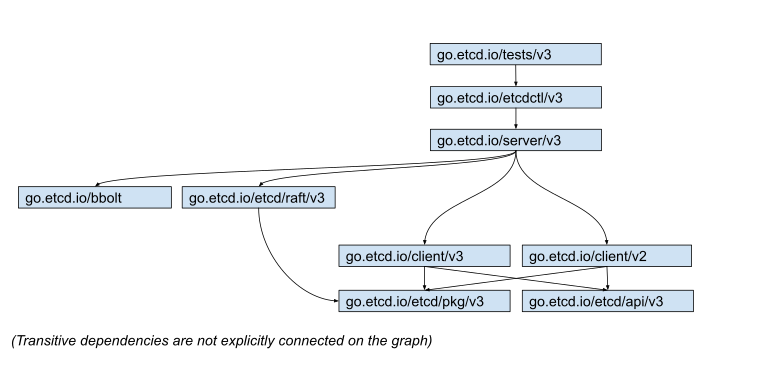
There are following modules:
go.etcd.io/etcd/api/v3 - contains API definitions (like protos & proto-generated libraries) that defines communication protocol between etcd clients and server.
go.etcd.io/etcd/pkg/v3 - collection of utility packages used by etcd without being specific to etcd itself. A package belongs here only if it could possibly be moved out into its own repository in the future. Please avoid adding here code that has a lot of dependencies on its own, as they automatically becoming dependencies of the client library (that we want to keep lightweight).
go.etcd.io/etcd/client/v3 - client library used to contact etcd over the network (grpc). Recommended for all new usage of etcd.
go.etcd.io/etcd/client/v2 - legacy client library used to contact etcd over HTTP protocol. Deprecated. All new usage should depend on /v3 library.
go.etcd.io/etcd/raft/v3 - implementation of distributed consensus protocol. Should have no etcd specific code.
go.etcd.io/etcd/server/v3 - etcd implementation. The code in this package is etcd internal and should not be consumed by external projects. The package layout and API can change within the minor versions.
go.etcd.io/etcd/etcdctl/v3 - a command line tool to access and manage etcd.
go.etcd.io/etcd/tests/v3 - a module that contains all integration tests of etcd. Notice: All unit-tests (fast and not requiring cross-module dependencies) should be kept in the local modules to the code under the test.
go.etcd.io/bbolt - implementation of persistent b-tree. Hosted in a separate repository: https://github.com/etcd-io/bbolt .
Operations
All etcd modules should be released in the same versions, e.g.
go.etcd.io/etcd/client/v3@v3.5.10must depend ongo.etcd.io/etcd/api/v3@v3.5.10.The consistent updating of versions can by performed using:
The released modules should be tagged according to https://golang.org/ref/mod#vcs-version rules, i.e. each module should get its own tag. The tagging can be performed using:
All etcd modules should depend on the same versions of underlying dependencies. This can be verified using:
The go.mod files must not contain dependencies not being used and must conform to
go mod tidyformat. This is being verified by:To trigger actions across all modules (e.g. auto-format all files), please use/expand the following script:
Future
As a North Star, we would like to evaluate etcd modules towards following model:
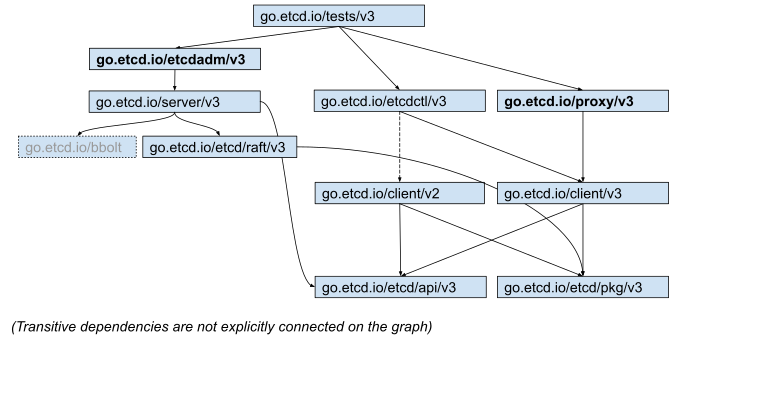
This assumes:
- Splitting etcdmigrate/etcdadm out of etcdctl binary. Thanks to this etcdctl would become clearly a command-line wrapper around network client API, while etcdmigrate/etcdadm would support direct physical operations on the etcd storage files.
- Splitting etcd-proxy out of ./etcd binary, as it contains more experimental code so carries additional risk & dependencies.
- Deprecation of support for v2 protocol.
12 - Learning
12.1 - Data model
etcd is designed to reliably store infrequently updated data and provide reliable watch queries. etcd exposes previous versions of key-value pairs to support inexpensive snapshots and watch history events (“time travel queries”). A persistent, multi-version, concurrency-control data model is a good fit for these use cases.
etcd stores data in a multiversion persistent key-value store. The persistent key-value store preserves the previous version of a key-value pair when its value is superseded with new data. The key-value store is effectively immutable; its operations do not update the structure in-place, but instead always generate a new updated structure. All past versions of keys are still accessible and watchable after modification. To prevent the data store from growing indefinitely over time and from maintaining old versions, the store may be compacted to shed the oldest versions of superseded data.
Logical view
The store’s logical view is a flat binary key space. The key space has a lexically sorted index on byte string keys so range queries are inexpensive.
The key space maintains multiple revisions. When the store is created, the initial revision is 1. Each atomic mutative operation (e.g., a transaction operation may contain multiple operations) creates a new revision on the key space. All data held by previous revisions remains unchanged. Old versions of key can still be accessed through previous revisions. Likewise, revisions are indexed as well; ranging over revisions with watchers is efficient. If the store is compacted to save space, revisions before the compact revision will be removed. Revisions are monotonically increasing over the lifetime of a cluster.
A key’s life spans a generation, from creation to deletion. Each key may have one or multiple generations. Creating a key increments the version of that key, starting at 1 if the key does not exist at the current revision. Deleting a key generates a key tombstone, concluding the key’s current generation by resetting its version to 0. Each modification of a key increments its version; so, versions are monotonically increasing within a key’s generation. Once a compaction happens, any generation ended before the compaction revision will be removed, and values set before the compaction revision except the latest one will be removed.
Physical view
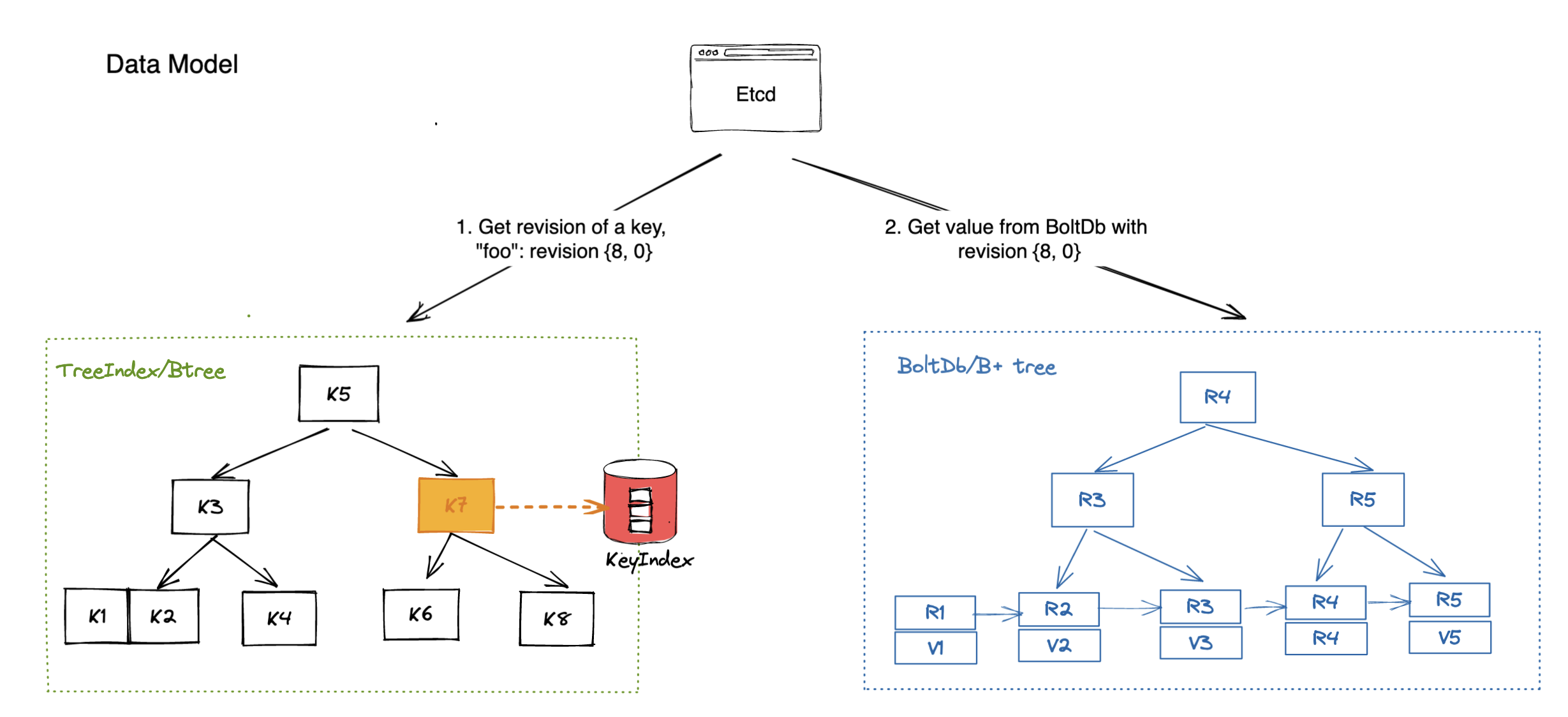
etcd stores the physical data as key-value pairs in a persistent b+tree . Each revision of the store’s state only contains the delta from its previous revision to be efficient. A single revision may correspond to multiple keys in the tree.
The key of key-value pair is a 3-tuple (major, sub, type). Major is the store revision holding the key. Sub differentiates among keys within the same revision. Type is an optional suffix for special value (e.g., t if the value contains a tombstone). The value of the key-value pair contains the modification from previous revision, thus one delta from previous revision. The b+tree is ordered by key in lexical byte-order. Ranged lookups over revision deltas are fast; this enables quickly finding modifications from one specific revision to another. Compaction removes out-of-date keys-value pairs.
etcd also keeps a secondary in-memory btree index to speed up range queries over keys. The keys in the btree index are the keys of the store exposed to user. The value is a pointer to the modification of the persistent b+tree. Compaction removes dead pointers.
Overall, etcd gets the revision information from btree and then uses the revision as key to fetch value from b+tree(As shown below).
12.2 - etcd client design
etcd Client Design
Gyuho Lee (github.com/gyuho, Amazon Web Services, Inc.), Joe Betz (github.com/jpbetz, Google Inc.)
Introduction
etcd server has proven its robustness with years of failure injection testing. Most complex application logic is already handled by etcd server and its data stores (e.g. cluster membership is transparent to clients, with Raft-layer forwarding proposals to leader). Although server components are correct, its composition with client requires a different set of intricate protocols to guarantee its correctness and high availability under faulty conditions. Ideally, etcd server provides one logical cluster view of many physical machines, and client implements automatic failover between replicas. This documents client architectural decisions and its implementation details.
Glossary
clientv3: etcd Official Go client for etcd v3 API.
clientv3-grpc1.0: Official client implementation, with grpc-go v1.0.x
, which is used in latest etcd v3.1.
clientv3-grpc1.7: Official client implementation, with grpc-go v1.7.x
, which is used in latest etcd v3.2 and v3.3.
clientv3-grpc1.23: Official client implementation, with grpc-go v1.23.x
, which is used in latest etcd v3.4.
Balancer: etcd client load balancer that implements retry and failover mechanism. etcd client should automatically balance loads between multiple endpoints.
Endpoints: A list of etcd server endpoints that clients can connect to. Typically, 3 or 5 client URLs of an etcd cluster.
Pinned endpoint: When configured with multiple endpoints, <= v3.3 client balancer chooses only one endpoint to establish a TCP connection, in order to conserve total open connections to etcd cluster. In v3.4, balancer round-robins pinned endpoints for every request, thus distributing loads more evenly.
Client Connection: TCP connection that has been established to an etcd server, via gRPC Dial.
Sub Connection: gRPC SubConn interface. Each sub-connection contains a list of addresses. Balancer creates a SubConn from a list of resolved addresses. gRPC ClientConn can map to multiple SubConn (e.g. example.com resolves to 10.10.10.1 and 10.10.10.2 of two sub-connections). etcd v3.4 balancer employs internal resolver to establish one sub-connection for each endpoint.
Transient disconnect: When gRPC server returns a status error of code Unavailable
.
Client Requirements
Correctness. Requests may fail in the presence of server faults. However, it never violates consistency guarantees: global ordering properties, never write corrupted data, at-most once semantics for mutable operations, watch never observes partial events, and so on.
Liveness. Servers may fail or disconnect briefly. Clients should make progress in either way. Clients should never deadlock waiting for a server to come back from offline, unless configured to do so. Ideally, clients detect unavailable servers with HTTP/2 ping and failover to other nodes with clear error messages.
Effectiveness. Clients should operate effectively with minimum resources: previous TCP connections should be gracefully closed after endpoint switch. Failover mechanism should effectively predict the next replica to connect, without wastefully retrying on failed nodes.
Portability. Official client should be clearly documented and its implementation be applicable to other language bindings. Error handling between different language bindings should be consistent. Since etcd is fully committed to gRPC, implementation should be closely aligned with gRPC long-term design goals (e.g. pluggable retry policy should be compatible with gRPC retry ). Upgrades between two client versions should be non-disruptive.
Client Overview
etcd client implements the following components:
- balancer that establishes gRPC connections to an etcd cluster,
- API client that sends RPCs to an etcd server, and
- error handler that decides whether to retry a failed request or switch endpoints.
Languages may differ in how to establish an initial connection (e.g. configure TLS), how to encode and send Protocol Buffer messages to server, how to handle stream RPCs, and so on. However, errors returned from etcd server will be the same. So should be error handling and retry policy.
For example, etcd server may return "rpc error: code = Unavailable desc = etcdserver: request timed out", which is transient error that expects retries. Or return rpc error: code = InvalidArgument desc = etcdserver: key is not provided, which means request was invalid and should not be retried. Go client can parse errors with google.golang.org/grpc/status.FromError, and Java client with io.grpc.Status.fromThrowable.
clientv3-grpc1.0: Balancer Overview
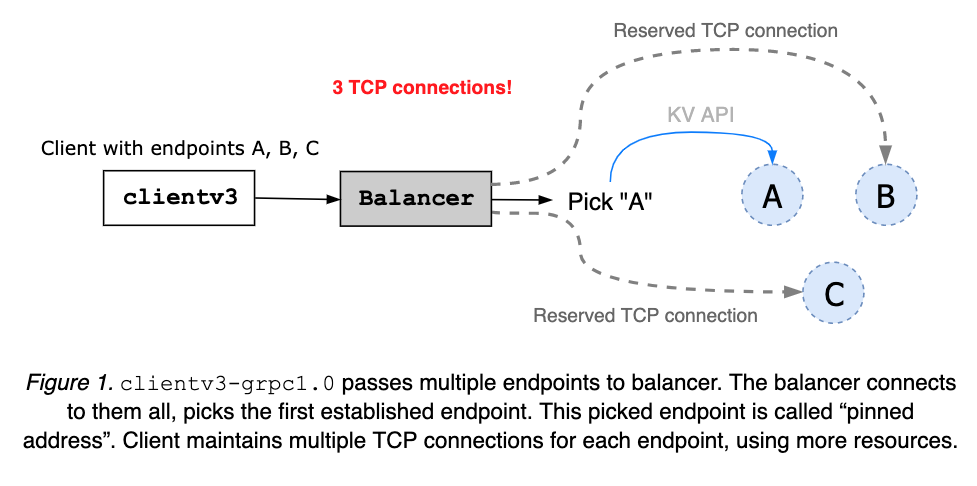
clientv3-grpc1.0 maintains multiple TCP connections when configured with multiple etcd endpoints. Then pick one address and use it to send all client requests. The pinned address is maintained until the client object is closed (see Figure 1). When the client receives an error, it randomly picks another and retries.
clientv3-grpc1.0: Balancer Limitation
clientv3-grpc1.0 opening multiple TCP connections may provide faster balancer failover but requires more resources. The balancer does not understand node’s health status or cluster membership. So, it is possible that balancer gets stuck with one failed or partitioned node.
clientv3-grpc1.7: Balancer Overview
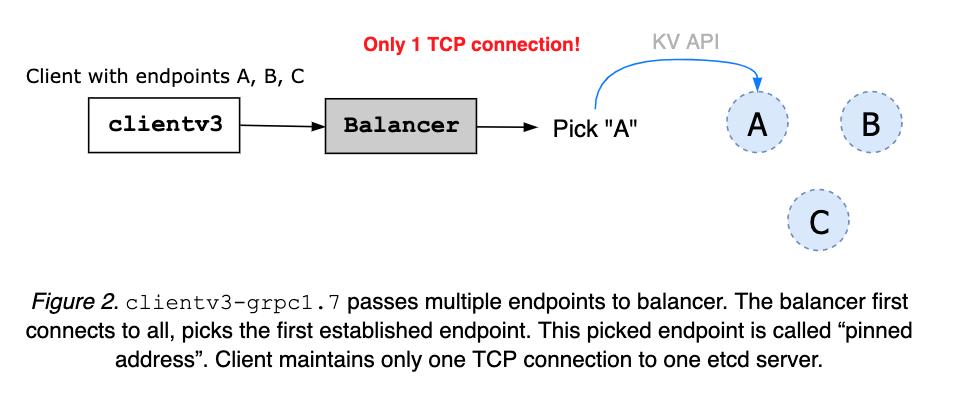
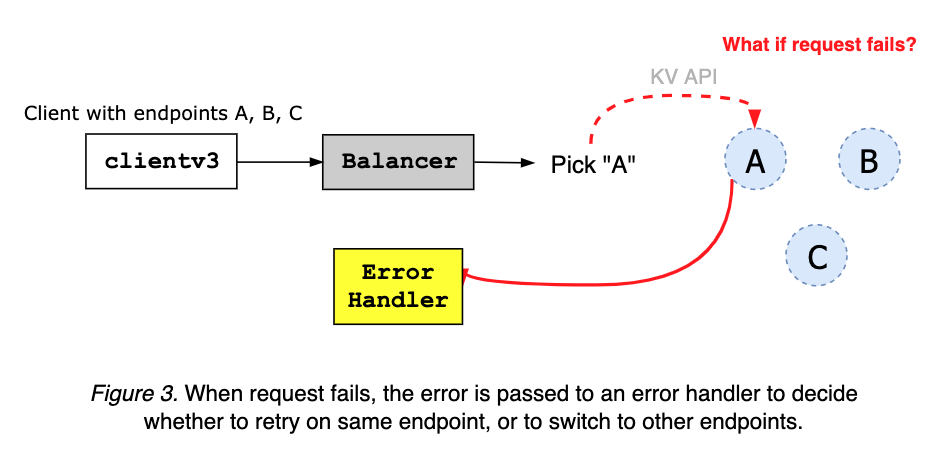
clientv3-grpc1.7 maintains only one TCP connection to a chosen etcd server. When given multiple cluster endpoints, a client first tries to connect to them all. As soon as one connection is up, balancer pins the address, closing others (see Figure 2). The pinned address is to be maintained until the client object is closed. An error, from server or client network fault, is sent to client error handler (see Figure 3).
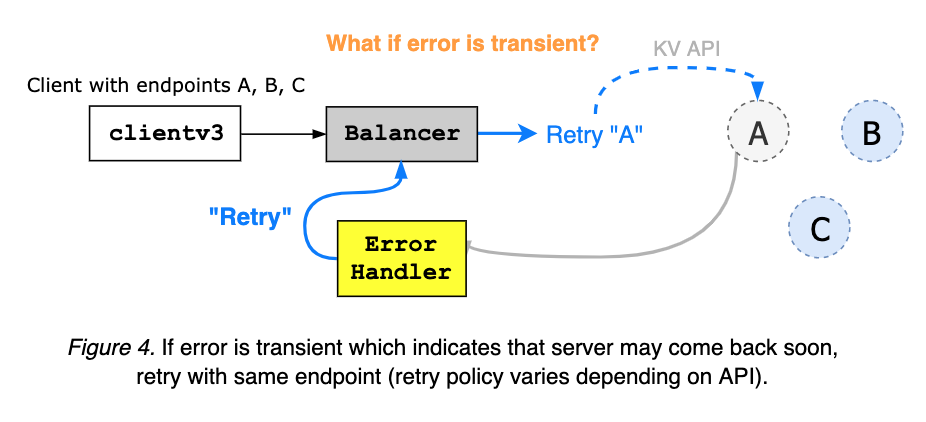
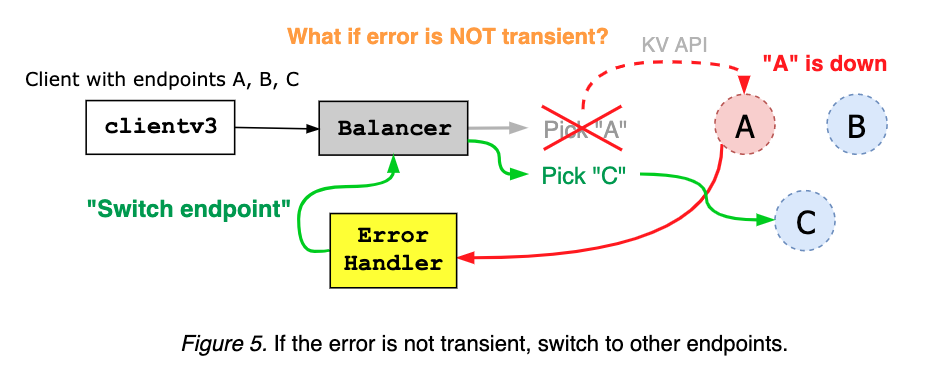
The client error handler takes an error from gRPC server, and decides whether to retry on the same endpoint, or to switch to other addresses, based on the error code and message (see Figure 4 and Figure 5).
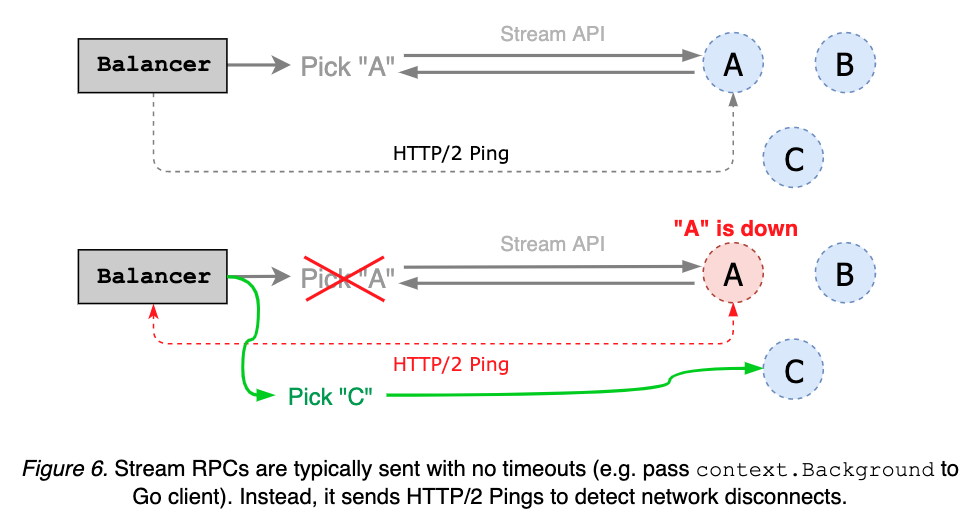
Stream RPCs, such as Watch and KeepAlive, are often requested with no timeouts. Instead, client can send periodic HTTP/2 pings to check the status of a pinned endpoint; if the server does not respond to the ping, balancer switches to other endpoints (see Figure 6).
clientv3-grpc1.7: Balancer Limitation
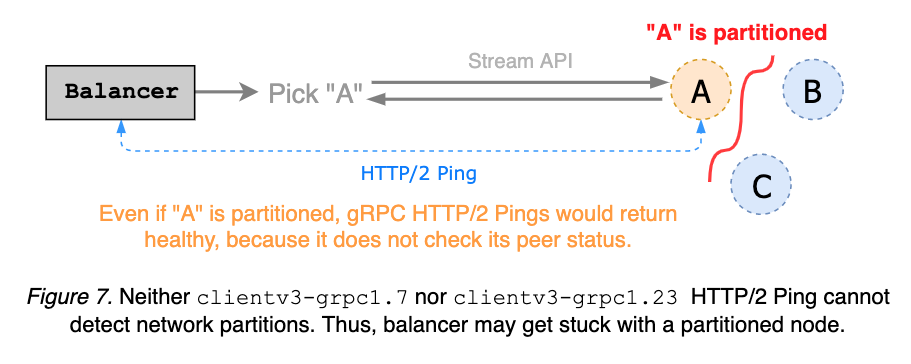
clientv3-grpc1.7 balancer sends HTTP/2 keepalives to detect disconnects from streaming requests. It is a simple gRPC server ping mechanism and does not reason about cluster membership, thus unable to detect network partitions. Since partitioned gRPC server can still respond to client pings, balancer may get stuck with a partitioned node. Ideally, keepalive ping detects partition and triggers endpoint switch, before request time-out (see etcd#8673
and Figure 7).
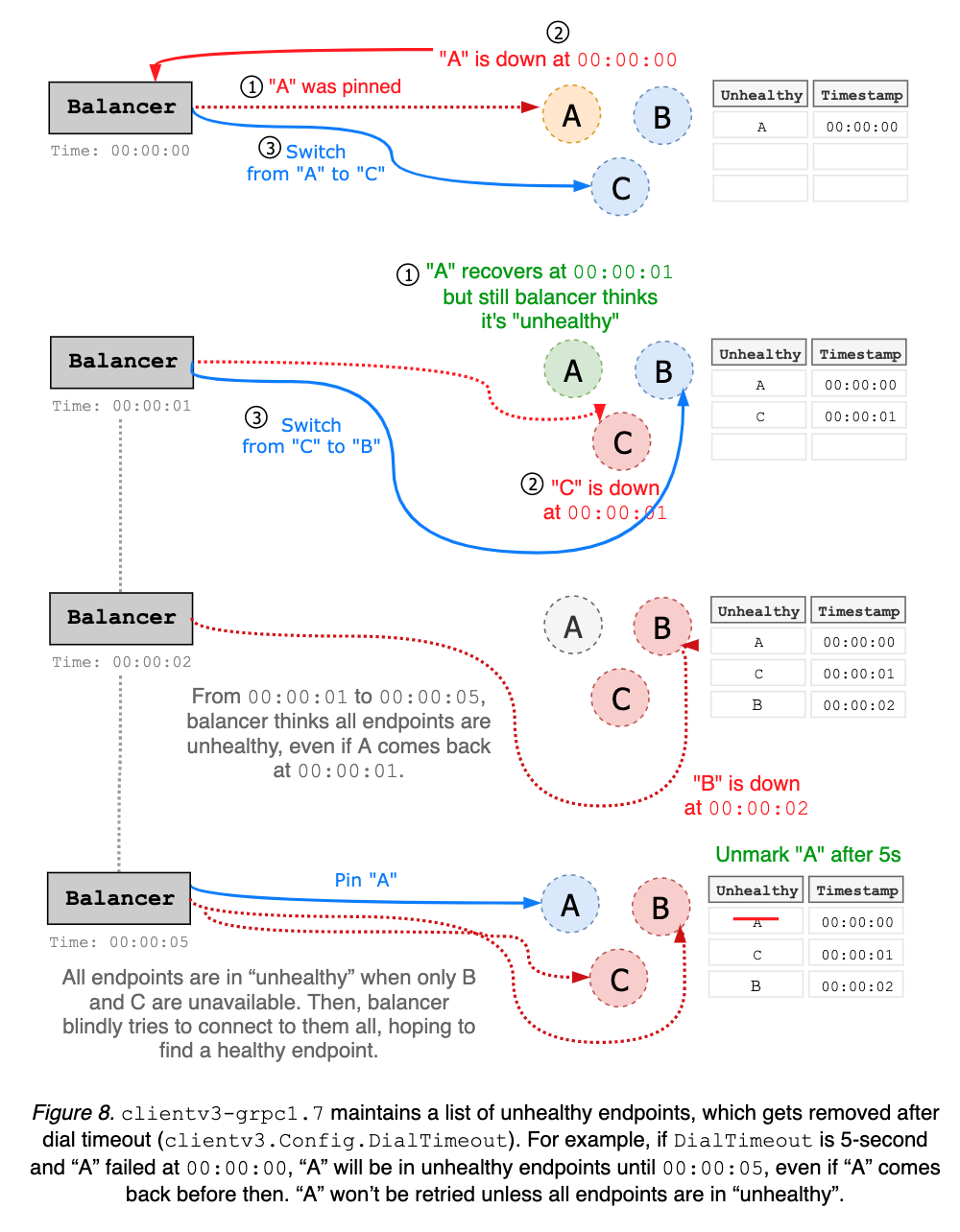
clientv3-grpc1.7 balancer maintains a list of unhealthy endpoints. Disconnected addresses are added to “unhealthy” list, and considered unavailable until after wait duration, which is hard coded as dial timeout with default value 5-second. Balancer can have false positives on which endpoints are unhealthy. For instance, endpoint A may come back right after being blacklisted, but still unusable for next 5 seconds (see Figure 8).
clientv3-grpc1.0 suffered the same problems above.
Upstream gRPC Go had already migrated to new balancer interface. For example, clientv3-grpc1.7 underlying balancer implementation uses new gRPC balancer and tries to be consistent with old balancer behaviors. While its compatibility has been maintained reasonably well, etcd client still suffered from subtle breaking changes
. Furthermore, gRPC maintainer recommends to not rely on the old balancer interface
. In general, to get better support from upstream, it is best to be in sync with latest gRPC releases. And new features, such as retry policy, may not be backported to gRPC 1.7 branch. Thus, both etcd server and client must migrate to latest gRPC versions.
clientv3-grpc1.23: Balancer Overview
clientv3-grpc1.7 is so tightly coupled with old gRPC interface, that every single gRPC dependency upgrade broke client behavior. Majority of development and debugging efforts were devoted to fixing those client behavior changes. As a result, its implementation has become overly complicated with bad assumptions on server connectivities.
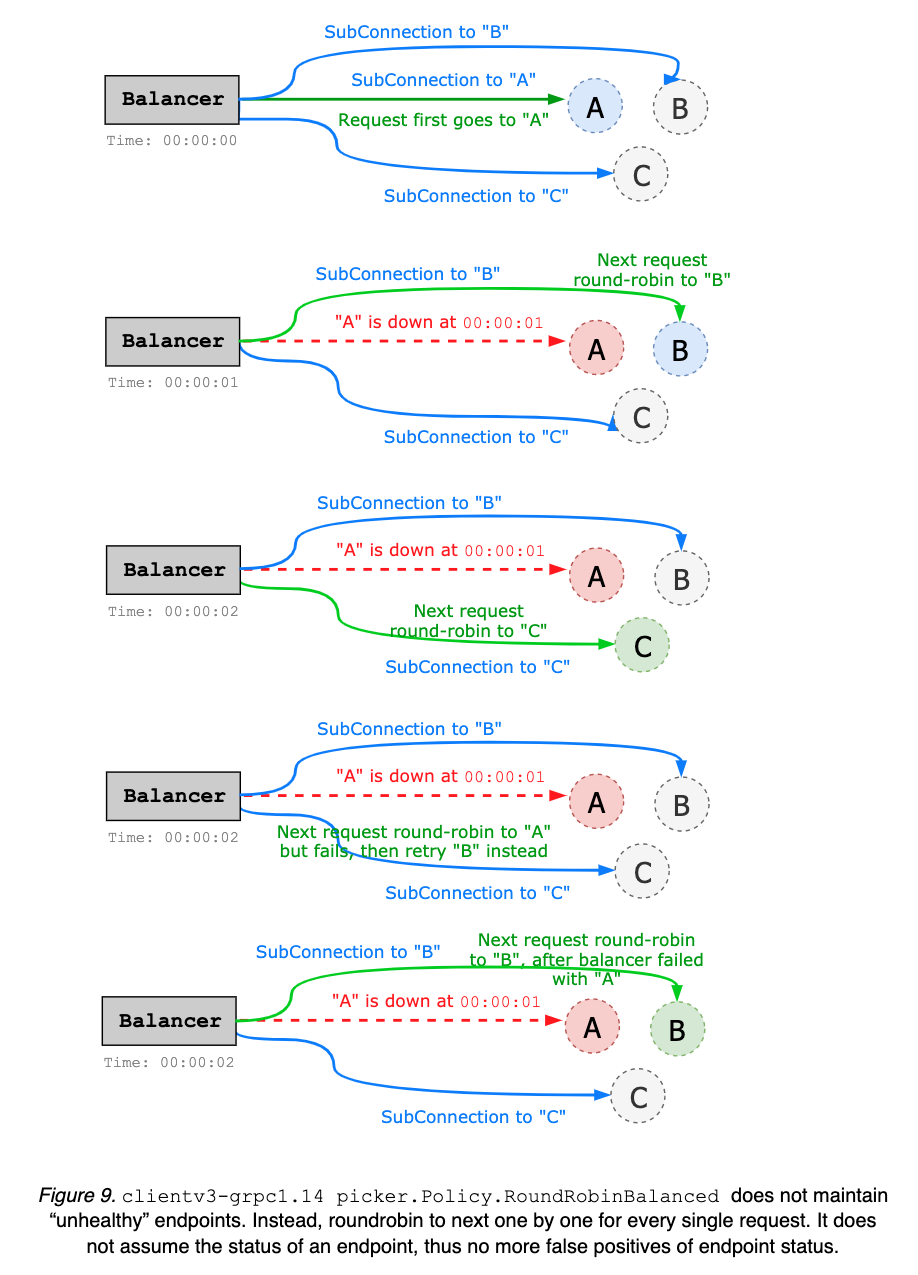
The primary goal of clientv3-grpc1.23 is to simplify balancer failover logic; rather than maintaining a list of unhealthy endpoints, which may be stale, simply roundrobin to the next endpoint whenever client gets disconnected from the current endpoint. It does not assume endpoint status. Thus, no more complicated status tracking is needed (see Figure 8 and above). Upgrading to clientv3-grpc1.23 should be no issue; all changes were internal while keeping all the backward compatibilities.
Internally, when given multiple endpoints, clientv3-grpc1.23 creates multiple sub-connections (one sub-connection per each endpoint), while clientv3-grpc1.7 creates only one connection to a pinned endpoint (see Figure 9). For instance, in 5-node cluster, clientv3-grpc1.23 balancer would require 5 TCP connections, while clientv3-grpc1.7 only requires one. By preserving the pool of TCP connections, clientv3-grpc1.23 may consume more resources but provide more flexible load balancer with better failover performance. The default balancing policy is round robin but can be easily extended to support other types of balancers (e.g. power of two, pick leader, etc.). clientv3-grpc1.23 uses gRPC resolver group and implements balancer picker policy, in order to delegate complex balancing work to upstream gRPC. On the other hand, clientv3-grpc1.7 manually handles each gRPC connection and balancer failover, which complicates the implementation. clientv3-grpc1.23 implements retry in the gRPC interceptor chain that automatically handles gRPC internal errors and enables more advanced retry policies like backoff, while clientv3-grpc1.7 manually interprets gRPC errors for retries.
clientv3-grpc1.23: Balancer Limitation
Improvements can be made by caching the status of each endpoint. For instance, balancer can ping each server in advance to maintain a list of healthy candidates, and use this information when doing round-robin. Or when disconnected, balancer can prioritize healthy endpoints. This may complicate the balancer implementation, thus can be addressed in later versions.
Client-side keepalive ping still does not reason about network partitions. Streaming request may get stuck with a partitioned node. Advanced health checking service need to be implemented to understand the cluster membership (see etcd#8673 for more detail).
Currently, retry logic is handled manually as an interceptor. This may be simplified via official gRPC retries .
12.3 - etcd learner design
etcd Learner
Gyuho Lee (github.com/gyuho, Amazon Web Services, Inc.), Joe Betz (github.com/jpbetz, Google Inc.)
Background
Membership reconfiguration has been one of the biggest operational challenges. Let’s review common challenges.
1. New Cluster member overloads Leader
A newly joined etcd member starts with no data, thus demanding more updates from leader until it catches up with leader’s logs. Then leader’s network is more likely to be overloaded, blocking or dropping leader heartbeats to followers. In such case, a follower may election-timeout to start a new leader election. That is, a cluster with a new member is more vulnerable to leader election. Both leader election and the subsequent update propagation to the new member are prone to causing periods of cluster unavailability (see Figure 1).
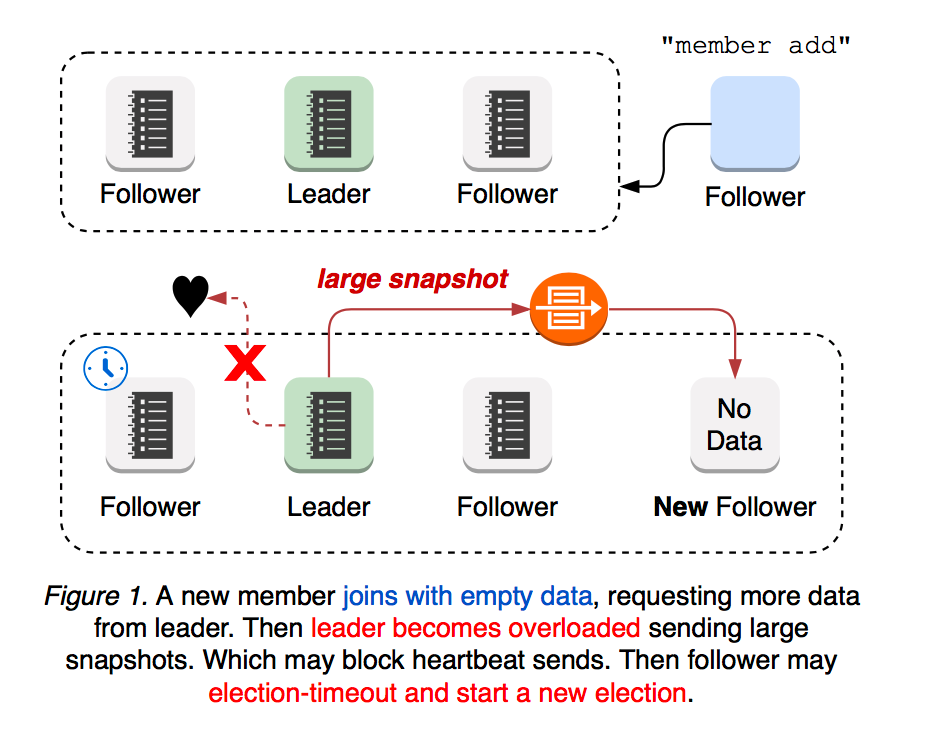
2. Network Partitions scenarios
What if network partition happens? It depends on leader partition. If the leader still maintains the active quorum, the cluster would continue to operate (see Figure 2).
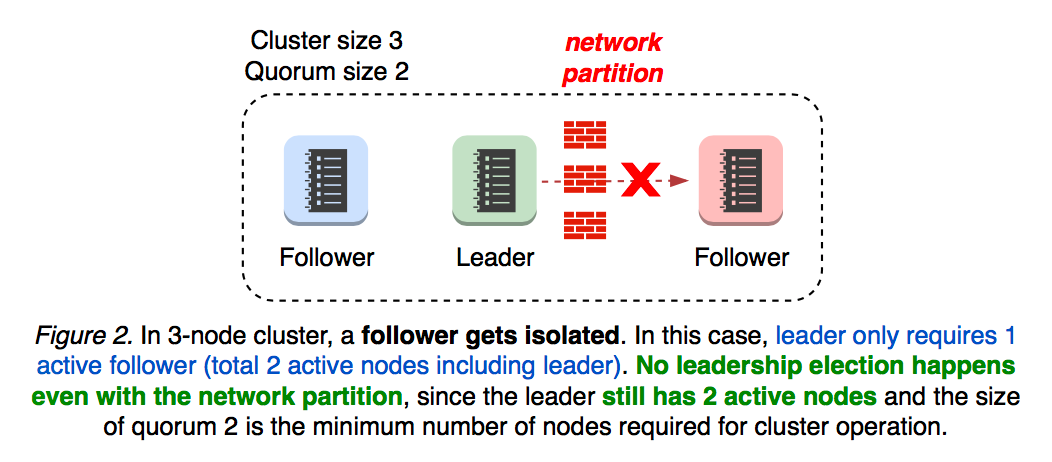
2.1 Leader isolation
What if the leader becomes isolated from the rest of the cluster? Leader monitors progress of each follower. When leader loses connectivity from the quorum, it reverts back to follower which will affect the cluster availability (see Figure 3).
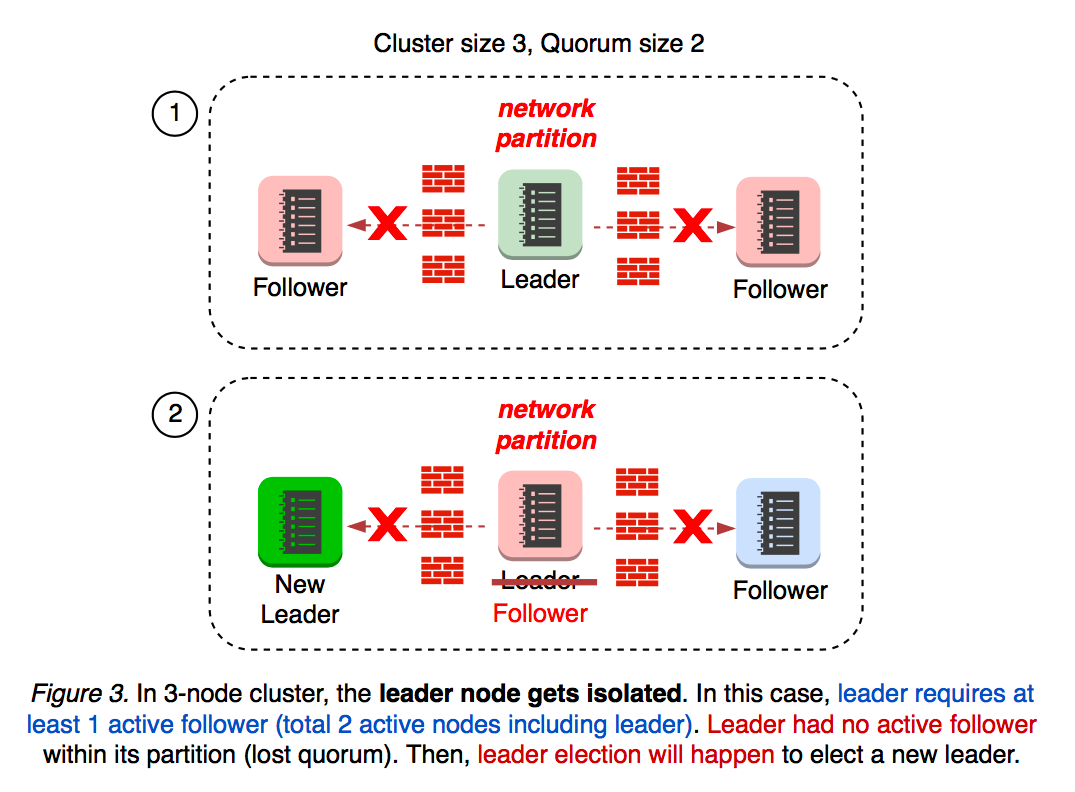
When a new node is added to 3 node cluster, the cluster size becomes 4 and the quorum size becomes 3. What if a new node had joined the cluster, and then network partition happens? It depends on which partition the new member gets located after partition.
2.2 Cluster Split 3+1
If the new node happens to be located in the same partition as leader’s, the leader still maintains the active quorum of 3. No leadership election happens, and no cluster availability gets affected (see Figure 4).
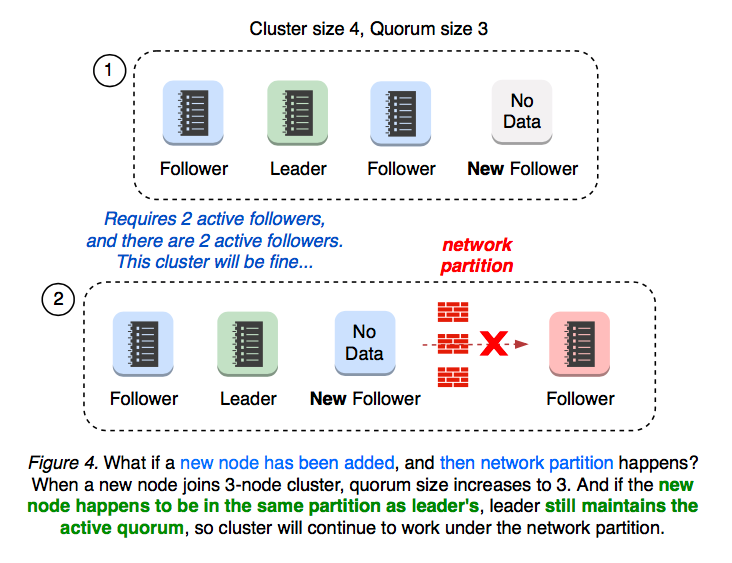
2.3 Cluster Split 2+2
If the cluster is 2-and-2 partitioned, then neither of partition maintains the quorum of 3. In this case, leadership election happens (see Figure 5).
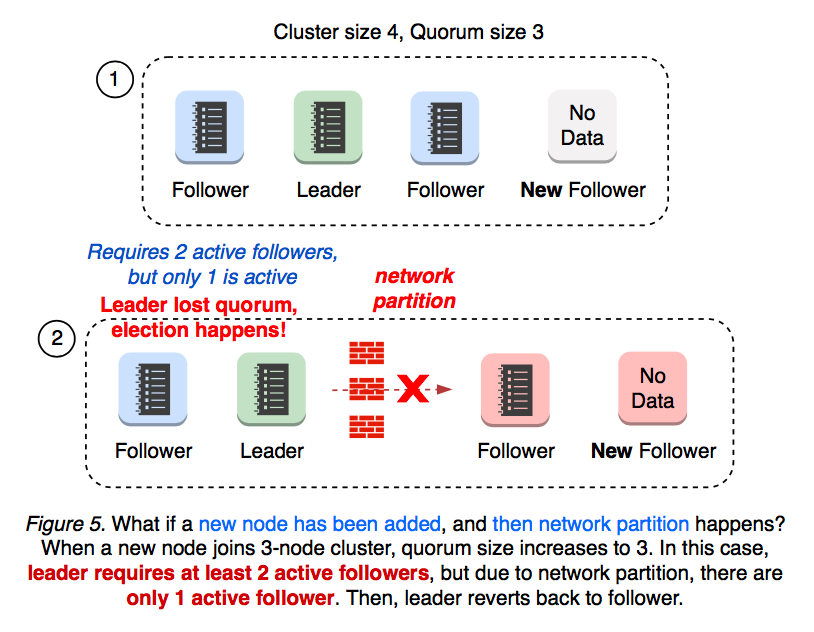
2.4 Quorum Lost
What if network partition happens first, and then a new member gets added? A partitioned 3-node cluster already has one disconnected follower. When a new member is added, the quorum changes from 2 to 3. Now, this cluster has only 2 active nodes out 4, thus losing quorum and starting a new leadership election (see Figure 6).
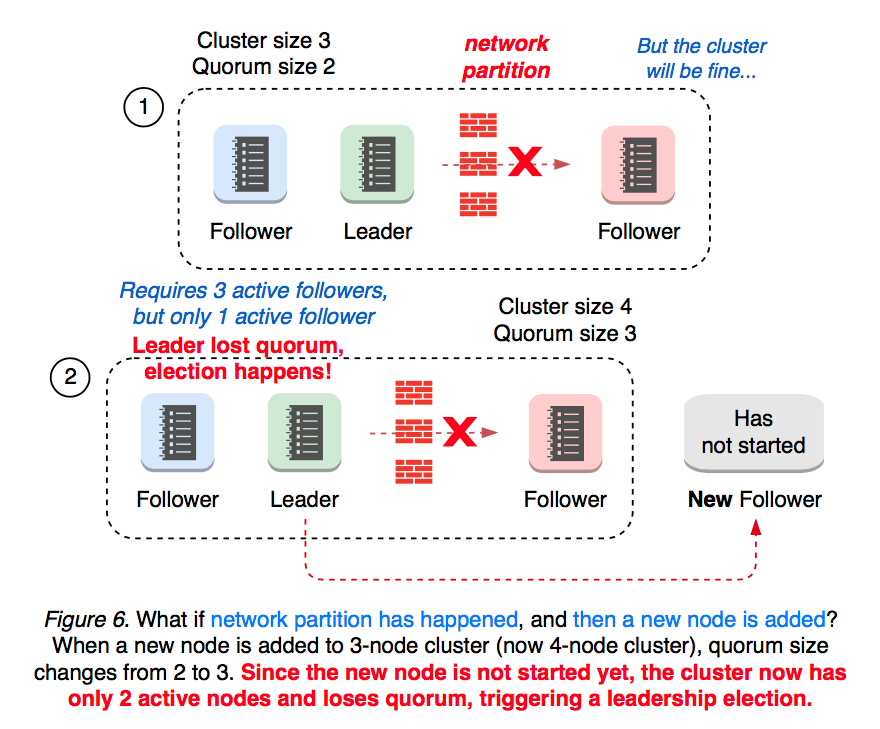
Since member add operation can change the size of quorum, it is always recommended to “member remove” first to replace an unhealthy node.
Adding a new member to a 1-node cluster changes the quorum size to 2, immediately causing a leader election when the previous leader finds out quorum is not active. This is because “member add” operation is a 2-step process where user needs to apply “member add” command first, and then starts the new node process (see Figure 7).
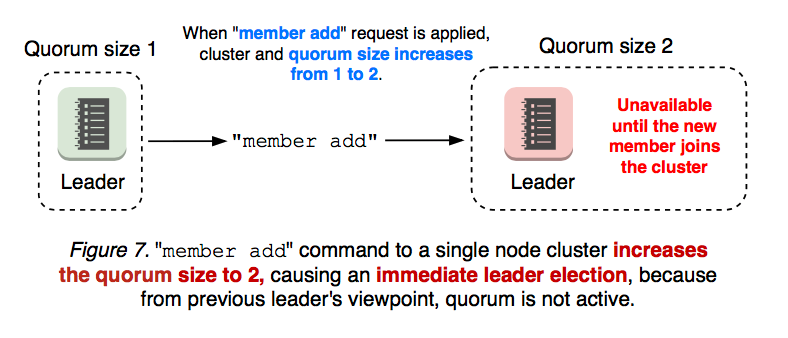
3. Cluster Misconfigurations
An even worse case is when an added member is misconfigured. Membership reconfiguration is a two-step process: “etcdctl member add” and starting an etcd server process with the given peer URL. That is, “member add” command is applied regardless of URL, even when the URL value is invalid. If the first step is applied with invalid URLs, the second step cannot even start the new etcd. Once the cluster loses quorum, there is no way to revert the membership change (see Figure 8).
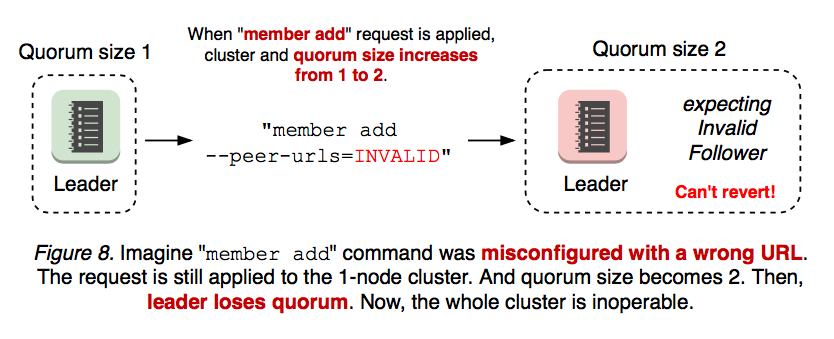
Same applies to a multi-node cluster. For example, the cluster has two members down (one is failed, the other is misconfigured) and two members up, but now it requires at least 3 votes to change the cluster membership (see Figure 9).
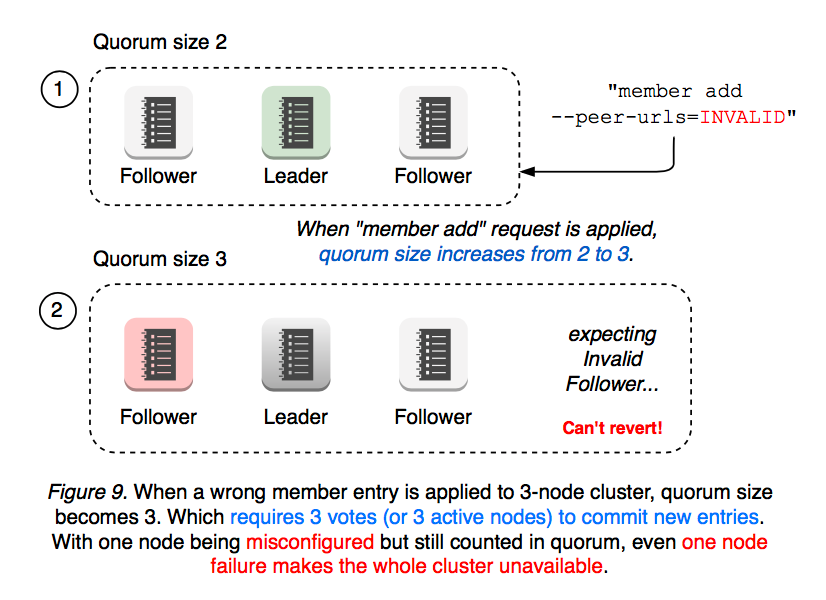
As seen above, a simple misconfiguration can fail the whole cluster into an inoperative state. In such case, an operator need manually recreate the cluster with etcd --force-new-cluster flag. As etcd has become a mission-critical service for Kubernetes, even the slightest outage may have significant impact on users. What can we better to make etcd such operations easier? Among other things, leader election is most critical to cluster availability: Can we make membership reconfiguration less disruptive by not changing the size of quorum? Can a new node be idle, only requesting the minimum updates from leader, until it catches up? Can membership misconfiguration be always reversible and handled in a more secure way (wrong member add command run should never fail the cluster)? Should an user worry about network topology when adding a new member? Can member add API work regardless of the location of nodes and ongoing network partitions?
Raft Learner
In order to mitigate such availability gaps in the previous section, Raft §4.2.1 introduces a new node state “Learner”, which joins the cluster as a non-voting member until it catches up to leader’s logs.
Features in v3.4
An operator should do the minimum amount of work possible to add a new learner node. member add --learner command to add a new learner, which joins cluster as a non-voting member but still receives all data from leader (see Figure 10).
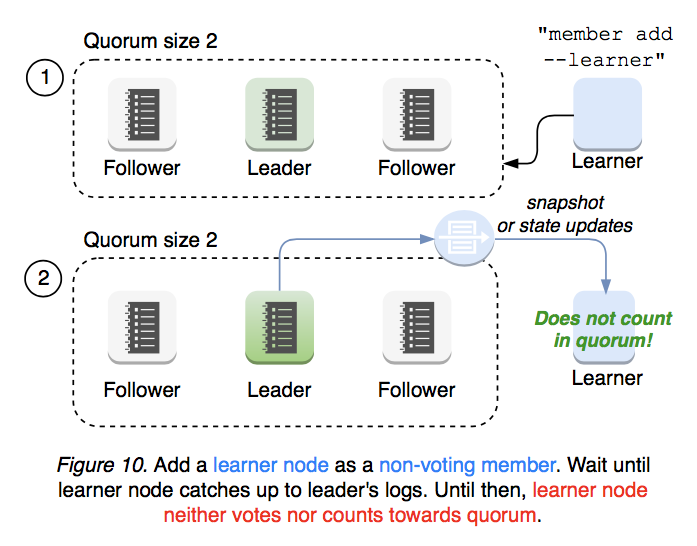
When a learner has caught up with leader’s progress, the learner can be promoted to a voting member using member promote API, which then counts towards the quorum (see Figure 11).
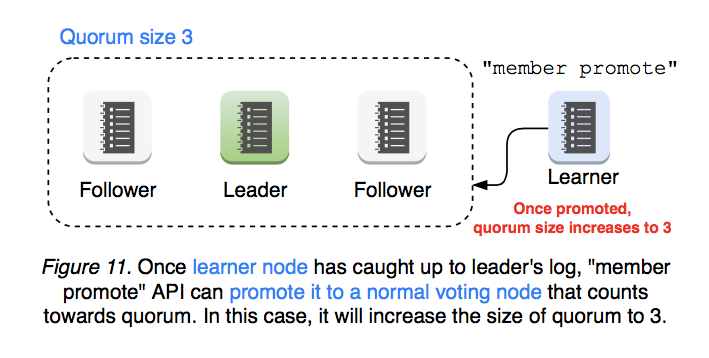
etcd server validates promote request to ensure its operational safety. Only after its log has caught up to leader’s can learner be promoted to a voting member (see Figure 12).
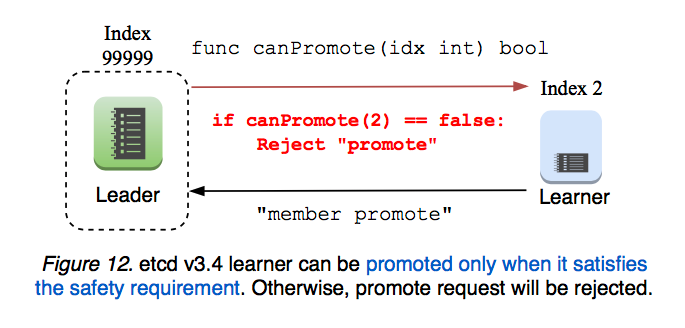
Learner only serves as a standby node until promoted: Leadership cannot be transferred to learner. Learner rejects client reads and writes (client balancer should not route requests to learner). Which means learner does not need issue Read Index requests to leader. Such limitation simplifies the initial learner implementation in v3.4 release (see Figure 13).
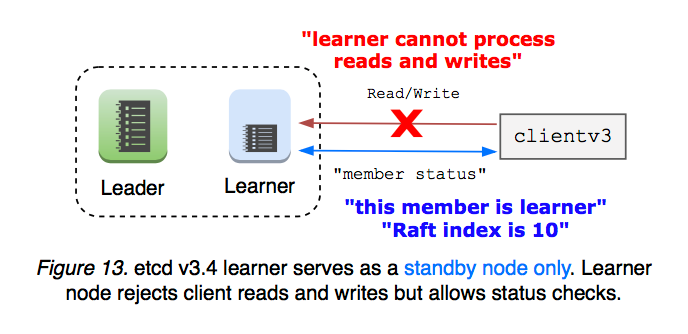
In addition, etcd limits the total number of learners that a cluster can have, and avoids overloading the leader with log replication. Learner never promotes itself. While etcd provides learner status information and safety checks, cluster operator must make the final decision whether to promote learner or not.
Proposed features for future releases
Make learner state only and default: Defaulting a new member state to learner will greatly improve membership reconfiguration safety, because learner does not change the size of quorum. Misconfiguration will always be reversible without losing the quorum.
Make voting-member promotion fully automatic: Once a learner catches up to leader’s logs, a cluster can automatically promote the learner. etcd requires certain thresholds to be defined by the user, and once the requirements are satisfied, learner promotes itself to a voting member. From a user’s perspective, “member add” command would work the same way as today but with greater safety provided by learner feature.
Make learner standby failover node: A learner joins as a standby node, and gets automatically promoted when the cluster availability is affected.
Make learner read-only: A learner can serve as a read-only node that never gets promoted. In a weak consistency mode, learner only receives data from leader and never process writes. Serving reads locally without consensus overhead would greatly decrease the workloads to leader but may serve stale data. In a strong consistency mode, learner requests read index from leader to serve latest data, but still rejects writes.
Learner vs. Mirror Maker
etcd implements “mirror maker” using watch API to continuously relay key creates and updates to a separate cluster. Mirroring usually has low latency overhead once it completes initial synchronization. Learner and mirroring overlap in that both can be used to replicate existing data for read-only. However, mirroring does not guarantee linearizability. During network disconnects, previous key-values might have been discarded, and clients are expected to verify watch responses for correct ordering. Thus, there is no ordering guarantee in mirror. Use mirror for minimum latency (e.g. cross data center) at the costs of consistency. Use learner to retain all historical data and its ordering.
Appendix: Learner Implementation in v3.4
Expose “Learner” node type to “MemberAdd” API.
etcd client adds a flag to “MemberAdd” API for learner node. And etcd server handler applies membership change entry with pb.ConfChangeAddLearnerNode type. Once the command has been applied, a server joins the cluster with etcd --initial-cluster-state=existing flag. This learner node can neither vote nor count as quorum.
etcd server must not transfer leadership to learner, since it may still lag behind and does not count as quorum. etcd server limits the number of learners that cluster can have to one: the more learners we have, the more data the leader has to propagate. Clients may talk to learner node, but learner rejects all requests other than serializable read and member status API. This is for simplicity of initial implementation. In the future, learner can be extended as a read-only server that continuously mirrors cluster data. Client balancer must provide helper function to exclude learner node endpoint. Otherwise, request sent to learner may fail. Client sync member call should factor into learner node type. So should client endpoints update call.
MemberList and MemberStatus responses should indicate which node is learner.
Add “MemberPromote” API.
Internally in Raft, second MemberAdd call to learner node promotes it to a voting member. Leader maintains the progress of each follower and learner. If learner has not completed its snapshot message, reject promote request. Only accept promote request if and only if: The learner node is in a healthy state. The learner is in sync with leader or the delta is within the threshold (e.g. the number of entries to replicate to learner is less than 1/10 of snapshot count, which means it is less likely that even after promotion leader would not need send snapshot to the learner). All these logic are hard-coded in etcdserver package and not configurable.
Reference
- Original github issue: etcd#9161
- Use case: etcd#3715
- Use case: etcd#8888
- Use case: etcd#10114
12.4 - etcd v3 authentication design
Why not reuse the v2 auth system?
The v3 protocol uses gRPC as its transport instead of a RESTful interface like v2. This new protocol provides an opportunity to iterate on and improve the v2 design. For example, v3 auth has connection based authentication, rather than v2’s slower per-request authentication. Additionally, v2 auth’s semantics tend to be unwieldy in practice with respect to reasoning about consistency, which will be described in the next sections. For v3, there is a well-defined description and implementation of the authentication mechanism which fixes the deficiencies in the v2 auth system.
Functionality requirements
- Per connection authentication, not per request
- User ID + password based authentication implemented for the gRPC API
- Authentication must be refreshed after auth policy changes
- Its functionality should be as simple and useful as v2
- v3 provides a flat key space, unlike the directory structure of v2. Permission checking will be provided as interval matching.
- It should have stronger consistency guarantees than v2 auth
Main required changes
- A client must create a dedicated connection only for authentication before sending authenticated requests
- Add permission information (user ID and authorized revision) to the Raft commands (
etcdserverpb.InternalRaftRequest) - Every request is permission checked in the state machine layer, rather than API layer
Permission metadata consistency
The metadata for auth should also be stored and managed in the storage controlled by etcd’s Raft protocol like other data stored in etcd. It is required for not sacrificing availability and consistency of the entire etcd cluster. If reading or writing the metadata (e.g. permission information) needs an agreement of every node (more than quorum), single node failure can stop the entire cluster. Requiring all nodes to agree at once means that checking ordinary read/write requests cannot be completed if any cluster member is down, even if the cluster has an available quorum. This unanimous scheme ultimately degrades cluster availability; quorum based consensus from raft should suffice since agreement follows from consistent ordering.
The authentication mechanism in the etcd v2 protocol has a tricky part because the metadata consistency should work as in the above, but does not: each permission check is processed by the etcd member that receives the client request (server/etcdserver/api/v2http/client.go), including follower members. Therefore, it’s possible the check may be based on stale metadata.
This staleness means that auth configuration cannot be reflected as soon as operators execute etcdctl. Therefore there is no way to know how long the stale metadata is active. Practically, the configuration change is reflected immediately after the command execution. However, in some cases of heavy load, the inconsistent state can be prolonged and it might result in counter-intuitive situations for users and developers. It requires a workaround like this .
Inconsistent permissions are unsafe for linearized requests
Inconsistent authentication state is most serious for writes. Even if an operator disables write on a user, if the write is only ordered with respect to the key value store but not the authentication system, it’s possible the write will complete successfully. Without ordering on both the auth store and the key-value store, the system will be susceptible to stale permission attacks.
Therefore, the permission checking logic should be added to the state machine of etcd. Each state machine should check the requests based on its permission information in the apply phase (so the auth information must not be stale).
Design and implementation
Authentication
At first, a client must create a gRPC connection only to authenticate its user ID and password. An etcd server will respond with an authentication reply. The response will be an authentication token on success or an error on failure. The client can use its authentication token to present its credentials to etcd when making API requests.
The client connection used to request the authentication token is typically thrown away; it cannot carry the new token’s credentials. This is because gRPC doesn’t provide a way for adding per RPC credential after creation of the connection (calling grpc.Dial()). Therefore, a client cannot assign a token to its connection that is obtained through the connection. The client needs a new connection for using the token.
Notes on the implementation of Authenticate() RPC
Authenticate() RPC generates an authentication token based on a given user name and password. etcd saves and checks a configured password and a given password using Go’s bcrypt package. By design, bcrypt’s password checking mechanism is computationally expensive, taking nearly 100ms on an ordinary x64 server. Therefore, performing this check in the state machine apply phase would cause performance trouble: the entire etcd cluster can only serve almost 10 Authenticate() requests per second.
For good performance, the v3 auth mechanism checks passwords in etcd’s API layer, where it can be parallelized outside of raft. However, this can lead to potential time-of-check/time-of-use (TOCTOU) permission lapses:
- client A sends a request
Authenticate() - the API layer processes the password checking part of
Authenticate() - another client B sends a request of
ChangePassword()and the server completes it - the state machine layer processes the part of getting a revision number for the
Authenticate()from A - the server returns a success to A
- now A is authenticated on an obsolete password
For avoiding such a situation, the API layer performs version number validation based on the revision number of the auth store. During password checking, the API layer saves the revision number of auth store. After successful password checking, the API layer compares the saved revision number and the latest revision number. If the numbers differ, it means someone else updated the auth metadata. So it retries the checking. With this mechanism, the successful password checking based on the obsolete password can be avoided.
Resolving a token in the API layer
After authenticating with Authenticate(), a client can create a gRPC connection as it would without auth. In addition to the existing initialization process, the client must associate the token with the newly created connection. grpc.WithPerRPCCredentials() provides the functionality for this purpose.
Every authenticated request from the client has a token. The token can be obtained with grpc.metadata.FromIncomingContext() in the server side. The server can obtain who is issuing the request and when the user was authorized. The information will be filled by the API layer in the header (etcdserverpb.RequestHeader.Username and etcdserverpb.RequestHeader.AuthRevision) of a raft log entry (etcdserverpb.InternalRaftRequest).
Checking permission in the state machine
The auth info in etcdserverpb.RequestHeader is checked in the apply phase of the state machine. This step checks the user is granted permission to requested keys on the latest revision of auth store.
Two types of tokens: simple and JWT
There are two kinds of token types: simple and JWT. The simple token isn’t designed for production use cases. Its tokens aren’t cryptographically signed and servers must statefully track token-user correspondence; it is meant for development testing. JWT tokens should be used for production deployments since it is cryptographically signed and verified. From the implementation perspective, JWT is stateless. Its token can include metadata including username and revision, so servers don’t need to remember correspondence between tokens and the metadata.
There is a known issue #18437 with simple tokens. Within etcd servers, tokens are resolved at the API layer and simple tokens are stateful. The process is not protected by a linearizable check, meaning an etcd member may not have completed processing a previous authentication request before receiving the next one. In such cases, the member might return an “invalid auth token” error to the client. This issue is usually rare on a node with good network conditions but can occur if there is significant latency. As a workaround, applications can implement a retry mechanism to handle this error.
Directly setting JWT tokens
In addition to the standard Authenticate() RPC flow, etcd supports setting JWT tokens directly at the client level. This allows applications to manage the complete lifecycle of JWT tokens outside of etcd, including token generation, validation, and rotation.
Use case and workflow
This approach is useful when:
- A separate token management system (outside of etcd) handles JWT token generation and lifecycle
- Applications receive pre-signed JWT tokens through an external mechanism (e.g., environment variables, configuration service)
- Token lifecycle must be managed entirely by the client application rather than by etcd’s automatic token generation
The typical workflow is:
- An external authority (not etcd) generates a signed JWT token that includes the username and other claims
- The application receives the pre-signed token and configures the etcd client with it
- The client submits the JWT token directly with requests (without calling
Authenticate()) - The etcd server validates the token signature using its configured public key and grants access based on the username in the token
- Before the token expires, the application obtains a new token from the external authority
- The application creates a new client with the updated token (token updates require client recreation)
How it differs from standard authentication
When using the standard Authenticate() flow:
- The client calls
Authenticate()with username and password - etcd generates and returns a token
- The client automatically uses this token for subsequent requests
- Token refresh requires calling
Authenticate()again
When setting JWT tokens directly:
- The client is initialized with a pre-signed JWT token
- The client does not call
Authenticate() - The token is used directly in all requests
- The client application is responsible for obtaining new tokens before expiration and managing client lifecycle
AuthStatus without valid token
To support applications that manage their own JWT tokens, the AuthStatus RPC is designed to allow clients to determine whether authentication is enabled and retrieve the current authRevision. This is important for recovery scenarios where a token has expired and the client needs the latest revision in order to obtain a new valid token from its external token provider.
Without this capability, an expired token could prevent a client from learning the current authRevision, leading to a deadlock where no new token can be generated.
Notes on the difference between KVS models and file system models
etcd v3 is a KVS, not a file system. So the permissions can be granted to the users in form of an exact key name or a key range like ["start key", "end key"). It means that granting a permission of a nonexistent key is possible. Users should care about unintended permission granting. In a case of file system like system (e.g. Chubby or ZooKeeper), an inode like data structure can include the permission information. So granting permission to a nonexist key won’t be possible (except the case of sticky bits).
The etcd v3 model requires multiple lookup of the metadata unlike the file system like systems. The worst case lookup cost will be sum the user’s total granted keys and intervals. The cost cannot be avoided because v3’s flat key space is completely different from Unix’s file system model (every inode includes permission metadata). Practically the cost won’t be a serious problem because the metadata is small enough to benefit from caching.
12.5 - etcd API
This document is meant to give an overview of the v3 etcd APIs central design. This should not be mistaken with etcd v2 API, deprecated in etcd v3.5. It is by no means all encompassing, but intended to focus on the basic ideas needed to understand etcd without the distraction of less common API calls. All etcd APIs are defined in gRPC services , which categorize remote procedure calls (RPCs) understood by the etcd server. A full listing of all etcd RPCs are documented in markdown in the gRPC API listing .
gRPC Services
Every API request sent to an etcd server is a gRPC remote procedure call. RPCs in etcd are categorized based on functionality into services.
Services important for dealing with etcd’s key space include:
- KV - Creates, updates, fetches, and deletes key-value pairs.
- Watch - Monitors changes to keys.
- Lease - Primitives for consuming client keep-alive messages.
Services which manage the cluster itself include:
- Auth - Role based authentication mechanism for authenticating users.
- Cluster - Provides membership information and configuration facilities.
- Maintenance - Takes recovery snapshots, defragments the store, and returns per-member status information.
Requests and Responses
All RPCs in etcd follow the same format. Each RPC has a function Name which takes NameRequest as an argument and returns NameResponse as a response. For example, here is the Range RPC description:
Response header
All Responses from etcd API have an attached response header which includes cluster metadata for the response:
- Cluster_ID - the ID of the cluster generating the response.
- Member_ID - the ID of the member generating the response.
- Revision - the revision of the key-value store when generating the response.
- Raft_Term - the Raft term of the member when generating the response.
An application may read the Cluster_ID or Member_ID field to ensure it is communicating with the intended cluster (member).
Applications can use the Revision field to know the latest revision of the key-value store. This is especially useful when applications specify a historical revision to make a time travel query and wish to know the latest revision at the time of the request.
Applications can use Raft_Term to detect when the cluster completes a new leader election.
Key-Value API
The Key-Value API manipulates key-value pairs stored inside etcd. The majority of requests made to etcd are usually key-value requests.
System primitives
Key-Value pair
A key-value pair is the smallest unit that the key-value API can manipulate. Each key-value pair has a number of fields, defined in protobuf format :
- Key - key in bytes. An empty key is not allowed.
- Value - value in bytes.
- Version - version is the version of the key. A deletion resets the version to zero and any modification of the key increases its version.
- Create_Revision - revision of the last creation on the key.
- Mod_Revision - revision of the last modification on the key.
- Lease - the ID of the lease attached to the key. If lease is 0, then no lease is attached to the key.
In addition to just the key and value, etcd attaches additional revision metadata as part of the key message. This revision information orders keys by time of creation and modification, which is useful for managing concurrency for distributed synchronization. The etcd client’s distributed shared locks use the creation revision to wait for lock ownership. Similarly, the modification revision is used for detecting software transactional memory read set conflicts and waiting on leader election updates.
Revisions
etcd maintains a 64-bit cluster-wide counter, the store revision, that is incremented each time the key space is modified. The revision serves as a global logical clock, sequentially ordering all updates to the store. The change represented by a new revision is incremental; the data associated with a revision is the data that changed the store. Internally, a new revision means writing the changes to the backend’s B+tree, keyed by the incremented revision.
Revisions become more valuable when considering etcd’s multi-version concurrency control backend. The MVCC model means that the key-value store can be viewed from past revisions since historical key revisions are retained. The retention policy for this history can be configured by cluster administrators for fine-grained storage management; usually etcd discards old revisions of keys on a timer. A typical etcd cluster retains superseded key data for hours. This also provides reliable handling for long client disconnection, not just transient network disruptions: watchers simply resume from the last observed historical revision. Similarly, to read from the store at a particular point-in-time, read requests can be tagged with a revision to return keys from a view of the key space at the point-in-time that revision was committed.
Key ranges
The etcd data model indexes all keys over a flat binary key space. This differs from other key-value store systems that use a hierarchical system of organizing keys into directories. Instead of listing keys by directory, keys are listed by key intervals [a, b).
These intervals are often referred to as “ranges” in etcd. Operations over ranges are more powerful than operations on directories. Like a hierarchical store, intervals support single key lookups via [a, a+1) (e.g., [‘a’, ‘a\x00’) looks up ‘a’) and directory lookups by encoding keys by directory depth. In addition to those operations, intervals can also encode prefixes; for example the interval ['a', 'b') looks up all keys prefixed by the string ‘a’.
By convention, ranges for a request are denoted by the fields key and range_end. The key field is the first key of the range and should be non-empty. The range_end is the key following the last key of the range. If range_end is not given or empty, the range is defined to contain only the key argument. If range_end is key plus one (e.g., “aa”+1 == “ab”, “a\xff”+1 == “b”), then the range represents all keys prefixed with key. If both key and range_end are ‘\0’, then range represents all keys. If range_end is ‘\0’, the range is all keys greater than or equal to the key argument.
Range
Keys are fetched from the key-value store using the Range API call, which takes a RangeRequest:
- Key, Range_End - The key range to fetch.
- Limit - the maximum number of keys returned for the request. When limit is set to 0, it is treated as no limit.
- Revision - the point-in-time of the key-value store to use for the range. If revision is less or equal to zero, the range is over the latest key-value store. If the revision is compacted, ErrCompacted is returned as a response.
- Sort_Order - the ordering for sorted requests.
- Sort_Target - the key-value field to sort.
- Serializable - sets the range request to use serializable member-local reads. By default, Range is linearizable; it reflects the current consensus of the cluster. For better performance and availability, in exchange for possible stale reads, a serializable range request is served locally without needing to reach consensus with other nodes in the cluster.
- Keys_Only - return only the keys and not the values.
- Count_Only - return only the count of the keys in the range.
- Min_Mod_Revision - the lower bound for key mod revisions; filters out lesser mod revisions.
- Max_Mod_Revision - the upper bound for key mod revisions; filters out greater mod revisions.
- Min_Create_Revision - the lower bound for key create revisions; filters out lesser create revisions.
- Max_Create_Revision - the upper bound for key create revisions; filters out greater create revisions.
The client receives a RangeResponse message from the Range call:
- Kvs - the list of key-value pairs matched by the range request. When
Count_Onlyis set,Kvsis empty. - More - indicates if there are more keys to return in the requested range if
limitis set. - Count - the total number of keys satisfying the range request.
For large key ranges where buffering the full response is undesirable, see RangeStream .
RangeStream
RangeStream returns the same result set as Range, but the server splits the response into a sequence of chunks and streams them to the client. This avoids buffering large ranges entirely in memory on either side. RangeStream accepts the same RangeRequest as Range.
The client receives a stream of RangeStreamResponse messages from the RangeStream call:
Field population across chunks:
- Kvs - each chunk carries a disjoint slice of the result. Concatenating the
kvsfrom every chunk in the order they arrive yields the same key set as a singleRangecall. - Header, More, Count - populated only on the final chunk, and only when the stream completes without error. Earlier chunks leave these fields zero-valued. Applying
proto.Mergeover every chunk’srange_responseyields aRangeResponseequivalent to whatRangewould have returned.
If the stream ends in error, no chunk carries a valid header, more, or count.
Every chunk in the stream is served against the same revision. If the request does not set Revision, the server captures the latest committed revision when the stream starts and reuses it for the rest of the stream.
RangeStream does not support custom sort orders or revision filters (min_mod_revision, max_mod_revision, min_create_revision, max_create_revision). Requests that use either return Unimplemented. RangeStream is also not supported by the etcd gRPC proxy.
There are two common ways to consume a RangeStream:
- Process each chunk independently. Suitable for high-performance scenarios where the client wants to decode and act on keys as they arrive rather than collecting the whole result first. The client iterates chunks and handles
kvsfrom each one, then readsheader,more, orcountfrom the last chunk after the stream ends cleanly. - Assemble a single response. Suitable when the client wants a result equivalent to a unary
Range. The client merges every chunk’srange_responseinto oneRangeResponse(e.g., viaproto.Merge). The merged result has the fullkvs, plusheader,more, andcountfrom the final chunk. The Go client providesclientv3.GetStreamToGetResponseas a helper for this pattern.
Put
Keys are saved into the key-value store by issuing a Put call, which takes a PutRequest:
- Key - the name of the key to put into the key-value store.
- Value - the value, in bytes, to associate with the key in the key-value store.
- Lease - the lease ID to associate with the key in the key-value store. A lease value of 0 indicates no lease.
- Prev_Kv - when set, responds with the key-value pair data before the update from this
Putrequest. - Ignore_Value - when set, update the key without changing its current value. Returns an error if the key does not exist.
- Ignore_Lease - when set, update the key without changing its current lease. Returns an error if the key does not exist.
The client receives a PutResponse message from the Put call:
- Prev_Kv - the key-value pair overwritten by the
Put, ifPrev_Kvwas set in thePutRequest.
Delete Range
Ranges of keys are deleted using the DeleteRange call, which takes a DeleteRangeRequest:
- Key, Range_End - The key range to delete.
- Prev_Kv - when set, return the contents of the deleted key-value pairs.
The client receives a DeleteRangeResponse message from the DeleteRange call:
- Deleted - number of keys deleted.
- Prev_Kv - a list of all key-value pairs deleted by the
DeleteRangeoperation.
Transaction
A transaction is an atomic If/Then/Else construct over the key-value store. It provides a primitive for grouping requests together in atomic blocks (i.e., then/else) whose execution is guarded (i.e., if) based on the contents of the key-value store. Transactions can be used for protecting keys from unintended concurrent updates, building compare-and-swap operations, and developing higher-level concurrency control.
A transaction can atomically process multiple requests in a single request. For modifications to the key-value store, this means the store’s revision is incremented only once for the transaction and all events generated by the transaction will have the same revision. However, modifications to the same key multiple times within a single transaction are forbidden.
All transactions are guarded by a conjunction of comparisons, similar to an If statement. Each comparison checks a single key in the store. It may check for the absence or presence of a value, compare with a given value, or check a key’s revision or version. Two different comparisons may apply to the same or different keys. All comparisons are applied atomically; if all comparisons are true, the transaction is said to succeed and etcd applies the transaction’s then / success request block, otherwise it is said to fail and applies the else / failure request block.
Each comparison is encoded as a Compare message:
- Result - the kind of logical comparison operation (e.g., equal, less than, etc).
- Target - the key-value field to be compared. Either the key’s version, create revision, modification revision, or value.
- Key - the key for the comparison.
- Target_Union - the user-specified data for the comparison.
After processing the comparison block, the transaction applies a block of requests. A block is a list of RequestOp messages:
- Request_Range - a
RangeRequest. - Request_Put - a
PutRequest. The keys must be unique. It may not share keys with any other Puts or Deletes. - Request_Delete_Range - a
DeleteRangeRequest. It may not share keys with any Puts or Deletes requests.
All together, a transaction is issued with a Txn API call, which takes a TxnRequest:
- Compare - A list of predicates representing a conjunction of terms for guarding the transaction.
- Success - A list of requests to process if all compare tests evaluate to true.
- Failure - A list of requests to process if any compare test evaluates to false.
The client receives a TxnResponse message from the Txn call:
- Succeeded - Whether
Compareevaluated to true or false. - Responses - A list of responses corresponding to the results from applying the
Successblock if succeeded is true or theFailureif succeeded is false.
The Responses list corresponds to the results from the applied RequestOp list, with each response encoded as a ResponseOp:
The ResponseHeader included in each inner response shouldn’t be interpreted in any way.
If clients need to get the latest revision, then they should always check the top level ResponseHeader in TxnResponse.
Watch API
The Watch API provides an event-based interface for asynchronously monitoring changes to keys. An etcd watch waits for changes to keys by continuously watching from a given revision, either current or historical, and streams key updates back to the client.
Events
Every change to every key is represented with Event messages. An Event message provides both the update’s data and the type of update:
- Type - The kind of event. A PUT type indicates new data has been stored to the key. A DELETE indicates the key was deleted.
- KV - The KeyValue associated with the event. A PUT event contains current kv pair. A PUT event with kv.Version=1 indicates the creation of a key. A DELETE event contains the deleted key with its modification revision set to the revision of deletion.
- Prev_KV - The key-value pair for the key from the revision immediately before the event. To save bandwidth, it is only filled out if the watch has explicitly enabled it.
Watch streams
Watches are long-running requests and use gRPC streams to stream event data. A watch stream is bi-directional; the client writes to the stream to establish watches and reads to receive watch events. A single watch stream can multiplex many distinct watches by tagging events with per-watch identifiers. This multiplexing helps reducing the memory footprint and connection overhead on the core etcd cluster.
To read about guarantees made about watch events, please read etcd api guarantees .
A client creates a watch by sending a WatchCreateRequest over a stream returned by Watch:
- Key, Range_End - The key range to watch.
- Start_Revision - An optional revision for where to inclusively begin watching. If not given, it will stream events following the revision of the watch creation response header revision. The entire available event history can be watched starting from the last compaction revision.
- Progress_Notify - When set, the watch will periodically receive a WatchResponse with no events, if there are no recent events. It is useful when clients wish to recover a disconnected watcher starting from a recent known revision. The etcd server decides how often to send notifications based on current server load.
- Filters - A list of event types to filter away at server side.
- Prev_Kv - When set, the watch receives the key-value data from before the event happens. This is useful for knowing what data has been overwritten.
In response to a WatchCreateRequest or if there is a new event for some established watch, the client receives a WatchResponse:
- Watch_ID - the ID of the watch that corresponds to the response.
- Created - set to true if the response is for a create watch request. The client should store the ID and expect to receive events for the watch on the stream. All events sent to the created watcher will have the same watch_id.
- Canceled - set to true if the response is for a cancel watch request. No further events will be sent to the canceled watcher.
- Compact_Revision - set to the minimum historical revision available to etcd if a watcher tries watching at a compacted revision. This happens when creating a watcher at a compacted revision or the watcher cannot catch up with the progress of the key-value store. The watcher will be canceled; creating new watches with the same start_revision will fail.
- Events - a list of new events in sequence corresponding to the given watch ID.
If the client wishes to stop receiving events for a watch, it issues a WatchCancelRequest:
- Watch_ID - the ID of the watch to cancel so that no more events are transmitted.
Lease API
Leases are a mechanism for detecting client liveness. The cluster grants leases with a time-to-live. A lease expires if the etcd cluster does not receive a keepAlive within a given TTL period.
To tie leases into the key-value store, each key may be attached to at most one lease. When a lease expires or is revoked, all keys attached to that lease will be deleted. Each expired key generates a delete event in the event history.
Obtaining leases
Leases are obtained through the LeaseGrant API call, which takes a LeaseGrantRequest:
- TTL - the advisory time-to-live, in seconds.
- ID - the requested ID for the lease. If ID is set to 0, etcd will choose an ID.
The client receives a LeaseGrantResponse from the LeaseGrant call:
- ID - the lease ID for the granted lease.
- TTL - is the server selected time-to-live, in seconds, for the lease.
- ID - the lease ID to revoke. When the lease is revoked, all attached keys are deleted.
Keep alives
Leases are refreshed using a bi-directional stream created with the LeaseKeepAlive API call. When the client wishes to refresh a lease, it sends a LeaseKeepAliveRequest over the stream:
- ID - the lease ID for the lease to keep alive.
The keep alive stream responds with a LeaseKeepAliveResponse:
- ID - the lease that was refreshed with a new TTL.
- TTL - the new time-to-live, in seconds, that the lease has remaining.
12.6 - etcd persistent storage files
This document explains the etcd persistent storage format: naming, content and tools that allow developers to inspect them. Going forward the document should be extended with changes to the storage model. This document is targeted at etcd developers to help with their data recovery needs.
Prerequisites
The following articles provide helpful background information for this document:
- etcd data model overview
- Raft overview (especially “5.3 Log replication” section).
Overview
Long leaving files
| File name | High level purpose |
|---|---|
./member/snap/db | bbolt b+tree that stores all the applied data, membership authorization information & metadata. It’s aware of what's the last applied WAL log index ("consistent_index"). |
./member/snap/0000000000000002-0000000000049425.snap ./member/snap/0000000000000002-0000000000061ace.snap | Periodic snapshots of legacy v2 store, containing:
As of etcd v3, the content is redundant to the content of /snap/db files. Periodically (30s) these files are purged, and the last |
/member/snap/000000000007a178.snap.db | A complete bbolt snapshot downloaded from the etcd leader if the replica was lagging too much. Has the same type of content as ( The file is used in 2 scenarios:
The file is not being deleted when the recovery is over (so whole content is populated to ./member/snap/db file). Periodically (30s) the files are purged.
Here also |
./member/wal/000000000000000f-00000000000b38c7.wal ./member/wal/000000000000000e-00000000000a7fe3.wal ./member/wal/000000000000000d-000000000009c70c.wal | Raft’s Write Ahead Logs, containing recent transactions accepted by Raft, periodic snapshots or CRC records. Recent If the snapshots are too infrequent, there can be more than |
./member/wal/0.tmp (or .../1.tmp) | Preallocated space for the next write ahead log file. Used to avoid Raft being stuck by a lack of WAL logs capacity without the possibility to raise an alarm. |
Temporary files
During etcd internal processing, it is possible that several short living files might be encountered:
| File | High level purpose |
|---|---|
./member/snap/0000000000000002-000000000007a178.snap.broken | Snapshot files are renamed as ‘broken’ when they cannot be loaded. The attempt to load the newest file happens when etcd is being started. Or during backup/migrate commands of etcdctl. |
./member/snap/tmp071677638 (random suffix) | Temporary (bbolt) file created on replicas in response to the msgSnap leaders request, so to the demand from the leader to recover storage from the given snapshot. After successful (complete) retrieval of content the file is renamed to: See etcd/issues/12837. Fixed in etcd 3.5. |
/member/snap/db.tmp.071677638 (random suffix) | A temporary file that contains a copy of the backend content (/member/snap/db), during the process of defragmentation. After the successful process the file is renamed to /member/snap/db, replacing the original backend. On etcd server startup these files get pruned. |
bbolt b+tree: member/snap/db
This file contains the main etcd content, applied to a specific point of the Raft log (see consistent_index ).
Physical organization
The better bolt storage is physically organized as a b+tree
. The physical pages of b-tree are never modified in-place1. Instead, the content is copied to a new page (reclaimed from the freepages list) and the old page is added to the free-pages list as soon as there is no open transaction that might access it. Thanks to this process, an open RO transaction sees a consistent historical state of the storage. The RW transaction is exclusive and blocking all other RW transactions.
Big values are stored on multiple continuous pages. The process of page reclamation combined with a need to allocate contiguous areas of pages of different sizes might lead to growing fragmentation of the bbolt storage.
The bbolt file never shrinks on its own. Only in the defragmentation process, the file can be rewritten to a new one that has some buffer of free pages on its end and has truncated size.
Logical organization
The bbolt storage is divided into buckets. In each bucket there are stored keys (byte[]->value byte[] pairs), in lexicographical order. The list below represents buckets used by etcd (as of version 3.5) and the keys in use.
| Bucket | Key | Exemplar value | Description |
|---|---|---|---|
| alarm | rpcpb.Alarm:
{MemberID, Alarm: NONE|NOSPACE|CORRUPT} | nil | Indicates problems have been diagnosed in one of the members. |
| auth | "authRevision" | "" (empty) or BigEndian.PutUint64 | Any change of Roles or Users increments this field on transaction commit. The value is used only for optimistic locking during the authorization process. |
| authRoles | [roleName] as string | authpb.Role marshalled | |
| authUsers | [userName] as string | authpb.User marshalled | |
| cluster | "clusterVersion" | "3.5.0" (string) | minor version of consensus-agreed common storage version. |
| "downgrade" | JSON:{
"target-version": "3.4.0"
"enabled": true/false
} | Persists intent configured by the most recent: Since v3.5 | |
| key | [revisionId] encoded using bytesToRev{main,sub} The key-value deletes are marshalled with 't' at the end (as a "Tombstone") | mvccpb.KeyValue marshalled proto (key, create_rev, mod_rev, version, value, lease id) | |
| lease | leasepb.Lease marshalled proto (ID, TTL, RemainingTTL) | Note: LeaseCheckpoint is extending only RemainingTTL. Just TTL is from the original Grant. Note2: We persist TTLs in seconds (from the undefined 'now'). Crash-looping server does not release leases!!! | |
| members | [memberId] in hex as string: "8e9e05c52164694d" | JSON as string serialized Member structure:{
"id":10276657743932975437,
"peerURLs":[
"http://localhost:2380"],
"name":"default",
"clientURLs": ["http://localhost:2379"]
} | Agreed cluster membership information. |
| members_removed | [memberId] in hex as string: "8e9e05c52164694d" | []byte("removed") | Ids of all removed members. Used to validate that a removed member is never added again under the same id. The field is currently (3.4) read from store V2 and never from V3. See https://github.com/etcd-io/etcd/pull/12820 |
| meta | "consistent_index" | uint64 bytes (BigEndian) | Represents the offset of the last applied WAL entry to the bolt DB storage. |
| "scheduledCompactRev" | bytesToRev{main,sub} encoded. (16 bytes) | Used to reinitialize compaction if a crash happened after a compaction request. | |
| "finishedCompactRev" | bytesToRev{main,sub} encoded. (16 bytes) | Revision at which store was recently successfully compacted (https://github.com/etcd-io/etcd/blob/ae7862e8bc8007eb396099db4e0e04ac026c8df5/server/mvcc/kvstore_compaction.go#L54) | |
| "confState" | Since etcd 3.5 | ||
| "term" | Since etcd 3.5 | ||
| "storage-version" |
Tools
bbolt
bbolt has a command line tool that enables inspecting the file content.
Examples of use:
List all buckets in given bbolt file:
Read a particular key/value pair:
etcd-dump-db
etcd-dump-db can be used to list content of v3 etcd backend (bbolt).
See more examples in: https://github.com/etcd-io/etcd/tree/master/tools/etcd-dump-db
WAL: Write ahead log
Write ahead log is a Raft persistent storage that is used to store proposals. First the leader stores the proposal in its log and then (concurrently) replicates it using Raft protocol to followers. Each follower persists the proposal in its WAL before confirming back replication to the leader.
The WAL log used in etcd differs from canonical Raft model 2-fold:
- It does persist not only indexed entries, but also Raft snapshots (lightweight) & hard-state. So the entire Raft state of the member can be recovered from the WAL log alone.
- It is append-only. Entries are not overridden in place, but an entry appended later in the file (with the same index) is superseding the previous one.
File names
The WAL log files are named using following pattern:
Example: ./member/wal/0000000000000010-00000000000bf1e6.wal
So the file names contains hex-encoded:
- Sequential number of the WAL log file
- Index of the first entry or snapshot in the file. In particular the first file “0000000000000000-0000000000000000.wal” has the initial snapshot record with index=0.
Physical content
The WAL log file contains a sequence of “Frames ”. Each frame contains:
- LittleEndian 2 encoded uint64 that contains the length of the marshalled walpb.Record (3).
- Padding: Some number of 0 bytes, such that whole frame has aligned (mod 8) size
- Marshalled walpb.Record
data:
- type - int encoded enum driving interpretation of the data-field below
- data - depending on type, usually marshalled proto
- crc - RC-32 checksum of all “data” fields combined (no type) in all the log records on this particular replica since WAL log creation. Please note that CRC takes in consideration ALL records (even if they didn’t get committedcomitted by Raft).
The files are “cut” (new file is started) when the current file is exceeding 64*10^6 bytes.
Logical content
Write ahead log files in the logical layer contains:
Raftpb.Entry:recent proposals replicated by Raft leader. Some of these proposals are considered ‘committed’ and the others are subject to be logically overridden.Raftpb.HardState(term,commit,vote):periodic (very frequent) information about the index of a log entry that is ‘committed’ (replicated to the majority of servers), so guaranteed to be not changed/overridden and that can be applied to the backends (v2, v3). It also contains a “term” (indicator whether there were any election related changes) and a vote - a member the current replica voted for in the current term.walpb.Snapshot(term, index):periodic snapshots of Raft state (no DB content, just snapshot log index and Raft term)- V2 store content is stored in a separate *.store files.
- V3 store content is maintained in the bbolt file, and it’s becoming an implicit snapshot as soon as entries are applied there.
- crc32 checksum record (at the beginning of each file), used to resume CRC checking for the remainder of the file.
etcdserverpb.Metadata(node_id, cluster_id)- identifying the cluster & replica the log represents.
Each WAL-log file is build from (in order):
CRC-32 frame (running crc from all previous files, 0 for the first file).
Metadata frame (cluster & replica IDs)
For the initial WAL file only:
- Empty Snapshot frame (Index:0, Term: 0). The purpose of this frame is to hold an invariant that all entries are ‘preceded’ by a snapshot.
For not initial (2nd+) WAL file:
- HardState frame.
Mix of entry, hard-state & snapshot records
The WAL log can contain multiple entries for the same index. Such a situation can happen in cases described in figure 7. of the Raft paper . The etcd WAL log is appended only, so the entries are getting overridden, by appending a new entry with the same index.
In particular during the WAL reading, the logic is overriding old entries with newer entries . Thus only the last version of entries with entry.index <= HardState.commit can be considered as final. Entries with index > HardState.commit are subject to change.
The “terms” in the WAL log are expected to be monotonic.
The “indexes” in the WAL log are expected to:
- start from some snapshot
- be sequentially growing after that snapshot as long as they stay in the same ‘term’
- if the term changes, the index can decrease, but to a new value that is higher than the latest HardState.commit.
- a new snapshot might happen with any index >= HardState.commit, that opens a new sequence for indexes.
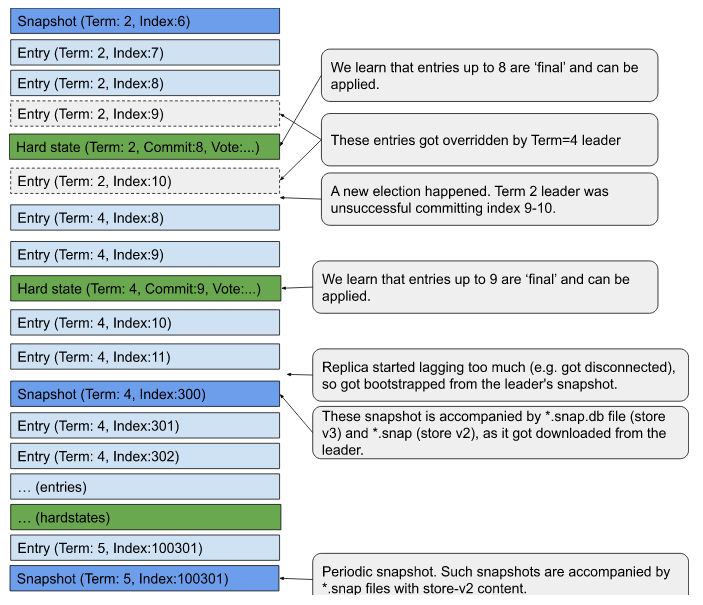
Tools
etcd-dump-logs
etcd WAL logs can be read using etcd-dump-logs tool:
Be aware that:
- The tool shows only Entries, and not all the WAL records (Snapshots, HardStates) that are in the WAL log files.
- The tool automatically applies ‘overrides’ on the entries. If an entry got overridden (by a fresher entry under the same index), the tool will print only the final value.
- The tool also prints uncommitted entries (from the tail of the LOG), without information about HardState.commitIndex, so it’s not known whether entries are final or not.
Snapshots of (Store V2): member/snap/{term}-{index}.snap
File names:
member/snap/{term}-{index}.snap
The filenames are generated here
("%016x-%016x.snap") and are using 2 hex-encoded compounds:
- term -> Raft term (period between elections) at the time snapshot is emitted
- index -> of last applied proposal at the time snapshot is emitted
Creation
The *.snap files are created by Snapshotter.SaveSnap method.
There are 2 triggers controlling creation of these files:
- A new file is created every (approximately) –snapshotCount=(by default 100'000) applied proposals. It’s an approximation as we might receive proposals in batches and we consider snapshotting only at the end of batch, finally the snapshotting process is asynchronously scheduled. The flag name (–snapshotCount) is pretty misleading as it drives differences in index value between last snapshot index and last applied proposal index.
- Raft requests the replica to restore from the snapshot. As a replica is receiving the snapshot over wire (msgSnap) message, it also checkpoints (lightweight) it into WAL log. This guarantees that in the WAL logs tail there is always a valid snapshot followed by entries. So it suppresses potential lack of continuity in the WAL logs.
Currently the files are roughly3 associated 1-1 with WAL logs Snapshot entries. With store v2 decommissioning we expect the files to stop being written at all (opt-in: 3.5.x, mandatory 3.6.x).
Content
The file contains marshalled snapdb.snapshot proto
(uint32 crc, bytes data),
that in the ‘data’ field holds Raftpb.Snapshot :
(bytes data, SnapshotMetadata{index, term, conf } metadata),
Finally the nested data holds a JSON serialized store v2 content .
In particular there is:
- Term
- Index
- Membership data:
/0/members/8e9e05c52164694d/attributes -> {"name":"default","clientURLs":["http://localhost:2379"]}/0/members/8e9e05c52164694d/RaftAttributes -> "{"peerURLs":["http://localhost:2380"]}"
- Storage version: /0/version-> 3.5.0
Tools
protoc
Following command allows you to see the file content when executed from etcd root directory:
Analogously you can extract ‘data’ field and decode as ‘Raftpb.Snapshot
'
Exemplar JSON serialized store v2 content in etcd 3.4 *.snap files:
Changes
This section is reserved to describe changes to the file formats introduces between different etcd versions.
12.7 - etcd API guarantees
etcd is a consistent and durable key value store. The key value store is exposed through gRPC Services . etcd ensures the strongest consistency and durability guarantees for a distributed system. This specification enumerates the API guarantees made by etcd.
APIs to consider
- KV APIs
- Watch APIs
- Lease APIs
- Grant
- [Revoke]
- Keep alive
KV API allows for direct reading and manipulation of key value store. Watch API allows subscribing to key value store changes. Lease API allows assigning a time to live to a key.
Both KV and Watch APIs allow access to not only the latest versions of keys, but also previous versions are accessible within a continuous history window, limited by a compaction operation.
Calling KV API will take an immediate effect, while Watch API will return with some unbounded delay. In correctly working etcd cluster you should expect to see watch events to appear with 10ms delay after them happening. However, there is no limit and events in unhealthy clusters might never arrive.
KV APIs
etcd ensures durability and strict serializability for all KV api calls. Those are the strongest isolation guarantee of distributed transactional database systems.
Durability
Any completed operations are durable. All accessible data is also durable data. A read will never return data that has not been made durable.
Strict serializability
KV Service operations are atomic and occur in a total order, consistent with real-time order of those operations. Total order is implied through revision . Read more about strict serializability .
For transactions without nested TXNs, the order of execution of operations is guaranteed to be the same as in its list of operations, which means stable GET responses within the transaction. For transactions with nested TXNs, the order of execution is not specified.
Strict serializability implies other weaker guarantees that might be easier to understand:
Atomicity
All API requests are atomic; an operation either completes entirely or not at all. For watch requests, all events generated by one operation will be in one watch response. Watch never observes partial events for a single operation.
Linearizability
From the perspective of client, linearizability provides useful properties which
make reasoning easily. This is a clean description quoted from
the original paper
: Linearizability provides the illusion that each operation applied by concurrent processes takes effect instantaneously at some point between its invocation and its response.
For example, consider a client completing a write at time point 1 (t1). A client issuing a read at t2 (for t2 > t1) should receive a value at least as recent as the previous write, completed at t1. However, the read might actually complete only by t3. Linearizability guarantees the read returns the most current value. Without linearizability guarantee, the returned value, current at t2 when the read began, might be “stale” by t3 because a concurrent write might happen between t2 and t3.
etcd ensures linearizability for all other operations by default.
Linearizability comes with a cost, however, because linearized requests must go
through the Raft consensus process. To obtain lower latencies and higher
throughput for read requests, clients can configure a request’s consistency mode
to serializable, which may access stale data with respect to quorum, but
removes the performance penalty of linearized accesses’ reliance on live consensus.
Watch APIs
Watches make guarantees about events:
- Ordered - events are ordered by revision. An event will never appear on a watch if it precedes an event in time that has already been posted. For transactions without nested TXNs, the order of generated events is guaranteed to be the same as in its list of operations. For transactions with nested TXNs, the order of generated events is not specified.
- Unique - an event will never appear on a watch twice.
- Reliable - a sequence of events will never drop any subsequence of events within the available history window. If there are events ordered in time as a < b < c, then if the watch receives events a and c, it is guaranteed to receive b as long b is in the available history window.
- Atomic - a list of events is guaranteed to encompass complete revisions. Updates in the same revision over multiple keys will not be split over several lists of events.
- Resumable - A broken watch can be resumed by establishing a new watch starting after the last revision received in a watch event before the break, so long as the revision is in the history window.
- Bookmarkable - Progress notification events guarantee that all events up to a revision have been already delivered.
etcd does not ensure linearizability for watch operations. Users are expected to verify the revision of watch events to ensure correct ordering with other operations.
Lease APIs
etcd provides a lease mechanism . The primary use case of a lease is implementing distributed coordination mechanisms like distributed locks. The lease mechanism itself is simple: a lease can be created with the grant API, attached to a key with the put API, revoked with the revoke API, and will be expired by the wall clock time to live (TTL). However, users need to be aware about the important properties of the APIs and usage for implementing correct distributed coordination mechanisms.
etcd specific definitions
Operation completed
An etcd operation is considered complete when it is committed through consensus,
and therefore “executed” – permanently stored – by the etcd storage engine.
The client knows an operation is completed when it receives a response from the
etcd server. Note that the client may be uncertain about the status of an
operation if it times out, or there is a network disruption between the client
and the etcd member. etcd may also abort operations when there is a leader
election. etcd does not send abort responses to clients’ outstanding requests
in this event.
Revision
An etcd operation that modifies the key value store is assigned a single increasing revision. A transaction operation might modify the key value store multiple times, but only one revision is assigned. The revision attribute of a key value pair that was modified by the operation has the same value as the revision of the operation. The revision can be used as a logical clock for key value store. A key value pair that has a larger revision is modified after a key value pair with a smaller revision. Two key value pairs that have the same revision are modified by an operation “concurrently”.
12.8 - etcd versus other key-value stores
The name “etcd” originated from two ideas, the unix “/etc” folder and “d"istributed systems. The “/etc” folder is a place to store configuration data for a single system whereas etcd stores configuration information for large scale distributed systems. Hence, a “d"istributed “/etc” is “etcd”.
etcd is designed as a general substrate for large scale distributed systems. These are systems that will never tolerate split-brain operation and are willing to sacrifice availability to achieve this end. etcd stores metadata in a consistent and fault-tolerant way. An etcd cluster is meant to provide key-value storage with best of class stability, reliability, scalability and performance.
Distributed systems use etcd as a consistent key-value store for configuration management, service discovery, and coordinating distributed work. Many organizations use etcd to implement production systems such as container schedulers, service discovery services, and distributed data storage. Common distributed patterns using etcd include leader election , distributed locks , and monitoring machine liveness.
Use cases
- Container Linux by CoreOS: Applications running on Container Linux get automatic, zero-downtime Linux kernel updates. Container Linux uses locksmith to coordinate updates. Locksmith implements a distributed semaphore over etcd to ensure only a subset of a cluster is rebooting at any given time.
- Kubernetes stores configuration data into etcd for service discovery and cluster management; etcd’s consistency is crucial for correctly scheduling and operating services. The Kubernetes API server persists cluster state into etcd. It uses etcd’s watch API to monitor the cluster and roll out critical configuration changes.
Comparison chart
Perhaps etcd already seems like a good fit, but as with all technological decisions, proceed with caution. Please note this documentation is written by the etcd team. Although the ideal is a disinterested comparison of technology and features, the authors’ expertise and biases obviously favor etcd. Use only as directed.
The table below is a handy quick reference for spotting the differences among etcd and its most popular alternatives at a glance. Further commentary and details for each column are in the sections following the table.
| etcd | ZooKeeper | Consul | NewSQL (Cloud Spanner, CockroachDB, TiDB) | |
|---|---|---|---|---|
| Concurrency Primitives | Lock RPCs , Election RPCs , command line locks , command line elections , recipes in go | External curator recipes in Java | Native lock API | Rare , if any |
| Linearizable Reads | Yes | No | Yes | Sometimes |
| Multi-version Concurrency Control | Yes | No | No | Sometimes |
| Transactions | Field compares, Read, Write | Version checks, Write | Field compare, Lock, Read, Write | SQL-style |
| Change Notification | Historical and current key intervals | Current keys and directories | Current keys and prefixes | Triggers (sometimes) |
| User permissions | Role based | ACLs | ACLs | Varies (per-table GRANT , per-database roles ) |
| HTTP/JSON API | Yes | No | Yes | Rarely |
| Membership Reconfiguration | Yes | >3.5.0 | Yes | Yes |
| Maximum reliable database size | Several gigabytes | Hundreds of megabytes (sometimes several gigabytes) | Hundreds of MBs | Terabytes+ |
| Minimum read linearization latency | Network RTT | No read linearization | RTT + fsync | Clock barriers (atomic, NTP) |
ZooKeeper
ZooKeeper solves the same problem as etcd: distributed system coordination and metadata storage. However, etcd has the luxury of hindsight taken from engineering and operational experience with ZooKeeper’s design and implementation. The lessons learned from Zookeeper certainly informed etcd’s design, helping it support large scale systems like Kubernetes. The improvements etcd made over Zookeeper include:
- Dynamic cluster membership reconfiguration
- Stable read/write under high load
- A multi-version concurrency control data model
- Reliable key monitoring which never silently drop events
- Lease primitives decoupling connections from sessions
- APIs for safe distributed shared locks
Furthermore, etcd supports a wide range of languages and frameworks out of the box. Whereas Zookeeper has its own custom Jute RPC protocol, which is totally unique to Zookeeper and limits its supported language bindings
, etcd’s client protocol is built from gRPC
, a popular RPC framework with language bindings for go, C++, Java, and more. Likewise, gRPC can be serialized into JSON over HTTP, so even general command line utilities like curl can talk to it. Since systems can select from a variety of choices, they are built on etcd with native tooling rather than around etcd with a single fixed set of technologies.
When considering features, support, and stability, new applications planning to use Zookeeper for a consistent key value store would do well to choose etcd instead.
Consul
Consul is an end-to-end service discovery framework. It provides built-in health checking, failure detection, and DNS services. In addition, Consul exposes a key value store with RESTful HTTP APIs. As it stands in Consul 1.0 , the storage system does not scale as well as other systems like etcd or Zookeeper in key-value operations; systems requiring millions of keys will suffer from high latencies and memory pressure. The key value API is missing, most notably, multi-version keys, conditional transactions, and reliable streaming watches.
etcd and Consul solve different problems. If looking for a distributed consistent key value store, etcd is a better choice over Consul. If looking for end-to-end cluster service discovery, etcd will not have enough features; choose Kubernetes, Consul, or SmartStack.
NewSQL (Cloud Spanner, CockroachDB, TiDB)
Both etcd and NewSQL databases (e.g., Cockroach , TiDB , Google Spanner ) provide strong data consistency guarantees with high availability. However, the significantly different system design parameters lead to significantly different client APIs and performance characteristics.
NewSQL databases are meant to horizontally scale across data centers. These systems typically partition data across multiple consistent replication groups (shards), potentially distant, storing data sets on the order of terabytes and above. This sort of scaling makes them poor candidates for distributed coordination as they have long latencies from waiting on clocks and expect updates with mostly localized dependency graphs. The data is organized into tables, including SQL-style query facilities with richer semantics than etcd, but at the cost of additional complexity for processing, planning, and optimizing queries.
In short, choose etcd for storing metadata or coordinating distributed applications. If storing more than a few GB of data or if full SQL queries are needed, choose a NewSQL database.
Using etcd for metadata
etcd replicates all data within a single consistent replication group. For storing up to a few GB of data with consistent ordering, this is the most efficient approach. Each modification of cluster state, which may change multiple keys, is assigned a global unique ID, called a revision in etcd, from a monotonically increasing counter for reasoning over ordering. Since there’s only a single replication group, the modification request only needs to go through the raft protocol to commit. By limiting consensus to one replication group, etcd gets distributed consistency with a simple protocol while achieving low latency and high throughput.
The replication behind etcd cannot horizontally scale because it lacks data sharding. In contrast, NewSQL databases usually shard data across multiple consistent replication groups, storing data sets on the order of terabytes and above. However, to assign each modification a global unique and increasing ID, each request must go through an additional coordination protocol among replication groups. This extra coordination step may potentially conflict on the global ID, forcing ordered requests to retry. The result is a more complicated approach with typically worse performance than etcd for strict ordering.
If an application reasons primarily about metadata or metadata ordering, such as to coordinate processes, choose etcd. If the application needs a large data store spanning multiple data centers and does not heavily depend on strong global ordering properties, choose a NewSQL database.
Using etcd for distributed coordination
etcd has distributed coordination primitives such as event watches, leases, elections, and distributed shared locks out of the box (Note that in the case of the distributed shared lock, users need to be aware about its non obvious properties. The details are described below). These primitives are both maintained and supported by the etcd developers; leaving these primitives to external libraries shirks the responsibility of developing foundational distributed software, essentially leaving the system incomplete. NewSQL databases usually expect these distributed coordination primitives to be authored by third parties. Likewise, ZooKeeper famously has a separate and independent library of coordination recipes. Consul, which provides a native locking API, goes so far as to apologize that it’s “not a bulletproof method ”.
In theory, it’s possible to build these primitives atop any storage systems providing strong consistency. However, the algorithms tend to be subtle; it is easy to develop a locking algorithm that appears to work, only to suddenly break due to thundering herd and timing skew. Furthermore, other primitives supported by etcd, such as transactional memory depend on etcd’s MVCC data model; simple strong consistency is not enough.
For distributed coordination, choosing etcd can help prevent operational headaches and save engineering effort.
Notes on the usage of lock and lease
etcd provides lock APIs which are based on the lease mechanism and its implementation in etcd . The basic idea of the lease mechanism is: a server grants a token, which is called a lease, to a requesting client. When the server grants a lease, it associates a TTL with the lease. When the server detects the passage of time longer than the TTL, it revokes the lease. While the client holds a non revoked lease it can claim that it owns access to a resource associated with the lease. In the case of etcd, the resource is a key in the etcd keyspace. etcd provides lock APIs with this scheme. However, the lock APIs cannot be used as mutual exclusion mechanism by themselves. The APIs are called lock because for historical reasons . The lock APIs can, however, be used as an optimization mechanism of mutual exclusion as described below.
The most important aspect of the lease mechanism is that TTL is defined as a physical time interval. Both of the server and client measures passing of time with their own clocks. It allows a situation that the server revokes the lease but the client still claims it owns the lease.
Then how does the lease mechanism guarantees mutual exclusion of the locking mechanism? Actually, the lease mechanism itself doesn’t guarantee mutual exclusion. Owning a lease cannot guarantee the owner holds a lock of the resource.
In the case of controlling mutual accesses to keys of etcd itself with etcd lock, mutual exclusion is implemented based on the mechanism of version number validation (it is sometimes called compare and swap in other systems like Consul). In etcd’s RPCs like Put or Txn, we can specify required conditions about revision number and lease ID for the operations. If the conditions are not satisfied, the operation can fail. With this mechanism, etcd provides distributed locking for clients. It means that a client knows that it is acquiring a lock of a key when its requests are completed by etcd cluster successfully.
In distributed locking literature similar designs are described:
- In the paper of Chubby , the concept of sequencer is introduced. We interpret that sequencer is an almost same to the combination of revision number and lease ID of etcd.
- In How to do distributed locking , Martin Kleppmann introduced the idea of fencing token. The authors interpret that fencing token is revision number in the case of etcd.
- In Practical Uses of Synchronized Clocks in Distributed Systems , we can find a description that Thor implements a distributed locking mechanism based on version number validation and lease.
Why do etcd and other systems provide lease if they provide mutual exclusion based on version number validation? Well, leases provide an optimization mechanism for reducing a number of aborted requests.
Note that in the case of etcd keys, it can be locked efficiently because of the mechanisms of lease and version number validation. If users need to protect resources which aren’t related to etcd, the resources must provide the version number validation mechanism and consistency of replicas like keys of etcd. The lock feature of etcd itself cannot be used for protecting external resources.
12.9 - Glossary
This document defines the various terms used in etcd documentation, command line and source code.
Alarm
The etcd server raises an alarm whenever the cluster needs operator intervention to remain reliable.
Authentication
Authentication manages user access permissions for etcd resources.
Client
A client connects to the etcd cluster to issue service requests such as fetching key-value pairs, writing data, or watching for updates.
Cluster
Cluster consists of several members.
The node in each member follows raft consensus protocol to replicate logs. Cluster receives proposals from members, commits them and apply to local store.
Compaction
Compaction discards all etcd event history and superseded keys prior to a given revision. It is used to reclaim storage space in the etcd backend database.
Election
The etcd cluster holds elections among its members to choose a leader as part of the raft consensus protocol.
Endpoint
A URL pointing to an etcd service or resource.
Key
A user-defined identifier for storing and retrieving user-defined values in etcd.
Key range
A set of keys containing either an individual key, a lexical interval for all x such that a < x <= b, or all keys greater than a given key.
Keyspace
The set of all keys in an etcd cluster.
Lease
A short-lived renewable contract that deletes keys associated with it on its expiry.
Member
A logical etcd server that participates in serving an etcd cluster.
Modification Revision
The first revision to hold the last write to a given key.
Peer
Peer is another member of the same cluster.
Proposal
A proposal is a request (for example a write request, a configuration change request) that needs to go through raft protocol.
Quorum
The number of active members needed for consensus to modify the cluster state. etcd requires a member majority to reach quorum.
Revision
A 64-bit cluster-wide counter that starts at 1 and is incremented each time the keyspace is modified.
Role
A unit of permissions over a set of key ranges which may be granted to a set of users for access control.
Snapshot
A point-in-time backup of the etcd cluster state.
Store
The physical storage backing the cluster keyspace.
Term
A term is a monotonically increasing integer that is associated with each leader election in the Raft algorithm. For a term there can only be one elected leader and term is incremented on leader change.
Transaction
An atomically executed set of operations. All modified keys in a transaction share the same modification revision.
Key Version
The number of writes to a key since it was created, starting at 1. The version of a nonexistent or deleted key is 0.
Watcher
A client opens a watcher to observe updates on a given key range.
13 - Developer guide
13.1 - Discovery service protocol
Discovery service protocol helps new etcd member to discover all other members in cluster bootstrap phase using a shared discovery URL.
Discovery service protocol is only used in cluster bootstrap phase, and cannot be used for runtime reconfiguration or cluster monitoring.
The protocol uses a new discovery token to bootstrap one unique etcd cluster. Remember that one discovery token can represent only one etcd cluster. As long as discovery protocol on this token starts, even if it fails halfway, it must not be used to bootstrap another etcd cluster.
The rest of this article will walk through the discovery process with examples that correspond to a self-hosted discovery cluster. The public discovery service, discovery.etcd.io, functions the same way, but with a layer of polish to abstract away ugly URLs, generate UUIDs automatically, and provide some protections against excessive requests. At its core, the public discovery service still uses an etcd cluster as the data store as described in this document.
Protocol workflow
The idea of discovery protocol is to use an internal etcd cluster to coordinate bootstrap of a new cluster. First, all new members interact with discovery service and help to generate the expected member list. Then each new member bootstraps its server using this list, which performs the same functionality as -initial-cluster flag.
In the following example workflow, we will list each step of protocol in curl format for ease of understanding.
By convention the etcd discovery protocol uses the key prefix _etcd/registry. If http://example.com hosts an etcd cluster for discovery service, a full URL to discovery keyspace will be http://example.com/v2/keys/_etcd/registry. We will use this as the URL prefix in the example.
Creating a new discovery token
Generate a unique token that will identify the new cluster. This will be used as a unique prefix in discovery keyspace in the following steps. An easy way to do this is to use uuidgen:
Specifying the expected cluster size
The discovery token expects a cluster size that must be specified. The size is used by the discovery service to know when it has found all members that will initially form the cluster.
Usually the cluster size is 3, 5 or 7. Check optimal cluster size for more details.
Bringing up etcd processes
Given the discovery URL, use it as -discovery flag and bring up etcd processes. Every etcd process will follow this next few steps internally if given a -discovery flag.
Registering itself
The first thing for etcd process is to register itself into the discovery URL as a member. This is done by creating member ID as a key in the discovery URL.
Checking the status
It checks the expected cluster size and registration status in discovery URL, and decides what the next action is.
If registered members are still not enough, it will wait for left members to appear.
If the number of registered members is bigger than the expected size N, it treats the first N registered members as the member list for the cluster. If the member itself is in the member list, the discovery procedure succeeds and it fetches all peers through the member list. If it is not in the member list, the discovery procedure finishes with the failure that the cluster has been full.
In etcd implementation, the member may check the cluster status even before registering itself. So it could fail quickly if the cluster has been full.
Waiting for all members
The wait process is described in detail in the etcd API documentation .
It keeps waiting until finding all members.
Public discovery service
CoreOS Inc. hosts a public discovery service at https://discovery.etcd.io/ , which provides some nice features for ease of use.
Mask key prefix
Public discovery service will redirect https://discovery.etcd.io/${UUID} to etcd cluster behind for the key at /v2/keys/_etcd/registry. It masks register key prefix for short and readable discovery url.
Get new token
The generation process in the service follows the steps from Creating a New Discovery Token to Specifying the Expected Cluster Size .
Check discovery status
The status for this discovery token, including the machines that have been registered, can be checked by requesting the value of the UUID.
Open-source repository
The repository is located at https://github.com/coreos/discovery.etcd.io . It could be used to build a custom discovery service.
13.2 - Set up a local cluster
For testing and development deployments, the quickest and easiest way is to configure a local cluster. For a production deployment, refer to the clustering section.
Local standalone cluster
Starting a cluster
Run the following to deploy an etcd cluster as a standalone cluster:
If the etcd binary is not present in the current working directory, it might be located either at $GOPATH/bin/etcd or at /usr/local/bin/etcd. Run the command appropriately.
The running etcd member listens on localhost:2379 for client requests.
Interacting with the cluster
Use etcdctl to interact with the running cluster:
Store an example key-value pair in the cluster:
If OK is printed, storing key-value pair is successful.
Retrieve the value of
foo:If
baris returned, interaction with the etcd cluster is working as expected.
Local multi-member cluster
Starting a cluster
A Procfile at the base of the etcd git repository is provided to easily configure a local multi-member cluster. To start a multi-member cluster, navigate to the root of the etcd source tree and perform the following:
Install
goremanto control Procfile-based applications:Start a cluster with
goremanusing etcd’s stock Procfile:The members start running. They listen on
localhost:2379,localhost:22379, andlocalhost:32379respectively for client requests.
Interacting with the cluster
Use etcdctl to interact with the running cluster:
Print the list of members:
The list of etcd members are displayed as follows:
Store an example key-value pair in the cluster:
If OK is printed, storing key-value pair is successful.
Testing fault tolerance
To exercise etcd’s fault tolerance, kill a member and attempt to retrieve the key.
Identify the process name of the member to be stopped.
The
Procfilelists the properties of the multi-member cluster. For example, consider the member with the process name,etcd2.Stop the member:
Store a key:
Retrieve the key that is stored in the previous step:
Retrieve a key from the stopped member:
The command should display an error caused by connection failure:
Restart the stopped member:
Get the key from the restarted member:
Restarting the member re-establish the connection.
etcdctlwill now be able to retrieve the key successfully. To learn more about interacting with etcd, read interacting with etcd section .
13.3 - Interacting with etcd
Users mostly interact with etcd by putting or getting the value of a key. This section describes how to do that by using etcdctl, a command line tool for interacting with etcd server. The concepts described here should apply to the gRPC APIs or client library APIs.
The API version used by etcdctl to speak to etcd may be set to version 2 or 3 via the ETCDCTL_API environment variable. By default, etcdctl on master (3.4) uses the v3 API and earlier versions (3.3 and earlier) default to the v2 API.
Note that any key that was created using the v2 API will not be able to be queried via the v3 API. A v3 API etcdctl get of a v2 key will exit with 0 and no key data, this is the expected behaviour.
Find versions
etcdctl version and Server API version can be useful in finding the appropriate commands to be used for performing various operations on etcd.
Here is the command to find the versions:
Write a key
Applications store keys into the etcd cluster by writing to keys. Every stored key is replicated to all etcd cluster members through the Raft protocol to achieve consistency and reliability.
Here is the command to set the value of key foo to bar:
Also a key can be set for a specified interval of time by attaching lease to it.
Here is the command to set the value of key foo1 to bar1 for 10s.
The lease id 1234abcd in the above command refers to id returned on creating the lease of 10s. This id can then be attached to the key.
Read keys
Applications can read values of keys from an etcd cluster. Queries may read a single key, or a range of keys.
Suppose the etcd cluster has stored the following keys:
Here is the command to read the value of key foo:
Here is the command to read the value of key foo in hex format:
Here is the command to read only the value of key foo:
Here is the command to range over the keys from foo to foo3:
foo3 is excluded since the range is over the half-open interval [foo, foo3), excluding foo3.
Here is the command to range over all keys prefixed with foo:
Here is the command to range over all keys prefixed with foo, limiting the number of results to 2:
Here is the command to range over all keys prefixed with foo using the RangeStream
RPC. The result is identical to a unary Range:
--stream does not support --order, --sort-by, or revision filters.
Read past version of keys
Applications may want to read superseded versions of a key. For example, an application may wish to roll back to an old configuration by accessing an earlier version of a key. Alternatively, an application may want a consistent view over multiple keys through multiple requests by accessing key history. Since every modification to the etcd cluster key-value store increments the global revision of an etcd cluster, an application can read superseded keys by providing an older etcd revision.
Suppose an etcd cluster already has the following keys:
Here are an example to access the past versions of keys:
Read keys which are greater than or equal to the byte value of the specified key
Applications may want to read keys which are greater than or equal to the byte value of the specified key.
Suppose an etcd cluster already has the following keys:
Here is the command to read keys which are greater than or equal to the byte value of key b :
Delete keys
Applications can delete a key or a range of keys from an etcd cluster.
Suppose an etcd cluster already has the following keys:
Here is the command to delete key foo:
Here is the command to delete keys ranging from foo to foo9:
Here is the command to delete key zoo with the deleted key value pair returned:
Here is the command to delete keys having prefix as zoo:
Here is the command to delete keys which are greater than or equal to the byte value of key b :
Watch key changes
Applications can watch on a key or a range of keys to monitor for any updates.
Here is the command to watch on key foo:
Here is the command to watch on key foo in hex format:
Here is the command to watch on a range key from foo to foo9:
Here is the command to watch on keys having prefix foo:
Here is the command to watch on multiple keys foo and zoo:
Watch historical changes of keys
Applications may want to watch for historical changes of keys in etcd. For example, an application may wish to receive all the modifications of a key; if the application stays connected to etcd, then watch is good enough. However, if the application or etcd fails, a change may happen during the failure, and the application will not receive the update in real time. To guarantee the update is delivered, the application must be able to watch for historical changes to keys. To do this, an application can specify a historical revision on a watch, just like reading past version of keys.
Suppose we finished the following sequence of operations:
Here is an example to watch the historical changes:
Here is an example to watch only from the last historical change:
Watch progress
Applications may want to check the progress of a watch to determine how up-to-date the watch stream is. For example, if a watch is used to update a cache, it can be useful to know if the cache is stale compared to the revision from a quorum read.
Progress requests can be issued using the “progress” command in interactive watch session to ask the etcd server to send a progress notify update in the watch stream:
The revision number in the progress notify response is the revision from the local etcd server node that the watch stream is connected to. If this node is partitioned and not part of quorum, this progress notify revision might be lower than the revision returned by a quorum read against a non-partitioned etcd server node.
Compacted revisions
As we mentioned, etcd keeps revisions so that applications can read past versions of keys. However, to avoid accumulating an unbounded amount of history, it is important to compact past revisions. After compacting, etcd removes historical revisions, releasing resources for future use. All superseded data with revisions before the compacted revision will be unavailable.
Here is the command to compact the revisions:
The current revision of etcd server can be found using get command on any key (existent or non-existent) in json format. Example is shown below for mykey which does not exist in etcd server:
Grant leases
Applications can grant leases for keys from an etcd cluster. When a key is attached to a lease, its lifetime is bound to the lease’s lifetime which in turn is governed by a time-to-live (TTL). Each lease has a minimum time-to-live (TTL) value specified by the application at grant time. The lease’s actual TTL value is at least the minimum TTL and is chosen by the etcd cluster. Once a lease’s TTL elapses, the lease expires and all attached keys are deleted.
Here is the command to grant a lease:
Revoke leases
Applications revoke leases by lease ID. Revoking a lease deletes all of its attached keys.
Suppose we finished the following sequence of operations:
Here is the command to revoke the same lease:
Keep leases alive
Applications can keep a lease alive by refreshing its TTL so it does not expire.
Suppose we finished the following sequence of operations:
Here is the command to keep the same lease alive:
Get lease information
Applications may want to know about lease information, so that they can be renewed or to check if the lease still exists or it has expired. Applications may also want to know the keys to which a particular lease is attached.
Suppose we finished the following sequence of operations:
Here is the command to get information about the lease:
Here is the command to get information about the lease along with the keys attached with the lease:
13.4 - Why gRPC gateway
etcd v3 uses gRPC for its messaging protocol. The etcd project includes a gRPC-based Go client and a command line utility, etcdctl , for communicating with an etcd cluster through gRPC. For languages with no gRPC support, etcd provides a JSON gRPC gateway . This gateway serves a RESTful proxy that translates HTTP/JSON requests into gRPC messages.
Using gRPC gateway
The gateway accepts a JSON mapping
for etcd’s protocol buffer
message definitions. Note that key and value fields are defined as byte arrays and therefore must be base64 encoded in JSON. The following examples use curl, but any HTTP/JSON client should work all the same.
Notes
gRPC gateway endpoint has changed since etcd v3.3:
- etcd v3.2 or before uses only
[CLIENT-URL]/v3alpha/*. - etcd v3.3 uses
[CLIENT-URL]/v3beta/*while keeping[CLIENT-URL]/v3alpha/*. - etcd v3.4 uses
[CLIENT-URL]/v3/*while keeping[CLIENT-URL]/v3beta/*.[CLIENT-URL]/v3alpha/*is deprecated.
- etcd v3.5 or later uses only
[CLIENT-URL]/v3/*.[CLIENT-URL]/v3beta/*is deprecated.
gRPC-gateway does not support authentication using TLS Common Name.
Put and get keys
Use the /v3/kv/range and /v3/kv/put services to read and write keys:
Watch keys
Use the /v3/watch service to watch keys:
Transactions
Issue a transaction with /v3/kv/txn:
Authentication
Set up authentication with the /v3/auth service:
Authenticate with etcd for an authentication token using /v3/auth/authenticate:
Set the Authorization header to the authentication token to fetch a key using authentication credentials:
Error responses
The gRPC gateway translates gRPC status into HTTP status codes and a JSON error
body. Starting in etcd v3.6, the upgrade to grpc-gateway v2 changed error
handling (see the v2 migration guide’s error-handling note
),
and the gateway behavior now aligns with google.rpc.Status (code, message,
details) as described in Google’s API error model
.
Historically, older grpc-gateway versions also included a top-level error
field, but this field is not supported in etcd v3.6 and higher versions.
Clients should treat the HTTP status code as the primary indicator of success or
failure. If a request fails, clients should rely on the message field as the
primary source of error information and use any additional details for further
context.
Swagger
Generated Swagger API definitions can be found at rpc.swagger.json .
13.5 - gRPC naming and discovery
etcd provides a gRPC resolver to support an alternative name system that fetches endpoints from etcd for discovering gRPC services. The underlying mechanism is based on watching updates to keys prefixed with the service name.
Note that this feature is experimental because it depends on the google.golang.org/grpc/resolver package, which is still experimental in grpc-go.
Using etcd discovery with go-grpc
The etcd client provides a gRPC resolver for resolving gRPC endpoints with an etcd backend. The resolver is initialized with an etcd client:
Managing service endpoints
The etcd resolver treats all keys under the prefix of the resolution target following a “/” (e.g., “foo/bar/my-service/”)
with JSON-encoded (historically go-grpc naming.Update) values as potential service endpoints.
Endpoints are added to the service by creating new keys and removed from the service by deleting keys.
Adding an endpoint
New endpoints can be added to the service through etcdctl:
The etcd client’s endpoints.Manager method can also register new endpoints with a key matching the Addr:
To enable round-robin load balancing when dialing service with multiple endpoints, you can set up you connection with grpc internal round-robin load balancer:
Deleting an endpoint
Hosts can be deleted from the service through etcdctl:
The etcd client’s endpoints.Manager method also supports deleting endpoints:
Registering an endpoint with a lease
Registering an endpoint with a lease ensures that if the host can’t maintain a keepalive heartbeat (e.g., its machine fails), it will be removed from the service:
In the golang:
Atomically updating endpoints
If it’s desired to modify multiple endpoints in a single transaction, endpoints.Manager can be used directly:
13.6 - Embedding etcd in a Go Application
embed go package to run an etcd server within your applicationThe etcd embed go package provides a simple way to embed an etcd server directly into your application.
For more details, see the embed package documentation .
13.7 - System limits
Request size limit
etcd is designed to handle small key value pairs typical for metadata. Larger requests will work, but may increase the latency of other requests. By default, the maximum size of any request is 1.5 MiB. This limit is configurable through --max-request-bytes flag for etcd server.
Storage size limit
The default storage size limit is 2 GiB, configurable with --quota-backend-bytes flag. 8 GiB is a suggested maximum size for normal environments and etcd warns at startup if the configured value exceeds it.
13.8 - etcd features
This document provides an overview of etcd features to help users better understand the features and related deprecation process. If you are interested in knowing about how features are developed in the etcd, please see these development guidelines .
The etcd features fall into three stages, experimental, stable, and unsafe. You can get the list of features by running etcd --help.
Experimental
In order to get early feedback, any new feature is usually added as an experimental feature. The experimental feature can be identified by looking at the flag name, which should have --experimental as a prefix. Please consider the following points while using an experimental feature:
- It might be buggy due to a lack of user testing. Enabling the feature may not work as expected.
- It is disabled by default.
- Support for such a feature may be dropped at any time without notice
- It can be removed in the next minor or major release without following the feature deprecation policy unless it graduates to a stable future.
- The project team would appreciate users reporting any issues related to experimental features. However, such issues may be given lower priorities compared to the issues related to stable featuers.
- An experimental feature flag deprecates when it graduates to the stable stage. Users should start using a stable feature flag as soon as possible.
Stable
This is the most common stage of features in the etcd. A stable feature is characterized as below:
- Supported as part of the supported releases of etcd.
- May be enabled by default.
- Discontinuation of support must follow the feature deprecation policy.
Unsafe
Unsafe features are rare and listed under the Unsafe feature: section in the etcd usage documentation. By default, they are disabled. They should be used with caution following documentation. An unsafe feature can be removed in the next minor or major release without following the feature deprecation policy.
Feature Deprecation
Experimental
An experimental feature deprecates when it graduates to the stable stage.
- The experimental feature documentation will show a deprecation message with a recommendation to use a related stable feature flag. e.g.
DEPRECATED. Use <feature-name> instead. - A deprecated feature will be removed in the following release.
Stable
As the project evolves, a stable feature may sometimes need to be deprecated and removed. When that happens,
- The feature documentation will show a warning message before a planned release for deprecation. e.g.
To be deprecated in <release>.. If a new feature is already planned to replace theTo be deprecatedfeature, then the documentation will also provide a message saying so. e.g.Use <feature-name> instead.. - The feature will be deprecated in the planned release. At that time, the feature documentation will show a deprecation message with a recommendation to use a related stable feature. e.g.
DEPRECATED. Use <feature-name> instead. - A deprecated feature will be removed in the following release.
13.9 - API reference
This API reference is autogenerated from the named .proto files.
service Auth (api/etcdserverpb/rpc.proto)
| Method | Request Type | Response Type | Description |
|---|---|---|---|
| AuthEnable | AuthEnableRequest | AuthEnableResponse | AuthEnable enables authentication. |
| AuthDisable | AuthDisableRequest | AuthDisableResponse | AuthDisable disables authentication. |
| AuthStatus | AuthStatusRequest | AuthStatusResponse | AuthStatus displays authentication status. |
| Authenticate | AuthenticateRequest | AuthenticateResponse | Authenticate processes an authenticate request. |
| UserAdd | AuthUserAddRequest | AuthUserAddResponse | UserAdd adds a new user. User name cannot be empty. |
| UserGet | AuthUserGetRequest | AuthUserGetResponse | UserGet gets detailed user information. |
| UserList | AuthUserListRequest | AuthUserListResponse | UserList gets a list of all users. |
| UserDelete | AuthUserDeleteRequest | AuthUserDeleteResponse | UserDelete deletes a specified user. |
| UserChangePassword | AuthUserChangePasswordRequest | AuthUserChangePasswordResponse | UserChangePassword changes the password of a specified user. |
| UserGrantRole | AuthUserGrantRoleRequest | AuthUserGrantRoleResponse | UserGrant grants a role to a specified user. |
| UserRevokeRole | AuthUserRevokeRoleRequest | AuthUserRevokeRoleResponse | UserRevokeRole revokes a role of specified user. |
| RoleAdd | AuthRoleAddRequest | AuthRoleAddResponse | RoleAdd adds a new role. Role name cannot be empty. |
| RoleGet | AuthRoleGetRequest | AuthRoleGetResponse | RoleGet gets detailed role information. |
| RoleList | AuthRoleListRequest | AuthRoleListResponse | RoleList gets lists of all roles. |
| RoleDelete | AuthRoleDeleteRequest | AuthRoleDeleteResponse | RoleDelete deletes a specified role. |
| RoleGrantPermission | AuthRoleGrantPermissionRequest | AuthRoleGrantPermissionResponse | RoleGrantPermission grants a permission of a specified key or range to a specified role. |
| RoleRevokePermission | AuthRoleRevokePermissionRequest | AuthRoleRevokePermissionResponse | RoleRevokePermission revokes a key or range permission of a specified role. |
service Cluster (api/etcdserverpb/rpc.proto)
| Method | Request Type | Response Type | Description |
|---|---|---|---|
| MemberAdd | MemberAddRequest | MemberAddResponse | MemberAdd adds a member into the cluster. |
| MemberRemove | MemberRemoveRequest | MemberRemoveResponse | MemberRemove removes an existing member from the cluster. |
| MemberUpdate | MemberUpdateRequest | MemberUpdateResponse | MemberUpdate updates the member configuration. |
| MemberList | MemberListRequest | MemberListResponse | MemberList lists all the members in the cluster. |
| MemberPromote | MemberPromoteRequest | MemberPromoteResponse | MemberPromote promotes a member from raft learner (non-voting) to raft voting member. |
service KV (api/etcdserverpb/rpc.proto)
| Method | Request Type | Response Type | Description |
|---|---|---|---|
| Range | RangeRequest | RangeResponse | Range gets the keys in the range from the key-value store. |
| Put | PutRequest | PutResponse | Put puts the given key into the key-value store. A put request increments the revision of the key-value store and generates one event in the event history. |
| DeleteRange | DeleteRangeRequest | DeleteRangeResponse | DeleteRange deletes the given range from the key-value store. A delete request increments the revision of the key-value store and generates a delete event in the event history for every deleted key. |
| Txn | TxnRequest | TxnResponse | Txn processes multiple requests in a single transaction. A txn request increments the revision of the key-value store and generates events with the same revision for every completed request. It is not allowed to modify the same key several times within one txn. |
| Compact | CompactionRequest | CompactionResponse | Compact compacts the event history in the etcd key-value store. The key-value store should be periodically compacted or the event history will continue to grow indefinitely. |
service Lease (api/etcdserverpb/rpc.proto)
| Method | Request Type | Response Type | Description |
|---|---|---|---|
| LeaseGrant | LeaseGrantRequest | LeaseGrantResponse | LeaseGrant creates a lease which expires if the server does not receive a keepAlive within a given time to live period. All keys attached to the lease will be expired and deleted if the lease expires. Each expired key generates a delete event in the event history. |
| LeaseRevoke | LeaseRevokeRequest | LeaseRevokeResponse | LeaseRevoke revokes a lease. All keys attached to the lease will expire and be deleted. |
| LeaseKeepAlive | LeaseKeepAliveRequest | LeaseKeepAliveResponse | LeaseKeepAlive keeps the lease alive by streaming keep alive requests from the client to the server and streaming keep alive responses from the server to the client. |
| LeaseTimeToLive | LeaseTimeToLiveRequest | LeaseTimeToLiveResponse | LeaseTimeToLive retrieves lease information. |
| LeaseLeases | LeaseLeasesRequest | LeaseLeasesResponse | LeaseLeases lists all existing leases. |
service Maintenance (api/etcdserverpb/rpc.proto)
| Method | Request Type | Response Type | Description |
|---|---|---|---|
| Alarm | AlarmRequest | AlarmResponse | Alarm activates, deactivates, and queries alarms regarding cluster health. |
| Status | StatusRequest | StatusResponse | Status gets the status of the member. |
| Defragment | DefragmentRequest | DefragmentResponse | Defragment defragments a member’s backend database to recover storage space. |
| Hash | HashRequest | HashResponse | Hash computes the hash of whole backend keyspace, including key, lease, and other buckets in storage. This is designed for testing ONLY! Do not rely on this in production with ongoing transactions, since Hash operation does not hold MVCC locks. Use “HashKV” API instead for “key” bucket consistency checks. |
| HashKV | HashKVRequest | HashKVResponse | HashKV computes the hash of all MVCC keys up to a given revision. It only iterates “key” bucket in backend storage. |
| Snapshot | SnapshotRequest | SnapshotResponse | Snapshot sends a snapshot of the entire backend from a member over a stream to a client. |
| MoveLeader | MoveLeaderRequest | MoveLeaderResponse | MoveLeader requests current leader node to transfer its leadership to transferee. |
| Downgrade | DowngradeRequest | DowngradeResponse | Downgrade requests downgrades, verifies feasibility or cancels downgrade on the cluster version. Supported since etcd 3.5. |
service Watch (api/etcdserverpb/rpc.proto)
| Method | Request Type | Response Type | Description |
|---|---|---|---|
| Watch | WatchRequest | WatchResponse | Watch watches for events happening or that have happened. Both input and output are streams; the input stream is for creating and canceling watchers and the output stream sends events. One watch RPC can watch on multiple key ranges, streaming events for several watches at once. The entire event history can be watched starting from the last compaction revision. |
message AlarmMember (api/etcdserverpb/rpc.proto)
| Field | Description | Type |
|---|---|---|
| (versionpb.etcd_version_msg) | option | |
| memberID | memberID is the ID of the member associated with the raised alarm. | uint64 |
| alarm | alarm is the type of alarm which has been raised. | AlarmType |
message AlarmRequest (api/etcdserverpb/rpc.proto)
| Field | Description | Type |
|---|---|---|
| (versionpb.etcd_version_msg) | option | |
| action | action is the kind of alarm request to issue. The action may GET alarm statuses, ACTIVATE an alarm, or DEACTIVATE a raised alarm. | AlarmAction |
| memberID | memberID is the ID of the member associated with the alarm. If memberID is 0, the alarm request covers all members. | uint64 |
| alarm | alarm is the type of alarm to consider for this request. | AlarmType |
message AlarmResponse (api/etcdserverpb/rpc.proto)
| Field | Description | Type |
|---|---|---|
| (versionpb.etcd_version_msg) | option | |
| header | ResponseHeader | |
| alarms | alarms is a list of alarms associated with the alarm request. | (slice of) AlarmMember |
message AuthDisableRequest (api/etcdserverpb/rpc.proto)
| Field | Description | Type |
|---|---|---|
| (versionpb.etcd_version_msg) | option |
message AuthDisableResponse (api/etcdserverpb/rpc.proto)
| Field | Description | Type |
|---|---|---|
| (versionpb.etcd_version_msg) | option | |
| header | ResponseHeader |
message AuthEnableRequest (api/etcdserverpb/rpc.proto)
| Field | Description | Type |
|---|---|---|
| (versionpb.etcd_version_msg) | option |
message AuthEnableResponse (api/etcdserverpb/rpc.proto)
| Field | Description | Type |
|---|---|---|
| (versionpb.etcd_version_msg) | option | |
| header | ResponseHeader |
message AuthRoleAddRequest (api/etcdserverpb/rpc.proto)
| Field | Description | Type |
|---|---|---|
| (versionpb.etcd_version_msg) | option | |
| name | name is the name of the role to add to the authentication system. | string |
message AuthRoleAddResponse (api/etcdserverpb/rpc.proto)
| Field | Description | Type |
|---|---|---|
| (versionpb.etcd_version_msg) | option | |
| header | ResponseHeader |
message AuthRoleDeleteRequest (api/etcdserverpb/rpc.proto)
| Field | Description | Type |
|---|---|---|
| (versionpb.etcd_version_msg) | option | |
| role | string |
message AuthRoleDeleteResponse (api/etcdserverpb/rpc.proto)
| Field | Description | Type |
|---|---|---|
| (versionpb.etcd_version_msg) | option | |
| header | ResponseHeader |
message AuthRoleGetRequest (api/etcdserverpb/rpc.proto)
| Field | Description | Type |
|---|---|---|
| (versionpb.etcd_version_msg) | option | |
| role | string |
message AuthRoleGetResponse (api/etcdserverpb/rpc.proto)
| Field | Description | Type |
|---|---|---|
| header | ResponseHeader | |
| perm | (slice of) authpb.Permission |
message AuthRoleGrantPermissionRequest (api/etcdserverpb/rpc.proto)
| Field | Description | Type |
|---|---|---|
| (versionpb.etcd_version_msg) | option | |
| name | name is the name of the role which will be granted the permission. | string |
| perm | perm is the permission to grant to the role. | authpb.Permission |
message AuthRoleGrantPermissionResponse (api/etcdserverpb/rpc.proto)
| Field | Description | Type |
|---|---|---|
| (versionpb.etcd_version_msg) | option | |
| header | ResponseHeader |
message AuthRoleListRequest (api/etcdserverpb/rpc.proto)
| Field | Description | Type |
|---|---|---|
| (versionpb.etcd_version_msg) | option |
message AuthRoleListResponse (api/etcdserverpb/rpc.proto)
| Field | Description | Type |
|---|---|---|
| (versionpb.etcd_version_msg) | option | |
| header | ResponseHeader | |
| roles | (slice of) string |
message AuthRoleRevokePermissionRequest (api/etcdserverpb/rpc.proto)
| Field | Description | Type |
|---|---|---|
| (versionpb.etcd_version_msg) | option | |
| role | string | |
| key | bytes | |
| range_end | bytes |
message AuthRoleRevokePermissionResponse (api/etcdserverpb/rpc.proto)
| Field | Description | Type |
|---|---|---|
| (versionpb.etcd_version_msg) | option | |
| header | ResponseHeader |
message AuthStatusRequest (api/etcdserverpb/rpc.proto)
| Field | Description | Type |
|---|---|---|
| (versionpb.etcd_version_msg) | option |
message AuthStatusResponse (api/etcdserverpb/rpc.proto)
| Field | Description | Type |
|---|---|---|
| (versionpb.etcd_version_msg) | option | |
| header | ResponseHeader | |
| enabled | bool | |
| authRevision | authRevision is the current revision of auth store | uint64 |
message AuthUserAddRequest (api/etcdserverpb/rpc.proto)
| Field | Description | Type |
|---|---|---|
| (versionpb.etcd_version_msg) | option | |
| name | string | |
| password | string | |
| options | authpb.UserAddOptions | |
| hashedPassword | string |
message AuthUserAddResponse (api/etcdserverpb/rpc.proto)
| Field | Description | Type |
|---|---|---|
| (versionpb.etcd_version_msg) | option | |
| header | ResponseHeader |
message AuthUserChangePasswordRequest (api/etcdserverpb/rpc.proto)
| Field | Description | Type |
|---|---|---|
| (versionpb.etcd_version_msg) | option | |
| name | name is the name of the user whose password is being changed. | string |
| password | password is the new password for the user. Note that this field will be removed in the API layer. | string |
| hashedPassword | hashedPassword is the new password for the user. Note that this field will be initialized in the API layer. | string |
message AuthUserChangePasswordResponse (api/etcdserverpb/rpc.proto)
| Field | Description | Type |
|---|---|---|
| (versionpb.etcd_version_msg) | option | |
| header | ResponseHeader |
message AuthUserDeleteRequest (api/etcdserverpb/rpc.proto)
| Field | Description | Type |
|---|---|---|
| (versionpb.etcd_version_msg) | option | |
| name | name is the name of the user to delete. | string |
message AuthUserDeleteResponse (api/etcdserverpb/rpc.proto)
| Field | Description | Type |
|---|---|---|
| (versionpb.etcd_version_msg) | option | |
| header | ResponseHeader |
message AuthUserGetRequest (api/etcdserverpb/rpc.proto)
| Field | Description | Type |
|---|---|---|
| (versionpb.etcd_version_msg) | option | |
| name | string |
message AuthUserGetResponse (api/etcdserverpb/rpc.proto)
| Field | Description | Type |
|---|---|---|
| (versionpb.etcd_version_msg) | option | |
| header | ResponseHeader | |
| roles | (slice of) string |
message AuthUserGrantRoleRequest (api/etcdserverpb/rpc.proto)
| Field | Description | Type |
|---|---|---|
| (versionpb.etcd_version_msg) | option | |
| user | user is the name of the user which should be granted a given role. | string |
| role | role is the name of the role to grant to the user. | string |
message AuthUserGrantRoleResponse (api/etcdserverpb/rpc.proto)
| Field | Description | Type |
|---|---|---|
| (versionpb.etcd_version_msg) | option | |
| header | ResponseHeader |
message AuthUserListRequest (api/etcdserverpb/rpc.proto)
| Field | Description | Type |
|---|---|---|
| (versionpb.etcd_version_msg) | option |
message AuthUserListResponse (api/etcdserverpb/rpc.proto)
| Field | Description | Type |
|---|---|---|
| (versionpb.etcd_version_msg) | option | |
| header | ResponseHeader | |
| users | (slice of) string |
message AuthUserRevokeRoleRequest (api/etcdserverpb/rpc.proto)
| Field | Description | Type |
|---|---|---|
| (versionpb.etcd_version_msg) | option | |
| name | string | |
| role | string |
message AuthUserRevokeRoleResponse (api/etcdserverpb/rpc.proto)
| Field | Description | Type |
|---|---|---|
| (versionpb.etcd_version_msg) | option | |
| header | ResponseHeader |
message AuthenticateRequest (api/etcdserverpb/rpc.proto)
| Field | Description | Type |
|---|---|---|
| (versionpb.etcd_version_msg) | option | |
| name | string | |
| password | string |
message AuthenticateResponse (api/etcdserverpb/rpc.proto)
| Field | Description | Type |
|---|---|---|
| (versionpb.etcd_version_msg) | option | |
| header | ResponseHeader | |
| token | token is an authorized token that can be used in succeeding RPCs | string |
message CompactionRequest (api/etcdserverpb/rpc.proto)
CompactionRequest compacts the key-value store up to a given revision. All superseded keys with a revision less than the compaction revision will be removed.
| Field | Description | Type |
|---|---|---|
| (versionpb.etcd_version_msg) | option | |
| revision | revision is the key-value store revision for the compaction operation. | int64 |
| physical | physical is set so the RPC will wait until the compaction is physically applied to the local database such that compacted entries are totally removed from the backend database. | bool |
message CompactionResponse (api/etcdserverpb/rpc.proto)
| Field | Description | Type |
|---|---|---|
| (versionpb.etcd_version_msg) | option | |
| header | ResponseHeader |
message Compare (api/etcdserverpb/rpc.proto)
| Field | Description | Type |
|---|---|---|
| (versionpb.etcd_version_msg) | option | |
| result | result is logical comparison operation for this comparison. | CompareResult |
| target | target is the key-value field to inspect for the comparison. | CompareTarget |
| key | key is the subject key for the comparison operation. | bytes |
| target_union | oneof | |
| version | version is the version of the given key | int64 |
| create_revision | create_revision is the creation revision of the given key | int64 |
| mod_revision | mod_revision is the last modified revision of the given key. | int64 |
| value | value is the value of the given key, in bytes. | bytes |
| lease | lease is the lease id of the given key. | int64 |
| range_end | range_end compares the given target to all keys in the range [key, range_end). See RangeRequest for more details on key ranges. | bytes |
message DefragmentRequest (api/etcdserverpb/rpc.proto)
| Field | Description | Type |
|---|---|---|
| (versionpb.etcd_version_msg) | option |
message DefragmentResponse (api/etcdserverpb/rpc.proto)
| Field | Description | Type |
|---|---|---|
| (versionpb.etcd_version_msg) | option | |
| header | ResponseHeader |
message DeleteRangeRequest (api/etcdserverpb/rpc.proto)
| Field | Description | Type |
|---|---|---|
| (versionpb.etcd_version_msg) | option | |
| key | key is the first key to delete in the range. | bytes |
| range_end | range_end is the key following the last key to delete for the range [key, range_end). If range_end is not given, the range is defined to contain only the key argument. If range_end is one bit larger than the given key, then the range is all the keys with the prefix (the given key). If range_end is ‘\0’, the range is all keys greater than or equal to the key argument. | bytes |
| prev_kv | If prev_kv is set, etcd gets the previous key-value pairs before deleting it. The previous key-value pairs will be returned in the delete response. | bool |
message DeleteRangeResponse (api/etcdserverpb/rpc.proto)
| Field | Description | Type |
|---|---|---|
| (versionpb.etcd_version_msg) | option | |
| header | ResponseHeader | |
| deleted | deleted is the number of keys deleted by the delete range request. | int64 |
| prev_kvs | if prev_kv is set in the request, the previous key-value pairs will be returned. | (slice of) mvccpb.KeyValue |
message DowngradeInfo (api/etcdserverpb/rpc.proto)
| Field | Description | Type |
|---|---|---|
| enabled | enabled indicates whether the cluster is enabled to downgrade. | bool |
| targetVersion | targetVersion is the target downgrade version. | string |
message DowngradeRequest (api/etcdserverpb/rpc.proto)
| Field | Description | Type |
|---|---|---|
| (versionpb.etcd_version_msg) | option | |
| action | action is the kind of downgrade request to issue. The action may VALIDATE the target version, DOWNGRADE the cluster version, or CANCEL the current downgrading job. | DowngradeAction |
| version | version is the target version to downgrade. | string |
message DowngradeResponse (api/etcdserverpb/rpc.proto)
| Field | Description | Type |
|---|---|---|
| (versionpb.etcd_version_msg) | option | |
| header | ResponseHeader | |
| version | version is the current cluster version. | string |
message DowngradeVersionTestRequest (api/etcdserverpb/rpc.proto)
DowngradeVersionTestRequest is used for test only. The version in this request will be read as the WAL record version.If the downgrade target version is less than this version, then the downgrade(online) or migration(offline) isn’t safe, so shouldn’t be allowed.
| Field | Description | Type |
|---|---|---|
| (versionpb.etcd_version_msg) | option | |
| ver | string |
message HashKVRequest (api/etcdserverpb/rpc.proto)
| Field | Description | Type |
|---|---|---|
| (versionpb.etcd_version_msg) | option | |
| revision | revision is the key-value store revision for the hash operation. | int64 |
message HashKVResponse (api/etcdserverpb/rpc.proto)
| Field | Description | Type |
|---|---|---|
| (versionpb.etcd_version_msg) | option | |
| header | ResponseHeader | |
| hash | hash is the hash value computed from the responding member’s MVCC keys up to a given revision. | uint32 |
| compact_revision | compact_revision is the compacted revision of key-value store when hash begins. | int64 |
| hash_revision | hash_revision is the revision up to which the hash is calculated. | int64 |
message HashRequest (api/etcdserverpb/rpc.proto)
| Field | Description | Type |
|---|---|---|
| (versionpb.etcd_version_msg) | option |
message HashResponse (api/etcdserverpb/rpc.proto)
| Field | Description | Type |
|---|---|---|
| (versionpb.etcd_version_msg) | option | |
| header | ResponseHeader | |
| hash | hash is the hash value computed from the responding member’s KV’s backend. | uint32 |
message LeaseCheckpoint (api/etcdserverpb/rpc.proto)
| Field | Description | Type |
|---|---|---|
| (versionpb.etcd_version_msg) | option | |
| ID | ID is the lease ID to checkpoint. | int64 |
| remaining_TTL | Remaining_TTL is the remaining time until expiry of the lease. | int64 |
message LeaseCheckpointRequest (api/etcdserverpb/rpc.proto)
| Field | Description | Type |
|---|---|---|
| (versionpb.etcd_version_msg) | option | |
| checkpoints | (slice of) LeaseCheckpoint |
message LeaseCheckpointResponse (api/etcdserverpb/rpc.proto)
| Field | Description | Type |
|---|---|---|
| (versionpb.etcd_version_msg) | option | |
| header | ResponseHeader |
message LeaseGrantRequest (api/etcdserverpb/rpc.proto)
| Field | Description | Type |
|---|---|---|
| (versionpb.etcd_version_msg) | option | |
| TTL | TTL is the advisory time-to-live in seconds. Expired lease will return -1. | int64 |
| ID | ID is the requested ID for the lease. If ID is set to 0, the lessor chooses an ID. | int64 |
message LeaseGrantResponse (api/etcdserverpb/rpc.proto)
| Field | Description | Type |
|---|---|---|
| (versionpb.etcd_version_msg) | option | |
| header | ResponseHeader | |
| ID | ID is the lease ID for the granted lease. | int64 |
| TTL | TTL is the server chosen lease time-to-live in seconds. | int64 |
| error | string |
message LeaseKeepAliveRequest (api/etcdserverpb/rpc.proto)
| Field | Description | Type |
|---|---|---|
| (versionpb.etcd_version_msg) | option | |
| ID | ID is the lease ID for the lease to keep alive. | int64 |
message LeaseKeepAliveResponse (api/etcdserverpb/rpc.proto)
| Field | Description | Type |
|---|---|---|
| (versionpb.etcd_version_msg) | option | |
| header | ResponseHeader | |
| ID | ID is the lease ID from the keep alive request. | int64 |
| TTL | TTL is the new time-to-live for the lease. | int64 |
message LeaseLeasesRequest (api/etcdserverpb/rpc.proto)
| Field | Description | Type |
|---|---|---|
| (versionpb.etcd_version_msg) | option |
message LeaseLeasesResponse (api/etcdserverpb/rpc.proto)
| Field | Description | Type |
|---|---|---|
| (versionpb.etcd_version_msg) | option | |
| header | ResponseHeader | |
| leases | (slice of) LeaseStatus |
message LeaseRevokeRequest (api/etcdserverpb/rpc.proto)
| Field | Description | Type |
|---|---|---|
| (versionpb.etcd_version_msg) | option | |
| ID | ID is the lease ID to revoke. When the ID is revoked, all associated keys will be deleted. | int64 |
message LeaseRevokeResponse (api/etcdserverpb/rpc.proto)
| Field | Description | Type |
|---|---|---|
| (versionpb.etcd_version_msg) | option | |
| header | ResponseHeader |
message LeaseStatus (api/etcdserverpb/rpc.proto)
| Field | Description | Type |
|---|---|---|
| (versionpb.etcd_version_msg) | option | |
| ID | int64 |
message LeaseTimeToLiveRequest (api/etcdserverpb/rpc.proto)
| Field | Description | Type |
|---|---|---|
| (versionpb.etcd_version_msg) | option | |
| ID | ID is the lease ID for the lease. | int64 |
| keys | keys is true to query all the keys attached to this lease. | bool |
message LeaseTimeToLiveResponse (api/etcdserverpb/rpc.proto)
| Field | Description | Type |
|---|---|---|
| (versionpb.etcd_version_msg) | option | |
| header | ResponseHeader | |
| ID | ID is the lease ID from the keep alive request. | int64 |
| TTL | TTL is the remaining TTL in seconds for the lease; the lease will expire in under TTL+1 seconds. | int64 |
| grantedTTL | GrantedTTL is the initial granted time in seconds upon lease creation/renewal. | int64 |
| keys | Keys is the list of keys attached to this lease. | (slice of) bytes |
message Member (api/etcdserverpb/rpc.proto)
| Field | Description | Type |
|---|---|---|
| (versionpb.etcd_version_msg) | option | |
| ID | ID is the member ID for this member. | uint64 |
| name | name is the human-readable name of the member. If the member is not started, the name will be an empty string. | string |
| peerURLs | peerURLs is the list of URLs the member exposes to the cluster for communication. | (slice of) string |
| clientURLs | clientURLs is the list of URLs the member exposes to clients for communication. If the member is not started, clientURLs will be empty. | (slice of) string |
| isLearner | isLearner indicates if the member is raft learner. | bool |
message MemberAddRequest (api/etcdserverpb/rpc.proto)
| Field | Description | Type |
|---|---|---|
| (versionpb.etcd_version_msg) | option | |
| peerURLs | peerURLs is the list of URLs the added member will use to communicate with the cluster. | (slice of) string |
| isLearner | isLearner indicates if the added member is raft learner. | bool |
message MemberAddResponse (api/etcdserverpb/rpc.proto)
| Field | Description | Type |
|---|---|---|
| (versionpb.etcd_version_msg) | option | |
| header | ResponseHeader | |
| member | member is the member information for the added member. | Member |
| members | members is a list of all members after adding the new member. | (slice of) Member |
message MemberListRequest (api/etcdserverpb/rpc.proto)
| Field | Description | Type |
|---|---|---|
| (versionpb.etcd_version_msg) | option | |
| linearizable | bool |
message MemberListResponse (api/etcdserverpb/rpc.proto)
| Field | Description | Type |
|---|---|---|
| (versionpb.etcd_version_msg) | option | |
| header | ResponseHeader | |
| members | members is a list of all members associated with the cluster. | (slice of) Member |
message MemberPromoteRequest (api/etcdserverpb/rpc.proto)
| Field | Description | Type |
|---|---|---|
| (versionpb.etcd_version_msg) | option | |
| ID | ID is the member ID of the member to promote. | uint64 |
message MemberPromoteResponse (api/etcdserverpb/rpc.proto)
| Field | Description | Type |
|---|---|---|
| (versionpb.etcd_version_msg) | option | |
| header | ResponseHeader | |
| members | members is a list of all members after promoting the member. | (slice of) Member |
message MemberRemoveRequest (api/etcdserverpb/rpc.proto)
| Field | Description | Type |
|---|---|---|
| (versionpb.etcd_version_msg) | option | |
| ID | ID is the member ID of the member to remove. | uint64 |
message MemberRemoveResponse (api/etcdserverpb/rpc.proto)
| Field | Description | Type |
|---|---|---|
| (versionpb.etcd_version_msg) | option | |
| header | ResponseHeader | |
| members | members is a list of all members after removing the member. | (slice of) Member |
message MemberUpdateRequest (api/etcdserverpb/rpc.proto)
| Field | Description | Type |
|---|---|---|
| (versionpb.etcd_version_msg) | option | |
| ID | ID is the member ID of the member to update. | uint64 |
| peerURLs | peerURLs is the new list of URLs the member will use to communicate with the cluster. | (slice of) string |
message MemberUpdateResponse (api/etcdserverpb/rpc.proto)
| Field | Description | Type |
|---|---|---|
| (versionpb.etcd_version_msg) | option | |
| header | ResponseHeader | |
| members | members is a list of all members after updating the member. | (slice of) Member |
message MoveLeaderRequest (api/etcdserverpb/rpc.proto)
| Field | Description | Type |
|---|---|---|
| (versionpb.etcd_version_msg) | option | |
| targetID | targetID is the node ID for the new leader. | uint64 |
message MoveLeaderResponse (api/etcdserverpb/rpc.proto)
| Field | Description | Type |
|---|---|---|
| (versionpb.etcd_version_msg) | option | |
| header | ResponseHeader |
message PutRequest (api/etcdserverpb/rpc.proto)
| Field | Description | Type |
|---|---|---|
| (versionpb.etcd_version_msg) | option | |
| key | key is the key, in bytes, to put into the key-value store. | bytes |
| value | value is the value, in bytes, to associate with the key in the key-value store. | bytes |
| lease | lease is the lease ID to associate with the key in the key-value store. A lease value of 0 indicates no lease. | int64 |
| prev_kv | If prev_kv is set, etcd gets the previous key-value pair before changing it. The previous key-value pair will be returned in the put response. | bool |
| ignore_value | If ignore_value is set, etcd updates the key using its current value. Returns an error if the key does not exist. | bool |
| ignore_lease | If ignore_lease is set, etcd updates the key using its current lease. Returns an error if the key does not exist. | bool |
message PutResponse (api/etcdserverpb/rpc.proto)
| Field | Description | Type |
|---|---|---|
| (versionpb.etcd_version_msg) | option | |
| header | ResponseHeader | |
| prev_kv | if prev_kv is set in the request, the previous key-value pair will be returned. | mvccpb.KeyValue |
message RangeRequest (api/etcdserverpb/rpc.proto)
| Field | Description | Type |
|---|---|---|
| (versionpb.etcd_version_msg) | option | |
| key | key is the first key for the range. If range_end is not given, the request only looks up key. | bytes |
| range_end | range_end is the upper bound on the requested range [key, range_end). If range_end is ‘\0’, the range is all keys >= key. If range_end is key plus one (e.g., “aa”+1 == “ab”, “a\xff”+1 == “b”), then the range request gets all keys prefixed with key. If both key and range_end are ‘\0’, then the range request returns all keys. | bytes |
| limit | limit is a limit on the number of keys returned for the request. When limit is set to 0, it is treated as no limit. | int64 |
| revision | revision is the point-in-time of the key-value store to use for the range. If revision is less or equal to zero, the range is over the newest key-value store. If the revision has been compacted, ErrCompacted is returned as a response. | int64 |
| sort_order | sort_order is the order for returned sorted results. | SortOrder |
| sort_target | sort_target is the key-value field to use for sorting. | SortTarget |
| serializable | serializable sets the range request to use serializable member-local reads. Range requests are linearizable by default; linearizable requests have higher latency and lower throughput than serializable requests but reflect the current consensus of the cluster. For better performance, in exchange for possible stale reads, a serializable range request is served locally without needing to reach consensus with other nodes in the cluster. | bool |
| keys_only | keys_only when set returns only the keys and not the values. | bool |
| count_only | count_only when set returns only the count of the keys in the range. | bool |
| min_mod_revision | min_mod_revision is the lower bound for returned key mod revisions; all keys with lesser mod revisions will be filtered away. | int64 |
| max_mod_revision | max_mod_revision is the upper bound for returned key mod revisions; all keys with greater mod revisions will be filtered away. | int64 |
| min_create_revision | min_create_revision is the lower bound for returned key create revisions; all keys with lesser create revisions will be filtered away. | int64 |
| max_create_revision | max_create_revision is the upper bound for returned key create revisions; all keys with greater create revisions will be filtered away. | int64 |
message RangeResponse (api/etcdserverpb/rpc.proto)
| Field | Description | Type |
|---|---|---|
| (versionpb.etcd_version_msg) | option | |
| header | ResponseHeader | |
| kvs | kvs is the list of key-value pairs matched by the range request. kvs is empty when count is requested. | (slice of) mvccpb.KeyValue |
| more | more indicates if there are more keys to return in the requested range. | bool |
| count | count is set to the actual number of keys within the range when requested. Unlike Kvs, it is unaffected by limits and filters (e.g., Min/Max, Create/Modify, Revisions) and reflects the full count within the specified range. | int64 |
message RequestOp (api/etcdserverpb/rpc.proto)
| Field | Description | Type |
|---|---|---|
| (versionpb.etcd_version_msg) | option | |
| request | request is a union of request types accepted by a transaction. | oneof |
| request_range | RangeRequest | |
| request_put | PutRequest | |
| request_delete_range | DeleteRangeRequest | |
| request_txn | TxnRequest |
message ResponseHeader (api/etcdserverpb/rpc.proto)
| Field | Description | Type |
|---|---|---|
| (versionpb.etcd_version_msg) | option | |
| cluster_id | cluster_id is the ID of the cluster which sent the response. | uint64 |
| member_id | member_id is the ID of the member which sent the response. | uint64 |
| revision | revision is the key-value store revision when the request was applied, and it’s unset (so 0) in case of calls not interacting with key-value store. For watch progress responses, the header.revision indicates progress. All future events received in this stream are guaranteed to have a higher revision number than the header.revision number. | int64 |
| raft_term | raft_term is the raft term when the request was applied. | uint64 |
message ResponseOp (api/etcdserverpb/rpc.proto)
| Field | Description | Type |
|---|---|---|
| (versionpb.etcd_version_msg) | option | |
| response | response is a union of response types returned by a transaction. | oneof |
| response_range | RangeResponse | |
| response_put | PutResponse | |
| response_delete_range | DeleteRangeResponse | |
| response_txn | TxnResponse |
message SnapshotRequest (api/etcdserverpb/rpc.proto)
| Field | Description | Type |
|---|---|---|
| (versionpb.etcd_version_msg) | option |
message SnapshotResponse (api/etcdserverpb/rpc.proto)
| Field | Description | Type |
|---|---|---|
| (versionpb.etcd_version_msg) | option | |
| header | header has the current key-value store information. The first header in the snapshot stream indicates the point in time of the snapshot. | ResponseHeader |
| remaining_bytes | remaining_bytes is the number of blob bytes to be sent after this message | uint64 |
| blob | blob contains the next chunk of the snapshot in the snapshot stream. | bytes |
| version | local version of server that created the snapshot. In cluster with binaries with different version, each cluster can return different result. Informs which etcd server version should be used when restoring the snapshot. | string |
message StatusRequest (api/etcdserverpb/rpc.proto)
| Field | Description | Type |
|---|---|---|
| (versionpb.etcd_version_msg) | option |
message StatusResponse (api/etcdserverpb/rpc.proto)
| Field | Description | Type |
|---|---|---|
| (versionpb.etcd_version_msg) | option | |
| header | ResponseHeader | |
| version | version is the cluster protocol version used by the responding member. | string |
| dbSize | dbSize is the size of the backend database physically allocated, in bytes, of the responding member. | int64 |
| leader | leader is the member ID which the responding member believes is the current leader. | uint64 |
| raftIndex | raftIndex is the current raft committed index of the responding member. | uint64 |
| raftTerm | raftTerm is the current raft term of the responding member. | uint64 |
| raftAppliedIndex | raftAppliedIndex is the current raft applied index of the responding member. | uint64 |
| errors | errors contains alarm/health information and status. | (slice of) string |
| dbSizeInUse | dbSizeInUse is the size of the backend database logically in use, in bytes, of the responding member. | int64 |
| isLearner | isLearner indicates if the member is raft learner. | bool |
| storageVersion | storageVersion is the version of the db file. It might be updated with delay in relationship to the target cluster version. | string |
| dbSizeQuota | dbSizeQuota is the configured etcd storage quota in bytes (the value passed to etcd instance by flag –quota-backend-bytes) | int64 |
| downgradeInfo | downgradeInfo indicates if there is downgrade process. | DowngradeInfo |
message TxnRequest (api/etcdserverpb/rpc.proto)
From google paxosdb paper: Our implementation hinges around a powerful primitive which we call MultiOp. All other database operations except for iteration are implemented as a single call to MultiOp. A MultiOp is applied atomically and consists of three components: 1. A list of tests called guard. Each test in guard checks a single entry in the database. It may check for the absence or presence of a value, or compare with a given value. Two different tests in the guard may apply to the same or different entries in the database. All tests in the guard are applied and MultiOp returns the results. If all tests are true, MultiOp executes t op (see item 2 below), otherwise it executes f op (see item 3 below). 2. A list of database operations called t op. Each operation in the list is either an insert, delete, or lookup operation, and applies to a single database entry. Two different operations in the list may apply to the same or different entries in the database. These operations are executed if guard evaluates to true. 3. A list of database operations called f op. Like t op, but executed if guard evaluates to false.
| Field | Description | Type |
|---|---|---|
| (versionpb.etcd_version_msg) | option | |
| compare | compare is a list of predicates representing a conjunction of terms. If the comparisons succeed, then the success requests will be processed in order, and the response will contain their respective responses in order. If the comparisons fail, then the failure requests will be processed in order, and the response will contain their respective responses in order. | (slice of) Compare |
| success | success is a list of requests which will be applied when compare evaluates to true. | (slice of) RequestOp |
| failure | failure is a list of requests which will be applied when compare evaluates to false. | (slice of) RequestOp |
message TxnResponse (api/etcdserverpb/rpc.proto)
| Field | Description | Type |
|---|---|---|
| (versionpb.etcd_version_msg) | option | |
| header | ResponseHeader | |
| succeeded | succeeded is set to true if the compare evaluated to true or false otherwise. | bool |
| responses | responses is a list of responses corresponding to the results from applying success if succeeded is true or failure if succeeded is false. | (slice of) ResponseOp |
message WatchCancelRequest (api/etcdserverpb/rpc.proto)
| Field | Description | Type |
|---|---|---|
| (versionpb.etcd_version_msg) | option | |
| watch_id | watch_id is the watcher id to cancel so that no more events are transmitted. | int64 |
message WatchCreateRequest (api/etcdserverpb/rpc.proto)
| Field | Description | Type |
|---|---|---|
| (versionpb.etcd_version_msg) | option | |
| key | key is the key to register for watching. | bytes |
| range_end | range_end is the end of the range [key, range_end) to watch. If range_end is not given, only the key argument is watched. If range_end is equal to ‘\0’, all keys greater than or equal to the key argument are watched. If the range_end is one bit larger than the given key, then all keys with the prefix (the given key) will be watched. | bytes |
| start_revision | start_revision is an optional revision to watch from (inclusive). No start_revision is “now”. | int64 |
| progress_notify | progress_notify is set so that the etcd server will periodically send a WatchResponse with no events to the new watcher if there are no recent events. It is useful when clients wish to recover a disconnected watcher starting from a recent known revision. The etcd server may decide how often it will send notifications based on current load. | bool |
| filters | filters filter the events at server side before it sends back to the watcher. | (slice of) FilterType |
| prev_kv | If prev_kv is set, created watcher gets the previous KV before the event happens. If the previous KV is already compacted, nothing will be returned. | bool |
| watch_id | If watch_id is provided and non-zero, it will be assigned to this watcher. Since creating a watcher in etcd is not a synchronous operation, this can be used ensure that ordering is correct when creating multiple watchers on the same stream. Creating a watcher with an ID already in use on the stream will cause an error to be returned. | int64 |
| fragment | fragment enables splitting large revisions into multiple watch responses. | bool |
message WatchProgressRequest (api/etcdserverpb/rpc.proto)
Requests the a watch stream progress status be sent in the watch response stream as soon as possible.
| Field | Description | Type |
|---|---|---|
| (versionpb.etcd_version_msg) | option |
message WatchRequest (api/etcdserverpb/rpc.proto)
| Field | Description | Type |
|---|---|---|
| (versionpb.etcd_version_msg) | option | |
| request_union | request_union is a request to either create a new watcher or cancel an existing watcher. | oneof |
| create_request | WatchCreateRequest | |
| cancel_request | WatchCancelRequest | |
| progress_request | WatchProgressRequest |
message WatchResponse (api/etcdserverpb/rpc.proto)
| Field | Description | Type |
|---|---|---|
| (versionpb.etcd_version_msg) | option | |
| header | ResponseHeader | |
| watch_id | watch_id is the ID of the watcher that corresponds to the response. | int64 |
| created | created is set to true if the response is for a create watch request. The client should record the watch_id and expect to receive events for the created watcher from the same stream. All events sent to the created watcher will attach with the same watch_id. | bool |
| canceled | canceled is set to true if the response is for a cancel watch request or if the start_revision has already been compacted. No further events will be sent to the canceled watcher. | bool |
| compact_revision | compact_revision is set to the minimum index if a watcher tries to watch at a compacted index. This happens when creating a watcher at a compacted revision or the watcher cannot catch up with the progress of the key-value store. The client should treat the watcher as canceled and should not try to create any watcher with the same start_revision again. | int64 |
| cancel_reason | cancel_reason indicates the reason for canceling the watcher. | string |
| fragment | framgment is true if large watch response was split over multiple responses. | bool |
| events | (slice of) mvccpb.Event |
message Event (api/mvccpb/kv.proto)
| Field | Description | Type |
|---|---|---|
| type | type is the kind of event. If type is a PUT, it indicates new data has been stored to the key. If type is a DELETE, it indicates the key was deleted. | EventType |
| kv | kv holds the KeyValue for the event. A PUT event contains current kv pair. A PUT event with kv.Version=1 indicates the creation of a key. A DELETE/EXPIRE event contains the deleted key with its modification revision set to the revision of deletion. | KeyValue |
| prev_kv | prev_kv holds the key-value pair before the event happens. | KeyValue |
message KeyValue (api/mvccpb/kv.proto)
| Field | Description | Type |
|---|---|---|
| key | key is the key in bytes. An empty key is not allowed. | bytes |
| create_revision | create_revision is the revision of last creation on this key. | int64 |
| mod_revision | mod_revision is the revision of last modification on this key. | int64 |
| version | version is the version of the key. A deletion resets the version to zero and any modification of the key increases its version. | int64 |
| value | value is the value held by the key, in bytes. | bytes |
| lease | lease is the ID of the lease that attached to key. When the attached lease expires, the key will be deleted. If lease is 0, then no lease is attached to the key. | int64 |
message Lease (server/lease/leasepb/lease.proto)
| Field | Description | Type |
|---|---|---|
| ID | int64 | |
| TTL | int64 | |
| RemainingTTL | int64 |
message LeaseInternalRequest (server/lease/leasepb/lease.proto)
| Field | Description | Type |
|---|---|---|
| LeaseTimeToLiveRequest | etcdserverpb.LeaseTimeToLiveRequest |
message LeaseInternalResponse (server/lease/leasepb/lease.proto)
| Field | Description | Type |
|---|---|---|
| LeaseTimeToLiveResponse | etcdserverpb.LeaseTimeToLiveResponse |
message Permission (api/authpb/auth.proto)
Permission is a single entity
| Field | Description | Type |
|---|---|---|
| permType | Type | |
| key | bytes | |
| range_end | bytes |
message Role (api/authpb/auth.proto)
Role is a single entry in the bucket authRoles
| Field | Description | Type |
|---|---|---|
| name | bytes | |
| keyPermission | (slice of) Permission |
message User (api/authpb/auth.proto)
User is a single entry in the bucket authUsers
| Field | Description | Type |
|---|---|---|
| name | bytes | |
| password | bytes | |
| roles | (slice of) string | |
| options | UserAddOptions |
message UserAddOptions (api/authpb/auth.proto)
| Field | Description | Type |
|---|---|---|
| no_password | bool |
13.10 - API reference: concurrency
This API reference is autogenerated from the named .proto files.
service Lock (server/etcdserver/api/v3lock/v3lockpb/v3lock.proto)
The lock service exposes client-side locking facilities as a gRPC interface.
| Method | Request Type | Response Type | Description |
|---|---|---|---|
| Lock | LockRequest | LockResponse | Lock acquires a distributed shared lock on a given named lock. On success, it will return a unique key that exists so long as the lock is held by the caller. This key can be used in conjunction with transactions to safely ensure updates to etcd only occur while holding lock ownership. The lock is held until Unlock is called on the key or the lease associate with the owner expires. |
| Unlock | UnlockRequest | UnlockResponse | Unlock takes a key returned by Lock and releases the hold on lock. The next Lock caller waiting for the lock will then be woken up and given ownership of the lock. |
message LockRequest (server/etcdserver/api/v3lock/v3lockpb/v3lock.proto)
| Field | Description | Type |
|---|---|---|
| name | name is the identifier for the distributed shared lock to be acquired. | bytes |
| lease | lease is the ID of the lease that will be attached to ownership of the lock. If the lease expires or is revoked and currently holds the lock, the lock is automatically released. Calls to Lock with the same lease will be treated as a single acquisition; locking twice with the same lease is a no-op. | int64 |
message LockResponse (server/etcdserver/api/v3lock/v3lockpb/v3lock.proto)
| Field | Description | Type |
|---|---|---|
| header | etcdserverpb.ResponseHeader | |
| key | key is a key that will exist on etcd for the duration that the Lock caller owns the lock. Users should not modify this key or the lock may exhibit undefined behavior. | bytes |
message UnlockRequest (server/etcdserver/api/v3lock/v3lockpb/v3lock.proto)
| Field | Description | Type |
|---|---|---|
| key | key is the lock ownership key granted by Lock. | bytes |
message UnlockResponse (server/etcdserver/api/v3lock/v3lockpb/v3lock.proto)
| Field | Description | Type |
|---|---|---|
| header | etcdserverpb.ResponseHeader |
service Election (server/etcdserver/api/v3election/v3electionpb/v3election.proto)
The election service exposes client-side election facilities as a gRPC interface.
| Method | Request Type | Response Type | Description |
|---|---|---|---|
| Campaign | CampaignRequest | CampaignResponse | Campaign waits to acquire leadership in an election, returning a LeaderKey representing the leadership if successful. The LeaderKey can then be used to issue new values on the election, transactionally guard API requests on leadership still being held, and resign from the election. |
| Proclaim | ProclaimRequest | ProclaimResponse | Proclaim updates the leader’s posted value with a new value. |
| Leader | LeaderRequest | LeaderResponse | Leader returns the current election proclamation, if any. |
| Observe | LeaderRequest | LeaderResponse | Observe streams election proclamations in-order as made by the election’s elected leaders. |
| Resign | ResignRequest | ResignResponse | Resign releases election leadership so other campaigners may acquire leadership on the election. |
message CampaignRequest (server/etcdserver/api/v3election/v3electionpb/v3election.proto)
| Field | Description | Type |
|---|---|---|
| name | name is the election’s identifier for the campaign. | bytes |
| lease | lease is the ID of the lease attached to leadership of the election. If the lease expires or is revoked before resigning leadership, then the leadership is transferred to the next campaigner, if any. | int64 |
| value | value is the initial proclaimed value set when the campaigner wins the election. | bytes |
message CampaignResponse (server/etcdserver/api/v3election/v3electionpb/v3election.proto)
| Field | Description | Type |
|---|---|---|
| header | etcdserverpb.ResponseHeader | |
| leader | leader describes the resources used for holding leadereship of the election. | LeaderKey |
message LeaderKey (server/etcdserver/api/v3election/v3electionpb/v3election.proto)
| Field | Description | Type |
|---|---|---|
| name | name is the election identifier that corresponds to the leadership key. | bytes |
| key | key is an opaque key representing the ownership of the election. If the key is deleted, then leadership is lost. | bytes |
| rev | rev is the creation revision of the key. It can be used to test for ownership of an election during transactions by testing the key’s creation revision matches rev. | int64 |
| lease | lease is the lease ID of the election leader. | int64 |
message LeaderRequest (server/etcdserver/api/v3election/v3electionpb/v3election.proto)
| Field | Description | Type |
|---|---|---|
| name | name is the election identifier for the leadership information. | bytes |
message LeaderResponse (server/etcdserver/api/v3election/v3electionpb/v3election.proto)
| Field | Description | Type |
|---|---|---|
| header | etcdserverpb.ResponseHeader | |
| kv | kv is the key-value pair representing the latest leader update. | mvccpb.KeyValue |
message ProclaimRequest (server/etcdserver/api/v3election/v3electionpb/v3election.proto)
| Field | Description | Type |
|---|---|---|
| leader | leader is the leadership hold on the election. | LeaderKey |
| value | value is an update meant to overwrite the leader’s current value. | bytes |
message ProclaimResponse (server/etcdserver/api/v3election/v3electionpb/v3election.proto)
| Field | Description | Type |
|---|---|---|
| header | etcdserverpb.ResponseHeader |
message ResignRequest (server/etcdserver/api/v3election/v3electionpb/v3election.proto)
| Field | Description | Type |
|---|---|---|
| leader | leader is the leadership to relinquish by resignation. | LeaderKey |
message ResignResponse (server/etcdserver/api/v3election/v3electionpb/v3election.proto)
| Field | Description | Type |
|---|---|---|
| header | etcdserverpb.ResponseHeader |
message Event (api/mvccpb/kv.proto)
| Field | Description | Type |
|---|---|---|
| type | type is the kind of event. If type is a PUT, it indicates new data has been stored to the key. If type is a DELETE, it indicates the key was deleted. | EventType |
| kv | kv holds the KeyValue for the event. A PUT event contains current kv pair. A PUT event with kv.Version=1 indicates the creation of a key. A DELETE/EXPIRE event contains the deleted key with its modification revision set to the revision of deletion. | KeyValue |
| prev_kv | prev_kv holds the key-value pair before the event happens. | KeyValue |
message KeyValue (api/mvccpb/kv.proto)
| Field | Description | Type |
|---|---|---|
| key | key is the key in bytes. An empty key is not allowed. | bytes |
| create_revision | create_revision is the revision of last creation on this key. | int64 |
| mod_revision | mod_revision is the revision of last modification on this key. | int64 |
| version | version is the version of the key. A deletion resets the version to zero and any modification of the key increases its version. | int64 |
| value | value is the value held by the key, in bytes. | bytes |
| lease | lease is the ID of the lease that attached to key. When the attached lease expires, the key will be deleted. If lease is 0, then no lease is attached to the key. | int64 |
14 - Operations guide
14.1 - Authentication Guides
14.1.1 - Authentication
auth,user,role for authentication:
Note:
This is just a stub which needs to be filled and updated with more information on authentication. The text above is just a code example.
14.1.2 - Role-based access control
Overview
Authentication was added in etcd 2.1. The etcd v3 API slightly modified the authentication feature’s API and user interface to better fit the new data model. This guide is intended to help users set up basic authentication and role-based access control in etcd v3.
Special users and roles
There is one special user, root, and one special role, root.
User root
The root user, which has full access to etcd, must be created before activating authentication. The idea behind the root user is for administrative purposes: managing roles and ordinary users. The root user must have the root role and is allowed to change anything inside etcd.
Role root
The role root may be granted to any user, in addition to the root user. A user with the root role has both global read-write access and permission to update the cluster’s authentication configuration. Furthermore, the root role grants privileges for general cluster maintenance, including modifying cluster membership, defragmenting the store, and taking snapshots.
Working with users
The user subcommand for etcdctl handles all things having to do with user accounts.
A listing of users can be found with:
Creating a user is as easy as
Creating a new user will prompt for a new password. The password can be supplied from standard input when an option --interactive=false is given. --new-user-password can also be used for supplying the password.
Creating a user which cannot be authenticated with password is also possible like below:
Such a user can only be authenticated with TLS Common Name .
etcd does not support authentication with an empty password via --user username:. For example, a user created with an empty password, such as etcdctl user add anonymous:'', cannot authenticate through username/password requests and requests such as etcdctl --user anonymous: get foo fail with user name is empty.
Roles can be granted and revoked for a user with:
The user’s settings can be inspected with:
And the password for a user can be changed with
Changing the password will prompt again for a new password. The password can be supplied from standard input when an option --interactive=false is given.
Delete an account with:
Working with roles
The role subcommand for etcdctl handles all things having to do with access controls for particular roles, as were granted to individual users.
List roles with:
Create a new role with:
A role has no password; it merely defines a new set of access rights.
Roles are granted access to a single key or a range of keys.
The range can be specified as an interval [start-key, end-key) where start-key should be lexically less than end-key in an alphabetical manner.
Access can be granted as either read, write, or both, as in the following examples:
To see what’s granted, we can look at the role at any time:
Revocation of permissions is done the same logical way:
As is removing a role entirely:
Enabling authentication
The minimal steps to enabling auth are as follows. The administrator can set up users and roles before or after enabling authentication, as a matter of preference.
Make sure the root user is created:
Enable authentication:
After this, etcd is running with authentication enabled. To disable it for any reason, use the reciprocal command:
Security Scope of Authentication
When authentication is enabled with etcdctl auth enable, it protects the V3 gRPC API operations (get, put, delete, watch, etc.).
The /metrics and /health HTTP endpoints operate on a separate handler and are not protected by V3 RBAC authentication. This design allows Prometheus and load balancers to scrape metrics without requiring gRPC authentication, while still protecting the key-value data.
To secure these observability endpoints:
- Enable mTLS with
--cert-file,--key-file, and--client-cert-auth - Or bind metrics to a private interface using
--listen-metrics-urls - Or use network policies/firewall rules to restrict access
Using etcdctl to authenticate
etcdctl supports a similar flag as curl for authentication.
The password can be taken from a prompt:
The password can also be taken from a command line flag --password:
Otherwise, all etcdctl commands remain the same. Users and roles can still be created and modified, but require authentication by a user with the root role.
Using TLS Common Name
As of version v3.2 if an etcd server is launched with the option --client-cert-auth=true, the field of Common Name (CN) in the client’s TLS cert will be used as an etcd user. In this case, the common name authenticates the user and the client does not need a password. Note that if both of 1. --client-cert-auth=true is passed and CN is provided by the client, and 2. username and password are provided by the client, the username and password based authentication is prioritized. Note that this feature cannot be used with gRPC-proxy and gRPC-gateway. This is because gRPC-proxy terminates TLS from its client so all the clients share a cert of the proxy. gRPC-gateway uses a TLS connection internally for transforming HTTP request to gRPC request so it shares the same limitation. Therefore the clients cannot provide their CN to the server correctly. gRPC-proxy will cause an error and stop if a given cert has non empty CN. gRPC-proxy returns an error which indicates that the client has an non empty CN in its cert.
Notes on password strength
The etcdctl and etcd API do not enforce a specific password length during user creation or user password update operations. It is the responsibility of the administrator to enforce these requirements. For avoiding security risks related to password strength, TLS Common Name based authentication
and users created with --no-password option can be utilized.
14.2 - Configuration options
You can configure etcd through the following:
- Command-line flags
- Environment variables: every flag has a corresponding environment variable
that has the same name but is prefixed with
ETCD_and formatted in all caps and snake case . For example,--some-flagwould beETCD_SOME_FLAG. - Configuration file
Caution: If you mix-and-match configuration options, then the following rules apply.
- Command-line flags take precedence over environment variables.
- If you provide a configuration file all command-line flags and environment variables are ignored.
Command-line flags
Flags are presented below using the format --flag-name DEFAULT_VALUE.
The list of flags provided below may not be up-to-date due to ongoing development changes. For the latest available flags, run etcd --help or refer to the etcd help
.
Note: For details concerning new, updated, and deprecated v3.7 flags, see CHANGELOG-3.7.md .
Member
Clustering
Security
Auth
Profiling and monitoring
Logging
Note: Several --experimental-* flags have been promoted or renamed in v3.7.
Be sure to replace deprecated flags with their stable counterparts listed below.
Distributed tracing
v2 Proxy
Note: flags will be deprecated in v3.6.
Features
Feature Gates
Unsafe features
Warning: using unsafe features may break the guarantees given by the consensus protocol!
Configuration file
An etcd configuration file consists of a YAML map whose keys are command-line
flag names and values are the flag values.
In order to use this file, specify the file path as a value to the --config-file flag or ETCD_CONFIG_FILE environment variable.
For an example, see the etcd.conf.yml sample .
Duration fields such as --grpc-keepalive-min-time, --grpc-keepalive-interval,
--grpc-keepalive-timeout, --backend-batch-interval, --corrupt-check-time,
--compact-hash-check-time, --compaction-sleep-interval,
--watch-progress-notify-interval, --warning-apply-duration,
--warning-unary-request-duration, and --downgrade-check-time accept
human-readable strings (e.g. 10m, 5s) when passed as command-line flags, but
in a configuration file they only accept integer values representing
nanoseconds. This is a known Go standard library limitation
where time.Duration is unmarshaled as a plain integer.
For example, to set a 10-minute watch progress notify interval in a config file:
14.3 - Transport security model
etcd supports automatic TLS as well as authentication through client certificates for both clients to server as well as peer (server to server / cluster) communication. Note that etcd doesn’t enable RBAC based authentication or the authentication feature in the transport layer by default to reduce friction for users getting started with the database. Further, changing this default would be a breaking change for the project which was established since 2013. An etcd cluster which doesn’t enable security features can expose its data to any clients.
To get up and running, first have a CA certificate and a signed key pair for one member. It is recommended to create and sign a new key pair for every member in a cluster.
For convenience, the cfssl tool provides an easy interface to certificate generation, and we provide an example using the tool here . Alternatively, try this guide to generating self-signed key pairs .
The list of flags provided below may not be up-to-date due to ongoing development changes. For the latest available flags, run etcd --help or refer to the etcd help
.
Basic setup
etcd takes several certificate related configuration options, either through command-line flags or environment variables:
Client-to-server communication:
--cert-file=<path>: Certificate used for SSL/TLS connections to etcd. When this option is set, advertise-client-urls can use the HTTPS schema.
--key-file=<path>: Key for the certificate. Must be unencrypted.
--client-cert-auth: When this is set etcd will check all incoming HTTPS requests for a client certificate signed by the trusted CA, requests that don’t supply a valid client certificate will fail. If authentication
is enabled, the certificate provides credentials for the user name given by the Common Name field.
--trusted-ca-file=<path>: Trusted certificate authority.
--auto-tls: Use automatically generated self-signed certificates for TLS connections with clients.
Peer (server-to-server / cluster) communication:
The peer options work the same way as the client-to-server options:
--peer-cert-file=<path>: Certificate used for SSL/TLS connections between peers. This will be used both for listening on the peer address as well as sending requests to other peers.
--peer-key-file=<path>: Key for the certificate. Must be unencrypted.
--peer-client-cert-auth: When set, etcd will check all incoming peer requests from the cluster for valid client certificates signed by the supplied CA.
--peer-trusted-ca-file=<path>: Trusted certificate authority.
--peer-auto-tls: Use automatically generated self-signed certificates for TLS connections between peers.
If either a client-to-server or peer certificate is supplied the key must also be set. All of these configuration options are also available through the environment variables, ETCD_CA_FILE, ETCD_PEER_CA_FILE and so on.
Common options:
--cipher-suites: Comma-separated list of supported TLS cipher suites between server/client and peers (empty will be auto-populated by Go).
--tls-min-version=<version> Sets the minimum TLS version supported by etcd.
--tls-max-version=<version> Sets the maximum TLS version supported by etcd. If not set the maximum version supported by Go will be used.
TLS certificate keyUsage and extendedKeyUsage
When generating X.509 certificates for securing etcd transport,
certificates should include appropriate keyUsage and
extendedKeyUsage fields depending on their role. etcd relies on Go’s
crypto/tls and crypto/x509 libraries for certificate verification,
which enforce these usages during the TLS handshake.
The following table summarizes the recommended usages for common certificate roles:
| Certificate role | keyUsage | extendedKeyUsage |
|---|---|---|
| Server (client-to-server) | digitalSignature, keyEncipherment | serverAuth |
| Client | digitalSignature, keyEncipherment | clientAuth |
| Peer (server-to-server) | digitalSignature, keyEncipherment | serverAuth, clientAuth |
Notes:
- When
--peer-client-cert-authis enabled, peer certificates are used for mutual TLS between etcd members and therefore require bothserverAuthandclientAuth. - Client certificates used with
--client-cert-authshould includeclientAuth.
Example 1: Client-to-server transport security with HTTPS
For this, have a CA certificate (ca.crt) and signed key pair (server.crt, server.key) ready.
Let us configure etcd to provide simple HTTPS transport security step by step:
This should start up fine and it will be possible to test the configuration by speaking HTTPS to etcd:
The command should show that the handshake succeed. Since we use self-signed certificates with our own certificate authority, the CA must be passed to curl using the --cacert option. Another possibility would be to add the CA certificate to the system’s trusted certificates directory (usually in /etc/pki/tls/certs or /etc/ssl/certs).
OSX 10.9+ Users: curl 7.30.0 on OSX 10.9+ doesn’t understand certificates passed in on the command line.
Instead, import the dummy ca.crt directly into the keychain or add the -k flag to curl to ignore errors.
To test without the -k flag, run open ./tests/fixtures/ca/ca.crt and follow the prompts.
Please remove this certificate after testing!
If there is a workaround, let us know.
Example 2: Client-to-server authentication with HTTPS client certificates
For now we’ve given the etcd client the ability to verify the server identity and provide transport security. We can however also use client certificates to prevent unauthorized access to etcd.
The clients will provide their certificates to the server and the server will check whether the cert is signed by the supplied CA and decide whether to serve the request.
The same files mentioned in the first example are needed for this, as well as a key pair for the client (client.crt, client.key) signed by the same certificate authority.
Now try the same request as above to this server:
The request should be rejected by the server:
To make it succeed, we need to give the CA signed client certificate to the server:
The output should include:
And also the response from the server:
Specify cipher suites to block weak TLS cipher suites .
TLS handshake would fail when client hello is requested with invalid cipher suites.
For instance:
Then, client requests must specify one of the cipher suites specified in the server:
Example 3: Transport security & client certificates in a cluster
etcd supports the same model as above for peer communication, that means the communication between etcd members in a cluster.
Assuming we have our ca.crt and two members with their own key pairs (member1.crt & member1.key, member2.crt & member2.key) signed by this CA, we launch etcd as follows:
The etcd members will form a cluster and all communication between members in the cluster will be encrypted and authenticated using the client certificates. The output of etcd will show that the addresses it connects to use HTTPS.
Example 4: Automatic self-signed transport security
When you specify ClientAutoTLS and PeerAutoTLS, the validity period of the client certificate and peer certificate automatically generated by etcd is only 1 year. You can specify the –self-signed-cert-validity flag to set the validity period of the certificate in years.
For cases where communication encryption, but not authentication, is needed, etcd supports encrypting its messages with automatically generated self-signed certificates. This simplifies deployment because there is no need for managing certificates and keys outside of etcd.
Configure etcd to use self-signed certificates for client and peer connections with the flags --auto-tls and --peer-auto-tls:
Self-signed certificates do not authenticate identity so curl will return an error:
To disable certificate chain checking, invoke curl with the -k flag:
Notes for DNS SRV
Since v3.1.0 (except v3.2.9), discovery SRV bootstrapping authenticates ServerName with a root domain name from --discovery-srv flag. This is to avoid man-in-the-middle cert attacks, by requiring a certificate to have matching root domain name in its Subject Alternative Name (SAN) field. For instance, etcd --discovery-srv=etcd.local will only authenticate peers/clients when the provided certs have root domain etcd.local as an entry in Subject Alternative Name (SAN) field
Notes for etcd proxy
etcd proxy terminates the TLS from its client if the connection is secure, and uses proxy’s own key/cert specified in --peer-key-file and --peer-cert-file to communicate with etcd members.
The proxy communicates with etcd members through both the --advertise-client-urls and --advertise-peer-urls of a given member. It forwards client requests to etcd members’ advertised client urls, and it syncs the initial cluster configuration through etcd members’ advertised peer urls.
When client authentication is enabled for an etcd member, the administrator must ensure that the peer certificate specified in the proxy’s --peer-cert-file option is valid for that authentication. The proxy’s peer certificate must also be valid for peer authentication if peer authentication is enabled.
Notes for TLS authentication
Since v3.2.0 , TLS certificates get reloaded on every client connection . This is useful when replacing expiry certs without stopping etcd servers; it can be done by overwriting old certs with new ones. Refreshing certs for every connection should not have too much overhead, but can be improved in the future, with caching layer. Example tests can be found here .
Since v3.2.0
, server denies incoming peer certs with wrong IP SAN
. For instance, if peer cert contains any IP addresses in Subject Alternative Name (SAN) field, server authenticates a peer only when the remote IP address matches one of those IP addresses. This is to prevent unauthorized endpoints from joining the cluster. For example, peer B’s CSR (with cfssl) is:
when peer B’s actual IP address is 10.138.0.2, not 10.138.0.27. When peer B tries to join the cluster, peer A will reject B with the error x509: certificate is valid for 10.138.0.27, not 10.138.0.2, because B’s remote IP address does not match the one in Subject Alternative Name (SAN) field.
Since v3.2.0
, server resolves TLS DNSNames when checking SAN
. For instance, if peer cert contains only DNS names (no IP addresses) in Subject Alternative Name (SAN) field, server authenticates a peer only when forward-lookups (dig b.com) on those DNS names have matching IP with the remote IP address. For example, peer B’s CSR (with cfssl) is:
when peer B’s remote IP address is 10.138.0.2. When peer B tries to join the cluster, peer A looks up the incoming host b.com to get the list of IP addresses (e.g. dig b.com). And rejects B if the list does not contain the IP 10.138.0.2, with the error tls: 10.138.0.2 does not match any of DNSNames ["b.com"].
Since v3.2.2
, server accepts connections if IP matches, without checking DNS entries
. For instance, if peer cert contains IP addresses and DNS names in Subject Alternative Name (SAN) field, and the remote IP address matches one of those IP addresses, server just accepts connection without further checking the DNS names. For example, peer B’s CSR (with cfssl) is:
when peer B’s remote IP address is 10.138.0.2 and invalid.domain is a invalid host. When peer B tries to join the cluster, peer A successfully authenticates B, since Subject Alternative Name (SAN) field has a valid matching IP address. See issue#8206
for more detail.
Since v3.2.5
, server supports reverse-lookup on wildcard DNS SAN
. For instance, if peer cert contains only DNS names (no IP addresses) in Subject Alternative Name (SAN) field, server first reverse-lookups the remote IP address to get a list of names mapping to that address (e.g. nslookup IPADDR). Then accepts the connection if those names have a matching name with peer cert’s DNS names (either by exact or wildcard match). If none is matched, server forward-lookups each DNS entry in peer cert (e.g. look up example.default.svc when the entry is *.example.default.svc), and accepts connection only when the host’s resolved addresses have the matching IP address with the peer’s remote IP address. For example, peer B’s CSR (with cfssl) is:
when peer B’s remote IP address is 10.138.0.2. When peer B tries to join the cluster, peer A reverse-lookup the IP 10.138.0.2 to get the list of host names. And either exact or wildcard match the host names with peer B’s cert DNS names in Subject Alternative Name (SAN) field. If none of reverse/forward lookups worked, it returns an error "tls: "10.138.0.2" does not match any of DNSNames ["*.example.default.svc","*.example.default.svc.cluster.local"]. See issue#8268
for more detail.
v3.3.0
adds etcd --peer-cert-allowed-cn
flag to support CN(Common Name)-based auth for inter-peer connections
. Kubernetes TLS bootstrapping involves generating dynamic certificates for etcd members and other system components (e.g. API server, kubelet, etc.). Maintaining different CAs for each component provides tighter access control to etcd cluster but often tedious. When –peer-cert-allowed-cn flag is specified, node can only join with matching common name even with shared CAs. The match is an exact string comparison against the certificate’s Common Name (CN) field — no wildcards or prefix matching is supported. For hostname-based filtering using –peer-cert-allowed-hostname or –client-cert-allowed-hostname, the match uses Go’s x509.Certificate.VerifyHostname(), which supports both exact hostnames and wildcard entries (e.g. *.example.com). For example, each member in 3-node cluster is set up with CSRs (with cfssl) as below:
Then only peers with matching common names will be authenticated if --peer-cert-allowed-cn etcd.local is given. And nodes with different CNs in CSRs or different --peer-cert-allowed-cn will be rejected:
Each process should be started with:
v3.2.19
and v3.3.4
fixes TLS reload when certificate SAN field only includes IP addresses but no domain names
. For example, a member is set up with CSRs (with cfssl) as below:
In Go, server calls (*tls.Config).GetCertificate for TLS reload if and only if server’s (*tls.Config).Certificates field is not empty, or (*tls.ClientHelloInfo).ServerName is not empty with a valid SNI from the client. Previously, etcd always populates (*tls.Config).Certificates on the initial client TLS handshake, as non-empty. Thus, client was always expected to supply a matching SNI in order to pass the TLS verification and to trigger (*tls.Config).GetCertificate to reload TLS assets.
However, a certificate whose SAN field does not include any domain names but only IP addresses
would request *tls.ClientHelloInfo with an empty ServerName field, thus failing to trigger the TLS reload on initial TLS handshake; this becomes a problem when expired certificates need to be replaced online.
Now, (*tls.Config).Certificates is created empty on initial TLS client handshake, first to trigger (*tls.Config).GetCertificate, and then to populate rest of the certificates on every new TLS connection, even when client SNI is empty (e.g. cert only includes IPs).
Notes for Host Whitelist
etcd --host-whitelist flag specifies acceptable hostnames from HTTP client requests. Client origin policy protects against “DNS Rebinding”
attacks to insecure etcd servers. That is, any website can simply create an authorized DNS name, and direct DNS to "localhost" (or any other address). Then, all HTTP endpoints of etcd server listening on "localhost" becomes accessible, thus vulnerable to DNS rebinding attacks. See CVE-2018-5702
for more detail.
Client origin policy works as follows:
- If client connection is secure via HTTPS, allow any hostnames.
- If client connection is not secure and
"HostWhitelist"is not empty, only allow HTTP requests whose Host field is listed in whitelist.
Note that the client origin policy is enforced whether authentication is enabled or not, for tighter controls.
By default, etcd --host-whitelist and embed.Config.HostWhitelist are set empty to allow all hostnames. Note that when specifying hostnames, loopback addresses are not added automatically. To allow loopback interfaces, add them to whitelist manually (e.g. "localhost", "127.0.0.1", etc.).
Frequently asked questions
I’m seeing a SSLv3 alert handshake failure when using TLS client authentication?
The crypto/tls package of golang checks the key usage of the certificate public key before using it.
To use the certificate public key to do client auth, we need to add clientAuth to Extended Key Usage when creating the certificate public key.
Here is how to do it:
Add the following section to openssl.cnf:
When creating the cert be sure to reference it in the -extensions flag:
With peer certificate authentication I receive “certificate is valid for 127.0.0.1, not $MY_IP”
Make sure to sign the certificates with a Subject Name the member’s public IP address. The etcd-ca tool for example provides an --ip= option for its new-cert command.
The certificate needs to be signed for the member’s FQDN in its Subject Name, use Subject Alternative Names (short IP SANs) to add the IP address. The etcd-ca tool provides --domain= option for its new-cert command, and openssl can make it
too.
Does etcd encrypt data stored on disk drives?
No. etcd doesn’t encrypt key/value data stored on disk drives. If a user need to encrypt data stored on etcd, there are some options:
- Let client applications encrypt and decrypt the data
- Use a feature of underlying storage systems for encrypting stored data like dm-crypt
I’m seeing a log warning that “directory X exist without recommended permission -rwx——”
When etcd create certain new directories it sets file permission to 700 to prevent unprivileged access as possible. However, if user has already created a directory with own preference, etcd uses the existing directory and logs a warning message if the permission is different than 700.
14.4 - Clustering Guide
Overview
Starting an etcd cluster statically requires that each member knows another in the cluster. In a number of cases, the IPs of the cluster members may be unknown ahead of time. In these cases, the etcd cluster can be bootstrapped with the help of a discovery service.
Once an etcd cluster is up and running, adding or removing members is done via runtime reconfiguration . To better understand the design behind runtime reconfiguration, we suggest reading the runtime configuration design document .
This guide will cover the following mechanisms for bootstrapping an etcd cluster:
Each of the bootstrapping mechanisms will be used to create a three machine etcd cluster with the following details:
| Name | Address | Hostname |
|---|---|---|
| infra0 | 10.0.1.10 | infra0.example.com |
| infra1 | 10.0.1.11 | infra1.example.com |
| infra2 | 10.0.1.12 | infra2.example.com |
Static
As we know the cluster members, their addresses and the size of the cluster before starting, we can use an offline bootstrap configuration by setting the initial-cluster flag. Each machine will get either the following environment variables or command line:
Note that the URLs specified in initial-cluster are the advertised peer URLs, i.e. they should match the value of initial-advertise-peer-urls on the respective nodes.
If spinning up multiple clusters (or creating and destroying a single cluster) with same configuration for testing purpose, it is highly recommended that each cluster is given a unique initial-cluster-token. By doing this, etcd can generate unique cluster IDs and member IDs for the clusters even if they otherwise have the exact same configuration. This can protect etcd from cross-cluster-interaction, which might corrupt the clusters.
etcd listens on listen-client-urls
to accept client traffic. etcd member advertises the URLs specified in advertise-client-urls
to other members, proxies, clients. Please make sure the advertise-client-urls are reachable from intended clients. A common mistake is setting advertise-client-urls to localhost or leave it as default if the remote clients should reach etcd.
On each machine, start etcd with these flags:
The command line parameters starting with --initial-cluster will be ignored on subsequent runs of etcd. Feel free to remove the environment variables or command line flags after the initial bootstrap process. If the configuration needs changes later (for example, adding or removing members to/from the cluster), see the runtime configuration
guide.
TLS
etcd supports encrypted communication through the TLS protocol. TLS channels can be used for encrypted internal cluster communication between peers as well as encrypted client traffic. This section provides examples for setting up a cluster with peer and client TLS. Additional information detailing etcd’s TLS support can be found in the security guide .
Self-signed certificates
A cluster using self-signed certificates both encrypts traffic and authenticates its connections. To start a cluster with self-signed certificates, each cluster member should have a unique key pair (member.crt, member.key) signed by a shared cluster CA certificate (ca.crt) for both peer connections and client connections. Certificates may be generated by following the etcd TLS setup
example.
On each machine, etcd would be started with these flags:
Automatic certificates
If the cluster needs encrypted communication but does not require authenticated connections, etcd can be configured to automatically generate its keys. On initialization, each member creates its own set of keys based on its advertised IP addresses and hosts.
On each machine, etcd would be started with these flags:
Error cases
In the following example, we have not included our new host in the list of enumerated nodes. If this is a new cluster, the node must be added to the list of initial cluster members.
In this example, we are attempting to map a node (infra0) on a different address (127.0.0.1:2380) than its enumerated address in the cluster list (10.0.1.10:2380). If this node is to listen on multiple addresses, all addresses must be reflected in the “initial-cluster” configuration directive.
If a peer is configured with a different set of configuration arguments and attempts to join this cluster, etcd will report a cluster ID mismatch will exit.
Discovery
In a number of cases, the IPs of the cluster peers may not be known ahead of time. This is common when utilizing cloud providers or when the network uses DHCP. In these cases, rather than specifying a static configuration, use an existing etcd cluster to bootstrap a new one. This process is called “discovery”.
There two methods that can be used for discovery:
- etcd discovery service
- DNS SRV records
etcd discovery
To better understand the design of the discovery service protocol, we suggest reading the discovery service protocol documentation .
Lifetime of a discovery URL
A discovery URL identifies a unique etcd cluster. Instead of reusing an existing discovery URL, each etcd instance shares a new discovery URL to bootstrap the new cluster.
Moreover, discovery URLs should ONLY be used for the initial bootstrapping of a cluster. To change cluster membership after the cluster is already running, see the runtime reconfiguration guide.
Custom etcd discovery service
Discovery uses an existing cluster to bootstrap itself. If using a private etcd cluster, create a URL like so:
By setting the size key to the URL, a discovery URL is created with an expected cluster size of 3.
The URL to use in this case will be https://myetcd.local/v2/keys/discovery/6c007a14875d53d9bf0ef5a6fc0257c817f0fb83 and the etcd members will use the https://myetcd.local/v2/keys/discovery/6c007a14875d53d9bf0ef5a6fc0257c817f0fb83 directory for registration as they start.
Each member must have a different name flag specified. Hostname or machine-id can be a good choice. Or discovery will fail due to duplicated name.
Now we start etcd with those relevant flags for each member:
This will cause each member to register itself with the custom etcd discovery service and begin the cluster once all machines have been registered.
Public etcd discovery service
If no exiting cluster is available, use the public discovery service hosted at discovery.etcd.io. To create a private discovery URL using the “new” endpoint, use the command:
This will create the cluster with an initial size of 3 members. If no size is specified, a default of 3 is used.
Each member must have a different name flag specified or else discovery will fail due to duplicated names. Hostname or machine-id can be a good choice.
Now we start etcd with those relevant flags for each member:
This will cause each member to register itself with the discovery service and begin the cluster once all members have been registered.
Use the environment variable ETCD_DISCOVERY_PROXY to cause etcd to use an HTTP proxy to connect to the discovery service.
Error and warning cases
Discovery server errors
Warnings
This is a harmless warning indicating the discovery URL will be ignored on this machine.
DNS discovery
DNS SRV records
can be used as a discovery mechanism.
The --discovery-srv flag can be used to set the DNS domain name where the discovery SRV records can be found.
Setting --discovery-srv example.com causes DNS SRV records to be looked up in the listed order:
- _etcd-server-ssl._tcp.example.com
- _etcd-server._tcp.example.com
If _etcd-server-ssl._tcp.example.com is found then etcd will attempt the bootstrapping process over TLS.
To help clients discover the etcd cluster, the following DNS SRV records are looked up in the listed order:
- _etcd-client._tcp.example.com
- _etcd-client-ssl._tcp.example.com
If _etcd-client-ssl._tcp.example.com is found, clients will attempt to communicate with the etcd cluster over SSL/TLS.
If etcd is using TLS, the discovery SRV record (e.g. example.com) must be included in the SSL certificate DNS SAN along with the hostname, or clustering will fail with log messages like the following:
If etcd is using TLS without a custom certificate authority, the discovery domain (e.g., example.com) must match the SRV record domain (e.g., infra1.example.com). This is to mitigate attacks that forge SRV records to point to a different domain; the domain would have a valid certificate under PKI but be controlled by an unknown third party.
The -discovery-srv-name flag additionally configures a suffix to the SRV name that is queried during discovery.
Use this flag to differentiate between multiple etcd clusters under the same domain.
For example, if discovery-srv=example.com and -discovery-srv-name=foo are set, the following DNS SRV queries are made:
- _etcd-server-ssl-foo._tcp.example.com
- _etcd-server-foo._tcp.example.com
Create DNS SRV records
Bootstrap the etcd cluster using DNS
etcd cluster members can advertise domain names or IP address, the bootstrap process will resolve DNS A records.
Since 3.2 (3.1 prints warnings) --listen-peer-urls and --listen-client-urls will reject domain name for the network interface binding.
The resolved address in --initial-advertise-peer-urls must match one of the resolved addresses in the SRV targets. The etcd member reads the resolved address to find out if it belongs to the cluster defined in the SRV records.
The cluster can also bootstrap using IP addresses instead of domain names:
Since v3.1.0 (except v3.2.9), when etcd --discovery-srv=example.com is configured with TLS, server will only authenticate peers/clients when the provided certs have root domain example.com as an entry in Subject Alternative Name (SAN) field. See Notes for DNS SRV
.
Gateway
etcd gateway is a simple TCP proxy that forwards network data to the etcd cluster. Please read gateway guide for more information.
Proxy
When the --proxy flag is set, etcd runs in proxy mode
. This proxy mode only supports the etcd v2 API; there are no plans to support the v3 API. Instead, for v3 API support, there will be a new proxy with enhanced features following the etcd 3.0 release.
To setup an etcd cluster with proxies of v2 API, please read the the clustering doc in etcd 2.3 release .
14.5 - Run etcd clusters as a Kubernetes StatefulSet
Below demonstrates how to perform the static bootstrap process as a Kubernetes StatefulSet.
Example Manifest
This manifest contains a service and statefulset for deploying a static etcd cluster in kubernetes.
If you copy the contents of the manifest into a file named etcd.yaml, it can be applied to a cluster with this command.
Upon being applied, wait for the pods to become ready.
The container used in the example includes etcdctl and can be called directly inside the pods.
To deploy with a self-signed certificate, refer to the commented configuration headings starting with ## TLS to find values that you can uncomment. Additional instructions for generating a cert with cert-manager is included in a section below.
Generating Certificates
In this section, we use Helm to install an operator called cert-manager .
With cert-manager installed in the cluster, self-signed certificates can be generated in the cluster. These generated certificates get placed inside a secret object that can be attached as files in containers.
This is the helm command to install cert-manager.
This is an example ClusterIssuer configuration for generating self-signed certificates.
This manifest creates Certificate objects for the client and server certs, referencing the ClusterIssuer “selfsigned”. The dnsNames should be an exhaustive list of valid hostnames for the certificates that cert-manager creates.
14.6 - Run etcd clusters inside containers
The following guide shows how to run etcd with Docker using the static bootstrap process .
Docker
In order to expose the etcd API to clients outside of Docker host, use the host IP address of the container. Please see docker inspect
for more detail on how to get the IP address. Alternatively, specify --net=host flag to docker run command to skip placing the container inside of a separate network stack.
Running a single node etcd
Use the host IP address when configuring etcd:
Configure a Docker volume to store etcd data:
Run the latest version of etcd (v3.7.0 at the time of
writing):
List the cluster member:
Running a 3 node etcd cluster
To run etcdctl using API version 3:
Bare Metal
To provision a 3 node etcd cluster on bare-metal, the examples in the baremetal repo may be useful.
Mounting a certificate volume
The etcd release container does not include default root certificates. To use HTTPS with certificates trusted by a root authority (e.g., for discovery), mount a certificate directory into the etcd container:
14.7 - Failure modes
Failures are common in a large deployment of machines. A machine fails when its hardware or software malfunctions. Multiple machines fail together when there are power failures or network issues. Multiple kinds of failures can also happen at once; it is almost impossible to enumerate all possible failure cases.
In this section, we catalog kinds of failures and discuss how etcd is designed to tolerate these failures. Most users, if not all, can map a particular failure into one kind of failure. To prepare for rare or unrecoverable failures , always back up the etcd cluster.
Minor followers failure
When fewer than half of the followers fail, the etcd cluster can still accept requests and make progress without any major disruption. For example, two follower failures will not affect a five member etcd cluster’s operation. However, clients will lose connectivity to the failed members. Client libraries should hide these interruptions from users for read requests by automatically reconnecting to other members. Operators should expect the system load on the other members to increase due to the reconnections.
Leader failure
When a leader fails, the etcd cluster automatically elects a new leader. The election does not happen instantly once the leader fails. It takes about an election timeout to elect a new leader since the failure detection model is timeout based.
During the leader election the cluster cannot process any writes. Write requests sent during the election are queued for processing until a new leader is elected.
Writes already sent to the old leader but not yet committed may be lost. The new leader has the power to rewrite any uncommitted entries from the previous leader. From the user perspective, some write requests might time out after a new leader election. However, no committed writes are ever lost.
The new leader extends timeouts automatically for all leases. This mechanism ensures a lease will not expire before the granted TTL even if it was granted by the old leader.
Majority failure
When the majority members of the cluster fail, the etcd cluster fails and cannot accept more writes.
The etcd cluster can only recover from a majority failure once the majority of members become available. If a majority of members cannot come back online, then the operator must start disaster recovery to recover the cluster.
Once a majority of members works, the etcd cluster elects a new leader automatically and returns to a healthy state. The new leader extends timeouts automatically for all leases. This mechanism ensures no lease expires due to server side unavailability.
Network partition
A network partition is similar to a minor followers failure or a leader failure. A network partition divides the etcd cluster into two parts; one with a member majority and the other with a member minority. The majority side becomes the available cluster and the minority side is unavailable. There is no “split-brain” in etcd because cluster members are explicitly added/removed with each such change is approved by the current majority of members.
If the leader is on the majority side, then from the majority point of view the failure is a minority follower failure. If the leader is on the minority side, then it is a leader failure. The leader on the minority side steps down and the majority side elects a new leader.
Once the network partition clears, the minority side automatically recognizes the leader from the majority side and recovers its state.
Failure during bootstrapping
A cluster bootstrap is only successful if all required members successfully start. If any failure happens during bootstrapping, remove the data directories on all members and re-bootstrap the cluster with a new cluster-token or new discovery token.
Of course, it is possible to recover a failed bootstrapped cluster like recovering a running cluster. However, it almost always takes more time and resources to recover that cluster than bootstrapping a new one, since there is no data to recover.
14.8 - Disaster recovery
etcd is designed to withstand machine failures. An etcd cluster automatically recovers from temporary failures (e.g., machine reboots) and tolerates up to (N-1)/2 permanent failures for a cluster of N members. When a member permanently fails, whether due to hardware failure or disk corruption, it loses access to the cluster. If the cluster permanently loses more than (N-1)/2 members then it disastrously fails, irrevocably losing quorum. Once quorum is lost, the cluster cannot reach consensus and therefore cannot continue accepting updates.
To recover from disastrous failure, etcd v3 provides snapshot and restore facilities to recreate the cluster without v3 key data loss. To recover v2 keys, refer to the v2 admin guide .
Snapshotting the keyspace
Recovering a cluster first needs a snapshot of the keyspace from an etcd member. A snapshot may either be taken from a live member with the etcdctl snapshot save command or by copying the member/snap/db file from an etcd data directory. For example, the following command snapshots the keyspace served by $ENDPOINT to the file snapshot.db:
Note that taking the snapshot from the member/snap/db file might lose data that has not been written yet, but is included in the wal (write-ahead-log) folder.
Status of a snapshot
To understand which revision and hash a given snapshot contains, you can use the etcdutl snapshot status command:
Restoring a cluster
Revision Difference
When you are restoring a cluster, existing clients may perceive the revision going back by many hundreds or thousands. This is due to the fact that a given snapshot only contains the data lineage up until the point of when it was taken, whereas the current state might already be further ahead.
This is particularly a problem when running Kubernetes using etcd, where controllers and operators may use so called informers which act as local caches and get notified on updates using watches. Restoring to an older revision may not correctly refresh the caches, causing unpredictable and inconsistent behavior in the controllers.
When restoring from a snapshot in the context of either: known consumers of the watch API, local cached copies of etcd data or when using Kubernetes in general - it is highly recommended to restore using “revision bumps” below.
Restoring from snapshot
To restore a cluster, all that is needed is a single snapshot “db” file. A cluster restore with etcdutl snapshot restore creates new etcd data directories; all members should restore using the same snapshot. Restoring overwrites some snapshot metadata (specifically, the member ID and cluster ID); the member loses its former identity. This metadata overwrite prevents the new member from inadvertently joining an existing cluster. Therefore in order to start a cluster from a snapshot, the restore must start a new logical cluster.
A simple restore can be excuted like this:
Integrity Checks
Snapshot integrity may be optionally verified at restore time. If the snapshot is taken with etcdctl snapshot save, it will have an integrity hash that is checked by etcdutl snapshot restore. If the snapshot is copied from the data directory, there is no integrity hash and it will only restore by using --skip-hash-check.
Restoring with revision bump
In order to ensure the revisions are never decreasing after a restore, you can supply the --bump-revision option. This option takes a 64 bit integer, which denotes how many revisions to add to the current revision of the snapshot. Since each write to etcd increases the revision by one, you may cover a week old snapshot with bumping by 1'000'000'000 assuming that etcd runs with less than 1500 writes per second.
In the context of Kubernetes controllers, it is important to also mark all the revisions, including the bump, as compacted using --mark-compacted. This ensures that all watches are terminated and etcd does not respond to requests about revisions that happened after taking the snapshot - effectively invalidating its informer caches.
A full invocation may look like this:
Restoring with updated membership
The members of an etcd cluster are stored in etcd itself and maintained through the raft consensus algorithm. When quorum is lost entirely, you may want to reconsider where and how the new cluster is formed, for example, on an entirely new set of members.
When restoring from a snapshot, you can directly supply the new membership into the datastore as follows:
This ensures that the newly constructed cluster only connects to the other restored members with the given token and not older members that might still be alive and try to connect.
Alternatively, when starting up etcd, you can supply --force-new-cluster to overwrite cluster membership while keeping existing application data. Note that this is strongly discouraged because it will panic if other members from previous cluster are still alive. Make sure to save snapshots periodically.
End-2-End Example
Grab a snapshot from a live cluster using:
Continuing from the previous example, the following creates new etcd data directories (m1.etcd, m2.etcd, m3.etcd) for a three member cluster:
Next, start etcd with the new data directories:
Now the restored etcd cluster should be available and serving the keyspace from the snapshot.
Starting form etcd v3.6, users can only use etcdctl to take the data to a snapshot, but use etcdutl to restore data from a snapshot. If --data-dir is not specified, the default --data-dir value is <name>.etcd (where <name> is the value from --name). For example, if --data-dir was not provided and the members were named m1, m2, and m3, the --data-dir directories would be m1.etcd, m2.etcd, and m3.etcd.
14.9 - etcd gateway
What is etcd gateway
etcd gateway is a simple TCP proxy that forwards network data to the etcd cluster. The gateway is stateless and transparent; it neither inspects client requests nor interferes with cluster responses. It does not terminate TLS connections, do TLS handshakes on behalf of its clients, or verify if the connection is secured.
The gateway supports multiple etcd server endpoints and works on a simple round-robin policy. It only routes to available endpoints and hides failures from its clients. Other retry policies, such as weighted round-robin, may be supported in the future.
When to use etcd gateway
Every application that accesses etcd must first have the address of an etcd cluster client endpoint. If multiple applications on the same server access the same etcd cluster, every application still needs to know the advertised client endpoints of the etcd cluster. If the etcd cluster is reconfigured to have different endpoints, every application may also need to update its endpoint list. This wide-scale reconfiguration is both tedious and error prone.
etcd gateway solves this problem by serving as a stable local endpoint. A typical etcd gateway configuration has each machine running a gateway listening on a local address and every etcd application connecting to its local gateway. The upshot is only the gateway needs to update its endpoints instead of updating each and every application.
In summary, to automatically propagate cluster endpoint changes, the etcd gateway runs on every machine serving multiple applications accessing the same etcd cluster.
When not to use etcd gateway
- Improving performance
The gateway is not designed for improving etcd cluster performance. It does not provide caching, watch coalescing or batching. The etcd team is developing a caching proxy designed for improving cluster scalability.
- Running on a cluster management system
Advanced cluster management systems like Kubernetes natively support service discovery. Applications can access an etcd cluster with a DNS name or a virtual IP address managed by the system. For example, kube-proxy is equivalent to etcd gateway.
Start etcd gateway
Consider an etcd cluster with the following static endpoints:
| Name | Address | Hostname | Port |
|---|---|---|---|
| infra0 | 10.0.1.10 | infra0.example.com | 2379 |
| infra1 | 10.0.1.11 | infra1.example.com | 2379 |
| infra2 | 10.0.1.12 | infra2.example.com | 2379 |
Start the etcd gateway to use these static endpoints with the command:
Alternatively, if using DNS for service discovery, consider the DNS SRV entries:
Start the etcd gateway to fetch the endpoints from the DNS SRV entries with the command:
Configuration flags
etcd cluster
–endpoints
- Comma-separated list of etcd server targets for forwarding client connections.
- Default:
127.0.0.1:2379 - Port must be included.
- Invalid example:
https://127.0.0.1:2379(gateway does not terminate TLS). Note that the gateway does not verify the HTTP schema or inspect the requests, it only forwards requests to the given endpoints.
–discovery-srv
- DNS domain used to bootstrap cluster endpoints through SRV records.
- Default: (not set)
Network
–listen-addr
- Interface and port to bind for accepting client requests.
- Default:
127.0.0.1:23790
–retry-delay
- Duration of delay before retrying to connect to failed endpoints.
- Default: 1m0s
- Invalid example: “123” (expects time unit in format)
Security
–insecure-discovery
- Accept SRV records that are insecure or susceptible to man-in-the-middle attacks.
- Default:
false
–trusted-ca-file
- Path to the client TLS CA file for the etcd cluster to verify the endpoints returned from SRV discovery. Note that it is ONLY used for authenticating the discovered endpoints rather than creating connections for data transferring. The gateway never terminates TLS connections or create TLS connections on behalf of its clients.
- Default: (not set)
14.10 - gRPC proxy
The gRPC proxy is a stateless etcd reverse proxy operating at the gRPC layer (L7). The proxy is designed to reduce the total processing load on the core etcd cluster. For horizontal scalability, it coalesces watch and lease API requests. To protect the cluster against abusive clients, it caches key range requests.
The gRPC proxy supports multiple etcd server endpoints. When the proxy starts, it randomly picks one etcd server endpoint to use. This endpoint serves all requests until the proxy detects an endpoint failure. If the gRPC proxy detects an endpoint failure, it switches to a different endpoint, if available, to hide failures from its clients. Other retry policies, such as weighted round-robin, may be supported in the future.
Scalable watch API
The gRPC proxy coalesces multiple client watchers (c-watchers) on the same key or range into a single watcher (s-watcher) connected to an etcd server. The proxy broadcasts all events from the s-watcher to its c-watchers.
Assuming N clients watch the same key, one gRPC proxy can reduce the watch load on the etcd server from N to 1. Users can deploy multiple gRPC proxies to further distribute server load.
In the following example, three clients watch on key A. The gRPC proxy coalesces the three watchers, creating a single watcher attached to the etcd server.
Limitations
To effectively coalesce multiple client watchers into a single watcher, the gRPC proxy coalesces new c-watchers into an existing s-watcher when possible. This coalesced s-watcher may be out of sync with the etcd server due to network delays or buffered undelivered events. When the watch revision is unspecified, the gRPC proxy will not guarantee the c-watcher will start watching from the most recent store revision. For example, if a client watches from an etcd server with revision 1000, that watcher will begin at revision 1000. If a client watches from the gRPC proxy, may begin watching from revision 990.
Similar limitations apply to cancellation. When the watcher is cancelled, the etcd server’s revision may be greater than the cancellation response revision.
These two limitations should not cause problems for most use cases. In the future, there may be additional options to force the watcher to bypass the gRPC proxy for more accurate revision responses.
Scalable lease API
To keep its leases alive, a client must establish at least one gRPC stream to an etcd server for sending periodic heartbeats. If an etcd workload involves heavy lease activity spread over many clients, these streams may contribute to excessive CPU utilization. To reduce the total number of streams on the core cluster, the proxy supports lease stream coalescing.
Assuming N clients are updating leases, a single gRPC proxy reduces the stream load on the etcd server from N to 1. Deployments may have additional gRPC proxies to further distribute streams across multiple proxies.
In the following example, three clients update three independent leases (L1, L2, and L3). The gRPC proxy coalesces the three client lease streams (c-streams) into a single lease keep alive stream (s-stream) attached to an etcd server. The proxy forwards client-side lease heartbeats from the c-streams to the s-stream, then returns the responses to the corresponding c-streams.
Abusive clients protection
The gRPC proxy caches responses for requests when it does not break consistency requirements. This can protect the etcd server from abusive clients in tight for loops.
Start etcd gRPC proxy
Consider an etcd cluster with the following static endpoints:
| Name | Address | Hostname |
|---|---|---|
| infra0 | 10.0.1.10 | infra0.example.com |
| infra1 | 10.0.1.11 | infra1.example.com |
| infra2 | 10.0.1.12 | infra2.example.com |
Start the etcd gRPC proxy to use these static endpoints with the command:
The etcd gRPC proxy starts and listens on port 2379. It forwards client requests to one of the three endpoints provided above.
Sending requests through the proxy:
Client endpoint synchronization and name resolution
The proxy supports registering its endpoints for discovery by writing to a user-defined endpoint. This serves two purposes. First, it allows clients to synchronize their endpoints against a set of proxy endpoints for high availability. Second, it is an endpoint provider for etcd gRPC naming .
Register proxy(s) by providing a user-defined prefix:
The proxy will list all its members for member list:
This lets clients automatically discover proxy endpoints through Sync:
Note that if a proxy is configured without a resolver prefix,
The member list API to the grpc-proxy returns its own advertise-client-url:
Namespacing
Suppose an application expects full control over the entire key space, but the etcd cluster is shared with other applications. To let all applications run without interfering with each other, the proxy can partition the etcd keyspace so clients appear to have access to the complete keyspace. When the proxy is given the flag --namespace, all client requests going into the proxy are translated to have a user-defined prefix on the keys. Accesses to the etcd cluster will be under the prefix and responses from the proxy will strip away the prefix; to the client, it appears as if there is no prefix at all.
To namespace a proxy, start it with --namespace:
Accesses to the proxy are now transparently prefixed on the etcd cluster:
TLS termination
Terminate TLS from a secure etcd cluster with the gRPC proxy by serving an unencrypted local endpoint.
To try it out, start a single member etcd cluster with client https:
Confirm the client port is serving https:
Next, start a gRPC proxy on localhost:12379 by connecting to the etcd endpoint https://localhost:2379 using the client certificates:
Finally, test the TLS termination by putting a key into the proxy over http:
Metrics and Health
The gRPC proxy exposes /health and Prometheus /metrics endpoints for the etcd members defined by --endpoints. An alternative define an additional URL that will respond to both the /metrics and /health endpoints with the --metrics-addr flag.
Known issue
The main interface of the proxy serves both HTTP2 and HTTP/1.1. If proxy is setup with TLS as show in the above example, when using a client such as cURL against the listening interface will require explicitly setting the protocol to HTTP/1.1 on the request to return /metrics or /health. By using the --metrics-addr flag the secondary interface will not have this requirement.
14.11 - Hardware recommendations
etcd usually runs well with limited resources for development or testing purposes; it’s common to develop with etcd on a laptop or a cheap cloud machine. However, when running etcd clusters in production, some hardware guidelines are useful for proper administration. These suggestions are not hard rules; they serve as a good starting point for a robust production deployment. As always, deployments should be tested with simulated workloads before running in production.
CPUs
Few etcd deployments require a lot of CPU capacity. Typical clusters need two to four cores to run smoothly. Heavily loaded etcd deployments, serving thousands of clients or tens of thousands of requests per second, tend to be CPU bound since etcd can serve requests from memory. Such heavy deployments usually need eight to sixteen dedicated cores.
Memory
etcd has a relatively small memory footprint but its performance still depends on having enough memory. An etcd server will aggressively cache key-value data and spends most of the rest of its memory tracking watchers. Typically 8GB is enough. For heavy deployments with thousands of watchers and millions of keys, allocate 16GB to 64GB memory accordingly.
Disks
Fast disks are the most critical factor for etcd deployment performance and stability.
A slow disk will increase etcd request latency and potentially hurt cluster stability. Since etcd’s consensus protocol depends on persistently storing metadata to a log, a majority of etcd cluster members must write every request down to disk. Additionally, etcd will also incrementally checkpoint its state to disk so it can truncate this log. If these writes take too long, heartbeats may time out and trigger an election, undermining the stability of the cluster. In general, to tell whether a disk is fast enough for etcd, a benchmarking tool such as fio can be used. Read here for an example.
etcd is very sensitive to disk write latency. Typically 50 sequential IOPS (e.g., a 7200 RPM disk) is required. For heavily loaded clusters, 500 sequential IOPS (e.g., a typical local SSD or a high performance virtualized block device) is recommended. Note that most cloud providers publish concurrent IOPS rather than sequential IOPS; the published concurrent IOPS can be 10x greater than the sequential IOPS. To measure actual sequential IOPS, we suggest using a disk benchmarking tool such as diskbench or fio .
etcd requires only modest disk bandwidth but more disk bandwidth buys faster recovery times when a failed member has to catch up with the cluster. Typically 10MB/s will recover 100MB data within 15 seconds. For large clusters, 100MB/s or higher is suggested for recovering 1GB data within 15 seconds.
When possible, back etcd’s storage with a SSD. A SSD usually provides lower write latencies and with less variance than a spinning disk, thus improving the stability and reliability of etcd. If using spinning disk, get the fastest disks possible (15,000 RPM). Using RAID 0 is also an effective way to increase disk speed, for both spinning disks and SSD. With at least three cluster members, mirroring and/or parity variants of RAID are unnecessary; etcd’s consistent replication already gets high availability.
Network
Multi-member etcd deployments benefit from a fast and reliable network. In order for etcd to be both consistent and partition tolerant, an unreliable network with partitioning outages will lead to poor availability. Low latency ensures etcd members can communicate fast. High bandwidth can reduce the time to recover a failed etcd member. 1GbE is sufficient for common etcd deployments. For large etcd clusters, a 10GbE network will reduce mean time to recovery.
Deploy etcd members within a single data center when possible to avoid latency overheads and lessen the possibility of partitioning events. If a failure domain in another data center is required, choose a data center closer to the existing one. Please also read the tuning documentation for more information on cross data center deployment.
Example hardware configurations
Here are a few example hardware setups on AWS and GCE environments. As mentioned before, but must be stressed regardless, administrators should test an etcd deployment with a simulated workload before putting it into production.
Note that these configurations assume these machines are totally dedicated to etcd. Running other applications along with etcd on these machines may cause resource contentions and lead to cluster instability.
Small cluster
A small cluster serves fewer than 100 clients, fewer than 200 of requests per second, and stores no more than 100MB of data.
Example application workload: A 50-node Kubernetes cluster
| Provider | Type | vCPUs | Memory (GB) | Max concurrent IOPS | Disk bandwidth (MB/s) |
|---|---|---|---|---|---|
| AWS | m4.large | 2 | 8 | 3600 | 56.25 |
| GCE | n1-standard-2 + 50GB PD SSD | 2 | 7.5 | 1500 | 25 |
Medium cluster
A medium cluster serves fewer than 500 clients, fewer than 1,000 of requests per second, and stores no more than 500MB of data.
Example application workload: A 250-node Kubernetes cluster
| Provider | Type | vCPUs | Memory (GB) | Max concurrent IOPS | Disk bandwidth (MB/s) |
|---|---|---|---|---|---|
| AWS | m4.xlarge | 4 | 16 | 6000 | 93.75 |
| GCE | n1-standard-4 + 150GB PD SSD | 4 | 15 | 4500 | 75 |
Large cluster
A large cluster serves fewer than 1,500 clients, fewer than 10,000 of requests per second, and stores no more than 1GB of data.
Example application workload: A 1,000-node Kubernetes cluster
| Provider | Type | vCPUs | Memory (GB) | Max concurrent IOPS | Disk bandwidth (MB/s) |
|---|---|---|---|---|---|
| AWS | m4.2xlarge | 8 | 32 | 8000 | 125 |
| GCE | n1-standard-8 + 250GB PD SSD | 8 | 30 | 7500 | 125 |
xLarge cluster
An xLarge cluster serves more than 1,500 clients, more than 10,000 of requests per second, and stores more than 1GB data.
Example application workload: A 3,000 node Kubernetes cluster
| Provider | Type | vCPUs | Memory (GB) | Max concurrent IOPS | Disk bandwidth (MB/s) |
|---|---|---|---|---|---|
| AWS | m4.4xlarge | 16 | 64 | 16,000 | 250 |
| GCE | n1-standard-16 + 500GB PD SSD | 16 | 60 | 15,000 | 250 |
14.12 - Maintenance
Overview
An etcd cluster needs periodic maintenance to remain reliable. Depending on an etcd application’s needs, this maintenance can usually be automated and performed without downtime or significantly degraded performance.
All etcd maintenance manages storage resources consumed by the etcd keyspace. Failure to adequately control the keyspace size is guarded by storage space quotas; if an etcd member runs low on space, a quota will trigger cluster-wide alarms which will put the system into a limited-operation maintenance mode. To avoid running out of space for writes to the keyspace, the etcd keyspace history must be compacted. Storage space itself may be reclaimed by defragmenting etcd members. Finally, periodic snapshot backups of etcd member state makes it possible to recover any unintended logical data loss or corruption caused by operational error.
Raft log retention
etcd --snapshot-count configures the number of applied Raft entries to hold in-memory before compaction. When --snapshot-count reaches, server first persists snapshot data onto disk, and then truncates old entries. When a slow follower requests logs before a compacted index, leader sends the snapshot forcing the follower to overwrite its state.
Higher --snapshot-count holds more Raft entries in memory until snapshot, thus causing recurrent higher memory usage
. Since leader retains latest Raft entries for longer, a slow follower has more time to catch up before leader snapshot. --snapshot-count is a tradeoff between higher memory usage and better availabilities of slow followers.
Since v3.2, the default value of --snapshot-count has changed from from 10,000 to 100,000
.
In performance-wise, --snapshot-count greater than 100,000 may impact the write throughput. Higher number of in-memory objects can slow down Go GC mark phase runtime.scanobject
, and infrequent memory reclamation makes allocation slow. Performance varies depending on the workloads and system environments. However, in general, too frequent compaction affects cluster availabilities and write throughputs. Too infrequent compaction is also harmful placing too much pressure on Go garbage collector. See Understanding Performance Aspects of etcd and Raft
for more research results.
History compaction: v3 API Key-Value Database
Since etcd keeps an exact history of its keyspace, this history should be periodically compacted to avoid performance degradation and eventual storage space exhaustion. Compacting the keyspace history drops all information about keys superseded prior to a given keyspace revision. The space used by these keys then becomes available for additional writes to the keyspace.
The keyspace can be compacted automatically with etcd’s time windowed history retention policy, or manually with etcdctl. The etcdctl method provides fine-grained control over the compacting process whereas automatic compacting fits applications that only need key history for some length of time.
An etcdctl initiated compaction works as follows:
Revisions prior to the compaction revision become inaccessible:
Auto Compaction
etcd can be set to automatically compact the keyspace with the --auto-compaction-mode and --auto-compaction-retention options. There are two compaction modes: periodic (default) and revision.
Periodic compaction
Periodic compaction retains a time-based window of keyspace history:
The retention value specifies how much history to keep. A record will not be compacted until approximately that duration after it was created. This ensures that slow watchers can still catch up within the retention window.
When the retention period is greater than 1 hour, etcd compacts every hour while maintaining the full retention window. When the retention period is 1 hour or less, etcd compacts at the retention period interval.
For example, with --auto-compaction-retention=10h, etcd waits 10 hours for the first compaction, then compacts every hour afterwards:
Recommended values depend on the use case:
- Frequent updates to the same keys: a short period such as
1hor30m - Infrequent updates: a longer period such as
24h,48h, or72h - General-purpose default:
10h
Revision compaction
Revision compaction retains a fixed number of revisions:
etcd checks every 5 minutes and compacts on "latest revision" - 1000. For example, when the latest revision is 30000, it compacts on revision 29000.
Defragmentation
After compacting the keyspace, the backend database may exhibit internal fragmentation. Any internal fragmentation is space that is free to use by the backend but still consumes storage space. Compacting old revisions internally fragments etcd by leaving gaps in backend database. Fragmented space is available for use by etcd but unavailable to the host filesystem. In other words, deleting application data does not reclaim the space on disk.
The process of defragmentation releases this storage space back to the file system. Defragmentation is issued on a per-member basis so that cluster-wide latency spikes may be avoided.
To defragment an etcd member, use the etcdctl defrag command:
Note that defragmentation to a live member blocks the system from reading and writing data while rebuilding its states
Note that defragmentation request does not get replicated over cluster. That is, the request is only applied to the local node. Specify all members in --endpoints flag or --cluster flag to automatically find all cluster members.
Run defragment operations for all endpoints in the cluster associated with the default endpoint:
To defragment an etcd data directory directly, while etcd is not running, use the command:
Space quota
The space quota in etcd ensures the cluster operates in a reliable fashion. Without a space quota, etcd may suffer from poor performance if the keyspace grows excessively large, or it may simply run out of storage space, leading to unpredictable cluster behavior. If the keyspace’s backend database for any member exceeds the space quota, etcd raises a cluster-wide alarm that puts the cluster into a maintenance mode which only accepts key reads and deletes. Only after freeing enough space in the keyspace and defragmenting the backend database, along with clearing the space quota alarm can the cluster resume normal operation.
By default, etcd sets a conservative space quota suitable for most applications, but it may be configured on the command line, in bytes:
The space quota can be triggered with a loop:
Removing excessive keyspace data and defragmenting the backend database will put the cluster back within the quota limits:
The metric etcd_mvcc_db_total_size_in_use_in_bytes indicates the actual database usage after a history compaction, while etcd_debugging_mvcc_db_total_size_in_bytes shows the database size including free space waiting for defragmentation. The latter increases only when the former is close to it, meaning when both of these metrics are close to the quota, a history compaction is required to avoid triggering the space quota.
etcd_debugging_mvcc_db_total_size_in_bytes is renamed to etcd_mvcc_db_total_size_in_bytes from v3.4.
It is possible to get an ErrGRPCNoSpace error for a Put/Txn/LeaseGrant request, and still have the write request succeed in the backend, because etcd checks space quota at the API layer and the internal Apply layer, and the Apply layer will only raise the NOSPACE alarm without blocking the transaction from proceeding.
Snapshot backup
Snapshotting the etcd cluster on a regular basis serves as a durable backup for an etcd keyspace. By taking periodic snapshots of an etcd member’s backend database, an etcd cluster can be recovered to a point in time with a known good state.
A snapshot is taken with etcdctl:
14.13 - Monitoring etcd
Each etcd server provides local monitoring information on its client port through http endpoints. The monitoring data is useful for both system health checking and cluster debugging.
Debug endpoint
If --log-level=debug is set, the etcd server exports debugging information on its client port under the /debug path. Take care when setting --log-level=debug, since there will be degraded performance and verbose logging.
The /debug/pprof endpoint is the standard go runtime profiling endpoint. This can be used to profile CPU, heap, mutex, and goroutine utilization. For example, here go tool pprof gets the top 10 functions where etcd spends its time:
The /debug/requests endpoint gives gRPC traces and performance statistics through a web browser. For example, here is a Range request for the key abc:
Metrics endpoint
Each etcd server exports metrics under the /metrics path on its client port and optionally on locations given by --listen-metrics-urls.
The metrics can be fetched with curl:
Health Check
Since v3.3.0, in addition to responding to the /metrics endpoint, any locations specified by --listen-metrics-urls will also respond to the /health endpoint. This can be useful if the standard endpoint is configured with mutual (client) TLS authentication, but a load balancer or monitoring service still needs access to the health check.
Since v3.4, two new endpoints /livez and /readyz are added.
- the
/livezendpoint reflects whether the process is alive or if it needs a restart. - the
/readyzendpoint reflects whether the process is ready to serve traffic.
Design details of the endpoints are documented in the KEP .
Each endpoint includes several individual health checks, and you can use the verbose parameter to print out the details of the checks and their status, for example
and you would see the response similar to
The http API also supports to exclude specific checks, for example
Prometheus
Running a Prometheus monitoring service is the easiest way to ingest and record etcd’s metrics.
First, install Prometheus:
Set Prometheus’s scraper to target the etcd cluster endpoints:
Set up the Prometheus handler:
Now Prometheus will scrape etcd metrics every 10 seconds.
Alerting
There is a set of default alerts for etcd v3 clusters for Prometheus.
Note that job labels may need to be adjusted to fit a particular need. The rules were written to apply to a single cluster so it is recommended to choose labels unique to a cluster.
Grafana
Grafana has built-in Prometheus support; just add a Prometheus data source:
Then import the default etcd dashboard template
and customize. For instance, if Prometheus data source name is my-etcd, the datasource field values in JSON also need to be my-etcd.
Sample dashboard:
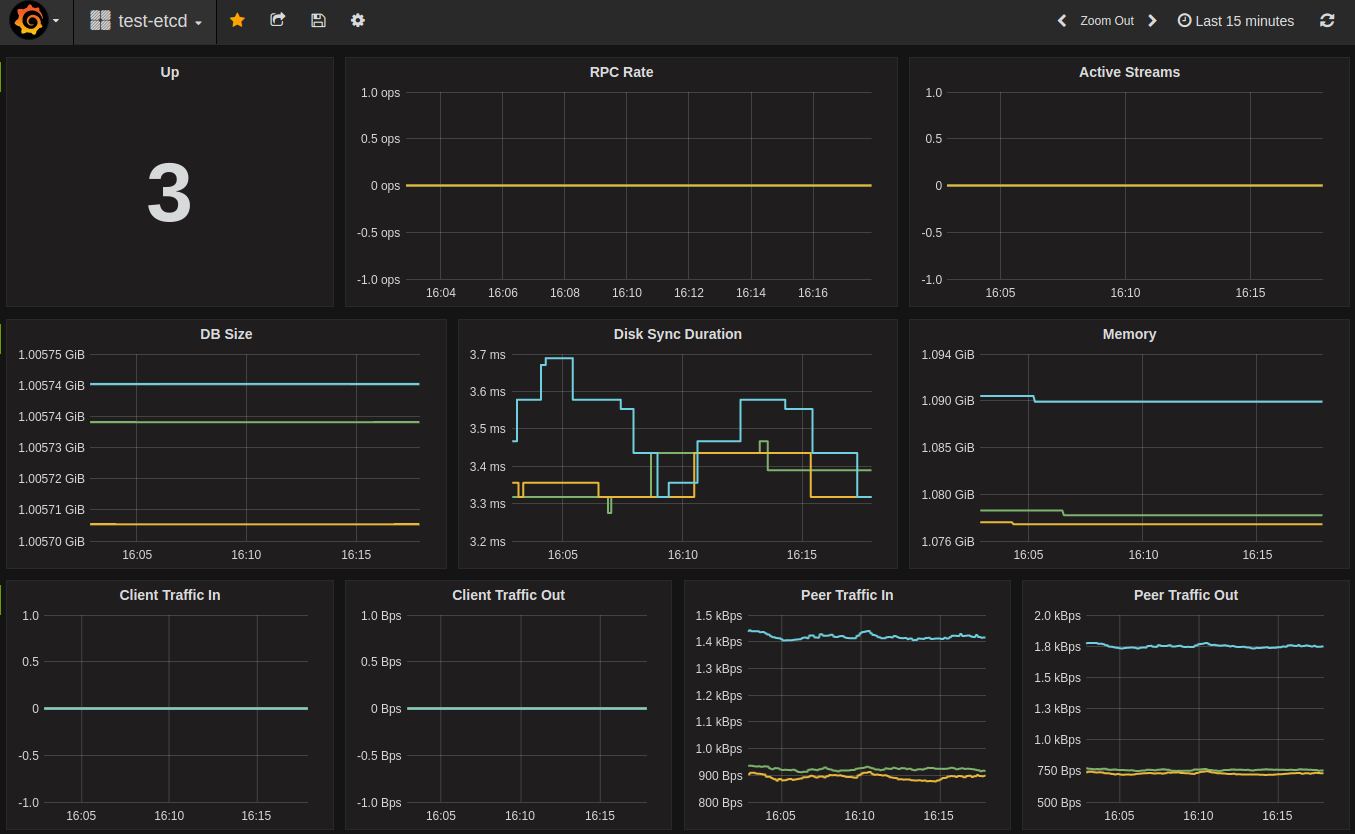
Distributed tracing
In v3.5 etcd has added support for distributed tracing using OpenTelemetry .
This feature is still experimental and can change at any time.
To enable this experimental feature, pass the --experimental-enable-distributed-tracing=true to the etcd server, along with the --experimental-distributed-tracing-sampling-rate=<number> flag to choose how many samples to collect per million spans, the default sampling rate is 0.
Configure the distributed tracing by starting etcd server with the following optional flags:
--experimental-distributed-tracing-address- (Optional) - “localhost:4317” - Address of the tracing collector.--experimental-distributed-tracing-service-name- (Optional) - “etcd” - Distributed tracing service name, must be same across all etcd instances.--experimental-distributed-tracing-instance-id- (Optional) - Instance ID, while optional it’s strongly recommended to set, must be unique per etcd instance.
Before enabling the distributed tracing, make sure to have the OpenTelemetry endpoint, if that address differs to the default one, override with the --experimental-distributed-tracing-address flag. Due to OpenTelemetry having different ways of running, refer to the collector documentation
to learn more.
There is a resource overhead, as with any observability signal, according to our initial measurements that overhead could be between 2% - 4% CPU overhead.
14.14 - Performance
Understanding performance
etcd provides stable, sustained high performance. Two factors define performance: latency and throughput. Latency is the time taken to complete an operation. Throughput is the total operations completed within some time period. Usually average latency increases as the overall throughput increases when etcd accepts concurrent client requests. In common cloud environments, like a standard n-4 on Google Compute Engine (GCE) or a comparable machine type on AWS, a three member etcd cluster finishes a request in less than one millisecond under light load, and can complete more than 30,000 requests per second under heavy load.
etcd uses the Raft consensus algorithm to replicate requests among members and reach agreement. Consensus performance, especially commit latency, is limited by two physical constraints: network IO latency and disk IO latency. The minimum time to finish an etcd request is the network Round Trip Time (RTT) between members, plus the time fdatasync requires to commit the data to permanent storage. The RTT within a datacenter may be as long as several hundred microseconds. A typical RTT within the United States is around 50ms, and can be as slow as 400ms between continents. The typical fdatasync latency for a spinning disk is about 10ms. For SSDs, the latency is often lower than 1ms. To increase throughput, etcd batches multiple requests together and submits them to Raft. This batching policy lets etcd attain high throughput despite heavy load.
There are other sub-systems which impact the overall performance of etcd. Each serialized etcd request must run through etcd’s boltdb-backed MVCC storage engine, which usually takes tens of microseconds to finish. Periodically etcd incrementally snapshots its recently applied requests, merging them back with the previous on-disk snapshot. This process may lead to a latency spike. Although this is usually not a problem on SSDs, it may double the observed latency on HDD. Likewise, inflight compactions can impact etcd’s performance. Fortunately, the impact is often insignificant since the compaction is staggered so it does not compete for resources with regular requests. The RPC system, gRPC, gives etcd a well-defined, extensible API, but it also introduces additional latency, especially for local reads.
Benchmarks
Benchmarking etcd performance can be done with the benchmark CLI tool included with etcd.
For some baseline performance numbers, we consider a three member etcd cluster with the following hardware configuration:
- Google Cloud Compute Engine
- 3 machines of 8 vCPUs + 16GB Memory + 50GB SSD
- 1 machine(client) of 16 vCPUs + 30GB Memory + 50GB SSD
- Ubuntu 17.04
- etcd 3.2.0, go 1.8.3
With this configuration, etcd can approximately write:
| Number of keys | Key size in bytes | Value size in bytes | Number of connections | Number of clients | Target etcd server | Average write QPS | Average latency per request | Average server RSS |
|---|---|---|---|---|---|---|---|---|
| 10,000 | 8 | 256 | 1 | 1 | leader only | 583 | 1.6ms | 48 MB |
| 100,000 | 8 | 256 | 100 | 1000 | leader only | 44,341 | 22ms | 124MB |
| 100,000 | 8 | 256 | 100 | 1000 | all members | 50,104 | 20ms | 126MB |
Sample commands are:
Linearizable read requests go through a quorum of cluster members for consensus to fetch the most recent data. Serializable read requests are cheaper than linearizable reads since they are served by any single etcd member, instead of a quorum of members, in exchange for possibly serving stale data. etcd can read:
| Number of requests | Key size in bytes | Value size in bytes | Number of connections | Number of clients | Consistency | Average read QPS | Average latency per request |
|---|---|---|---|---|---|---|---|
| 10,000 | 8 | 256 | 1 | 1 | Linearizable | 1,353 | 0.7ms |
| 10,000 | 8 | 256 | 1 | 1 | Serializable | 2,909 | 0.3ms |
| 100,000 | 8 | 256 | 100 | 1000 | Linearizable | 141,578 | 5.5ms |
| 100,000 | 8 | 256 | 100 | 1000 | Serializable | 185,758 | 2.2ms |
Sample commands are:
We encourage running the benchmark test when setting up an etcd cluster for the first time in a new environment to ensure the cluster achieves adequate performance; cluster latency and throughput can be sensitive to minor environment differences.
14.15 - Design of runtime reconfiguration
Runtime reconfiguration is one of the hardest and most error prone features in a distributed system, especially in a consensus based system like etcd.
Read on to learn about the design of etcd’s runtime reconfiguration commands and how we tackled these problems.
Two phase config changes keep the cluster safe
In etcd, every runtime reconfiguration has to go through two phases for safety reasons. For example, to add a member, first inform the cluster of the new configuration and then start the new member.
Phase 1 - Inform cluster of new configuration
To add a member into an etcd cluster, make an API call to request a new member to be added to the cluster. This is the only way to add a new member into an existing cluster. The API call returns when the cluster agrees on the configuration change.
Phase 2 - Start new member
To join the new etcd member into the existing cluster, specify the correct initial-cluster and set initial-cluster-state to existing. When the member starts, it will contact the existing cluster first and verify the current cluster configuration matches the expected one specified in initial-cluster. When the new member successfully starts, the cluster has reached the expected configuration.
By splitting the process into two discrete phases users are forced to be explicit regarding cluster membership changes. This actually gives users more flexibility and makes things easier to reason about. For example, if there is an attempt to add a new member with the same ID as an existing member in an etcd cluster, the action will fail immediately during phase one without impacting the running cluster. Similar protection is provided to prevent adding new members by mistake. If a new etcd member attempts to join the cluster before the cluster has accepted the configuration change, it will not be accepted by the cluster.
Without the explicit workflow around cluster membership etcd would be vulnerable to unexpected cluster membership changes. For example, if etcd is running under an init system such as systemd, etcd would be restarted after being removed via the membership API, and attempt to rejoin the cluster on startup. This cycle would continue every time a member is removed via the API and systemd is set to restart etcd after failing, which is unexpected.
We expect runtime reconfiguration to be an infrequent operation. We decided to keep it explicit and user-driven to ensure configuration safety and keep the cluster always running smoothly under explicit control.
Permanent loss of quorum requires new cluster
If a cluster permanently loses a majority of its members, a new cluster will need to be started from an old data directory to recover the previous state.
It is entirely possible to force removing the failed members from the existing cluster to recover. However, we decided not to support this method since it bypasses the normal consensus committing phase, which is unsafe. If the member to remove is not actually dead or force removed through different members in the same cluster, etcd will end up with a diverged cluster with same clusterID. This is very dangerous and hard to debug/fix afterwards.
With a correct deployment, the possibility of permanent majority loss is very low. But it is a severe enough problem that is worth special care. We strongly suggest reading the disaster recovery documentation and preparing for permanent majority loss before putting etcd into production.
Do not use public discovery service for runtime reconfiguration
The public discovery service should only be used for bootstrapping a cluster. To join member into an existing cluster, use the runtime reconfiguration API.
The discovery service is designed for bootstrapping an etcd cluster in a cloud environment, when the IP addresses of all the members are not known beforehand. After successfully bootstrapping a cluster, the IP addresses of all the members are known. Technically, the discovery service should no longer be needed.
It seems that using public discovery service is a convenient way to do runtime reconfiguration, after all discovery service already has all the cluster configuration information. However relying on public discovery service brings troubles:
it introduces external dependencies for the entire life-cycle of the cluster, not just bootstrap time. If there is a network issue between the cluster and public discovery service, the cluster will suffer from it.
public discovery service must reflect correct runtime configuration of the cluster during its life-cycle. It has to provide security mechanisms to avoid bad actions, and it is hard.
public discovery service has to keep tens of thousands of cluster configurations. Our public discovery service backend is not ready for that workload.
To have a discovery service that supports runtime reconfiguration, the best choice is to build a private one.
14.16 - Runtime reconfiguration
etcd comes with support for incremental runtime reconfiguration, which allows users to update the membership of the cluster at run time.
Reconfiguration requests can only be processed when a majority of cluster members are functioning. It is highly recommended to always have a cluster size greater than two in production. It is unsafe to remove a member from a two member cluster. The majority of a two member cluster is also two. If there is a failure during the removal process, the cluster might not be able to make progress and need to restart from majority failure .
To better understand the design behind runtime reconfiguration, please read the runtime reconfiguration document .
Reconfiguration use cases
This section will walk through some common reasons for reconfiguring a cluster. Most of these reasons just involve combinations of adding or removing a member, which are explained below under Cluster Reconfiguration Operations .
Cycle or upgrade multiple machines
If multiple cluster members need to move due to planned maintenance (hardware upgrades, network downtime, etc.), it is recommended to modify members one at a time.
It is safe to remove the leader, however there is a brief period of downtime while the election process takes place. If the cluster holds more than 50MB of v2 data, it is recommended to migrate the member’s data directory .
Change the cluster size
Increasing the cluster size can enhance failure tolerance and provide better read performance. Since clients can read from any member, increasing the number of members increases the overall serialized read throughput.
Decreasing the cluster size can improve the write performance of a cluster, with a trade-off of decreased resilience. Writes into the cluster are replicated to a majority of members of the cluster before considered committed. Decreasing the cluster size lowers the majority, and each write is committed more quickly.
Replace a failed machine
If a machine fails due to hardware failure, data directory corruption, or some other fatal situation, it should be replaced as soon as possible. Machines that have failed but haven’t been removed adversely affect the quorum and reduce the tolerance for an additional failure.
To replace the machine, follow the instructions for removing the member from the cluster, and then add a new member in its place. If the cluster holds more than 50MB, it is recommended to migrate the failed member’s data directory if it is still accessible.
Restart cluster from majority failure
If the majority of the cluster is lost or all of the nodes have changed IP addresses, then manual action is necessary to recover safely. The basic steps in the recovery process include creating a new cluster using the old data , forcing a single member to act as the leader, and finally using runtime configuration to add new members to this new cluster one at a time.
Recover cluster from minority failure
If a specific member is lost, then it is equivalent to replacing a failed machine. The steps are mentioned in Replace a failed machine .
Cluster reconfiguration operations
With these use cases in mind, the involved operations can be described for each.
Before making any change, a simple majority (quorum) of etcd members must be available. This is essentially the same requirement for any kind of write to etcd.
All changes to the cluster must be done sequentially:
- To update a single member peerURLs, issue an update operation
- To replace a healthy single member, remove the old member then add a new member
- To increase from 3 to 5 members, issue two add operations
- To decrease from 5 to 3, issue two remove operations
All of these examples use the etcdctl command line tool that ships with etcd. To change membership without etcdctl, use the v2 HTTP members API
or the v3 gRPC members API
.
Update a member
Update advertise client URLs
To update the advertise client URLs of a member, simply restart that member with updated client urls flag (--advertise-client-urls) or environment variable (ETCD_ADVERTISE_CLIENT_URLS). The restarted member will self publish the updated URLs. A wrongly updated client URL will not affect the health of the etcd cluster.
Update advertise peer URLs
To update the advertise peer URLs of a member, first update it explicitly via member command and then restart the member. The additional action is required since updating peer URLs changes the cluster wide configuration and can affect the health of the etcd cluster.
To update the advertise peer URLs, first find the target member’s ID. To list all members with etcdctl:
This example will update a8266ecf031671f3 member ID and change its peerURLs value to http://10.0.1.10:2380:
Remove a member
Suppose the member ID to remove is a8266ecf031671f3. Use the remove command to perform the removal:
The target member will stop itself at this point and print out the removal in the log:
It is safe to remove the leader, however the cluster will be inactive while a new leader is elected. This duration is normally the period of election timeout plus the voting process.
Add a new member
Adding a member is a two step process:
- Add the new member to the cluster via the HTTP members API
, the gRPC members API
, or the
etcdctl member addcommand. - Start the new member with the new cluster configuration, including a list of the updated members (existing members + the new member).
etcdctl adds a new member to the cluster by specifying the member’s name
and advertised peer URLs
:
etcdctl has informed the cluster about the new member and printed out the environment variables needed to successfully start it. Now start the new etcd process with the relevant flags for the new member:
The new member will run as a part of the cluster and immediately begin catching up with the rest of the cluster.
If adding multiple members the best practice is to configure a single member at a time and verify it starts correctly before adding more new members. If adding a new member to a 1-node cluster, the cluster cannot make progress before the new member starts because it needs two members as majority to agree on the consensus. This behavior only happens between the time etcdctl member add informs the cluster about the new member and the new member successfully establishing a connection to the existing one.
Add a new member as learner
Starting from v3.4, etcd supports adding a new member as learner / non-voting member. The motivation and design can be found in design doc . In order to make the process of adding a new member safer, and to reduce cluster downtime when the new member is added, it is recommended that the new member is added to cluster as a learner until it catches up. This can be described as a three step process:
Add the new member as learner via gRPC members API or the
etcdctl member add --learnercommand.Start the new member with the new cluster configuration, including a list of the updated members (existing members + the new member). This step is exactly the same as before.
Promote the newly added learner to voting member via gRPC members API or the
etcdctl member promotecommand. etcd server validates promote request to ensure its operational safety. Only after its raft log has caught up to leader’s can learner be promoted to a voting member. If a learner member has not caught up to leader’s raft log, member promote request will fail (see error cases when promoting a member section for more details). In this case, user should wait and retry later.
In v3.4, etcd server limits the number of learners that cluster can have to one. The main consideration is to limit the extra workload on leader due to propagating data from leader to learner.
Use etcdctl member add with flag --learner to add new member to cluster as learner.
After new etcd process is started for the newly added learner member, use etcdctl member promote to promote learner to voting member.
Error cases when adding members
In the following case a new host is not included in the list of enumerated nodes. If this is a new cluster, the node must be added to the list of initial cluster members.
In this case, give a different address (10.0.1.14:2380) from the one used to join the cluster (10.0.1.13:2380):
If etcd starts using the data directory of a removed member, etcd automatically exits if it connects to any active member in the cluster:
Error cases when adding a learner member
Cannot add learner to cluster if the cluster already has 1 learner (v3.4).
Error cases when promoting a learner member
Learner can only be promoted to voting member if it is in sync with leader.
Promoting a member that is not a learner will fail.
Promoting a member that does not exist in cluster will fail.
Strict reconfiguration check mode (-strict-reconfig-check)
As described in the above, the best practice of adding new members is to configure a single member at a time and verify it starts correctly before adding more new members. This step by step approach is very important because if newly added members is not configured correctly (for example the peer URLs are incorrect), the cluster can lose quorum. The quorum loss happens since the newly added member are counted in the quorum even if that member is not reachable from other existing members. Also quorum loss might happen if there is a connectivity issue or there are operational issues.
For avoiding this problem, etcd provides an option -strict-reconfig-check. If this option is passed to etcd, etcd rejects reconfiguration requests if the number of started members will be less than a quorum of the reconfigured cluster.
It is enabled by default.
14.17 - Supported platforms
Support tiers
etcd runs on different platforms, but the guarantees it provides depends on a platform’s support tier:
- Tier 1: fully supported by etcd maintainers ; etcd is guaranteed to pass all tests including functional and robustness tests.
- Tier 2: etcd is guaranteed to pass integration and end-to-end tests but not necessarily functional or robustness tests.
- Tier 3: etcd is guaranteed to build, may be lightly tested (or not), and so it should be considered unstable.
Current support
The following table lists currently supported platforms and their corresponding etcd support tier:
| Architecture | Operating system | Support tier | Maintainers |
|---|---|---|---|
| AMD64 | Linux | 1 | etcd maintainers |
| ARM64 | Linux | 1 | etcd maintainers |
| AMD64 | Darwin | 3 | |
| ARM64 | Darwin | 3 | |
| AMD64 | Windows | 3 | |
| ppc64le | Linux | 3 | |
| s390x | Linux | 3 |
Unlisted platforms are unsupported.
Supporting a new platform
Want to contribute to etcd as the “official” maintainer of a new platform? In addition to committing to support the platform, you must setup etcd continuous integration (CI) satisfying the following requirements, depending on the support tier:
| etcd continuous integration | Tier 1 | Tier 2 | Tier 3 |
|---|---|---|---|
| Build passes | ✓ | ✓ | ✓ |
| Unit tests pass | ✓ | ✓ | |
| Integration and end-to-end tests pass | ✓ | ✓ | |
| Robustness tests pass | ✓ |
For an example of setting up tier-2 CI for ARM64, see etcd PR #12928 .
Unsupported platforms
To avoid inadvertently running an etcd server on an unsupported platform, etcd
prints a warning message and exits immediately unless the environment variable
ETCD_UNSUPPORTED_ARCH is set to the target architecture.
32-bit systems etcd has known issues on 32-bit systems due to a bug in the Go runtime. For more information see the Go issue #599 and the atomic package bug note .
14.18 - Versioning
This document describes the versions supported by the etcd project.
Service versioning and supported versions
etcd versions are expressed as x.y.z, where x is the major version, y is the minor version, and z is the patch version, following Semantic Versioning terminology. New minor versions may add additional features to the API.
The etcd project maintains release branches for the current version and previous release. For example, when v3.5 is the current version, v3.4 is supported. When v3.6 is released, v3.4 goes out of support.
Applicable fixes, including security fixes, may be backported to those two release branches, depending on severity and feasibility. Patch releases are cut from those branches when required.
The project Maintainers own this decision.
You can check the running etcd cluster version with etcdctl:
API versioning
The v3 API responses should not change after the 3.0.0 release but new features will be added over time.
14.19 - Data Corruption
etcd has built in automated data corruption detection to prevent member state from diverging.
Enabling data corruption detection
Data corruption detection can be done using:
- Initial check, enabled with
--experimental-initial-corrupt-checkflag. - Periodic check of:
- Compacted revision hash, enabled with
--experimental-compact-hash-check-enabledflag. - Latest revision hash, enabled with
--experimental-corrupt-check-timeflag.
- Compacted revision hash, enabled with
Initial check will be executed during bootstrap of etcd member. Member will compare its persistent state vs other members and exit if there is a mismatch.
Both periodic check will be executed by the cluster leader in a cluster that is already running. Leader will compare its persistent state vs other members and raise a CORRUPT ALARM if there is a mismatch. Both checks serve the same purpose, however they are both worth enabling to balance performance and time to detection.
- Compacted revision hash check - requires regular compaction, minimal performance cost, handles slow followers.
- Latest revision hash check - high performance cost, doesn’t handle slow followers or frequent compactions.
Compacted revision hash check
When enabled using --experimental-compact-hash-check-enabled flag, check will be executed once every minute.
This can be adjusted using --experimental-compact-hash-check-time flag using format: 1m - every minute, 1h - evey hour.
This check extends compaction to also calculate checksum that can be compared between cluster members.
Doesn’t cause additional database scan making it very cheap, but requiring a regular compaction in cluster.
Latest revision hash check
Enabled using --experimental-corrupt-check-time flag, requires providing an execution period in format: 1m - every minute, 1h - evey hour.
Recommended period is a couple of hours due to a high performance cost.
Running a check requires computing a checksum by scanning entire etcd content at given revision.
Restoring a corrupted member
There are three ways to restore a corrupted member:
- Purge member persistent state
- Replace member
- Restore whole cluster
After the corrupted member is restored, CORRUPT ALARM can be removed.
Purge member persistent state
Members state can be purged by:
- Stopping the etcd instance.
- Backing up etcd data directory.
- Moving out the
snapsubdirectory from the etcd data directory. - Starting
etcdwith--initial-cluster-state=existingand cluster members listed in--initial-cluster.
Etcd member is expected to download up-to-date snapshot from the leader.
Replace member
Member can be replaced by:
- Stopping the etcd instance.
- Backing up the etcd data directory.
- Removing the data directory.
- Removing the member from cluster by running
etcdctl member remove. - Adding it back by running
etcdctl member add - Starting
etcdwith--initial-cluster-state=existingand cluster members listed in--initial-cluster.
Restore whole cluster
Cluster can be restored by saving a snapshot from current leader and restoring it to all members.
Run etcdctl snapshot save against the leader and follow restoring a cluster procedure
.
15 - Benchmarks
Benchmarks
etcd benchmarks will be published regularly and tracked for each release below:
Memory Usage Benchmarks
It records expected memory usage in different scenarios.
15.1 - Storage Memory Usage Benchmark
Two components of etcd storage consume physical memory. The etcd process allocates an in-memory index to speed key lookup. The process’s page cache, managed by the operating system, stores recently-accessed data from disk for quick re-use.
The in-memory index holds all the keys in a B-tree data structure, along with pointers to the on-disk data (the values). Each key in the B-tree may contain multiple pointers, pointing to different versions of its values. The theoretical memory consumption of the in-memory index can hence be approximated with the formula:
N * (c1 + avg_key_size) + N * (avg_versions_of_key) * (c2 + size_of_pointer)
where c1 is the key metadata overhead and c2 is the version metadata overhead.
The graph shows the detailed structure of the in-memory index B-tree.
Page cache memory is managed by the operating system and is not covered in detail in this document.
Testing Environment
etcd version
GCE n1-standard-2 machine type
- 7.5 GB memory
- 2x CPUs
In-memory index memory usage
In this test, we only benchmark the memory usage of the in-memory index. The goal is to find c1 and c2 mentioned above and to understand the hard limit of memory consumption of the storage.
We calculate the memory usage consumption via the Go runtime.ReadMemStats. We calculate the total allocated bytes difference before creating the index and after creating the index. It cannot perfectly reflect the memory usage of the in-memory index itself but can show the rough consumption pattern.
| N | versions | key size | memory usage |
|---|---|---|---|
| 100K | 1 | 64bytes | 22MB |
| 100K | 5 | 64bytes | 39MB |
| 1M | 1 | 64bytes | 218MB |
| 1M | 5 | 64bytes | 432MB |
| 100K | 1 | 256bytes | 41MB |
| 100K | 5 | 256bytes | 65MB |
| 1M | 1 | 256bytes | 409MB |
| 1M | 5 | 256bytes | 506MB |
Based on the result, we can calculate c1=120bytes, c2=30bytes. We only need two sets of data to calculate c1 and c2, since they are the only unknown variable in the formula. The c1=120bytes and c2=30bytes are the average value of the 4 sets of c1 and c2 we calculated. The key metadata overhead is still relatively nontrivial (50%) for small key-value pairs. However, this is a significant improvement over the old store, which had at least 1000% overhead.
Overall memory usage
The overall memory usage captures how much RSS etcd consumes with the storage. The value size should have very little impact on the overall memory usage of etcd, since we keep values on disk and only retain hot values in memory, managed by the OS page cache.
| N | versions | key size | value size | memory usage |
|---|---|---|---|---|
| 100K | 1 | 64bytes | 256bytes | 40MB |
| 100K | 5 | 64bytes | 256bytes | 89MB |
| 1M | 1 | 64bytes | 256bytes | 470MB |
| 1M | 5 | 64bytes | 256bytes | 880MB |
| 100K | 1 | 64bytes | 1KB | 102MB |
| 100K | 5 | 64bytes | 1KB | 164MB |
| 1M | 1 | 64bytes | 1KB | 587MB |
| 1M | 5 | 64bytes | 1KB | 836MB |
Based on the result, we know the value size does not significantly impact the memory consumption. There is some minor increase due to more data held in the OS page cache.
15.2 - Watch Memory Usage Benchmark
The watch features are under active development, and their memory usage may change as that development progresses. We do not expect it to significantly increase beyond the figures stated below.
A primary goal of etcd is supporting a very large number of watchers doing a massively large amount of watching. etcd aims to support O(10k) clients, O(100K) watch streams (O(10) streams per client) and O(10M) total watchings (O(100) watching per stream). The memory consumed by each individual watching accounts for the largest portion of etcd’s overall usage, and is therefore the focus of current and future optimizations.
Three related components of etcd watch consume physical memory: each grpc.Conn, each watch stream, and each instance of the watching activity. grpc.Conn maintains the actual TCP connection and other gRPC connection state. Each grpc.Conn consumes O(10kb) of memory, and might have multiple watch streams attached.
Each watch stream is an independent HTTP2 connection which consumes another O(10kb) of memory. Multiple watchings might share one watch stream.
Watching is the actual struct that tracks the changes on the key-value store. Each watching should only consume < O(1kb).
The theoretical memory consumption of watch can be approximated with the formula:
memory = c1 * number_of_conn + c2 * avg_number_of_stream_per_conn + c3 * avg_number_of_watch_stream
Testing Environment
etcd version
GCE n1-standard-2 machine type
- 7.5 GB memory
- 2x CPUs
Overall memory usage
The overall memory usage captures how much RSS etcd consumes with the client watchers. While the result may vary by as much as 10%, it is still meaningful, since the goal is to learn about the rough memory usage and the pattern of allocations.
With the benchmark result, we can calculate roughly that c1 = 17kb, c2 = 18kb and c3 = 350bytes. So each additional client connection consumes 17kb of memory and each additional stream consumes 18kb of memory, and each additional watching only cause 350bytes. A single etcd server can maintain millions of watchings with a few GB of memory in normal case.
| clients | streams per client | watchings per stream | total watching | memory usage |
|---|---|---|---|---|
| 1k | 1 | 1 | 1k | 50MB |
| 2k | 1 | 1 | 2k | 90MB |
| 5k | 1 | 1 | 5k | 200MB |
| 1k | 10 | 1 | 10k | 217MB |
| 2k | 10 | 1 | 20k | 417MB |
| 5k | 10 | 1 | 50k | 980MB |
| 1k | 50 | 1 | 50k | 1001MB |
| 2k | 50 | 1 | 100k | 1960MB |
| 5k | 50 | 1 | 250k | 4700MB |
| 1k | 50 | 10 | 500k | 1171MB |
| 2k | 50 | 10 | 1M | 2371MB |
| 5k | 50 | 10 | 2.5M | 5710MB |
| 1k | 50 | 100 | 5M | 2380MB |
| 2k | 50 | 100 | 10M | 4672MB |
| 5k | 50 | 100 | 25M | OOM |
15.3 - Benchmarking etcd v3
Physical machines
GCE n1-highcpu-2 machine type
- 1x dedicated local SSD mounted under /var/lib/etcd
- 1x dedicated slow disk for the OS
- 1.8 GB memory
- 2x CPUs
- etcd version 2.2.0
etcd Cluster
1 etcd member running in v3 demo mode
Testing
Use etcd v3 benchmark tool .
Performance
reading one single key
| key size in bytes | number of clients | read QPS | 90th Percentile Latency (ms) |
|---|---|---|---|
| 256 | 1 | 2716 | 0.4 |
| 256 | 64 | 16623 | 6.1 |
| 256 | 256 | 16622 | 21.7 |
The performance is nearly the same as the one with empty server handler.
reading one single key after putting
| key size in bytes | number of clients | read QPS | 90th Percentile Latency (ms) |
|---|---|---|---|
| 256 | 1 | 2269 | 0.5 |
| 256 | 64 | 13582 | 8.6 |
| 256 | 256 | 13262 | 47.5 |
The performance with empty server handler is not affected by one put. So the performance downgrade should be caused by storage package.
15.4 - Benchmarking etcd v2.2.0-rc-memory
Physical machine
GCE n1-standard-2 machine type
- 1x dedicated local SSD mounted under /var/lib/etcd
- 1x dedicated slow disk for the OS
- 7.5 GB memory
- 2x CPUs
etcd
Testing
Start 3-member etcd cluster, each of which uses 2 cores.
The length of key name is always 64 bytes, which is a reasonable length of average key bytes.
Memory Maximal Usage
- etcd may use maximal memory if one follower is dead and the leader keeps sending snapshots.
max RSSis the maximal memory usage recorded in 3 runs.
| value bytes | key number | data size(MB) | max RSS(MB) | max RSS/data rate on leader |
|---|---|---|---|---|
| 128 | 50000 | 6 | 433 | 72x |
| 128 | 100000 | 12 | 659 | 54x |
| 128 | 200000 | 24 | 1466 | 61x |
| 1024 | 50000 | 48 | 1253 | 26x |
| 1024 | 100000 | 96 | 2344 | 24x |
| 1024 | 200000 | 192 | 4361 | 22x |
Data Size Threshold
- When etcd reaches data size threshold, it may trigger leader election easily and drop part of proposals.
- For most cases, the etcd cluster should work smoothly if it doesn’t hit the threshold. If it doesn’t work well due to insufficient resources, decrease its data size.
| value bytes | key number limitation | suggested data size threshold(MB) | consumed RSS(MB) |
|---|---|---|---|
| 128 | 400K | 48 | 2400 |
| 1024 | 300K | 292 | 6500 |
15.5 - Benchmarking etcd v2.2.0-rc
Physical machine
GCE n1-highcpu-2 machine type
- 1x dedicated local SSD mounted under /var/lib/etcd
- 1x dedicated slow disk for the OS
- 1.8 GB memory
- 2x CPUs
etcd Cluster
3 etcd 2.2.0-rc members, each runs on a single machine.
Detailed versions:
Also, we use 3 etcd 2.1.0 alpha-stage members to form cluster to get base performance. etcd’s commit head is at c7146bd5 , which is the same as the one that we use in etcd 2.1 benchmark .
Testing
Bootstrap another machine and use the hey HTTP benchmark tool to send requests to each etcd member. Check the benchmark hacking guide for detailed instructions.
Performance
reading one single key
| key size in bytes | number of clients | target etcd server | read QPS | 90th Percentile Latency (ms) |
|---|---|---|---|---|
| 64 | 1 | leader only | 2804 (-5%) | 0.4 (+0%) |
| 64 | 64 | leader only | 17816 (+0%) | 5.7 (-6%) |
| 64 | 256 | leader only | 18667 (-6%) | 20.4 (+2%) |
| 256 | 1 | leader only | 2181 (-15%) | 0.5 (+25%) |
| 256 | 64 | leader only | 17435 (-7%) | 6.0 (+9%) |
| 256 | 256 | leader only | 18180 (-8%) | 21.3 (+3%) |
| 64 | 64 | all servers | 46965 (-4%) | 2.1 (+0%) |
| 64 | 256 | all servers | 55286 (-6%) | 7.4 (+6%) |
| 256 | 64 | all servers | 46603 (-6%) | 2.1 (+5%) |
| 256 | 256 | all servers | 55291 (-6%) | 7.3 (+4%) |
writing one single key
| key size in bytes | number of clients | target etcd server | write QPS | 90th Percentile Latency (ms) |
|---|---|---|---|---|
| 64 | 1 | leader only | 76 (+22%) | 19.4 (-15%) |
| 64 | 64 | leader only | 2461 (+45%) | 31.8 (-32%) |
| 64 | 256 | leader only | 4275 (+1%) | 69.6 (-10%) |
| 256 | 1 | leader only | 64 (+20%) | 16.7 (-30%) |
| 256 | 64 | leader only | 2385 (+30%) | 31.5 (-19%) |
| 256 | 256 | leader only | 4353 (-3%) | 74.0 (+9%) |
| 64 | 64 | all servers | 2005 (+81%) | 49.8 (-55%) |
| 64 | 256 | all servers | 4868 (+35%) | 81.5 (-40%) |
| 256 | 64 | all servers | 1925 (+72%) | 47.7 (-59%) |
| 256 | 256 | all servers | 4975 (+36%) | 70.3 (-36%) |
performance changes explanation
read QPS in most scenarios is decreased by 5~8%. The reason is that etcd records store metrics for each store operation. The metrics is important for monitoring and debugging, so this is acceptable.
write QPS to leader is increased by 20~30%. This is because we decouple raft main loop and entry apply loop, which avoids them blocking each other.
write QPS to all servers is increased by 30~80% because follower could receive latest commit index earlier and commit proposals faster.
15.6 - Benchmarking etcd v2.2.0
Physical Machines
GCE n1-highcpu-2 machine type
- 1x dedicated local SSD mounted as etcd data directory
- 1x dedicated slow disk for the OS
- 1.8 GB memory
- 2x CPUs
etcd Cluster
3 etcd 2.2.0 members, each runs on a single machine.
Detailed versions:
Testing
Bootstrap another machine, outside of the etcd cluster, and run the hey HTTP benchmark tool
with a connection reuse patch to send requests to each etcd cluster member. See the benchmark instructions
for the patch and the steps to reproduce our procedures.
The performance is calculated through results of 100 benchmark rounds.
Performance
Single Key Read Performance
| key size in bytes | number of clients | target etcd server | average read QPS | read QPS stddev | average 90th Percentile Latency (ms) | latency stddev |
|---|---|---|---|---|---|---|
| 64 | 1 | leader only | 2303 | 200 | 0.49 | 0.06 |
| 64 | 64 | leader only | 15048 | 685 | 7.60 | 0.46 |
| 64 | 256 | leader only | 14508 | 434 | 29.76 | 1.05 |
| 256 | 1 | leader only | 2162 | 214 | 0.52 | 0.06 |
| 256 | 64 | leader only | 14789 | 792 | 7.69 | 0.48 |
| 256 | 256 | leader only | 14424 | 512 | 29.92 | 1.42 |
| 64 | 64 | all servers | 45752 | 2048 | 2.47 | 0.14 |
| 64 | 256 | all servers | 46592 | 1273 | 10.14 | 0.59 |
| 256 | 64 | all servers | 45332 | 1847 | 2.48 | 0.12 |
| 256 | 256 | all servers | 46485 | 1340 | 10.18 | 0.74 |
Single Key Write Performance
| key size in bytes | number of clients | target etcd server | average write QPS | write QPS stddev | average 90th Percentile Latency (ms) | latency stddev |
|---|---|---|---|---|---|---|
| 64 | 1 | leader only | 55 | 4 | 24.51 | 13.26 |
| 64 | 64 | leader only | 2139 | 125 | 35.23 | 3.40 |
| 64 | 256 | leader only | 4581 | 581 | 70.53 | 10.22 |
| 256 | 1 | leader only | 56 | 4 | 22.37 | 4.33 |
| 256 | 64 | leader only | 2052 | 151 | 36.83 | 4.20 |
| 256 | 256 | leader only | 4442 | 560 | 71.59 | 10.03 |
| 64 | 64 | all servers | 1625 | 85 | 58.51 | 5.14 |
| 64 | 256 | all servers | 4461 | 298 | 89.47 | 36.48 |
| 256 | 64 | all servers | 1599 | 94 | 60.11 | 6.43 |
| 256 | 256 | all servers | 4315 | 193 | 88.98 | 7.01 |
Performance Changes
Because etcd now records metrics for each API call, read QPS performance seems to see a minor decrease in most scenarios. This minimal performance impact was judged a reasonable investment for the breadth of monitoring and debugging information returned.
Write QPS to cluster leaders seems to be increased by a small margin. This is because the main loop and entry apply loops were decoupled in the etcd raft logic, eliminating several blocks between them.
Write QPS to all members seems to be increased by a significant margin, because followers now receive the latest commit index sooner, and commit proposals more quickly.
15.7 - Benchmarking etcd v2.1.0
Physical machines
GCE n1-highcpu-2 machine type
- 1x dedicated local SSD mounted under /var/lib/etcd
- 1x dedicated slow disk for the OS
- 1.8 GB memory
- 2x CPUs
- etcd version 2.1.0 alpha
etcd Cluster
3 etcd members, each runs on a single machine
Testing
Bootstrap another machine and use the hey HTTP benchmark tool to send requests to each etcd member. Check the benchmark hacking guide for detailed instructions.
Performance
reading one single key
| key size in bytes | number of clients | target etcd server | read QPS | 90th Percentile Latency (ms) |
|---|---|---|---|---|
| 64 | 1 | leader only | 1534 | 0.7 |
| 64 | 64 | leader only | 10125 | 9.1 |
| 64 | 256 | leader only | 13892 | 27.1 |
| 256 | 1 | leader only | 1530 | 0.8 |
| 256 | 64 | leader only | 10106 | 10.1 |
| 256 | 256 | leader only | 14667 | 27.0 |
| 64 | 64 | all servers | 24200 | 3.9 |
| 64 | 256 | all servers | 33300 | 11.8 |
| 256 | 64 | all servers | 24800 | 3.9 |
| 256 | 256 | all servers | 33000 | 11.5 |
writing one single key
| key size in bytes | number of clients | target etcd server | write QPS | 90th Percentile Latency (ms) |
|---|---|---|---|---|
| 64 | 1 | leader only | 60 | 21.4 |
| 64 | 64 | leader only | 1742 | 46.8 |
| 64 | 256 | leader only | 3982 | 90.5 |
| 256 | 1 | leader only | 58 | 20.3 |
| 256 | 64 | leader only | 1770 | 47.8 |
| 256 | 256 | leader only | 4157 | 105.3 |
| 64 | 64 | all servers | 1028 | 123.4 |
| 64 | 256 | all servers | 3260 | 123.8 |
| 256 | 64 | all servers | 1033 | 121.5 |
| 256 | 256 | all servers | 3061 | 119.3 |
16 - Downgrading
16.1 - Downgrading etcd clusters and applications
This section contains documents specific to downgrading etcd clusters and applications.
Downgrading an etcd v3.x cluster
16.2 - Downgrade etcd from v3.7 to v3.6
In the general case, downgrading from etcd v3.7 to v3.6 can be a zero-downtime, rolling downgrade:
- one by one, stop the etcd v3.7 processes and replace them with etcd v3.6 processes
- after enabling the downgrade, new features in v3.7 are no longer available to the cluster
Before starting a downgrade , read through the rest of this guide to prepare.
Downgrade checklists
Highlighted differences between v3.7 and v3.6:
Difference in flags
v3.7 does not introduce any new flags, so a v3.6 process accepts every flag of a v3.7 configuration and no configuration changes are required when downgrading.
The diff is based on version v3.7.0-rc.0 and v3.6.13. The actual diff would be dependent on your patch version, check with diff <(etcd-3.7/bin/etcd -h | grep \\-\\-) <(etcd-3.6/bin/etcd -h | grep \\-\\-) first.
The deprecated --experimental-* flags that were removed in v3.7 still exist in v3.6, but do not re-add them after the downgrade; use their non-experimental equivalents or --feature-gates entries, which work on both versions.
Difference in Prometheus metrics
Server downgrade checklists
Downgrade requirements
To ensure a smooth rolling downgrade, the running cluster must be healthy. Check the health of the cluster by using the etcdctl endpoint health command before proceeding.
Preparation
Before downgrading etcd, always test the services relying on etcd in a staging environment before deploying the downgrade to the production environment.
Before beginning, download the snapshot backup . Should something go wrong with the downgrade, it is possible to use this backup to rollback back to existing etcd version.
Before beginning, download the latest release of etcd v3.6.
Mixed versions
While downgrading, an etcd cluster supports mixed versions of etcd members, and operates with the protocol of the lowest common version. The cluster is considered downgraded once downgrade is enabled by etcdctl downgrade enable 3.6. Internally, the overall cluster version is set to the downgrade target version, which controls the reported version and the supported features.
Rollback
Before downgrading your etcd cluster, please create and download a snapshot backup of your etcd cluster. This snapshot can be used to restore the cluster to its pre-downgrade state if needed. If users encounter issues during the downgrade, they should first identify and resolve the root cause.
If the downgrade has started after running etcdctl downgrade enable, and the cluster is still in a mixed-version state, where at least one member remains on v3.7, users can cancel the ongoing downgrade process by running etcdctl downgrade cancel, and restarting all the downgraded members with the original v3.7 binaries.
Once all members have been downgraded to v3.6, the cluster is considered fully downgraded. If users wish to return to the original version after a full downgrade has completed, they should follow the official upgrade guide to ensure consistency and avoid data corruption.
Downgrade procedure
This example shows how to downgrade a 3-member v3.7 etcd cluster running on a local machine. The output below is from a real run against etcd v3.7.0-rc.0 and etcd v3.6.13 on a single host with three loopback ports, on a cluster that was upgraded from v3.6.13 shortly before.
Step 1: check downgrade requirements
Is the cluster healthy and running v3.7.x?
Step 2: download snapshot backup from leader
Download the snapshot backup to provide a downgrade path should any problems occur:
Step 3: validate downgrade target version
Validate the downgrade target version before enabling the downgrade:
- We only support downgrading one minor version at a time. e.g downgrading from v3.7 to v3.5 isn’t allowed.
- Please do not move on to next step until the validation is successful.
Step 4: enable downgrade
After enabling downgrade, the cluster will start to operate with v3.6 protocol, which is the downgrade target version. In addition, etcd will automatically migrate the schema to the downgrade target version, which usually happens very fast. Confirm the storage version of all servers has been migrated to v3.6 by checking the endpoint status before moving on to the next step.
Once downgrade is enabled, the cluster will remain operating with v3.6 protocol even if all the servers are still running the v3.7 binary, unless the downgrade is canceled with etcdctl downgrade cancel
Step 5: stop one existing etcd server
Before stopping the server, check if it is the leader. We recommend downgrading the leader last. If the server to be stopped is the leader, you can avoid some downtime by move-leader to another server before stopping this server.
When each etcd process is stopped, expected errors will be logged by other cluster members. This is normal since a cluster member connection has been (temporarily) broken:
Step 6: restart the etcd server with same configuration
Restart the etcd server with same configuration but with the v3.6 etcd binary.
Verify that each member, and then the entire cluster, becomes healthy with the v3.6 etcd binary:
Unlike v3.5, the v3.6 status endpoint does report the downgrade info, so downgraded members keep showing DOWNGRADE ENABLED as true and their storage version until the downgrade completes.
Step 7: repeat step 5 and step 6 for rest of the members
When all members are downgraded, the downgrade is automatically completed and DOWNGRADE ENABLED is reset to false. Check the health and status of the cluster, and confirm the minor version of all members and the storage version are v3.6:
In the log of the leader, you should be able to see message similar to the following:
16.3 - Downgrade etcd from 3.5 to 3.4
In the general case, downgrading from etcd 3.5 to 3.4 can be a zero-downtime, rolling downgrade:
- one by one, stop the etcd 3.5 processes and replace them with etcd 3.4 processes
- after starting any 3.4 processes, new features in 3.5 are not longer available to the cluster
Before starting a downgrade , read through the rest of this guide to prepare.
Downgrade checklists
content/enhttps://etcd.io/docs/v3.5/op-guide/authentication/rbac.md
If your cluster enables auth, rolling downgrade from 3.5 isn’t supported because 3.5 changes a format of WAL entries related to auth . You can follow the authentification instructions to disable auth, and delete all users first.
Highlighted breaking changes from 3.5 to 3.4:
Difference in flags
If you are using any of the following flags in your 3.5 configurations, make sure to remove, rename, or change the default value when downgrading to 3.4.
The diff is based on version 3.5.14 and v.3.4.33. The actual diff would be dependent on your patch version, check with diff <(etcd-3.5/bin/etcd -h | grep \\-\\-) <(etcd-3.4/bin/etcd -h | grep \\-\\-) first.
etcd --logger zap
3.4 defaults to --logger=capnslog while 3.5 defaults --logger=zap.
If you want to keep using zap, it needs to be explicitly specified.
Difference in Prometheus metrics
Server downgrade checklists
Downgrade requirements
To ensure a smooth rolling downgrade, the running cluster must be healthy. Check the health of the cluster by using the etcdctl endpoint health command before proceeding.
The 3.4 version to downgrade to must be >= 3.4.32.
Preparation
Before downgrading etcd, always test the services relying on etcd in a staging environment before deploying the downgrade to the production environment.
Before beginning, download the snapshot backup
. Should something go wrong with the downgrade, it is possible to use this backup to rollback
back to existing etcd version. Please note that the snapshot command only backs up the v3 data. For v2 data, see backing up v2 datastore
.
Before beginning, download the latest release of etcd 3.4, and make sure its version is >= 3.4.32.
Mixed versions
While downgrading, an etcd cluster supports mixed versions of etcd members, and operates with the protocol of the lowest common version. The cluster is considered downgraded once any of its members is downgraded to version 3.4. Internally, etcd members negotiate with each other to determine the overall cluster version, which controls the reported version and the supported features.
Limitations
Note: If the cluster only has v3 data and no v2 data, it is not subject to this limitation.
If the cluster is serving a v2 data set larger than 50MB, each newly downgraded member may take up to two minutes to catch up with the existing cluster. Check the size of a recent snapshot to estimate the total data size. In other words, it is safest to wait for 2 minutes between downgrading each member.
For a much larger total data size, 100MB or more , this one-time process might take even more time. Administrators of very large etcd clusters of this magnitude can feel free to contact the etcd team before downgrading, and we’ll be happy to provide advice on the procedure.
Rollback
If any member has been downgraded to 3.4, the cluster version will be downgraded to 3.4, and operations will be “3.4” compatible. You would need to follow the Upgrade etcd from 3.4 to 3.5 instructions to rollback.
Please download the snapshot backup to make downgrading the cluster possible even after it has been completely downgraded.
Downgrade procedure
This example shows how to downgrade a 3-member 3.5 etcd cluster running on a local machine.
Step 1: check downgrade requirements
Is the cluster healthy and running 3.5.x?
Step 2: download snapshot backup from leader
Download the snapshot backup to provide a downgrade path should any problems occur.
Step 3: stop one existing etcd server
Before stopping the server, check if it is the leader
If the server to be stopped is the leader, you can avoid some downtime by move-leader to another server before stopping this server.
When each etcd process is stopped, expected errors will be logged by other cluster members. This is normal since a cluster member connection has been (temporarily) broken:
Step 4: restart the etcd server with same configuration + --next-cluster-version-compatible
Restart the etcd server with same configuration but with the new etcd binary and --next-cluster-version-compatible.
The new 3.4 etcd will publish its information to the cluster. At this point, cluster will start to operate as 3.4 protocol, which is the lowest common version.
Verify that each member, and then the entire cluster, becomes healthy with the new 3.4 etcd binary:
Un-downgraded members will log info like the following
Step 5: repeat step 3 and step 4 for rest of the members
When all members are downgraded, check the health status and version of the cluster:
16.4 - Downgrade etcd from v3.6 to v3.5
In the general case, downgrading from etcd v3.6 to v3.5 can be a zero-downtime, rolling downgrade:
- one by one, stop the etcd v3.6 processes and replace them with etcd v3.5 processes
- after enabling the downgrade, new features in v3.6 are no longer available to the cluster
Before starting a downgrade , read through the rest of this guide to prepare.
Downgrade checklists
Highlighted breaking changes from v3.6 to v3.5:
Difference in flags
If you are using any of the following flags in your v3.6 configurations, make sure to remove, rename, or change the default value when downgrading to v3.5.
The diff is based on version v3.6.0 and v.3.5.18. The actual diff would be dependent on your patch version, check with diff <(etcd-3.6/bin/etcd -h | grep \\-\\-) <(etcd-3.5/bin/etcd -h | grep \\-\\-) first.
Difference in Prometheus metrics
Server downgrade checklists
Downgrade requirements
To ensure a smooth rolling downgrade, the running cluster must be healthy. Check the health of the cluster by using the etcdctl endpoint health command before proceeding.
Preparation
Before downgrading etcd, always test the services relying on etcd in a staging environment before deploying the downgrade to the production environment.
Before beginning, download the snapshot backup . Should something go wrong with the downgrade, it is possible to use this backup to rollback back to existing etcd version.
Before beginning, download the latest release of etcd v3.5.
Mixed versions
While downgrading, an etcd cluster supports mixed versions of etcd members, and operates with the protocol of the lowest common version. The cluster is considered downgraded once downgrade is enabled by etcdctl downgrade enable 3.5. Internally, the overall cluster version is set to the downgrade target version, which controls the reported version and the supported features.
Rollback
Before downgrading your etcd cluster, please create and download a snapshot backup of your etcd cluster. This snapshot can be used to restore the cluster to its pre-upgrade state if needed. If users encounter issues during the downgrade, they should first identify and resolve the root cause.
If the downgrade has started after running etcdctl downgrade enabled, and the cluster is still in a mixed-version state—where at least one member remains on v3.6, users can cancel the ongoing downgrade process by running etcdctl downgrade cancel, and restarting all the downgraded members with the original v3.6 binaries.
Once all members have been downgraded to v3.5, the cluster is considered fully downgraded. If users wish to return to the original version after a full downgrade has completed, they should follow the official upgrade guide to ensure consistency and avoid data corruption.
Downgrade procedure
This example shows how to downgrade a 3-member v3.6 etcd cluster running on a local machine.
Step 1: check downgrade requirements
Is the cluster healthy and running v3.6.x?
Step 2: download snapshot backup from leader
Download the snapshot backup to provide a downgrade path should any problems occur.
Step 3: validate downgrade target version
Validate the downgrade target version before enabling the downgrade:
- We only support downgrading one minor version at a time. e.g downgrading from v3.6 to v3.4 isn’t allowed.
- Please do not move on to next step until the validation is successful.
Step 4: enable downgrade
After enabling downgrade, the cluster will start to operate with v3.5 protocol, which is the downgrade target version. In addition, etcd will automatically migrate the schema to the downgrade target version, which usually happens very fast. Confirm the storage version of all servers has been migrated to v3.5 by checking the endpoint status before moving on to the next step.
Once downgrade is enabled, the cluster will remain operating with v3.5 protocol even if all the servers are still running the v3.6 binary, unless the downgrade is canceled with etcdctl downgrade cancel
Step 5: stop one existing etcd server
Before stopping the server, check if it is the leader. We recommend downgrading the leader last.
If the server to be stopped is the leader, you can avoid some downtime by move-leader to another server before stopping this server.
When each etcd process is stopped, expected errors will be logged by other cluster members. This is normal since a cluster member connection has been (temporarily) broken:
Step 6: restart the etcd server with same configuration (minus the flags that are removed or replaced in v3.5)
Restart the etcd server with same configuration but with the new etcd binary.
Verify that each member, and then the entire cluster, becomes healthy with the new v3.5 etcd binary:
You will see the DOWNGRADE ENABLED is false for the v3.5 server, because the downgrade info is not implemented in v3.5 status endpoint, downgrade is still enabled for the cluster at this point.
Step 7: repeat step 5 and step 6 for rest of the members
When all members are downgraded, check the health and status of the cluster, and confirm the minor version of all members is v3.5, and storage version is empty:
In the log of the leader, you should be able to see message similar to the following:
17 - Upgrading
17.1 - Upgrading etcd clusters and applications
This section contains documents specific to upgrading etcd clusters and applications.
Upgrade policy
Before upgrading, note that etcd only supports the following two upgrade cases:
- Patch upgrade: Upgrading between patch releases within the same minor version (e.g. 3.7.0 - 3.7.1).
- Minor upgrade: Upgrading one minor version at a time (e.g. 3.6 - 3.7). Upgrades that skip a minor version are not supported and will likely fail. Update to the most recent patch version before upgrading to the next minor version.
Upgrading an etcd v3.x cluster
- Upgrade etcd from 3.0 to 3.1
- Upgrade etcd from 3.1 to 3.2
- Upgrade etcd from 3.2 to 3.3
- Upgrade etcd from 3.3 to 3.4
- Upgrade etcd from 3.4 to 3.5
- Upgrade etcd from 3.5 to 3.6
- Upgrade etcd from 3.6 to 3.7
Upgrading from etcd v2.3
17.2 - Upgrade etcd from v3.5 to v3.6
In the general case, upgrading from etcd v3.5 to v3.6 can be a zero-downtime, rolling upgrade:
- one by one, stop the etcd v3.5 processes and replace them with etcd v3.6 processes
- after running all v3.6 processes, new features in v3.6 are available to the cluster
Before starting an upgrade , read through the rest of this guide to prepare.
Upgrade checklists
Update 3.5
Before upgrading to 3.6, make sure that all of your 3.5 members are updated to 3.5.32 or later
. Patch releases 3.5.24 through 3.5.26 fix several potential upgrade blockers; 3.5.32
adds --v2-deprecation=write-only-skip-check and extends etcdutl check v2store to inspect WAL records as well as the v2 snapshot.
V2 Store
If the --enable-v2 flag is not configured or is set to false, no further action is required.
If --enable-v2 is configured, run the command etcdutl check v2store to verify whether the v2store contains any non-membership (custom) data. If no custom data is present, the flag can be safely removed. Otherwise, refer to the v2 migration guide
for more details.
Flags added
Flags removed
Flags deprecated
etcd --experimental-bootstrap-defrag-threshold-megabytes flag has been deprecated.
etcd --experimental-compaction-batch-limit flag has been deprecated.
etcd --experimental-compact-hash-check-time flag has been deprecated.
etcd --experimental-compaction-sleep-interval flag has been deprecated.
etcd --experimental-corrupt-check-time flag has been deprecated.
etcd --experimental-enable-distributed-tracing flag has been deprecated.
etcd --experimental-distributed-tracing-address flag has been deprecated.
etcd --experimental-distributed-tracing-instance-id flag has been deprecated.
etcd --experimental-distributed-tracing-sampling-rate flag has been deprecated.
etcd --experimental-distributed-tracing-service-name flag has been deprecated.
etcd --experimental-downgrade-check-time flag has been deprecated.
etcd --experimental-max-learners flag has been deprecated.
etcd --experimental-memory-mlock flag has been deprecated.
etcd --experimental-peer-skip-client-san-verification flag has been deprecated.
etcd --experimental-snapshot-catchup-entries flag has been deprecated.
etcd --experimental-warning-apply-duration flag has been deprecated.
etcd --experimental-warning-unary-request-duration flag has been deprecated.
etcd --experimental-watch-progress-notify-interval flag has been deprecated.
Equivalent flags of v3.5 feature gates
equivalent flag for feature gate etcd --experimental-compact-hash-check-enabled=true
equivalent flag for feature gate etcd --experimental-initial-corrupt-check=true
equivalent flag for feature gate etcd --experimental-enable-lease-checkpoint=true
equivalent flag for feature gate etcd --experimental-enable-lease-checkpoint-persist=true
equivalent flag for feature gate etcd --experimental-stop-grpc-service-on-defrag=true
equivalent flag for feature gate etcd --experimental-txn-mode-write-with-shared-buffer=false
Flags with new defaults
Original default flag etcd --snapshot-count=100000
Original default flag etcd --v2-deprecation='not-yet'
Original default flag etcd --discovery-fallback='proxy'
Difference in Prometheus metrics
Server upgrade checklists
Upgrade requirements
To upgrade an existing etcd deployment to v3.6, the running cluster must be v3.5 or greater. If it’s before v3.5, please upgrade to v3.5 before upgrading to v3.6.
Also, to ensure a smooth rolling upgrade, the running cluster must be healthy. Check the health of the cluster by using the etcdctl endpoint health command before proceeding.
Preparation
Before upgrading etcd, always test the services relying on etcd in a staging environment before deploying the upgrade to the production environment.
Before beginning, download the snapshot backup
. Should something go wrong with the upgrade, it is possible to use this backup to rollback
back to existing etcd version. Please note that the snapshot command only backs up the v3 data.
Mixed versions
While upgrading, an etcd cluster supports mixed versions of etcd members, and operates with the protocol of the lowest common version. The cluster is only considered upgraded once all of its members are upgraded to version v3.6. Internally, etcd members negotiate with each other to determine the overall cluster version, which controls the reported version and the supported features.
Rollback
Before upgrading your etcd cluster, please create and download a snapshot backup of your etcd cluster. This snapshot can be used to restore the cluster to its pre-upgrade state if needed. If users encounter issues during the upgrade, they should first identify and resolve the root cause. If the cluster is still in a mixed-version state—where at least one member remains on v3.5—they can either replace the binary or image with the old v3.5 version or restore the cluster directly using the snapshot. In this mixed state, the cluster continues to operate as a v3.5 cluster, allowing rollback without following a formal downgrade process.
However, once all members have been upgraded to v3.6, the cluster is considered fully upgraded and rollback using binaries is no longer possible. In that case, the only recovery option is to restore from the snapshot taken before the upgrade. If users wish to return to the original version after a full upgrade has completed, they should follow the official downgrade guide to ensure consistency and avoid data corruption.
Upgrade procedure
This example shows how to upgrade a 3-member v3.5 etcd cluster running on a local machine.
Step 1: check upgrade requirements
Is the cluster healthy and running v3.5.x?
Step 2: download snapshot backup from leader
Download the snapshot backup to provide a downgrade path should any problems occur.
etcd leader is guaranteed to have the latest application data, thus fetch snapshot from leader:
Step 3: stop one existing etcd server
When each etcd process is stopped, expected errors will be logged by other cluster members. This is normal since a cluster member connection has been (temporarily) broken:
Step 4: restart the etcd server with same configuration
Restart the etcd server with same configuration but with the new etcd binary.
The new v3.6 etcd will publish its information to the cluster. At this point, cluster still operates as v3.5 protocol, which is the lowest common version.
{"level":"info","ts":"2025-03-01T04:40:36.828+0530","caller":"api/capability.go:76","msg":"enabled capabilities for version","cluster-version":"3.5"}
{"level":"info","ts":"2025-03-01T04:40:36.889+0530","caller":"membership/cluster.go:539","msg":"updated cluster version","cluster-id":"59a05384c9b79ee","local-member-id":"bf9071f4639c75cc","from":"3.0","to":"3.5"}
{"level":"info","ts":"2025-03-01T04:40:36.828+0530","caller":"api/capability.go:76","msg":"enabled capabilities for version","cluster-version":"3.5"}
{"level":"info","ts":"2025-03-01T04:40:36.894+0530","caller":"etcdserver/server.go:1686","msg":"published local member to cluster through raft","local-member-id":"bf9071f4639c75cc","local-member-attributes":"{Name:node1 ClientURLs:[http://127.0.0.1:2379]}","cluster-id":"59a05384c9b79ee","publish-timeout":"7s"}
Verify that each member, and then the entire cluster, becomes healthy with the new v3.6 etcd binary:
Un-upgraded members will log warnings like the following until the entire cluster is upgraded.
This is expected and will cease after all etcd cluster members are upgraded to v3.6:
Step 5: repeat step 3 and step 4 for rest of the members
When all members are upgraded, the cluster will report upgrading to v3.6 successfully:
Member 1:
{"level":"info","ts":"2025-03-01T04:58:32.375+0530","caller":"etcdserver/server.go:2149","msg":"updating cluster version using v3 API","from":"3.5","to":"3.6"}{"level":"info","ts":"2025-03-01T04:58:32.377+0530","caller":"etcdserver/server.go:2164","msg":"cluster version is updated","cluster-version":"3.6"}
Member 2:
{"level":"info","ts":"2025-03-01T04:58:32.377+0530","caller":"membership/cluster.go:539","msg":"updated cluster version","cluster-id":"59a05384c9b79ee","local-member-id":"91bc3c398fb3c146","from":"3.5","to":"3.6"}
Member 3:
{"level":"info","ts":"2025-03-01T04:58:32.377+0530","caller":"membership/cluster.go:539","msg":"updated cluster version","cluster-id":"59a05384c9b79ee","local-member-id":"fd422379fda50e48","from":"3.5","to":"3.6"}
17.3 - Upgrade etcd from 3.4 to 3.5
In the general case, upgrading from etcd 3.4 to 3.5 can be a zero-downtime, rolling upgrade:
- one by one, stop the etcd v3.4 processes and replace them with etcd v3.5 processes
- after running all v3.5 processes, new features in v3.5 are available to the cluster
Before starting an upgrade , read through the rest of this guide to prepare.
Upgrade checklists
When migrating from v2 with no v3 data
, etcd server v3.2+ panics when etcd restores from existing snapshots but no v3 ETCD_DATA_DIR/member/snap/db file. This happens when the server had migrated from v2 with no previous v3 data. This also prevents accidental v3 data loss (e.g. db file might have been moved). etcd requires that post v3 migration can only happen with v3 data. Do not upgrade to newer v3 versions until v3.0 server contains v3 data.
If your cluster enables auth, rolling upgrade from 3.4 or older version isn’t supported because 3.5 changes a format of WAL entries related to auth .
Highlighted breaking changes in 3.5.
Deprecated etcd_debugging_mvcc_db_total_size_in_bytes Prometheus metrics
v3.5 promoted etcd_debugging_mvcc_db_total_size_in_bytes Prometheus metrics to etcd_mvcc_db_total_size_in_bytes, in order to encourage etcd storage monitoring. And v3.5 completely deprecates etcd_debugging_mvcc_db_total_size_in_bytes.
Note that etcd_debugging_* namespace metrics have been marked as experimental. As we improve monitoring guide, we may promote more metrics.
Deprecated etcd_debugging_mvcc_put_total Prometheus metrics
v3.5 promoted etcd_debugging_mvcc_put_total Prometheus metrics to etcd_mvcc_put_total, in order to encourage etcd storage monitoring. And v3.5 completely deprecates etcd_debugging_mvcc_put_total.
Note that etcd_debugging_* namespace metrics have been marked as experimental. As we improve monitoring guide, we may promote more metrics.
Deprecated etcd_debugging_mvcc_delete_total Prometheus metrics
v3.5 promoted etcd_debugging_mvcc_delete_total Prometheus metrics to etcd_mvcc_delete_total, in order to encourage etcd storage monitoring. And v3.5 completely deprecates etcd_debugging_mvcc_delete_total.
Note that etcd_debugging_* namespace metrics have been marked as experimental. As we improve monitoring guide, we may promote more metrics.
Deprecated etcd_debugging_mvcc_txn_total Prometheus metrics
v3.5 promoted etcd_debugging_mvcc_txn_total Prometheus metrics to etcd_mvcc_txn_total, in order to encourage etcd storage monitoring. And v3.5 completely deprecates etcd_debugging_mvcc_txn_total.
Note that etcd_debugging_* namespace metrics have been marked as experimental. As we improve monitoring guide, we may promote more metrics.
Deprecated etcd_debugging_mvcc_range_total Prometheus metrics
v3.5 promoted etcd_debugging_mvcc_range_total Prometheus metrics to etcd_mvcc_range_total, in order to encourage etcd storage monitoring. And v3.5 completely deprecates etcd_debugging_mvcc_range_total.
Note that etcd_debugging_* namespace metrics have been marked as experimental. As we improve monitoring guide, we may promote more metrics.
Deprecated etcd --logger capnslog
v3.4 defaults to --logger=zap in order to support multiple log outputs and structured logging.
etcd --logger=capnslog has been deprecated in v3.5, and now --logger=zap is the default.
v3.4 adds etcd --logger=zap support for structured logging and multiple log outputs. Main motivation is to promote automated etcd monitoring, rather than looking back server logs when it starts breaking. Future development will make etcd log as few as possible, and make etcd easier to monitor with metrics and alerts. etcd --logger=capnslog will be deprecated in v3.5.
Deprecated etcd --log-output
v3.4 renamed etcd --log-output to --log-outputs
to support multiple log outputs.
etcd --log-output has been deprecated in v3.5.
Deprecated etcd --debug flag (now --log-level=debug)
etcd --debug flag has been deprecated.
Deprecated etcd --log-package-levels
etcd --log-package-levels flag for capnslog has been deprecated.
Now, etcd --logger=zap is the default.
Deprecated [CLIENT-URL]/config/local/log
/config/local/log endpoint is being deprecated in v3.5, as is etcd --log-package-levels flag.
Changed gRPC gateway HTTP endpoints (deprecated /v3beta)
Before
After
/v3beta has been removed in 3.5 release.
Server upgrade checklists
Upgrade requirements
To upgrade an existing etcd deployment to 3.5, the running cluster must be 3.4 or greater. If it’s before 3.4, please upgrade to 3.4 before upgrading to 3.5.
Also, to ensure a smooth rolling upgrade, the running cluster must be healthy. Check the health of the cluster by using the etcdctl endpoint health command before proceeding.
Preparation
Before upgrading etcd, always test the services relying on etcd in a staging environment before deploying the upgrade to the production environment.
Before beginning, download the snapshot backup
. Should something go wrong with the upgrade, it is possible to use this backup to downgrade
back to existing etcd version. Please note that the snapshot command only backs up the v3 data. For v2 data, see backing up v2 datastore
.
Mixed versions
While upgrading, an etcd cluster supports mixed versions of etcd members, and operates with the protocol of the lowest common version. The cluster is only considered upgraded once all of its members are upgraded to version 3.5. Internally, etcd members negotiate with each other to determine the overall cluster version, which controls the reported version and the supported features.
Limitations
Note: If the cluster only has v3 data and no v2 data, it is not subject to this limitation.
If the cluster is serving a v2 data set larger than 50MB, each newly upgraded member may take up to two minutes to catch up with the existing cluster. Check the size of a recent snapshot to estimate the total data size. In other words, it is safest to wait for 2 minutes between upgrading each member.
For a much larger total data size, 100MB or more , this one-time process might take even more time. Administrators of very large etcd clusters of this magnitude can feel free to contact the etcd team before upgrading, and we’ll be happy to provide advice on the procedure.
Downgrade
If all members have been upgraded to v3.5, the cluster will be upgraded to v3.5, and downgrade from this completed state is not possible. If any single member is still v3.4, however, the cluster and its operations remains “v3.4”, and it is possible from this mixed cluster state to return to using a v3.4 etcd binary on all members.
Please download the snapshot backup to make downgrading the cluster possible even after it has been completely upgraded.
Upgrade procedure
This example shows how to upgrade a 3-member v3.4 etcd cluster running on a local machine.
Step 1: check upgrade requirements
Is the cluster healthy and running v3.4.x?
Step 2: download snapshot backup from leader
Download the snapshot backup to provide a downgrade path should any problems occur.
etcd leader is guaranteed to have the latest application data, thus fetch snapshot from leader:
Step 3: stop one existing etcd server
When each etcd process is stopped, expected errors will be logged by other cluster members. This is normal since a cluster member connection has been (temporarily) broken:
Step 4: restart the etcd server with same configuration
Restart the etcd server with same configuration but with the new etcd binary.
The new v3.5 etcd will publish its information to the cluster. At this point, cluster still operates as v3.4 protocol, which is the lowest common version.
{"level":"info","ts":1526586617.1647713,"caller":"membership/cluster.go:485","msg":"set initial cluster version","cluster-id":"7dee9ba76d59ed53","local-member-id":"7339c4e5e833c029","cluster-version":"3.0"}
{"level":"info","ts":1526586617.1648536,"caller":"api/capability.go:76","msg":"enabled capabilities for version","cluster-version":"3.0"}
{"level":"info","ts":1526586617.1649303,"caller":"membership/cluster.go:473","msg":"updated cluster version","cluster-id":"7dee9ba76d59ed53","local-member-id":"7339c4e5e833c029","from":"3.0","from":"3.4"}
{"level":"info","ts":1526586617.1649797,"caller":"api/capability.go:76","msg":"enabled capabilities for version","cluster-version":"3.4"}
{"level":"info","ts":1526586617.2107732,"caller":"etcdserver/server.go:1770","msg":"published local member to cluster through raft","local-member-id":"7339c4e5e833c029","local-member-attributes":"{Name:s1 ClientURLs:[http://localhost:2379]}","request-path":"/0/members/7339c4e5e833c029/attributes","cluster-id":"7dee9ba76d59ed53","publish-timeout":7}
Verify that each member, and then the entire cluster, becomes healthy with the new v3.5 etcd binary:
Un-upgraded members will log warnings like the following until the entire cluster is upgraded.
This is expected and will cease after all etcd cluster members are upgraded to v3.5:
Step 5: repeat step 3 and step 4 for rest of the members
When all members are upgraded, the cluster will report upgrading to 3.5 successfully:
Member 1:
{"level":"info","ts":1526586949.0920913,"caller":"api/capability.go:76","msg":"enabled capabilities for version","cluster-version":"3.5"}{"level":"info","ts":1526586949.0921566,"caller":"etcdserver/server.go:2272","msg":"cluster version is updated","cluster-version":"3.5"}
Member 2:
{"level":"info","ts":1526586949.092117,"caller":"membership/cluster.go:473","msg":"updated cluster version","cluster-id":"7dee9ba76d59ed53","local-member-id":"729934363faa4a24","from":"3.4","from":"3.5"}{"level":"info","ts":1526586949.0923078,"caller":"api/capability.go:76","msg":"enabled capabilities for version","cluster-version":"3.5"}
Member 3:
{"level":"info","ts":1526586949.0921423,"caller":"membership/cluster.go:473","msg":"updated cluster version","cluster-id":"7dee9ba76d59ed53","local-member-id":"b548c2511513015","from":"3.4","from":"3.5"}{"level":"info","ts":1526586949.0922918,"caller":"api/capability.go:76","msg":"enabled capabilities for version","cluster-version":"3.5"}
17.4 - Upgrade etcd from 3.3 to 3.4
In the general case, upgrading from etcd 3.3 to 3.4 can be a zero-downtime, rolling upgrade:
- one by one, stop the etcd v3.3 processes and replace them with etcd v3.4 processes
- after running all v3.4 processes, new features in v3.4 are available to the cluster
Before starting an upgrade , read through the rest of this guide to prepare.
Upgrade checklists
When migrating from v2 with no v3 data
, etcd server v3.2+ panics when etcd restores from existing snapshots but no v3 ETCD_DATA_DIR/member/snap/db file. This happens when the server had migrated from v2 with no previous v3 data. This also prevents accidental v3 data loss (e.g. db file might have been moved). etcd requires that post v3 migration can only happen with v3 data. Do not upgrade to newer v3 versions until v3.0 server contains v3 data.
Highlighted breaking changes in 3.4.
Make ETCDCTL_API=3 etcdctl default
ETCDCTL_API=3 is now the default.
Make etcd --enable-v2=false default
etcd --enable-v2=false
is now the default.
This means, unless etcd --enable-v2=true is specified, etcd v3.4 server would not serve v2 API requests.
If v2 API were used, make sure to enable v2 API in v3.4:
Other HTTP APIs will still work (e.g. [CLIENT-URL]/metrics, [CLIENT-URL]/health, v3 gRPC gateway).
Deprecated etcd --ca-file and etcd --peer-ca-file flags
--ca-file and --peer-ca-file flags are deprecated; they have been deprecated since v2.1.
Note setting this parameter will also automatically enable client cert authentication no matter what value is set for --client-cert-auth.
Deprecated grpc.ErrClientConnClosing error
grpc.ErrClientConnClosing has been deprecated in gRPC >= 1.10
.
Require grpc.WithBlock for client dial
The new client balancer
uses an asynchronous resolver to pass endpoints to the gRPC dial function. As a result, v3.4 client requires grpc.WithBlock dial option to wait until the underlying connection is up.
Deprecating etcd_debugging_mvcc_db_total_size_in_bytes Prometheus metrics
v3.4 promotes etcd_debugging_mvcc_db_total_size_in_bytes Prometheus metrics to etcd_mvcc_db_total_size_in_bytes, in order to encourage etcd storage monitoring.
etcd_debugging_mvcc_db_total_size_in_bytes is still served in v3.4 for backward compatibilities. It will be completely deprecated in v3.5.
Note that etcd_debugging_* namespace metrics have been marked as experimental. As we improve monitoring guide, we may promote more metrics.
Deprecating etcd_debugging_mvcc_put_total Prometheus metrics
v3.4 promotes etcd_debugging_mvcc_put_total Prometheus metrics to etcd_mvcc_put_total, in order to encourage etcd storage monitoring.
etcd_debugging_mvcc_put_total is still served in v3.4 for backward compatibilities. It will be completely deprecated in v3.5.
Note that etcd_debugging_* namespace metrics have been marked as experimental. As we improve monitoring guide, we may promote more metrics.
Deprecating etcd_debugging_mvcc_delete_total Prometheus metrics
v3.4 promotes etcd_debugging_mvcc_delete_total Prometheus metrics to etcd_mvcc_delete_total, in order to encourage etcd storage monitoring.
etcd_debugging_mvcc_delete_total is still served in v3.4 for backward compatibilities. It will be completely deprecated in v3.5.
Note that etcd_debugging_* namespace metrics have been marked as experimental. As we improve monitoring guide, we may promote more metrics.
Deprecating etcd_debugging_mvcc_txn_total Prometheus metrics
v3.4 promotes etcd_debugging_mvcc_txn_total Prometheus metrics to etcd_mvcc_txn_total, in order to encourage etcd storage monitoring.
etcd_debugging_mvcc_txn_total is still served in v3.4 for backward compatibilities. It will be completely deprecated in v3.5.
Note that etcd_debugging_* namespace metrics have been marked as experimental. As we improve monitoring guide, we may promote more metrics.
Deprecating etcd_debugging_mvcc_range_total Prometheus metrics
v3.4 promotes etcd_debugging_mvcc_range_total Prometheus metrics to etcd_mvcc_range_total, in order to encourage etcd storage monitoring.
etcd_debugging_mvcc_range_total is still served in v3.4 for backward compatibilities. It will be completely deprecated in v3.5.
Note that etcd_debugging_* namespace metrics have been marked as experimental. As we improve monitoring guide, we may promote more metrics.
Deprecating etcd --log-output flag (now --log-outputs)
Rename etcd --log-output to --log-outputs
to support multiple log outputs. etcd --logger=capnslog does not support multiple log outputs.
etcd --log-output will be deprecated in v3.5. etcd --logger=capnslog will be deprecated in v3.5.
v3.4 adds etcd --logger=zap --log-outputs=stderr support for structured logging and multiple log outputs. Main motivation is to promote automated etcd monitoring, rather than looking back server logs when it starts breaking. Future development will make etcd log as few as possible, and make etcd easier to monitor with metrics and alerts. etcd --logger=capnslog will be deprecated in v3.5.
Changed log-outputs field type in etcd --config-file to []string
Now that log-outputs (old field name log-output) accepts multiple writers, etcd configuration YAML file log-outputs field must be changed to []string type as below:
Renamed embed.Config.LogOutput to embed.Config.LogOutputs
Renamed embed.Config.LogOutput to embed.Config.LogOutputs
to support multiple log outputs. And changed embed.Config.LogOutput type from string to []string
to support multiple log outputs.
v3.5 deprecates capnslog
v3.5 will deprecate etcd --log-package-levels flag for capnslog; etcd --logger=zap --log-outputs=stderr will the default. v3.5 will deprecate [CLIENT-URL]/config/local/log endpoint.
Deprecating etcd --debug flag (now --log-level=debug)
v3.4 deprecates etcd --debug
flag. Instead, use etcd --log-level=debug flag.
Deprecated pkg/transport.TLSInfo.CAFile field
Deprecated pkg/transport.TLSInfo.CAFile field.
Changed embed.Config.SnapCount to embed.Config.SnapshotCount
To be consistent with the flag name etcd --snapshot-count, embed.Config.SnapCount field has been renamed to embed.Config.SnapshotCount:
Changed etcdserver.ServerConfig.SnapCount to etcdserver.ServerConfig.SnapshotCount
To be consistent with the flag name etcd --snapshot-count, etcdserver.ServerConfig.SnapCount field has been renamed to etcdserver.ServerConfig.SnapshotCount:
Changed function signature in package wal
Changed wal function signatures to support structured logger.
Changed IntervalTree type in package pkg/adt
pkg/adt.IntervalTree is now defined as an interface.
Deprecated embed.Config.SetupLogging
embed.Config.SetupLogging has been removed in order to prevent wrong logging configuration, and now set up automatically.
Changed gRPC gateway HTTP endpoints (replaced /v3beta with /v3)
Before
After
Requests to /v3beta endpoints will redirect to /v3, and /v3beta will be removed in 3.5 release.
Deprecated container image tags
latest and minor version images tags are deprecated:
Server upgrade checklists
Upgrade requirements
To upgrade an existing etcd deployment to 3.4, the running cluster must be 3.3 or greater. If it’s before 3.3, please upgrade to 3.3 before upgrading to 3.4.
Also, to ensure a smooth rolling upgrade, the running cluster must be healthy. Check the health of the cluster by using the etcdctl endpoint health command before proceeding.
Preparation
Before upgrading etcd, always test the services relying on etcd in a staging environment before deploying the upgrade to the production environment.
Before beginning, download the snapshot backup
. Should something go wrong with the upgrade, it is possible to use this backup to downgrade
back to existing etcd version. Please note that the snapshot command only backs up the v3 data. For v2 data, see backing up v2 datastore
.
Mixed versions
While upgrading, an etcd cluster supports mixed versions of etcd members, and operates with the protocol of the lowest common version. The cluster is only considered upgraded once all of its members are upgraded to version 3.4. Internally, etcd members negotiate with each other to determine the overall cluster version, which controls the reported version and the supported features.
Limitations
Note: If the cluster only has v3 data and no v2 data, it is not subject to this limitation.
If the cluster is serving a v2 data set larger than 50MB, each newly upgraded member may take up to two minutes to catch up with the existing cluster. Check the size of a recent snapshot to estimate the total data size. In other words, it is safest to wait for 2 minutes between upgrading each member.
For a much larger total data size, 100MB or more , this one-time process might take even more time. Administrators of very large etcd clusters of this magnitude can feel free to contact the etcd team before upgrading, and we’ll be happy to provide advice on the procedure.
Downgrade
If all members have been upgraded to v3.4, the cluster will be upgraded to v3.4, and downgrade from this completed state is not possible. If any single member is still v3.3, however, the cluster and its operations remains “v3.3”, and it is possible from this mixed cluster state to return to using a v3.3 etcd binary on all members.
Please download the snapshot backup to make downgrading the cluster possible even after it has been completely upgraded.
Upgrade procedure
This example shows how to upgrade a 3-member v3.3 etcd cluster running on a local machine.
Step 1: check upgrade requirements
Is the cluster healthy and running v3.3.x?
Step 2: download snapshot backup from leader
Download the snapshot backup to provide a downgrade path should any problems occur.
etcd leader is guaranteed to have the latest application data, thus fetch snapshot from leader:
Step 3: stop one existing etcd server
When each etcd process is stopped, expected errors will be logged by other cluster members. This is normal since a cluster member connection has been (temporarily) broken:
Step 4: restart the etcd server with same configuration
Restart the etcd server with same configuration but with the new etcd binary.
The new v3.4 etcd will publish its information to the cluster. At this point, cluster still operates as v3.3 protocol, which is the lowest common version.
{"level":"info","ts":1526586617.1647713,"caller":"membership/cluster.go:485","msg":"set initial cluster version","cluster-id":"7dee9ba76d59ed53","local-member-id":"7339c4e5e833c029","cluster-version":"3.0"}
{"level":"info","ts":1526586617.1648536,"caller":"api/capability.go:76","msg":"enabled capabilities for version","cluster-version":"3.0"}
{"level":"info","ts":1526586617.1649303,"caller":"membership/cluster.go:473","msg":"updated cluster version","cluster-id":"7dee9ba76d59ed53","local-member-id":"7339c4e5e833c029","from":"3.0","from":"3.3"}
{"level":"info","ts":1526586617.1649797,"caller":"api/capability.go:76","msg":"enabled capabilities for version","cluster-version":"3.3"}
{"level":"info","ts":1526586617.2107732,"caller":"etcdserver/server.go:1770","msg":"published local member to cluster through raft","local-member-id":"7339c4e5e833c029","local-member-attributes":"{Name:s1 ClientURLs:[http://localhost:2379]}","request-path":"/0/members/7339c4e5e833c029/attributes","cluster-id":"7dee9ba76d59ed53","publish-timeout":7}
Verify that each member, and then the entire cluster, becomes healthy with the new v3.4 etcd binary:
Un-upgraded members will log warnings like the following until the entire cluster is upgraded.
This is expected and will cease after all etcd cluster members are upgraded to v3.4:
Step 5: repeat step 3 and step 4 for rest of the members
When all members are upgraded, the cluster will report upgrading to 3.4 successfully:
Member 1:
{"level":"info","ts":1526586949.0920913,"caller":"api/capability.go:76","msg":"enabled capabilities for version","cluster-version":"3.4"}{"level":"info","ts":1526586949.0921566,"caller":"etcdserver/server.go:2272","msg":"cluster version is updated","cluster-version":"3.4"}
Member 2:
{"level":"info","ts":1526586949.092117,"caller":"membership/cluster.go:473","msg":"updated cluster version","cluster-id":"7dee9ba76d59ed53","local-member-id":"729934363faa4a24","from":"3.3","from":"3.4"}{"level":"info","ts":1526586949.0923078,"caller":"api/capability.go:76","msg":"enabled capabilities for version","cluster-version":"3.4"}
Member 3:
{"level":"info","ts":1526586949.0921423,"caller":"membership/cluster.go:473","msg":"updated cluster version","cluster-id":"7dee9ba76d59ed53","local-member-id":"b548c2511513015","from":"3.3","from":"3.4"}{"level":"info","ts":1526586949.0922918,"caller":"api/capability.go:76","msg":"enabled capabilities for version","cluster-version":"3.4"}
17.5 - Upgrade etcd from v3.6 to v3.7
In the general case, upgrading from etcd v3.6 to v3.7 can be a zero-downtime, rolling upgrade:
- one by one, stop the etcd v3.6 processes and replace them with etcd v3.7 processes
- after running all v3.7 processes, new features in v3.7 are available to the cluster
Before starting an upgrade , read through the rest of this guide to prepare.
Upgrade checklists
Update 3.6
Before upgrading to 3.7, make sure that all of your 3.6 members are updated to 3.6.11 or later. Earlier 3.6 patch releases may not be compatible with a rolling upgrade to 3.7.
V2 store
The v2 store has been fully removed in v3.7. The v2 HTTP API (--enable-v2), the v2-on-v3 emulation (--experimental-enable-v2v3), the v2 discovery service, the client/v2 package, and the loading of v2 snapshot files are all gone. See the breaking-change references in CHANGELOG-3.7
.
If you are upgrading from a 3.6 cluster these flags are already absent and no action is required. If you are coming from an older release with custom v2 data, follow the v2 migration guide before upgrading.
Go refactoring
v3.7 contains substantial internal refactoring that does not affect normal upgraders, but is worth being aware of when upgrading custom integrations:
- Migration from
gogo/protobufto standardgoogle.golang.org/protobuf(tracked in #14533 ). - Migration of the deprecated
go-grpc-middlewarev1 logging and tags libraries to the v2 interceptors (#20420 ). - The OpenTelemetry gRPC interceptors were updated to
otelgrpcv0.61.0, replacing the deprecatedUnaryServerInterceptorandStreamServerInterceptorwithNewServerHandler(#20017 ).
If you embed etcd as a library, build against the clientv3 API, or depend on internal packages, review the CHANGELOG
before upgrading.
Flags removed
All deprecated --experimental-* flags have been removed in v3.7 (#19959
). In v3.6 each of these was replaced either by a non-experimental flag of the same name or by a --feature-gates entry. If you still have any of these set, replace them with the v3.6 equivalent before rolling to v3.7, otherwise the v3.7 process will fail to start.
Refer to the v3.5 to v3.6 upgrade guide
for the mapping from each removed flag to its non-experimental equivalent or --feature-gates entry.
Flags added
None.
Flags with new defaults
None.
Server upgrade checklists
Upgrade requirements
To upgrade an existing etcd deployment to v3.7, the running cluster must be v3.6.11 or later. If it is on an older minor version, please upgrade to v3.6 first; etcd only supports upgrading one minor version at a time.
Also, to ensure a smooth rolling upgrade, the running cluster must be healthy. Check the health of the cluster by using the etcdctl endpoint health command before proceeding.
Preparation
Before upgrading etcd, always test the services relying on etcd in a staging environment before deploying the upgrade to the production environment.
Before beginning, download the snapshot backup . Should something go wrong with the upgrade, it is possible to use this backup to rollback back to existing etcd version.
Mixed versions
While upgrading, an etcd cluster supports mixed versions of etcd members, and operates with the protocol of the lowest common version. The cluster is only considered upgraded once all of its members are upgraded to version v3.7. Internally, etcd members negotiate with each other to determine the overall cluster version, which controls the reported version and the supported features.
Rollback
Before upgrading your etcd cluster, please create and download a snapshot backup of your etcd cluster. This snapshot can be used to restore the cluster to its pre-upgrade state if needed. If users encounter issues during the upgrade, they should first identify and resolve the root cause. If the cluster is still in a mixed-version state, where at least one member remains on v3.6, they can either replace the binary or image with the old v3.6 version or restore the cluster directly using the snapshot. In this mixed state, the cluster continues to operate as a v3.6 cluster, allowing rollback without following a formal downgrade process.
However, once all members have been upgraded to v3.7, the cluster is considered fully upgraded and rollback using binaries is no longer possible. In that case, the only recovery options are to restore from the snapshot taken before the upgrade or to follow the official downgrade guide in case your upgrade goes badly.
Upgrade procedure
This example shows how to upgrade a 3-member v3.6 etcd cluster running on a local machine. The output below is from a real run against etcd v3.6.12 and etcd v3.7.0-rc.0 on a single host with three loopback ports.
Step 1: check upgrade requirements
Is the cluster healthy and running v3.6.11 or later?
Step 2: download snapshot backup from leader
Download the snapshot backup to provide a downgrade path should any problems occur.
etcd leader is guaranteed to have the latest application data, thus fetch snapshot from leader:
Step 3: stop one existing etcd server
When each etcd process is stopped, expected errors will be logged by other cluster members. This is normal since a cluster member connection has been (temporarily) broken. The leader will transfer leadership before exiting:
Step 4: restart the etcd server with same configuration
Restart the etcd server with same configuration but with the new etcd binary.
The new v3.7 etcd will publish its information to the cluster. At this point, the cluster still operates as v3.6 protocol, which is the lowest common version.
{"level":"info","ts":"2026-06-02T07:01:58.920780+0300","caller":"membership/cluster.go:296","msg":"set cluster version from store","cluster-version":"3.6"}
{"level":"info","ts":"2026-06-02T07:01:58.979186+0300","caller":"etcdserver/server.go:1828","msg":"published local member to cluster through raft","local-member-id":"7339c4e5e833c029","local-member-attributes":"{Name:s1 ClientURLs:[http://localhost:2379]}","cluster-id":"7dee9ba76d59ed53","publish-timeout":"7s"}
Verify that each member, and then the entire cluster, becomes healthy with the new v3.7 etcd binary:
Un-upgraded members and the upgraded member will log messages about the mixed-version state until the entire cluster is upgraded. This is expected and will cease after all etcd cluster members are upgraded to v3.7.
Step 5: repeat step 3 and step 4 for rest of the members
When all members are upgraded, the cluster will report upgrading to v3.7 successfully:
{"level":"info","ts":"2026-06-02T07:02:36.054783+0300","caller":"etcdserver/server.go:2311","msg":"updating cluster version using v3 API","from":"3.6","to":"3.7"}
{"level":"info","ts":"2026-06-02T07:02:36.059345+0300","caller":"membership/cluster.go:593","msg":"updated cluster version","cluster-id":"7dee9ba76d59ed53","local-member-id":"7339c4e5e833c029","from":"3.6","to":"3.7"}
{"level":"info","ts":"2026-06-02T07:02:36.059409+0300","caller":"etcdserver/server.go:2326","msg":"cluster version is updated","cluster-version":"3.7"}
17.6 - Upgrade etcd from 3.2 to 3.3
In the general case, upgrading from etcd 3.2 to 3.3 can be a zero-downtime, rolling upgrade:
- one by one, stop the etcd v3.2 processes and replace them with etcd v3.3 processes
- after running all v3.3 processes, new features in v3.3 are available to the cluster
Before starting an upgrade , read through the rest of this guide to prepare.
Upgrade checklists
When migrating from v2 with no v3 data
, etcd server v3.2+ panics when etcd restores from existing snapshots but no v3 ETCD_DATA_DIR/member/snap/db file. This happens when the server had migrated from v2 with no previous v3 data. This also prevents accidental v3 data loss (e.g. db file might have been moved). etcd requires that post v3 migration can only happen with v3 data. Do not upgrade to newer v3 versions until v3.0 server contains v3 data.
if you enable auth and use lease(lease ttl is small), it has a high probability to encounter issue
that will result in data inconsistency. It is strongly recommended upgrading to 3.2.31+ firstly to fix this problem, and then upgrade to 3.3. In addition, if the user without permission sends a LeaseRevoke request to the 3.3 node during the upgrade process, it may still cause data corruption, so it is best to ensure that your environment doesn’t exist such abnormal calls before upgrading, see #11691
for detail.
Highlighted breaking changes in 3.3.
Changed value type of etcd --auto-compaction-retention flag to string
Changed --auto-compaction-retention flag to accept string values
with finer granularity
. Now that --auto-compaction-retention accepts string values, etcd configuration YAML file auto-compaction-retention field must be changed to string type. Previously, --config-file etcd.config.yaml can have auto-compaction-retention: 24 field, now must be auto-compaction-retention: "24" or auto-compaction-retention: "24h". If configured as --auto-compaction-mode periodic --auto-compaction-retention "24h", the time duration value for --auto-compaction-retention flag must be valid for time.ParseDuration
function in Go.
Changed etcdserver.EtcdServer.ServerConfig to *etcdserver.EtcdServer.ServerConfig
etcdserver.EtcdServer has changed the type of its member field *etcdserver.ServerConfig to etcdserver.ServerConfig. And etcdserver.NewServer now takes etcdserver.ServerConfig, instead of *etcdserver.ServerConfig.
Before and after (e.g. k8s.io/kubernetes/test/e2e_node/services/etcd.go )
Added embed.Config.LogOutput struct
Note that this field has been renamed to embed.Config.LogOutputs in []string type in v3.4. Please see v3.4 upgrade guide
for more details.
Field LogOutput is added to embed.Config:
Before gRPC server warnings were logged in etcdserver.
From v3.3, gRPC server logs are disabled by default.
Note that embed.Config.SetupLogging method has been deprecated in v3.4. Please see v3.4 upgrade guide
for more details.
Set embed.Config.Debug field to true to enable gRPC server logs.
Changed /health endpoint response
Previously, [endpoint]:[client-port]/health returned manually marshaled JSON value. 3.3 now defines etcdhttp.Health
struct.
Note that in v3.3.0-rc.0, v3.3.0-rc.1, and v3.3.0-rc.2, etcdhttp.Health has boolean type "health" and "errors" fields. For backward compatibilities, we reverted "health" field to string type and removed "errors" field. Further health information will be provided in separate APIs.
Changed gRPC gateway HTTP endpoints (replaced /v3alpha with /v3beta)
Before
After
Requests to /v3alpha endpoints will redirect to /v3beta, and /v3alpha will be removed in 3.4 release.
Changed maximum request size limits
3.3 now allows custom request size limits for both server and client side. In previous versions(v3.2.10, v3.2.11), client response size was limited to only 4 MiB.
Server-side request limits can be configured with --max-request-bytes flag:
Or configure embed.Config.MaxRequestBytes field:
If not specified, server-side limit defaults to 1.5 MiB.
Client-side request limits must be configured based on server-side limits.
If not specified, client-side send limit defaults to 2 MiB (1.5 MiB + gRPC overhead bytes) and receive limit to math.MaxInt32. Please see clientv3 godoc
for more detail.
Changed raw gRPC client wrapper function signatures
3.3 changes the function signatures of clientv3 gRPC client wrapper. This change was needed to support custom grpc.CallOption on message size limits
.
Before and after
Changed clientv3 Snapshot API error type
Previously, clientv3 Snapshot API returned raw [grpc/*status.statusError] type error. v3.3 now translates those errors to corresponding public error types, to be consistent with other APIs.
Before
After
Changed etcdctl lease timetolive command output
Previously, lease timetolive LEASE_ID command on expired lease prints -1s for remaining seconds. 3.3 now outputs clearer messages.
Before
After
Changed golang.org/x/net/context imports
clientv3 has deprecated golang.org/x/net/context. If a project vendors golang.org/x/net/context in other code (e.g. etcd generated protocol buffer code) and imports github.com/coreos/etcd/clientv3, it requires Go 1.9+ to compile.
Before
After
Changed gRPC dependency
3.3 now requires grpc/grpc-go
v1.7.5.
Deprecated grpclog.Logger
grpclog.Logger has been deprecated in favor of grpclog.LoggerV2
. clientv3.Logger is now grpclog.LoggerV2.
Before
After
Deprecated grpc.ErrClientConnTimeout
Previously, grpc.ErrClientConnTimeout error is returned on client dial time-outs. 3.3 instead returns context.DeadlineExceeded (see #8504
).
Before
After
Changed official container registry
etcd now uses gcr.io/etcd-development/etcd
as a primary container registry, and quay.io/coreos/etcd
as secondary.
Before
After
Upgrades to >= v3.3.14
v3.3.14 had to include some features from 3.4, while trying to minimize the difference between client balancer implementation. This release fixes “kube-apiserver 1.13.x refuses to work when first etcd-server is not available” (kubernetes#72102) .
grpc.ErrClientConnClosing has been deprecated in gRPC >= 1.10
.
The new client balancer
uses an asynchronous resolver to pass endpoints to the gRPC dial function. As a result, v3.3.14
or later requires grpc.WithBlock dial option to wait until the underlying connection is up.
Please see CHANGELOG for a full list of changes.
Server upgrade checklists
Upgrade requirements
To upgrade an existing etcd deployment to 3.3, the running cluster must be 3.2 or greater. If it’s before 3.2, please upgrade to 3.2 before upgrading to 3.3.
Also, to ensure a smooth rolling upgrade, the running cluster must be healthy. Check the health of the cluster by using the etcdctl endpoint health command before proceeding.
Preparation
Before upgrading etcd, always test the services relying on etcd in a staging environment before deploying the upgrade to the production environment.
Before beginning, backup the etcd data
. Should something go wrong with the upgrade, it is possible to use this backup to downgrade
back to existing etcd version. Please note that the snapshot command only backs up the v3 data. For v2 data, see backing up v2 datastore
.
Mixed versions
While upgrading, an etcd cluster supports mixed versions of etcd members, and operates with the protocol of the lowest common version. The cluster is only considered upgraded once all of its members are upgraded to version 3.3. Internally, etcd members negotiate with each other to determine the overall cluster version, which controls the reported version and the supported features.
Limitations
Note: If the cluster only has v3 data and no v2 data, it is not subject to this limitation.
If the cluster is serving a v2 data set larger than 50MB, each newly upgraded member may take up to two minutes to catch up with the existing cluster. Check the size of a recent snapshot to estimate the total data size. In other words, it is safest to wait for 2 minutes between upgrading each member.
For a much larger total data size, 100MB or more , this one-time process might take even more time. Administrators of very large etcd clusters of this magnitude can feel free to contact the etcd team before upgrading, and we’ll be happy to provide advice on the procedure.
Downgrade
If all members have been upgraded to v3.3, the cluster will be upgraded to v3.3, and downgrade from this completed state is not possible. If any single member is still v3.2, however, the cluster and its operations remains “v3.2”, and it is possible from this mixed cluster state to return to using a v3.2 etcd binary on all members.
Please backup the data directory of all etcd members to make downgrading the cluster possible even after it has been completely upgraded.
Upgrade procedure
This example shows how to upgrade a 3-member v3.2 etcd cluster running on a local machine.
1. Check upgrade requirements
Is the cluster healthy and running v3.2.x?
2. Stop the existing etcd process
When each etcd process is stopped, expected errors will be logged by other cluster members. This is normal since a cluster member connection has been (temporarily) broken:
It’s a good idea at this point to backup the etcd data to provide a downgrade path should any problems occur:
3. Drop-in etcd v3.3 binary and start the new etcd process
The new v3.3 etcd will publish its information to the cluster:
Verify that each member, and then the entire cluster, becomes healthy with the new v3.3 etcd binary:
Upgraded members will log warnings like the following until the entire cluster is upgraded. This is expected and will cease after all etcd cluster members are upgraded to v3.3:
4. Repeat step 2 to step 3 for all other members
5. Finish
When all members are upgraded, the cluster will report upgrading to 3.3 successfully:
17.7 - Upgrade etcd from 3.1 to 3.2
In the general case, upgrading from etcd 3.1 to 3.2 can be a zero-downtime, rolling upgrade:
- one by one, stop the etcd v3.1 processes and replace them with etcd v3.2 processes
- after running all v3.2 processes, new features in v3.2 are available to the cluster
Before starting an upgrade , read through the rest of this guide to prepare.
Upgrade checklists
When migrating from v2 with no v3 data
, etcd server v3.2+ panics when etcd restores from existing snapshots but no v3 ETCD_DATA_DIR/member/snap/db file. This happens when the server had migrated from v2 with no previous v3 data. This also prevents accidental v3 data loss (e.g. db file might have been moved). etcd requires that post v3 migration can only happen with v3 data. Do not upgrade to newer v3 versions until v3.0 server contains v3 data.
Highlighted breaking changes in 3.2.
Changed default snapshot-count value
Higher --snapshot-count holds more Raft entries in memory until snapshot, thus causing recurrent higher memory usage
. Since leader retains latest Raft entries for longer, a slow follower has more time to catch up before leader snapshot. --snapshot-count is a tradeoff between higher memory usage and better availabilities of slow followers.
Since v3.2, the default value of --snapshot-count has changed from from 10,000 to 100,000
.
Changed gRPC dependency (>=3.2.10)
3.2.10 or later now requires grpc/grpc-go
v1.7.5 (<=3.2.9 requires v1.2.1).
Deprecated grpclog.Logger
grpclog.Logger has been deprecated in favor of grpclog.LoggerV2
. clientv3.Logger is now grpclog.LoggerV2.
Before
After
Deprecated grpc.ErrClientConnTimeout
Previously, grpc.ErrClientConnTimeout error is returned on client dial time-outs. 3.2 instead returns context.DeadlineExceeded (see #8504
).
Before
After
Changed maximum request size limits (>=3.2.10)
3.2.10 and 3.2.11 allow custom request size limits in server side. >=3.2.12 allows custom request size limits for both server and client side. In previous versions(v3.2.10, v3.2.11), client response size was limited to only 4 MiB.
Server-side request limits can be configured with --max-request-bytes flag:
Or configure embed.Config.MaxRequestBytes field:
If not specified, server-side limit defaults to 1.5 MiB.
Client-side request limits must be configured based on server-side limits.
If not specified, client-side send limit defaults to 2 MiB (1.5 MiB + gRPC overhead bytes) and receive limit to math.MaxInt32. Please see clientv3 godoc
for more detail.
Changed raw gRPC client wrappers
3.2.12 or later changes the function signatures of clientv3 gRPC client wrapper. This change was needed to support custom grpc.CallOption on message size limits
.
Before and after
Changed clientv3.Lease.TimeToLive API
Previously, clientv3.Lease.TimeToLive API returned lease.ErrLeaseNotFound on non-existent lease ID. 3.2 instead returns TTL=-1 in its response and no error (see #7305
).
Before
After
Moved clientv3.NewFromConfigFile to clientv3.yaml.NewConfig
clientv3.NewFromConfigFile is moved to yaml.NewConfig.
Before
After
Change in --listen-peer-urls and --listen-client-urls
3.2 now rejects domains names for --listen-peer-urls and --listen-client-urls (3.1 only prints out warnings), since domain name is invalid for network interface binding. Make sure that those URLs are properly formatted as scheme://IP:port.
See issue #6336 for more contexts.
Server upgrade checklists
Upgrade requirements
To upgrade an existing etcd deployment to 3.2, the running cluster must be 3.1 or greater. If it’s before 3.1, please upgrade to 3.1 before upgrading to 3.2.
Also, to ensure a smooth rolling upgrade, the running cluster must be healthy. Check the health of the cluster by using the etcdctl endpoint health command before proceeding.
Preparation
Before upgrading etcd, always test the services relying on etcd in a staging environment before deploying the upgrade to the production environment.
Before beginning, backup the etcd data
. Should something go wrong with the upgrade, it is possible to use this backup to downgrade
back to existing etcd version. Please note that the snapshot command only backs up the v3 data. For v2 data, see backing up v2 datastore
.
Mixed versions
While upgrading, an etcd cluster supports mixed versions of etcd members, and operates with the protocol of the lowest common version. The cluster is only considered upgraded once all of its members are upgraded to version 3.2. Internally, etcd members negotiate with each other to determine the overall cluster version, which controls the reported version and the supported features.
Limitations
Note: If the cluster only has v3 data and no v2 data, it is not subject to this limitation.
If the cluster is serving a v2 data set larger than 50MB, each newly upgraded member may take up to two minutes to catch up with the existing cluster. Check the size of a recent snapshot to estimate the total data size. In other words, it is safest to wait for 2 minutes between upgrading each member.
For a much larger total data size, 100MB or more , this one-time process might take even more time. Administrators of very large etcd clusters of this magnitude can feel free to contact the etcd team before upgrading, and we’ll be happy to provide advice on the procedure.
Downgrade
If all members have been upgraded to v3.2, the cluster will be upgraded to v3.2, and downgrade from this completed state is not possible. If any single member is still v3.1, however, the cluster and its operations remains “v3.1”, and it is possible from this mixed cluster state to return to using a v3.1 etcd binary on all members.
Please backup the data directory of all etcd members to make downgrading the cluster possible even after it has been completely upgraded.
Upgrade procedure
This example shows how to upgrade a 3-member v3.1 etcd cluster running on a local machine.
1. Check upgrade requirements
Is the cluster healthy and running v3.1.x?
2. Stop the existing etcd process
When each etcd process is stopped, expected errors will be logged by other cluster members. This is normal since a cluster member connection has been (temporarily) broken:
It’s a good idea at this point to backup the etcd data to provide a downgrade path should any problems occur:
3. Drop-in etcd v3.2 binary and start the new etcd process
The new v3.2 etcd will publish its information to the cluster:
Verify that each member, and then the entire cluster, becomes healthy with the new v3.2 etcd binary:
Upgraded members will log warnings like the following until the entire cluster is upgraded. This is expected and will cease after all etcd cluster members are upgraded to v3.2:
4. Repeat step 2 to step 3 for all other members
5. Finish
When all members are upgraded, the cluster will report upgrading to 3.2 successfully:
17.8 - Upgrade etcd from 3.0 to 3.1
In the general case, upgrading from etcd 3.0 to 3.1 can be a zero-downtime, rolling upgrade:
- one by one, stop the etcd v3.0 processes and replace them with etcd v3.1 processes
- after running all v3.1 processes, new features in v3.1 are available to the cluster
Before starting an upgrade , read through the rest of this guide to prepare.
Upgrade checklists
When migrating from v2 with no v3 data
, etcd server v3.2+ panics when etcd restores from existing snapshots but no v3 ETCD_DATA_DIR/member/snap/db file. This happens when the server had migrated from v2 with no previous v3 data. This also prevents accidental v3 data loss (e.g. db file might have been moved). etcd requires that post v3 migration can only happen with v3 data. Do not upgrade to newer v3 versions until v3.0 server contains v3 data.
Monitoring
Following metrics from v3.0.x have been deprecated in favor of go-grpc-prometheus :
etcd_grpc_requests_totaletcd_grpc_requests_failed_totaletcd_grpc_active_streamsetcd_grpc_unary_requests_duration_seconds
Upgrade requirements
To upgrade an existing etcd deployment to 3.1, the running cluster must be 3.0 or greater. If it’s before 3.0, please upgrade to 3.0 before upgrading to 3.1.
Also, to ensure a smooth rolling upgrade, the running cluster must be healthy. Check the health of the cluster by using the etcdctl endpoint health command before proceeding.
Preparation
Before upgrading etcd, always test the services relying on etcd in a staging environment before deploying the upgrade to the production environment.
Before beginning, backup the etcd data
. Should something go wrong with the upgrade, it is possible to use this backup to downgrade
back to existing etcd version. Please note that the snapshot command only backs up the v3 data. For v2 data, see backing up v2 datastore
.
Mixed versions
While upgrading, an etcd cluster supports mixed versions of etcd members, and operates with the protocol of the lowest common version. The cluster is only considered upgraded once all of its members are upgraded to version 3.1. Internally, etcd members negotiate with each other to determine the overall cluster version, which controls the reported version and the supported features.
Limitations
Note: If the cluster only has v3 data and no v2 data, it is not subject to this limitation.
If the cluster is serving a v2 data set larger than 50MB, each newly upgraded member may take up to two minutes to catch up with the existing cluster. Check the size of a recent snapshot to estimate the total data size. In other words, it is safest to wait for 2 minutes between upgrading each member.
For a much larger total data size, 100MB or more , this one-time process might take even more time. Administrators of very large etcd clusters of this magnitude can feel free to contact the etcd team before upgrading, and we’ll be happy to provide advice on the procedure.
Downgrade
If all members have been upgraded to v3.1, the cluster will be upgraded to v3.1, and downgrade from this completed state is not possible. If any single member is still v3.0, however, the cluster and its operations remains “v3.0”, and it is possible from this mixed cluster state to return to using a v3.0 etcd binary on all members.
Please backup the data directory of all etcd members to make downgrading the cluster possible even after it has been completely upgraded.
Upgrade procedure
This example shows how to upgrade a 3-member v3.0 etcd cluster running on a local machine.
1. Check upgrade requirements
Is the cluster healthy and running v3.0.x?
2. Stop the existing etcd process
When each etcd process is stopped, expected errors will be logged by other cluster members. This is normal since a cluster member connection has been (temporarily) broken:
It’s a good idea at this point to backup the etcd data to provide a downgrade path should any problems occur:
3. Drop-in etcd v3.1 binary and start the new etcd process
The new v3.1 etcd will publish its information to the cluster:
Verify that each member, and then the entire cluster, becomes healthy with the new v3.1 etcd binary:
Upgraded members will log warnings like the following until the entire cluster is upgraded. This is expected and will cease after all etcd cluster members are upgraded to v3.1:
4. Repeat step 2 to step 3 for all other members
5. Finish
When all members are upgraded, the cluster will report upgrading to 3.1 successfully:
17.9 - Upgrade etcd from 2.3 to 3.0
In the general case, upgrading from etcd 2.3 to 3.0 can be a zero-downtime, rolling upgrade:
- one by one, stop the etcd v2.3 processes and replace them with etcd v3.0 processes
- after running all v3.0 processes, new features in v3.0 are available to the cluster
Before starting an upgrade , read through the rest of this guide to prepare.
Upgrade checklists
When migrating from v2 with no v3 data
, etcd server v3.2+ panics when etcd restores from existing snapshots but no v3 ETCD_DATA_DIR/member/snap/db file. This happens when the server had migrated from v2 with no previous v3 data. This also prevents accidental v3 data loss (e.g. db file might have been moved). etcd requires that post v3 migration can only happen with v3 data. Do not upgrade to newer v3 versions until v3.0 server contains v3 data.
Upgrade requirements
To upgrade an existing etcd deployment to 3.0, the running cluster must be 2.3 or greater. If it’s before 2.3, please upgrade to 2.3 before upgrading to 3.0.
Also, to ensure a smooth rolling upgrade, the running cluster must be healthy. Check the health of the cluster by using the etcdctl cluster-health command before proceeding.
Preparation
Before upgrading etcd, always test the services relying on etcd in a staging environment before deploying the upgrade to the production environment.
Before beginning, backup the etcd data directory . Should something go wrong with the upgrade, it is possible to use this backup to downgrade back to existing etcd version.
Mixed versions
While upgrading, an etcd cluster supports mixed versions of etcd members, and operates with the protocol of the lowest common version. The cluster is only considered upgraded once all of its members are upgraded to version 3.0. Internally, etcd members negotiate with each other to determine the overall cluster version, which controls the reported version and the supported features.
Limitations
It might take up to 2 minutes for the newly upgraded member to catch up with the existing cluster when the total data size is larger than 50MB. Check the size of a recent snapshot to estimate the total data size. In other words, it is safest to wait for 2 minutes between upgrading each member.
For a much larger total data size, 100MB or more , this one-time process might take even more time. Administrators of very large etcd clusters of this magnitude can feel free to contact the etcd team before upgrading, and we’ll be happy to provide advice on the procedure.
Downgrade
If all members have been upgraded to v3.0, the cluster will be upgraded to v3.0, and downgrade from this completed state is not possible. If any single member is still v2.3, however, the cluster and its operations remains “v2.3”, and it is possible from this mixed cluster state to return to using a v2.3 etcd binary on all members.
Please backup the data directory of all etcd members to make downgrading the cluster possible even after it has been completely upgraded.
Upgrade procedure
This example details the upgrade of a three-member v2.3 etcd cluster running on a local machine.
1. Check upgrade requirements.
Is the cluster healthy and running v.2.3.x?
2. Stop the existing etcd process
When each etcd process is stopped, expected errors will be logged by other cluster members. This is normal since a cluster member connection has been (temporarily) broken:
It’s a good idea at this point to backup the etcd data directory to provide a downgrade path should any problems occur:
3. Drop-in etcd v3.0 binary and start the new etcd process
The new v3.0 etcd will publish its information to the cluster:
Verify that each member, and then the entire cluster, becomes healthy with the new v3.0 etcd binary:
Upgraded members will log warnings like the following until the entire cluster is upgraded. This is expected and will cease after all etcd cluster members are upgraded to v3.0:
4. Repeat step 2 to step 3 for all other members
5. Finish
When all members are upgraded, the cluster will report upgrading to 3.0 successfully:
Further considerations
- etcdctl environment variables have been updated. If
ETCDCTL_API=2 etcdctl cluster-healthworks properly butETCDCTL_API=3 etcdctl endpoints healthresponds withError: grpc: timed out when dialing, be sure to use the new variable names .
Known Issues
- etcd < v3.1 does not work properly if built with Go > v1.7. See Issue 6951 for additional information.
- If an error such as
transport: http2Client.notifyError got notified that the client transport was broken unexpected EOF.shows up in the etcd server logs, be sure etcd is a pre-built release or built with (etcd v3.1+ & go v1.7+) or (etcd <v3.1 & go v1.6.x). - Adding a v3 node to v2.3 cluster during upgrades is not supported and could trigger panics. See Issue 7249 for additional information. Mixed versions of etcd members are only allowed during v3 migration. Finish upgrades before making any membership changes.
18 - Triage
18.1 - Issue triage guidelines
Purpose
Speed up issue management.
The etcd issues are listed at https://github.com/etcd-io/etcd/issues
and are identified with labels. For example, an issue that is identified
as a bug will eventually be set to label area/bug . New issues will
start out without any labels, but typically etcd maintainers and active contributors
add labels based on their findings. The detailed list of labels can be found at
https://github.com/kubernetes/kubernetes/labels
Following are few predetermined searches on issues for convenience:
Scope
These guidelines serves as a primary document for triaging an incoming issues in
etcd. Everyone is welcome to help manage issues and PRs but the work and responsibilities discussed in this document are created with etcd maintainers and active contributors in mind.
Validate if an issue is a bug
Validate if the issue is indeed a bug. If not, add a comment with findings and close trivial issue. For non-trivial issue, wait to hear back from issue reporter and see if there is any objection. If issue reporter does not reply in 30 days, close the issue. If the problem can not be reproduced or require more information, leave a comment for the issue reporter.
Inactive issues
Issues that lack enough information from the issue reporter should be closed if issue reporter do not provide information in 60 days.
Duplicate issues
If an issue is a duplicate, add a comment stating so along with a reference for the original issue and close it.
Issues that don’t belong to etcd
Sometime issues are reported that actually belongs to other projects that etcd use. For example, grpc or golang issues. Such issues should be addressed by asking reporter to open issues in appropriate other project. Close the issue unless a maintainer and issue reporter see a need to keep it open for tracking purpose.
Verify important labels are in place
Make sure that issue has label on areas it belongs to, proper assignees are added and milestone is identified. If any of these labels are missing, add one. If labels can not be assigned due to limited privilege or correct label can not be decided, that’s fine, contact maintainers if needed.
Poke issue owner if needed
If an issue owned by a developer has no PR created in 30 days, contact the issue owner and ask for a PR or to release ownership if needed.
18.2 - PR management
Purpose
Speed up PR management.
The etcd PRs are listed at https://github.com/etcd-io/etcd/pulls
A PR can have various labels, milestone, reviewer etc. The detailed list of labels can be found at
https://github.com/kubernetes/kubernetes/labels
Following are few example searches on PR for convenience:
Scope
These guidelines serves as a primary document for managing PRs in etcd. Everyone is welcome to help manage PRs but the work and responsibilities discussed in this document is created with etcd maintainers and active contributors in mind.
Handle inactive PRs
Poke PR owner if review comments are not addressed in 15 days. If PR owner does not reply in 90 days, update the PR with a new commit if possible. If not, inactive PR should be closed after 180 days.
Poke reviewer if needed
Reviewers are responsive in a timely fashion, but considering everyone is busy, give them some time after requesting review if quick response is not provided. If response is not provided in 10 days, feel free to contact them via adding a comment in the PR or sending an email or message on the Slack.
Verify important labels are in place
Make sure that appropriate reviewers are added to the PR. Also, make sure that a milestone is identified. If any of these or other important labels are missing, add them. If a correct label cannot be decided, leave a comment for the maintainers to do so as needed.